What is the difference in a pdf24 digital signature question?
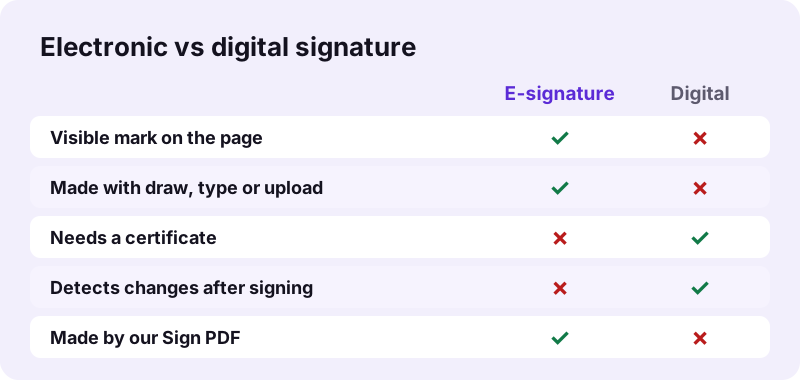
An electronic signature is any mark you add to show agreement, such as a drawn or typed signature image on the page. A digital signature is a cryptographic seal made with a certificate and private key: a reader can verify who signed and detect any change made after signing. Both can appear on PDFs.
“A digital signature is a mathematical scheme for verifying the authenticity of digital messages or documents.”
pdf24 digital signature: what an electronic signature is
A simple electronic signature is an image or text placed on the document: your drawn signature, your typed name, or a photo of ink on paper. It shows intent, and many everyday documents accept it. It does not prove by itself who placed it, and anyone can edit the file afterwards without a warning.
pdf24 digital signature: what a certificate adds
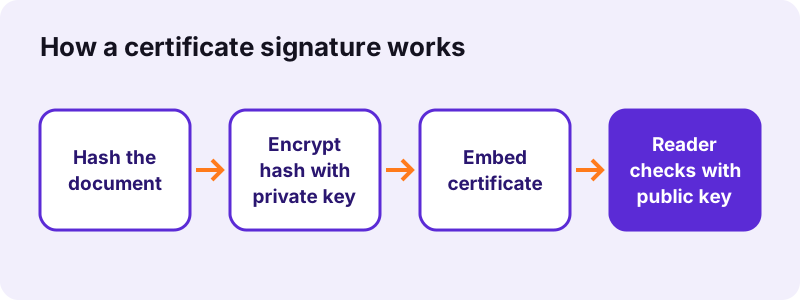
A certificate-based signature computes a hash of the file, encrypts it with the signer's private key and embeds it with the signer's certificate. A PDF reader recomputes the hash; if one byte changed, the check fails and the reader shows the signature as invalid.
pdf24 digital signature and trust in the certificate
The math only proves the file matches a key. Whether that key belongs to a real person depends on who issued the certificate, which is the job of a public key infrastructure.
“A public key infrastructure (PKI) is a set of roles, policies, hardware, software and procedures used to create, manage, distribute”
pdf24 digital signature: tip before you sign
Ask the sender which kind they need before you start. A form that says "sign here" usually means a visible signature; a request that mentions a certificate, a qualified signature or a signing service means a digital one.
Does our tool create a pdf24 digital signature with a certificate?
No. Sign PDF places a visible electronic signature: an image drawn, typed or uploaded by you, plus optional initials, date and text. It does not attach a certificate or cryptographic seal. After saving, the tool states that the result is a visible signature, not a certificate-based digital signature, so nothing is overstated.
We also do not offer signature verification. Checking a certificate signature properly needs the certificate chain, revocation data (OCSP or CRL) and trust lists, which is a server task; we list it among the tools we do not ship rather than offer a check that could mislead. Use a reader that shows the signature panel, or the verification service named by the sender.
So if a sender asks for a pdf24 digital signature and means a certificate, our tool is the wrong one, and we would rather say that here than let you find out when the recipient rejects the file.
What did our pdf24 digital signature test show?
Our signature test placed a typed name on a one-page form of 12 KB. The signed file was 29 KB and saved in 0.2 seconds with 0 bytes uploaded. The result note read: visible signature, not a certificate-based digital signature. The file had no signature field or certificate added, only an image.
| Check | Result |
|---|---|
| Input | form.pdf, 1 page, 12 KB |
| Signature type | Typed name, placed as PNG image |
| Output | form-signed.pdf, 29 KB |
| Time | 0.2 s |
| Certificate added | No |
| Bytes uploaded | 0 |
The 17 KB difference is the PNG image of the signature. A real pdf24 digital signature with a certificate would add a signature dictionary, the certificate and often a timestamp instead, which this test file did not contain.
When do you need a pdf24 digital signature instead of an e-signature?
A certificate-based digital signature is needed when the recipient must verify the signer and detect changes: tenders, tax filings, some court and notary documents, and contracts that require an advanced or qualified signature. Leases, school forms, delivery notes and most HR paperwork usually accept a visible electronic signature.
| Document | Usually accepted | Why |
|---|---|---|
| Permission slip, school form | Visible e-signature | Shows agreement, low risk |
| Rental application, job offer | Visible e-signature | Check the sender's request |
| Public tender, tax filing | Certificate signature | Signer identity must be verified |
| Notarial or court filing | Qualified signature | Rules set by law |
“This type of signature has the same legal standing as a handwritten signature as long as it adheres to the requirements of the specific regulation”
If you are unsure, a short email asking "does a visible signature work, or do you need a pdf24 digital signature with a certificate?" saves a second round of signing.
How do you add a visible pdf24 digital signature image with Sign PDF?
To add a visible signature, open Sign PDF, choose the file, then draw, type or upload your signature and tap Use this signature. Click or tap the page where it belongs, move and resize it, add the date if needed, press the sign button and download the -signed.pdf copy.
- Open Sign PDF and choose the document.
- Make the signature in the Draw, Type or Upload tab; pick black, blue or red ink.
- Place it on the page; drag to move and pull the corner to resize.
- Add Initials, Date or Text where the form asks.
- Save and check the file before sending it.
That visible route is what most people searching for a pdf24 digital signature actually need: a neat signature on the right line, a date beside it and a file that can be emailed in seconds.
Why does my reader say a pdf24 digital signature is not verified?
A reader shows a signature as not verified when the certificate is not in its trust list, the file changed after signing, or revocation data could not be checked. A visible signature image never shows this message, because it carries no certificate. Editing, compressing or merging a digitally signed PDF always breaks its seal.
- Changed after signing: any tool that rewrites the file, including compress, merge, split or edit, invalidates the certificate check.
- Unknown issuer: the certificate was issued by an authority the reader does not trust.
- Offline check: revocation servers could not be reached; try again online.
Keep a digitally signed original untouched. If you need a smaller or merged copy, make it from the original and send both, so the recipient can still verify the pdf24 digital signature on the signed version.
Is a visible pdf24 digital signature image safe to make in a browser?
Making a visible signature here is private because the PDF and your signature stay on your device. The page reads the file with the File API, draws the signature in the browser and saves the copy locally; our request log showed no POST request. Nothing is stored after you close the tab.
Because a signature image can be copied from a file, do not post signed documents publicly. For how the browser opens local files, see the File API on MDN.
pdf24 digital signature: frequently asked questions
Can pdf24 digital signature tools here sign with my certificate?
No. Sign PDF on pdf24tools places a visible signature image and does not use certificates, smart cards or private keys. For a certificate-based signature, use a desktop PDF reader that supports signing with your certificate, or the signing service required by the organisation that asked for it.
Is a pdf24 digital signature the same as an electronic signature?
No. Electronic signature is the broad term for any sign of agreement in digital form, including a drawn image. A pdf24 digital signature in the strict sense is one technical kind that uses a certificate and cryptography to prove the signer and detect changes. Every digital signature is electronic, not the other way round.
Can pdf24 digital signature checks verify a signed PDF here?
No. We do not offer signature verification, because a proper check needs certificate chains, revocation data and trust lists that a browser page cannot fetch reliably. Open the file in a reader with a signature panel, or use the verification service the sender recommends.
Is a visible signature from the pdf24 digital signature guide legally binding?
In many countries a simple electronic signature can be valid for ordinary agreements, as long as the parties accept it and intent is clear. Some documents legally require an advanced or qualified signature. This guide is not legal advice; check the rules for your document or ask the recipient.
Does compressing break a pdf24 digital signature?
A certificate signature, yes. Compressing, merging, splitting or editing rewrites the file, so the stored hash no longer matches and readers report the signature as invalid. A visible signature image is not affected, because it is part of the page content. Keep certificate-signed originals unchanged.
How long does a visible pdf24 digital signature image take to add?
Making the signature takes as long as you need to draw or type it. Saving is quick: our test on a one-page, 12 KB form finished in 0.2 seconds and produced a 29 KB file. Large scanned documents take longer to load into the page preview than to save.
Is my signature uploaded in the pdf24 digital signature steps?
No. The signature is drawn, typed or loaded in your browser and placed on the PDF on your device. The request log of our test showed no POST request, and the result line states 0 bytes uploaded. The signature is not saved anywhere after the tab is closed.
Can pdf24 digital signature steps add a signature field for others?
No. Sign PDF places your own signature on the page; it does not add empty signature fields or send the file to other people for signing. To collect several signatures, send the signed file to the next person, who can add their own signature with the same tool.
Why is a pdf24 digital signature more secure than an image?
A certificate signature is bound to the exact bytes of the file, so any later change is detected, and the certificate links the key to an identity. A signature image, the kind most pdf24 digital signature searches end with, can be copied onto another document and gives no warning when the file is changed.
Can I add a date with the pdf24 digital signature image tool?
Yes. Sign PDF has a Date button that inserts today's date in your browser's date format as a text box you can move and edit. A Text button adds other words, such as your printed name, job title or the place where you signed.
Does a pdf24 digital signature image work on iPhone and Android?
Yes. Sign PDF is a web page, so it runs in Safari, Chrome, Edge and Firefox on phones and tablets. You can draw the signature with your finger, type it or upload a photo. The signed file is saved to the Downloads folder of the device.
Is pdf24 digital signature help here from an official source?
No. pdf24tools is an independent website and is not affiliated with PDF24 or Geek Software GmbH. Our Sign PDF tool is separate code that runs in your browser. The measurements in this guide are our own, made on 2 November 2026.
Can I remove a pdf24 digital signature image after saving?
Not from the saved copy, because the image becomes part of the page. Open the unsigned original again and sign once more, placing the signature differently. That is why keeping the original until the document has been accepted is a good habit for any signing task.
More pdf24 digital signature tools and guides
pdf24 digital signature: sources
- Digital signature — Wikipedia
- Electronic signature — Wikipedia
- Public key infrastructure — Wikipedia
- File API — MDN Web Docs