How to use pdf24 compress PDF in 4 steps
- Choose the PDF. Tap Choose PDF files or drop one or more PDFs on the box. The files are read from your device, never sent to a server.
- Pick a level or an exact size. Recommended suits email and uploads. Light keeps more detail, Strong goes smallest, and Exact size takes a number in KB, from 20 to 20,000.
- Press Compress PDF. Each page is processed in your browser; a counter shows page 1 of 4, 2 of 4 and so on, then the saving in percent.
- Download and check. Save the -compressed.pdf file, open it and zoom in on small print. If it is too soft, run the original again on Light.
What does pdf24 compress PDF do to a file?
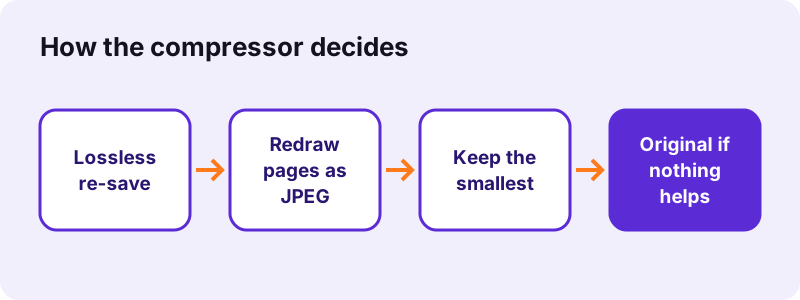
pdf24 compress PDF first re-saves the file losslessly with packed object streams, then redraws each page as a JPEG at a lower resolution and keeps whichever version is smaller. Scans and photos shrink by 80 to 96 % in our tests, while a typed 6-page document lost 18 % and kept its text.
| Level | Page resolution | JPEG quality | 8.07 MB scan became |
|---|---|---|---|
| Light | about 115 DPI | 82 % | 1,453 KB (−82 %) |
| Recommended | 90 DPI | 66 % | 770 KB (−91 %) |
| Strong | about 65 DPI | 45 % | 337 KB (−96 %) |
| Exact size | 108 down to 25 DPI | 80 down to 16 % | the KB you type |
“Lossy compression reduces bits by removing unnecessary or less important information.”
pdf24 compress PDF for scanned documents
Scans are where the tool shines, because a scanner often stores each page at 300 DPI or more with little JPEG compression. Redrawing at 90 DPI keeps normal print legible on screen and cuts the weight by a factor of ten: the 8,463,060-byte scan came out at 788,075 bytes.
pdf24 compress PDF on iPhone and Android
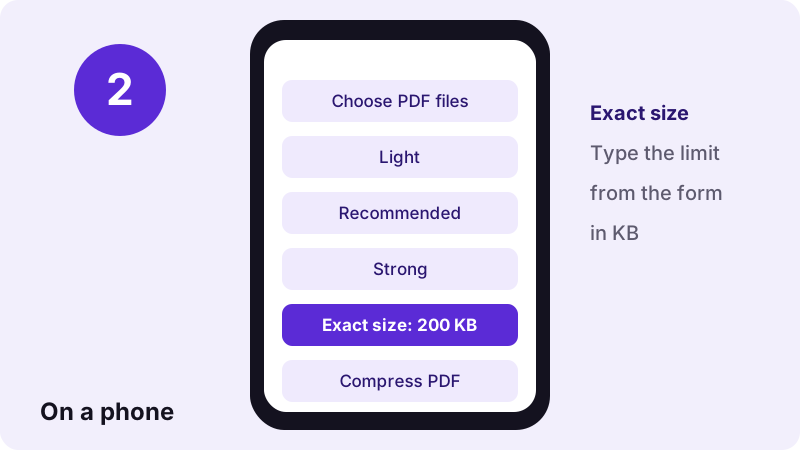
Open the page in Safari, Chrome, Edge or Firefox, tap Choose PDF files and pick the document from Files, Google Drive or Downloads. The work runs on the phone itself, so a scan takes longer than the 2.5 to 11 seconds we measured on a laptop.
pdf24 compress PDF on Windows and Mac
On Windows, macOS, Linux and ChromeOS there is nothing to install. Drag several PDFs onto the box at once and they are compressed one after another and delivered together in a ZIP file.
pdf24 compress PDF: tip for 100 KB forms
Government and job portals often cap uploads at 100 KB or 200 KB. Choose Exact size and type the limit minus 5 KB, or open compress PDF to 100 KB, where the value is already filled in.
pdf24 compress PDF for photo-heavy reports
Brochures and reports full of photos behave like scans: the pictures dominate the size, so Recommended usually removes most of the weight. Charts and thin lines can blur on Strong; check them at 100 % zoom.
pdf24 compress PDF for typed text files
A PDF exported from Word with no pictures is already small. The lossless re-save is then the winner and the text layer survives: our 5,238-byte file became 4,312 bytes with all 13,806 characters still selectable.
How small can pdf24 compress PDF make a file?
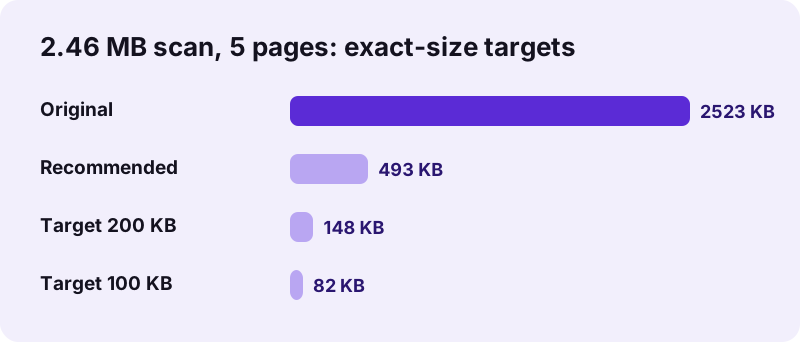
The smallest result depends on page count and content, not on the starting size. With Exact size, pdf24 compress PDF tries up to 10 settings, from about 108 DPI down to 25 DPI, and stops at the first that fits. Our 2.46 MB, 5-page scan reached 148 KB for 200 KB and 82 KB for 100 KB.
| Test file | Setting | Before | After | Saved |
|---|---|---|---|---|
| scan-4p.pdf, 4 pages | Light | 8,463,060 bytes | 1,488,157 bytes | 82 % |
| scan-4p.pdf, 4 pages | Recommended | 8,463,060 bytes | 788,075 bytes | 91 % |
| scan-4p.pdf, 4 pages | Strong | 8,463,060 bytes | 345,501 bytes | 96 % |
| contract-scan-5p.pdf, 5 pages | Recommended | 2,583,035 bytes | 504,948 bytes | 80 % |
| contract-scan-5p.pdf, 5 pages | Exact 200 KB | 2,583,035 bytes | 151,803 bytes | 94 % |
| contract-scan-5p.pdf, 5 pages | Exact 100 KB | 2,583,035 bytes | 84,351 bytes | 97 % |
| text-6p.pdf, 6 typed pages | Recommended | 5,238 bytes | 4,312 bytes | 18 % |
In our 100 KB test each scanned A4 page ended up at about 17 KB. A 20-page scan would need under 5 KB per page for the same limit, far below a readable picture; split it with Split PDF and send the parts.
pdf24 compress PDF to an exact size in KB or MB
Ready-made pages exist for the most common limits:
- Compress PDF to 100 KB
- Compress PDF to 200 KB
- Compress PDF to 500 KB
- Compress PDF to 1 MB
- Compress PDF to 2 MB
- All size targets
pdf24 compress PDF when the target is missed
If even the last step of the ladder is too big, the tool tells you it could not reach the limit and still gives you its smallest attempt. Remove blank or extra pages with Remove PDF pages and try again.
Does pdf24 compress PDF reduce quality?
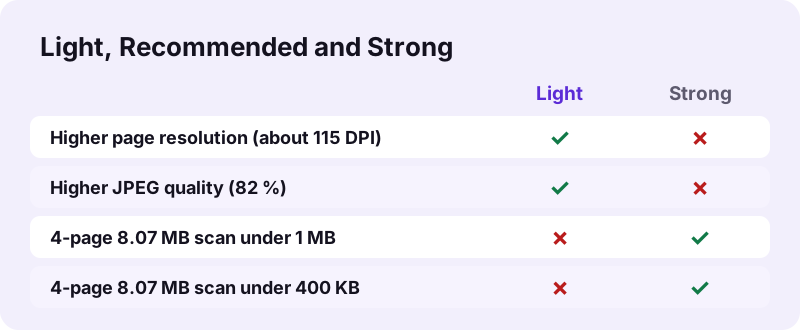
pdf24 compress PDF on Light redraws pages at about 115 DPI with 82 % JPEG quality, Recommended at 90 DPI and 66 %, Strong at about 65 DPI and 45 %, so small print gets softer step by step. Whenever pages are redrawn, the text layer is replaced by a picture, so words can no longer be selected or searched.
- Need selectable text? Use Light on files with few pictures, or run OCR PDF on the compressed scan.
- Need to print? Light or Recommended; avoid Strong.
- Need the smallest file? Strong or an Exact size target.
The tool never returns a file that is larger than your original. If no setting helps, you get the original back with a message saying so.
pdf24 compress PDF without losing quality
A truly lossless result only shrinks what is redundant in the file structure, which the first, lossless pass already does. For typed documents that pass alone saved 18 %. For scans there is no lossless shortcut: smaller always means fewer pixels or stronger JPEG.
Why is my PDF so big, and what can pdf24 compress PDF do?
A PDF becomes big when it carries high-resolution pictures: scanner output at 300 to 600 DPI, phone photos of 12 megapixels, or slides with full-size images. Embedded fonts and duplicated objects add a little more. pdf24 compress PDF targets the pictures, which is why scans shrink by 80 % or more.
| Cause | Typical sign | What helps |
|---|---|---|
| Scanned at 300+ DPI | Each page is one big image | Recommended or Exact size |
| Phone photos inserted | Pages of 1 to 4 MB each | Recommended |
| Many embedded fonts | Text file over 1 MB | Lossless pass, Light |
| Edited many times | Old versions kept inside | Any level re-saves cleanly |
pdf24 compress PDF for email and upload limits
Email services and web forms set hard limits: Gmail accepts attachments up to 25 MB, many job and visa portals stop at 1 MB, 500 KB or 100 KB. Choosing Exact size with your limit gives a file that fits on the first try in most cases.
Google's own help on attaching files in Gmail explains what happens to larger files. For a step-by-step version of this workflow see our guide how to compress a PDF for email.
- Email to colleagues: Recommended.
- Online form with a limit: Exact size, limit minus 5 %.
- Archive or print shop: Light, or no compression at all.
pdf24 compress PDF for WhatsApp and messengers
Messengers accept large documents but recipients on mobile data appreciate small ones. Recommended turns a typical 4-page scan into well under 1 MB, which opens instantly in any chat.
Is pdf24 compress PDF safe for private documents?
pdf24 compress PDF never uploads the file: the browser reads it with the File API, and pdf.js and pdf-lib process every page in JavaScript on your device. The result line confirmed 0 bytes uploaded in every one of our 7 test runs, and nothing is stored after you close the tab.
“The File API enables web applications to access files and their contents.”
Contracts, payslips, IDs and medical records therefore stay on your phone or computer. After the page has loaded you can even switch off Wi-Fi and the compressor keeps working.
pdf24 compress PDF not working? Fixes
Most failures have one of four causes: the file is password-protected, it is damaged, it is already as small as it can be, or the device runs out of memory on a very long scan. The table below lists the message you see and the fix for each.
| Message or symptom | Cause | Fix |
|---|---|---|
| File is password-protected | Encryption | Unlock PDF first |
| Already as small as it gets | Typed file, no pictures | Nothing to gain; keep the original |
| Could not reach the KB target | Too many pages for the limit | Split or remove pages |
| Tab reloads on a phone | Out of memory | Split the file, compress the parts |
| File will not open | Broken structure | Repair PDF, then compress |
When not to use pdf24 compress PDF
Some files should stay as they are. Print-ready artwork, legal originals with a digital signature, archive copies and fillable forms lose something important when pages are redrawn: print resolution, the signature, searchable text or the fields. Keep the original for those and compress only a copy meant for reading.
- Print shop files: send the original, or use Light at most.
- Signed contracts: compressing breaks the signature.
- Fillable forms: fields disappear when pages are redrawn; fill and flatten first if you want the answers kept.
- Archives: keep a full-quality master next to any small copy.
Reading the pdf24 compress PDF result line
After each run the status line reports what happened, so you never have to guess. It shows the saving in percent with the size before and after, a warning when an exact target could not be reached, or a note that the original was already as small as possible and is returned unchanged.
| Result line | Meaning |
|---|---|
| 91% smaller: 8.07 MB → 770 KB | Pages were redrawn; the new file is the smaller one |
| Fits the limit: 148 KB (target 200 KB) | Exact size reached on a step of the ladder |
| Could not reach 100 KB | Smallest attempt returned; remove or split pages |
| Already as small as it gets | Original returned, nothing lost |
pdf24 compress PDF compared with other ways to shrink a PDF
Compression is one of several ways to make a PDF lighter, and sometimes another tool fits better. Removing pages, converting to grayscale or saving at a lower export setting in Word can all help; the table shows when each is the right choice.
| Method | Best for | Keeps text? |
|---|---|---|
| Compress PDF, Recommended | Scans and photos | No |
| Remove pages | Long files with unneeded pages | Yes |
| Grayscale | Colour scans for black-and-white printing | No |
| Export again from Word as "Minimum size" | Files you made yourself | Yes |
| Web-optimize | Faster first page online, not smaller | Yes |
pdf24 compress PDF: frequently asked questions
Is pdf24 compress PDF free?
Yes. pdf24 compress PDF on pdf24tools costs nothing, needs no account and adds no watermark. There is no daily cap, because the work runs on your own device and uses no server time. You can compress one file or a whole batch, as often as you like, and keep every result.
Is my file uploaded when I use pdf24 compress PDF?
No. pdf24 compress PDF reads the file from your disk and processes it in memory with pdf.js and pdf-lib. The result line shows 0 bytes uploaded, and closing the tab removes everything. You can check it yourself: load the page, switch off Wi-Fi, and the compressor still works.
How do I pdf24 compress PDF to 100 KB?
Choose Exact size and type 100, or open the ready-made 100 KB page. The tool tries up to 10 settings until the file fits. Our 5-page scan of 2.46 MB reached 82 KB. A long scan may not fit 100 KB while staying readable; then split it or remove pages first.
Can pdf24 compress PDF make a file under 1 MB?
Usually, yes. With pdf24 compress PDF a 4-page scan of 8.07 MB became 770 KB on Recommended and 337 KB on Strong in our test. For a fixed 1 MB limit choose Exact size and type 1000, so the tool stops at the best quality that still fits instead of going smaller than needed.
Does pdf24 compress PDF keep text selectable?
Only when the lossless pass wins, which happens with typed documents that contain few or no pictures. When pages are redrawn as JPEG the text becomes part of the picture and can no longer be selected or searched. Run OCR PDF on the compressed file if you need searchable text again.
Why does pdf24 compress PDF say my file is already small?
The message appears when neither the lossless re-save nor any redrawn version is smaller than your original. That is typical for PDFs made by a careful export from Word or LaTeX with no photos. The tool then returns the original unchanged instead of a heavier or blurrier copy.
Which level of pdf24 compress PDF should I choose?
The Recommended level of pdf24 compress PDF suits almost everything read on a screen: email, chat and portal uploads. Choose Light when the file will be printed or contains small print and thin lines. Choose Strong, or an exact size, only when a hard limit forces you to go as small as possible.
Can pdf24 compress PDF handle several files at once?
Yes. Select or drop as many PDFs as you need; they are compressed one after another with the same level and returned in one ZIP file. Each output keeps its name with -compressed added, and the status line lists the saving for every file so you can spot one that did not shrink.
Does pdf24 compress PDF work on iPhone?
Yes. Open pdf24 compress PDF in Safari or Chrome on iPhone or iPad, tap Choose PDF files and pick the document from the Files app or iCloud Drive. Save the result back to Files or share it straight to Mail. Very long scans take more time on a phone than on a computer.
Does pdf24 compress PDF work on Android?
Yes, in Chrome, Edge, Firefox or Samsung Internet. Pick the PDF from Downloads, Google Drive or a messenger folder, compress it and save the result to Downloads. If the tab reloads during a very long scan, the phone ran out of memory: split the file and compress the parts.
Can pdf24 compress PDF work offline?
Yes, once the page has loaded. All the code that reads, redraws and saves the pages is downloaded with the page and runs locally, so the tool keeps working after you disconnect. The next visit is faster too, because the browser caches the PDF engine.
Is there a file size limit for pdf24 compress PDF?
There is no fixed limit set by us. The practical limit is your device's memory, which is smaller on a phone than on a laptop. Our largest test file, 8.07 MB with 4 pages, finished on every level without trouble. Very large files are best split into parts first and compressed one part at a time.
Does pdf24 compress PDF add a watermark?
No. A file from pdf24 compress PDF contains only your pages, with nothing added on top or in the margins. The file's producer field shows the library that wrote it, as with any PDF program, but nothing is visible on the pages and no logo or link is inserted.
Will pdf24 compress PDF remove my digital signature?
Yes, any change to a signed PDF breaks the signature, because the signature protects the exact bytes of the file. Compress the document first and sign it afterwards. If you received a signed file, keep the original for proof and send a compressed copy only for reading.
Does pdf24 compress PDF keep links and form fields?
When pages are redrawn as pictures, links, form fields and comments are lost, because only the visible page is kept. The lossless pass keeps them. If interactive parts matter, use Light on a file with few pictures and check the result, or keep the original for forms.
How long does pdf24 compress PDF take?
Seconds for most files. On a laptop our 2.46 MB scan took 2.5 seconds on Recommended and the 8.07 MB scan about 11 seconds. Exact size needs several attempts, so the 200 KB target took 28 seconds. Time grows with page count, and a phone is slower than a computer.
Can pdf24 compress PDF reduce a PDF made from photos?
Yes, photo PDFs shrink the most with pdf24 compress PDF, because phone pictures are much larger than a page needs. Recommended redraws each page at 90 DPI, which looks sharp on a phone screen. To build a small PDF straight from photos, the JPG to PDF tool also has an under-size option.
Why did pdf24 compress PDF make my scan blurry?
Strong and low Exact size targets lower the resolution to about 65 DPI or less, which softens small print. Run the original again on Light or Recommended, or raise the target size. A higher target lets the tool stop at an earlier, sharper step of its 10-step ladder, so allow as many kilobytes as the form accepts.
Can pdf24 compress PDF shrink a password-protected file?
Not directly. An encrypted PDF must be opened with its password first. Remove the protection with Unlock PDF, compress the unlocked copy, and lock it again with Lock PDF if the recipient needs the password. Only do this with files you are allowed to change.
Does pdf24 compress PDF work in every browser?
It works in current versions of Chrome, Edge, Firefox and Safari on Windows, macOS, Linux, ChromeOS, Android and iOS. Internet Explorer is not supported. If the Compress PDF button stays grey, reload the page so the PDF engine can finish loading.
Is pdf24tools the official pdf24 compress PDF tool?
No. pdf24tools is an independent website and is not affiliated with PDF24 or Geek Software GmbH. Our compressor is our own build using the open-source pdf.js and pdf-lib libraries, running entirely in your browser. The name only reflects what many people type when they look for a free PDF compressor.
Can I compress a PDF again with pdf24 compress PDF?
You can, but compressing an already compressed file twice adds blur for little gain. It is better to run the original once more with a stronger level or a smaller Exact size. The tool always starts from the bytes you give it, so the original is the best starting point.
Does pdf24 compress PDF change the page size?
No. Every page keeps its original dimensions, such as A4 or US Letter, and its orientation. Only the resolution of the picture drawn on the page changes. To change the paper format itself, for example from A3 to A4, use the Change PDF page size tool.
More pdf24 compress PDF tools and guides
pdf24 compress PDF: sources
- Data compression — Wikipedia
- JPEG — Wikipedia
- File API — MDN Web Docs
- Attach files in Gmail — Google Gmail Help
- PDF (Portable Document Format) Family — Library of Congress