How to use pdf24 PDF converter in 4 steps
- Add the files. Drop documents, spreadsheets, slides, e-books, images and PDFs together, or tap Choose files.
- Choose one PDF or separate PDFs. Combine everything into one PDF is on by default; untick it to get a ZIP with one PDF per file.
- Pick A4 or Letter. Used for documents, spreadsheets and images; slides keep their own size.
- Press Convert and download. Every file is converted on your device and the result downloads.
What does pdf24 PDF converter accept?
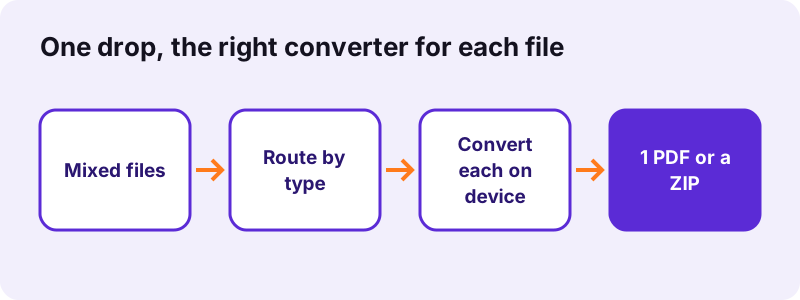
pdf24 PDF converter accepts more than 25 file extensions: Word (.docx, .doc), OpenDocument (.odt, .ods, .odp, .odg), Excel (.xlsx, .xls, .xlsm, .csv), PowerPoint (.pptx), Rich Text, plain text, Markdown, HTML, EPUB e-books, eight image formats and existing PDFs. Each file goes to the converter built for its format.
| Files | Converted by | Page size |
|---|---|---|
| .docx | Word engine: headings, lists, tables, pictures | A4 or Letter |
| .doc, .odt, .rtf, .txt, .md, .html, .epub | Text engine | A4 or Letter |
| .xlsx, .xls, .xlsm, .ods, .csv | Spreadsheet printer, every sheet | A4 or Letter, auto landscape |
| .pptx, .odp, .odg | Slide drawer, one page per slide | Slide size |
| .jpg, .png, .webp, .gif, .bmp, .svg, .tif, .heic | One image per page, centred | A4 or Letter, auto landscape |
| Added unchanged | As it is |
“PDF was standardized as ISO 32000 in 2008.”
pdf24 PDF converter and images
Each picture becomes one page, landscape when the picture is wider than tall, centred with a 20-point margin and never enlarged beyond 150 %. Multi-page TIFF files give one page per frame.
pdf24 PDF converter and existing PDFs
A PDF in the mix is copied in as it is, pages untouched, so you can append an existing contract or form to newly converted files.
pdf24 PDF converter with spreadsheets
Spreadsheets print every sheet with gridlines and automatic landscape for wide sheets; for portrait-only or gridline-free output use Excel to PDF, which has those options.
pdf24 PDF converter tip for file order
Files are converted and combined in the order of the list, so drop or select them in the order you want the pages to appear.
One combined PDF or separate files: how does pdf24 PDF converter decide?
pdf24 PDF converter combines everything into a single file called converted.pdf by default. Untick Combine everything into one PDF and each input becomes its own PDF with the same base name, downloaded together as a ZIP. A single input file always gives a single PDF.
| Setting | Result | Measured |
|---|---|---|
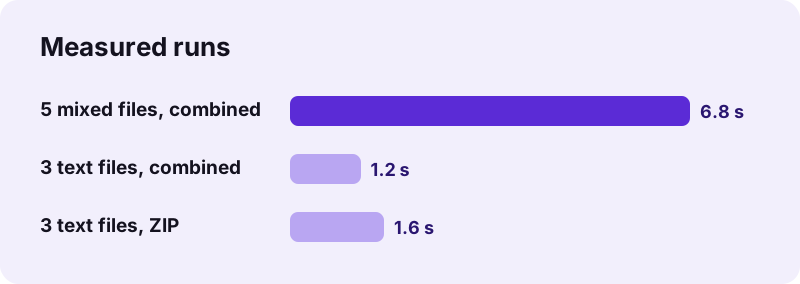
| Combine on (default) | converted.pdf, all pages in list order | 3 text files → 5 pages, 64,627 B, 1.2 s |
| Combine off | ZIP with one PDF per file | Same 3 files → 66,439 B ZIP, 1.6 s |
| One file | One PDF, same name | — |
How fast is pdf24 PDF converter with mixed files? Measured
pdf24 PDF converter converted five different files, a 2-page Word report with a photo, a 2-sheet Excel workbook, a 3-slide PowerPoint deck, a 95-line text file and a WebP photo, 2.06 MB in total, into one 13-page PDF of 2.25 MB in 6.8 seconds in Chrome on Windows 10.
| Run | Input | Output | Pages | Time |
|---|---|---|---|---|
| Word + Excel + PowerPoint + TXT + WebP | 2.06 MB, 5 files | converted.pdf, 2,254,841 B | 13 | 6.8 s |
| TXT + Markdown + RTF, combined | 5.7 KB, 3 files | converted.pdf, 64,627 B | 5 | 1.2 s |
| TXT + Markdown + RTF, ZIP | 5.7 KB, 3 files | ZIP, 66,439 B | 3 PDFs | 1.6 s |
8,784 characters were extractable from the 13-page PDF: documents, sheets and slides keep real text, while the photo page is an image.
Is pdf24 PDF converter private?
pdf24 PDF converter processes every file on your device: the browser reads the files with the File API, each converter runs in JavaScript in memory, and the result line confirms 0 bytes uploaded. A bundle of contracts, payslips and ID scans never reaches a server, and nothing is stored after you close the tab.
More on local file reading: File API on MDN.
What pdf24 PDF converter keeps and what it cannot
pdf24 PDF converter uses the same engines as the single-format pages, with the same honest limits. Fonts become Noto Sans everywhere, links are visible but not clickable, and a few features per format are not drawn.
| Format | Not kept |
|---|---|
| Word .docx | Original fonts, headers, footers, footnotes |
| Old .doc | Formatting and pictures (text and tables only) |
| Spreadsheets | Charts, cell colours, print areas |
| Slides | Charts, SmartArt, gradients, animations, notes |
| EPUB | Publisher CSS; DRM-protected books cannot be read |
| Old .ppt, .pub, Keynote .key | Not accepted; save as .pptx or .docx first |
pdf24 PDF converter for job applications, claims and archives
Typical bundles mix formats: a cover letter in Word, a CV as PDF, certificates as phone photos. pdf24 PDF converter turns such a mix into one file that a portal or an insurer accepts, in the order you choose.
- Drop the cover letter (.docx), the CV (.pdf) and the certificate photos (.jpg or .heic) in that order.
- Keep Combine everything into one PDF ticked and press Convert.
- Check the size: portals often cap uploads at 2 to 10 MB; if it is too big, use Compress PDF.
- Need a signature? Add it with Sign PDF.
pdf24 PDF converter on iPhone, Android and Chromebook
pdf24 PDF converter runs in Safari, Chrome, Edge and Firefox, so the whole bundle can be made on a phone: iPhone photos in HEIC, documents from Files or Drive, and a downloaded PDF can go into one PDF together.
- iPhone: Choose files → Photo Library for photos, Browse for documents.
- Android: Choose files → Files or Drive.
- Large bundles with many photos need memory; on older phones convert in two batches and merge.
pdf24 PDF converter problems and fixes
- A file is skipped: its type is not supported (for example .ppt, .pages, .key); save it as .pptx, .docx or .pdf first.
- One file fails and stops the run: convert it alone on its own page to see the message.
- Pages in the wrong order: reorder with Rearrange PDF pages.
pdf24 PDF converter: frequently asked questions
Is pdf24 PDF converter free?
Yes. It is free, with no sign-up, no watermark and no limit on files, because your own device does all the work. pdf24tools is an independent website and is not affiliated with PDF24 or Geek Software GmbH; the name only reflects what people search for. Every converter on the site runs in the browser.
Does pdf24 PDF converter upload my files?
No. Every file is read by your browser and converted in memory by JavaScript; the result line shows the bytes read and 0 bytes uploaded. Only the converter code is downloaded from our server, so even a bundle of contracts or ID scans stays on your device.
Which file types does pdf24 PDF converter support?
Word .docx and .doc, OpenDocument .odt, .ods, .odp and .odg, Excel .xlsx, .xls, .xlsm and .csv, PowerPoint .pptx, .rtf, .txt, Markdown, HTML, EPUB, the image types JPG, PNG, WebP, GIF, BMP, SVG, TIFF and HEIC, and PDF. Old .ppt, Publisher and Keynote files are not supported.
Can pdf24 PDF converter combine different files into one PDF?
Yes, that is the default. Every file is converted and the pages are joined in the order of the list into converted.pdf. In our test five files of five different types became one 13-page PDF in 6.8 seconds. Untick the option to get separate PDFs in a ZIP.
Does pdf24 PDF converter keep text selectable?
Yes, for documents, spreadsheets and slides: their text is drawn as real text with an embedded Noto Sans font, so it can be searched and copied; 8,784 characters were extractable from our 13-page mixed PDF. Photos and scans become image pages; use OCR PDF to make their text searchable.
What page size does pdf24 PDF converter use?
Documents, spreadsheets and images use A4 or Letter, whichever you pick; wide sheets and wide pictures turn to landscape automatically. Slides and drawings keep their own size, such as 720 × 540 points for a 4:3 deck. Existing PDFs keep their pages exactly as they were.
How do I change the order of files in pdf24 PDF converter?
Files are converted and combined in the order they appear in the list, which is the order you dropped or selected them. To change it, clear the list and add the files again in the right order, or rearrange the pages of converted.pdf afterwards with Rearrange PDF pages.
Does pdf24 PDF converter work on iPhone?
Yes. In Safari tap Choose files, then pick photos from the Photo Library, including HEIC pictures, and documents from Files or iCloud Drive. The PDF or ZIP is saved to Downloads. Everything happens on the iPhone; nothing is sent to a server.
Why was a file skipped by pdf24 PDF converter?
Its type is not one the converter reads, for example an old binary .ppt, an Apple .pages or .key file, or a Publisher .pub. Save it in a supported format first: .pptx for slides, .docx for documents, or export it as PDF from the app that made it.
Is there a size limit in pdf24 PDF converter?
There is no fixed limit, because nothing is uploaded; the limit is your device's memory. Our 2.06 MB five-file test took 6.8 seconds on a laptop. Bundles of many large photos can be slow on older phones, so convert them in smaller batches and merge the results.
Can pdf24 PDF converter convert web pages?
It converts saved .html files, reading their headings, paragraphs, lists, tables and text, but it cannot fetch a live web page from a URL, because a browser page cannot load another site's content for privacy and security reasons. Save the page as .html first, or print it to PDF in your browser.
More pdf24 PDF converter tools and guides
pdf24 PDF converter: sources
- PDF — Wikipedia
- PDF (Portable Document Format) Family — Library of Congress
- File API — MDN Web Docs