How to use pdf24 EPUB to PDF in 4 steps
- Choose the e-book. Drop one or more DRM-free .epub files on the box, or tap Choose files.
- Pick A4 or Letter. E-books have no fixed page size, so the paper you choose sets the layout.
- Press Convert to PDF. Chapters are read in spine order and laid out on your device.
- Download the PDF. Save it, or the ZIP for several books.
What is an EPUB and how does pdf24 EPUB to PDF read it?
An EPUB is a ZIP archive of XHTML chapters, pictures and a package file. pdf24 EPUB to PDF opens META-INF/container.xml to find the package, reads the spine in content.opf for the reading order, then converts each XHTML chapter into headings, paragraphs, lists, tables and pictures on PDF pages.
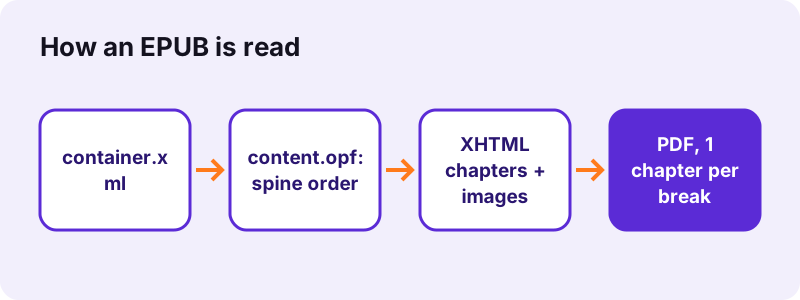
The book title from the dc:title metadata becomes the title of the PDF, which PDF readers show in their window bar. Every chapter in the spine starts on a new page, so the PDF keeps the book's structure even without a clickable table of contents.
“It became an official standard of the IDPF in September 2007, superseding the older Open eBook (OEB) standard.”
Pictures in pdf24 EPUB to PDF
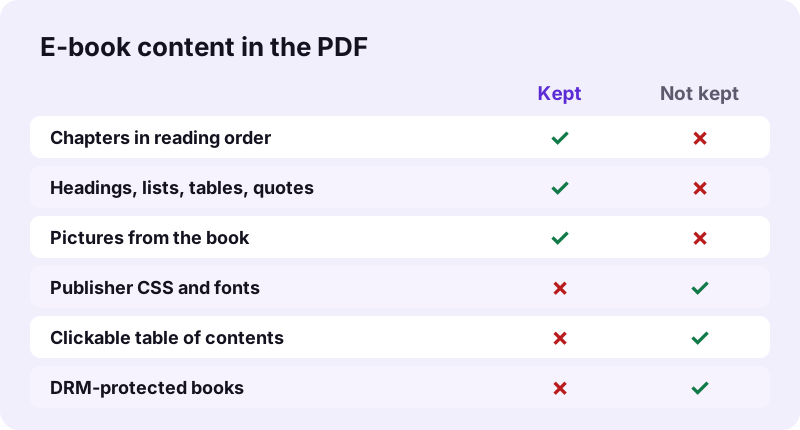
Images referenced by <img> tags are read from the archive and placed in the text flow, scaled to the page width when they are wider. Our test chapter's PNG came through as the PDF's single picture.
pdf24 EPUB to PDF and styling
Publisher stylesheets are not applied: drop caps, custom fonts, colours and margins are replaced by one clean layout in Noto Sans, 11-point body text, which prints well and reads well on screen.
pdf24 EPUB to PDF with footnotes and links
Footnote markers and the notes themselves are kept as text where the book puts them; links inside the book are drawn in blue but are not clickable in the PDF.
pdf24 EPUB to PDF tip for long books
A 300-page novel makes a PDF of several hundred A4 pages. Letter paper or a later pass through Pages per sheet saves paper when printing.
Can pdf24 EPUB to PDF convert Kindle or DRM-protected books?
pdf24 EPUB to PDF only reads DRM-free EPUB files. Books bought with copy protection have their chapters encrypted, so the converter cannot read them, and Kindle formats such as AZW, AZW3, KFX and MOBI are different formats altogether. Many public-domain, open-access and author-direct e-books are DRM-free and convert normally.
| E-book file | Converts here? |
|---|---|
| DRM-free .epub (EPUB 2 or 3) | Yes |
| EPUB with publisher DRM | No, chapters are encrypted |
| Kindle AZW, AZW3, KFX | No, different format |
| MOBI | No, different format |
| Fixed-layout EPUB | Yes, but reflowed as text |
Removing DRM from a book you bought may break the seller's terms or local law. Use this tool for books you are free to convert, such as public-domain titles or your own manuscripts.
How fast is pdf24 EPUB to PDF? Measured
pdf24 EPUB to PDF converted our 3.8 KB test e-book, two XHTML chapters and one PNG picture, into a 2-page A4 PDF of 18,178 bytes in 1.2 seconds in Chrome on Windows 10. The PDF contained the picture and 131 extractable characters of chapter text.
| Measure | Value |
|---|---|
| Input | dc-book.epub, 3.8 KB, 2 chapters, 1 PNG |
| Output | 2 pages, 18,178 B, A4 |
| Time (tool) | 1.2 s |
| Pictures in PDF | 1 |
| Characters extractable | 131 |
| Uploaded | 0 bytes |
Real books are far longer, so expect conversion time to grow with the number of chapters and pictures; the progress line shows which part of the book is being read, for example part 12 of 40.
The PDF is larger than this tiny test book because it embeds Noto Sans subsets in regular, bold and italic. For a novel the text adds little; pictures and the number of pages decide the size, and Compress PDF can shrink a picture-heavy result.
Is pdf24 EPUB to PDF private?
pdf24 EPUB to PDF keeps the book on your device: the browser reads the .epub with the File API, JavaScript unzips and lays it out in memory, and the result line confirms 0 bytes uploaded. Manuscripts, review copies and course readers are never sent to a server, and no account is needed.
How local file reading works: File API on MDN.
pdf24 EPUB to PDF for printing, annotating and studying
People convert e-books to PDF for three reasons: to print a chapter, to annotate on a tablet, or to quote pages in course work. The PDF suits all three, because its pages stay fixed while an EPUB reflows on every screen.
- Print: convert, then print only the pages of the chapter you need.
- Annotate: open the PDF in a tablet app and highlight; Annotate PDF works in the browser.
- Cite: fixed page numbers are easier to reference than reflowing e-book locations.
- Split by chapter: Split PDF cuts the PDF into parts.
pdf24 EPUB to PDF on phones, tablets and computers
The page runs in Safari, Chrome, Edge and Firefox, so an EPUB becomes a PDF on an iPhone, iPad, Android tablet, Chromebook, Windows PC or Mac. Save the .epub file to the device first, then pick it with Choose files.
- iPhone/iPad: Files app → the .epub (books in Apple Books' library cannot be picked).
- Android: Download folder or Drive.
- Computer: drag the .epub onto the box.
pdf24 EPUB to PDF problems and fixes
- "Could not open": the file is not an EPUB, or META-INF/container.xml is missing.
- An error, empty pages or garbled text: the book is DRM-protected.
- Pictures missing: the image path in the chapter does not match the file in the archive.
- Odd layout of a fixed-layout book (comics, children's books): these are reflowed as text; use the e-reader's own export if it has one.
pdf24 EPUB to PDF: frequently asked questions
Is pdf24 EPUB to PDF free?
Yes. It is free, with no sign-up, no watermark and no limit on books, because your own device does the work. pdf24tools is an independent site and is not affiliated with PDF24 or Geek Software GmbH; we use the name only because it is what people search for. All tools on the site run in the browser.
Does pdf24 EPUB to PDF upload my e-book?
No. The .epub is read from your disk by the browser, unzipped and laid out in memory by JavaScript. The result line shows the bytes read and 0 bytes uploaded. Only the converter code comes from our server; the book itself never leaves your device.
Can pdf24 EPUB to PDF convert Kindle books?
No. Kindle formats such as AZW, AZW3, KFX and MOBI are not EPUB and cannot be read here, and Kindle purchases are usually DRM-protected as well. For your own Kindle documents without DRM, export or save them as EPUB first, then convert that file.
Does pdf24 EPUB to PDF keep pictures?
Yes. Pictures referenced in the chapters are read from the archive and placed in the text flow, scaled down when wider than the page; our test e-book's PNG appeared in the PDF. A cover image that is listed only in the metadata and not in a chapter is not added.
Does pdf24 EPUB to PDF keep the chapter order?
Yes. Chapters are read in the order of the spine in content.opf, which is the reading order the publisher set, and each chapter starts on a new page. The table of contents chapter, if the book has one, is printed as text without clickable links.
Why does the PDF from pdf24 EPUB to PDF look plainer than the book?
Publisher stylesheets and embedded fonts are not applied. Every book is set in one layout, 11-point Noto Sans with 56-point margins, which keeps the PDF clean and printable. Headings, bold, italic, lists, tables and quotes still show the structure of the text.
What page size does pdf24 EPUB to PDF use?
A4 by default, or Letter if you choose it before converting. An EPUB has no fixed pages, so the text is reflowed onto the paper size you pick, and the page count depends on it. Our 2-chapter test book filled 2 A4 pages, one per chapter.
Is the text in the PDF from pdf24 EPUB to PDF searchable?
Yes. Chapter text is drawn as real text with an embedded Noto Sans subset, so you can search it, copy quotations and use a screen reader. Arabic, Hebrew, Indic, Thai and CJK text is shaped by the browser and placed as images instead.
Can pdf24 EPUB to PDF convert several books at once?
Yes. Select several .epub files together; each book becomes its own PDF with the same name, and the set downloads as one ZIP. Long books with many pictures take longer and need more memory, so on a phone convert them one at a time.
Does pdf24 EPUB to PDF work with EPUB 3?
Yes. EPUB 2 and EPUB 3 both use XHTML chapters, a package file and a spine, and the converter reads both. EPUB 3 extras such as audio, video, scripts and media overlays are not included in the PDF, because a PDF page is static.
Can I turn the PDF back into an EPUB after pdf24 EPUB to PDF?
Yes, with PDF to EPUB on this site, but the result is a simpler e-book than the original, because a PDF has fixed pages and no chapter structure. Keep the original .epub if you want to read it again on an e-reader, and use the PDF for printing.