How to use pdf24 tools PPT to PDF in 4 steps
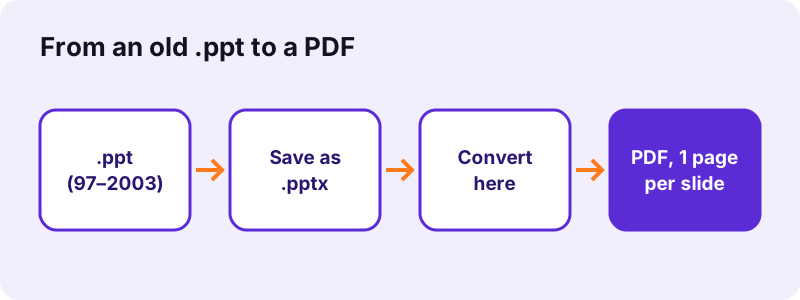
- Check the extension. A .pptx, .ppsx or .potx converts directly; a .ppt from PowerPoint 97–2003 needs step 2.
- Save a .ppt as .pptx. Open it in PowerPoint, Keynote, Google Slides or LibreOffice Impress and save or download it as .pptx.
- Convert the .pptx. Drop the .pptx on the box and press Convert to PDF; the slides are drawn on your device.
- Download the PDF. One page per slide, at the slide's own size, with selectable text.
Why does pdf24 tools PPT to PDF need a .pptx and not a .ppt?
pdf24 tools PPT to PDF draws slides from the PresentationML XML inside a .pptx. An old .ppt from PowerPoint 97–2003 is a binary compound file with a completely different, record-based structure, which the converter does not read. When you pick a .ppt, the page skips it and says the type is not accepted.
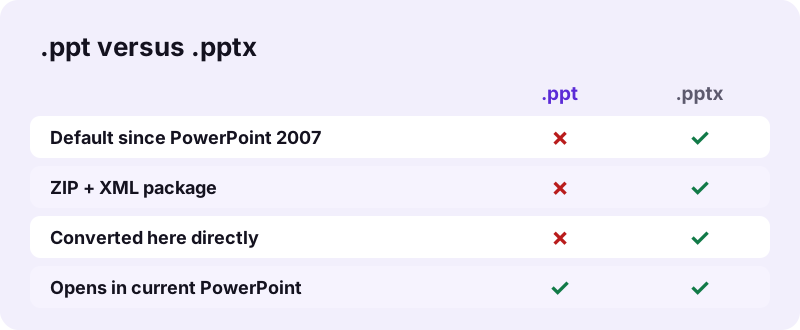
We tested exactly that: a legacy .ppt (its first bytes are D0 CF 11 E0, the compound-file signature) was skipped with the message "1 file(s) skipped because this tool does not accept that type." A .ppt renamed to .pptx is caught too: the converter checks those first bytes and tells you to save it as .pptx.
“It was released on April 20, 1987, initially for Macintosh computers only.”
pdf24 tools PPT to PDF: why no half conversion
A partial reader would drop pictures, positions or text without warning and give you a PDF that looks finished but is not. Refusing the file and naming the fix is more honest, and the .pptx route keeps every slide intact.
pdf24 tools PPT to PDF and what survives the resave
Saving a .ppt as .pptx in PowerPoint keeps text, pictures, shapes, charts and animations; the new file is usually smaller, because .pptx is ZIP-compressed.
pdf24 tools PPT to PDF with very old files
Files from PowerPoint 4.0 or 95 are older than the 97–2003 format. Current PowerPoint may refuse them; LibreOffice Impress opens many of them and can save as .pptx.
pdf24 tools PPT to PDF tip for a whole folder
LibreOffice can convert a folder of .ppt files to .pptx in one batch from its command line; then drop all the .pptx files here at once.
How do I save a .ppt as .pptx for pdf24 tools PPT to PDF?
pdf24 tools PPT to PDF needs one resave, which every presentation app can do. In PowerPoint use File, Save As, PowerPoint Presentation (.pptx). In Keynote use File, Export To, PowerPoint. In Google Slides open the .ppt and choose File, Download, Microsoft PowerPoint. In LibreOffice Impress choose Save As, PowerPoint 2007–365.
| App | Steps | Works on |
|---|---|---|
| PowerPoint (Windows, Mac) | File → Save As → PowerPoint Presentation (.pptx) | Desktop |
| PowerPoint (current versions) | File → Info → Convert | Desktop |
| Keynote | Open the .ppt → File → Export To → PowerPoint | Mac, iPhone, iPad |
| Google Slides | Upload to Drive → open with Slides → File → Download → .pptx | Any browser |
| LibreOffice Impress | Open → File → Save As → PowerPoint 2007–365 (.pptx) | Windows, Mac, Linux |
What does pdf24 tools PPT to PDF draw once you have a .pptx?
The converter draws every slide of the .pptx as one PDF page at the slide's own size, with backgrounds, master logos, pictures, rectangles, ellipses, lines, tables and text boxes. Text is real, selectable text set in Noto Sans. Charts, SmartArt, gradients, rotation, animations, video and speaker notes are not drawn.
| Slide content | In the PDF |
|---|---|
| Titles, bullets, text boxes | Drawn, selectable |
| Pictures and backgrounds | Drawn |
| Tables, basic shapes, groups | Drawn |
| Charts, SmartArt | Not drawn |
| Gradients, rotation | Not drawn |
| Animations, video, audio | Not drawn |
| Speaker notes | Not included |
Our 3-slide test .pptx (31 KB) became a 3-page PDF of 14,541 bytes in 1.0 seconds, with 720 × 540-point pages and 124 extractable characters.
pdf24 tools PPT to PDF for old .pps slide shows and .pot templates
PowerPoint 97–2003 had three binary file types: .ppt presentations, .pps slide shows that open straight into the show, and .pot templates. All three use the same old structure, so all three need the same resave before converting. Their modern counterparts convert directly.
| Old binary file | Save it as | Then |
|---|---|---|
| .ppt presentation | .pptx | Convert here |
| .pps slide show | .ppsx or .pptx | Convert here |
| .pot template | .potx or .pptx | Convert here |
A .pps opens as a running slide show when you double-click it. To resave it, open PowerPoint first and use File, Open to load the .pps, so it opens for editing instead of playing.
Is pdf24 tools PPT to PDF safe for old company presentations?
pdf24 tools PPT to PDF never uploads anything: the .pptx is read by your browser with the File API, drawn in memory, and the result line confirms 0 bytes uploaded. Old sales decks, training material and board presentations stay on your computer. For the resave step, use a desktop app if the file must not reach a cloud service.
Google Slides needs the .ppt in Google Drive; PowerPoint, Keynote and LibreOffice convert locally. How the browser reads files: File API (MDN).
pdf24 tools PPT to PDF on iPhone, Android and Chromebook
On a phone the quickest route for a .ppt is Keynote on iPhone and iPad, or Google Slides on Android and Chromebook: both open the old format and export .pptx. Then pick the .pptx in Safari or Chrome on this page.
- iPhone/iPad: Keynote → open the .ppt → Share → Export → PowerPoint → Save to Files.
- Android: Google Slides app → open the .ppt → Share & export → Save as → PowerPoint.
- Chromebook: Google Slides in the browser → File → Download → Microsoft PowerPoint.
pdf24 tools PPT to PDF when a .pptx arrives by e-mail
A .pptx attachment needs no resave: save it to Files or Download and drop it straight on the box.
Other routes next to pdf24 tools PPT to PDF
Depending on the file you have, another page may fit better. All of them run in the browser with 0 bytes uploaded.
- PowerPoint to PDF: full details for .pptx decks.
- PPTX to PDF: the .pptx package explained.
- ODP to PDF: LibreOffice Impress decks, no resave needed.
- Pages per sheet: handouts with 2, 4 or 6 slides per page.
- Merge PDF: join several converted decks.
pdf24 tools PPT to PDF: frequently asked questions
Is pdf24 tools PPT to PDF free?
Yes. Converting the .pptx is free, with no sign-up, no watermark and no limit, because your device does the work. pdf24tools is an independent site and is not affiliated with PDF24 or Geek Software GmbH; we use the name only because it is what people search for. The resave step uses apps you already have.
Can pdf24 tools PPT to PDF convert a .ppt file directly?
No. The converter reads .pptx, .ppsx and .potx files. A PowerPoint 97–2003 .ppt is skipped when you pick it, and a .ppt renamed to .pptx is detected by its first bytes. Save it as .pptx in PowerPoint, Keynote, Google Slides or LibreOffice Impress, then convert that copy here.
How do I know if my file is .ppt or .pptx before using pdf24 tools PPT to PDF?
Look at the extension: turn on file name extensions in Windows Explorer (View, Show, File name extensions) or in Finder settings on a Mac. PowerPoint also shows [Compatibility Mode] in its title bar for an old .ppt. A .pptx opens as a ZIP archive if you rename it to .zip.
Do I lose anything when saving .ppt as .pptx for pdf24 tools PPT to PDF?
Normally not. PowerPoint, Keynote and Impress carry text, pictures, shapes, charts and animations into the new file. What the PDF then shows depends on the converter: charts, SmartArt, gradients and animations are not drawn, while text, pictures, shapes and tables are.
Does pdf24 tools PPT to PDF upload my presentation?
No. The .pptx is read by your browser and drawn in memory, and the result line confirms 0 bytes uploaded. The only step that may involve a cloud is Google Slides, if you use it for the resave; PowerPoint, Keynote and LibreOffice convert on your own computer or phone.
Can I use pdf24 tools PPT to PDF on an iPhone?
Yes. Open the old .ppt in Keynote, export it as PowerPoint and save it to Files. Then open this page in Safari, tap Choose files, pick the .pptx and convert. The PDF is saved to Downloads, and the file stays on the iPhone the whole time.
What page size does pdf24 tools PPT to PDF give?
Each PDF page takes the slide size of the presentation: 720 × 540 points for a classic 4:3 deck, as in our test, and 960 × 540 points for a current 16:9 widescreen deck. Old .ppt decks are usually 4:3, and the size survives the resave to .pptx.
Why not upload the .ppt to a server converter instead of pdf24 tools PPT to PDF?
A server converter would read the .ppt directly, but your file would leave your device. The two-step route keeps everything local: the resave happens in an app on your computer or phone and the PDF is drawn in your browser, which matters for confidential decks.
Does pdf24 tools PPT to PDF keep speaker notes?
No. Only the slides are drawn, one page per slide; notes are not included. If you need the notes, export Notes Pages from PowerPoint, or copy the notes into a document and convert it with Word to PDF. Slide text stays selectable either way.
Can pdf24 tools PPT to PDF convert many old presentations?
Yes, after the resave. Convert the .ppt files to .pptx in a batch, for example with LibreOffice, then select all the .pptx files here at once. Each becomes its own PDF, and the set downloads as one ZIP. Merge PDF can join them afterwards.
Is the text selectable after pdf24 tools PPT to PDF?
Yes. Slide text is drawn as real text with an embedded Noto Sans subset, so it can be searched and copied; our 3-slide test gave 124 extractable characters. Lines in Arabic, Hebrew, Indic, Thai and CJK scripts are placed as images and are not selectable.
More pdf24 tools PPT to PDF tools and guides
pdf24 tools PPT to PDF: sources
- Microsoft PowerPoint — Wikipedia
- Office Open XML — Wikipedia
- File API — MDN Web Docs