How to use pdf24 unlock PDF in 4 steps
- Choose the protected PDF. Tap Choose PDF files or drop the locked file on the box. It is read from your disk and never sent to a server.
- Type the password if needed. If the file asks for a password when you open it, type that password in the box. Leave the box empty for files that only block printing or copying.
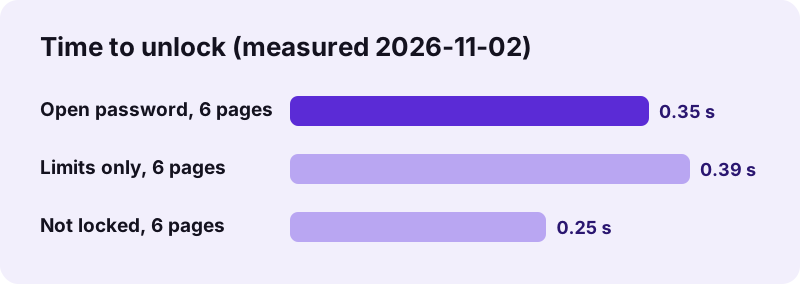
- Press the button. qpdf, compiled to WebAssembly, decrypts the file on your device. Our test files took between 0.25 and 0.39 seconds.
- Download the unlocked copy. Save the -unlocked.pdf file. It opens without a prompt and allows printing, copying and editing; the original stays unchanged.
What does pdf24 unlock PDF remove from a file?
pdf24 unlock PDF removes the encryption of a PDF, and with it both kinds of protection: the open password that stops a file from being read, and the owner restrictions that block printing, copying or editing. The result is a plain PDF with the same pages, text and images, minus the security settings.
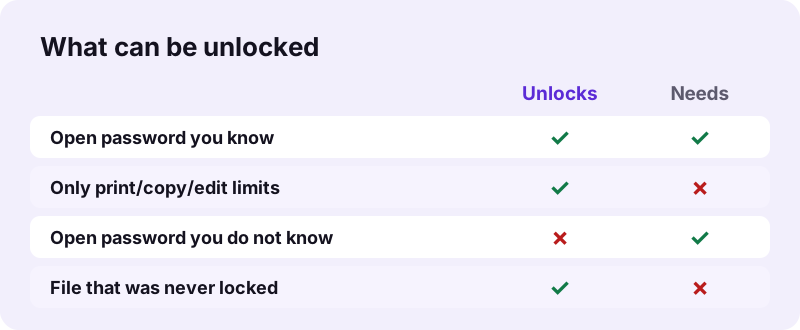
A PDF can carry two passwords. The user or open password is needed to see the pages at all. The owner or permissions password only guards the limits. Files with just an owner password open in every reader without a prompt, and the tool unlocks them without asking for anything.
“The PDF specification also provides for encryption and digital signatures, file attachments, and metadata to enable workflows requiring these features.”
pdf24 unlock PDF with the open password
Our test file locked-user.pdf is encrypted with AES-256 and opens only with the password 1234. With that password typed, the tool returned a 5,510-byte copy with all 6 pages and 2,301 characters of text on each page, and pypdf reported it as not encrypted.
pdf24 unlock PDF without a password
The file locked-owner.pdf has only an owner password, so it opens freely but refuses printing in strict readers. With the password box left empty, the tool removed the limits in 0.39 seconds. No password is needed here because the PDF format lets anyone who can read the pages decrypt them.
pdf24 unlock PDF on iPhone, Android and computers
The same page works in Safari on iPhone and iPad, in Chrome, Edge or Firefox on Android, and in any current browser on Windows, macOS and Linux. Nothing has to be installed; the engine is cached after the first file.
pdf24 unlock PDF: tip for passwords with capitals
Passwords are case-sensitive. If you get the message about a wrong password, check Caps Lock and the automatic capital letter that phone keyboards add at the start of a field, then try again.
Can pdf24 unlock PDF open a file if I forgot the password?
pdf24 unlock PDF cannot open a file whose open password you do not know. The tool does not guess, crack or brute-force passwords: AES-256 keeps the pages unreadable without the key. In our test, an empty box gave "This PDF needs its password to open" and a wrong one gave "That password is not right".
- Ask the sender for the password, or for an unprotected copy.
- Look for the password in the original email, a payslip portal or a bank letter: many statements use a birth date or account digits.
- If you created the file, check your password manager.
- If the file only blocks printing or copying, it unlocks without any password.
Tools that promise to recover any open password can only try candidates one by one, which for a long password takes longer than a lifetime. We prefer to say clearly that it does not work.
pdf24 unlock PDF test results
We ran five unlock tests in Chrome on Windows on 2026-11-02 and checked each output with pypdf and PyMuPDF. Three runs produced an unlocked file in under 0.4 seconds; the two runs with a missing or wrong password stopped with a clear message and produced no file, which is the correct behaviour.
| Test | Password typed | Result | Time | Output |
|---|---|---|---|---|
| locked-user.pdf (AES-256 open password) | 1234 (right) | Unlocked | 0.35 s | 6,111 → 5,510 bytes, 6 pages |
| locked-user.pdf | 9999 (wrong) | "That password is not right" | — | No file |
| locked-user.pdf | None | "This PDF needs its password" | — | No file |
| locked-owner.pdf (limits only) | None | Unlocked | 0.39 s | 6,111 → 5,510 bytes, 6 pages |
| text-6p.pdf (not locked) | None | Clean copy | 0.25 s | 5,238 → 5,510 bytes |
Every unlocked output kept the full text, 2,301 characters per page, so search, copy and screen readers work as before.
Is pdf24 unlock PDF safe and private?
pdf24 unlock PDF processes the file and the password only inside your browser tab. The PDF is read with the File API, qpdf decrypts it in memory, and the result line reported 0 bytes uploaded in every run. Bank statements, payslips and medical letters therefore never pass through a server.
The unlocked copy is no longer protected, so treat it with the same care as the paper original: do not leave it in a shared Downloads folder, and delete it when you are done. To protect it again with a password of your own, use Lock PDF.
Only unlock files you own or are allowed to change. Removing limits from someone else's document may break their terms of use or copyright.
Why use pdf24 unlock PDF instead of typing the password each time?
pdf24 unlock PDF saves typing the password on every open, and it lets other tools work on the file. Most editors, mergers and converters refuse encrypted input, so a monthly bank statement has to be unlocked before it can be merged into a yearly file, compressed for an upload portal or converted to Word.
| Next step | Tool |
|---|---|
| Combine statements into one file | Merge PDF |
| Fit an upload limit | Compress PDF |
| Edit text or fill a field | Edit PDF |
| Fix a file that still will not open | Repair PDF |
Each of these tools also runs on your device, so the unlocked statement never leaves it between steps.
pdf24 unlock PDF before printing
Some files block printing through owner restrictions. After unlocking, the print command works again in every reader, at full quality, because the high-quality printing bit is no longer cleared.
pdf24 unlock PDF error messages and fixes
pdf24 unlock PDF reports problems in plain words instead of failing silently. The table lists every message the tool can show, what causes it, and what to do next, from a missing password to a damaged file that needs Repair PDF before it can be decrypted.
| Message | Cause | What to do |
|---|---|---|
| This PDF needs its password to open. | Open password, box empty | Type the password |
| That password is not right for this file. | Wrong password | Check capitals and retype |
| This PDF was not password-protected. | File had no encryption | Use the clean copy as it is |
| This file could not be unlocked. | Damaged or unusual encryption | Repair PDF, then try again |
pdf24 unlock PDF: frequently asked questions
Is pdf24 unlock PDF free?
Yes. pdf24 unlock PDF costs nothing, needs no account and adds no watermark. There is no daily limit, because the decryption runs on your own phone or computer with qpdf compiled to WebAssembly instead of on a paid server. You can unlock one file after another as often as you need.
Can pdf24 unlock PDF remove a password I do not know?
No. An open password is the key that decrypts the pages, and the tool does not guess or crack it. You must type the right password. Files that only restrict printing, copying or editing are different: they open without a password, and the tool removes those limits with the password box left empty.
Does pdf24 unlock PDF upload my file?
No. The browser reads the PDF from your disk with the File API, and the password you type stays in the same tab. qpdf decrypts the file in memory and the result line shows 0 bytes uploaded. Close the tab and both the file and the password are gone from memory.
Does pdf24 unlock PDF keep the text and quality?
Yes. pdf24 unlock PDF does not re-encode anything, so pages, fonts and images are identical to the protected original. In our tests every unlocked page kept its 2,301 characters of text, and the page count stayed at 6. Search, copy and paste, links and bookmarks work as they did after typing the password.
How do I unlock a bank statement with pdf24 unlock PDF?
Open the statement page, choose the PDF and type the password your bank gave you, often a birth date or part of an account number as described in the bank's email. Press the button and download the unlocked copy. Store it somewhere private, because it now opens without any password.
Does pdf24 unlock PDF work on iPhone and Android?
Yes. Open the page in Safari on an iPhone or iPad, or in Chrome, Edge or Firefox on Android, pick the PDF from Files or Downloads and type the password if one is needed. The unlocked copy downloads to the usual folder of your phone. No app has to be installed.
Why does pdf24 unlock PDF say my file was not password-protected?
The file had no encryption at all, so there was nothing to remove. You still get a clean copy; in our test a 5,238-byte file came back as 5,510 bytes with the same text. If another program refuses the file, the problem lies elsewhere, often a damaged structure that Repair PDF can fix.
Can pdf24 unlock PDF remove print and copy restrictions?
Yes. Owner restrictions on printing, copying, editing, comments or form filling are removed together with the encryption. Our test file with limits only was unlocked in 0.39 seconds without a password. Afterwards every reader allows printing and copying, so only do this with documents you own or have permission to change.
Is pdf24tools the official pdf24 unlock PDF tool?
No. pdf24tools is an independent website and is not affiliated with PDF24 or Geek Software GmbH. Our unlock page is our own build around the open-source qpdf library, running in your browser. The name only describes what people search for when they need to remove a password from a PDF they can open.
Can I unlock several PDFs at once with pdf24 unlock PDF?
Not in one run. pdf24 unlock PDF takes one file at a time, because each protected file can have its own password. Unlocking takes well under a second per file in our tests, so a dozen monthly statements are done in a few minutes. Merge them afterwards with Merge PDF if you want one file.
Which encryption types can pdf24 unlock PDF handle?
The tool uses qpdf, which reads the standard PDF security handlers: 40-bit and 128-bit RC4, 128-bit AES and 256-bit AES, the type our test files used. Certificate-based encryption, where the key is tied to a digital ID instead of a password, cannot be opened by any password tool, including this one.
Is it legal to use pdf24 unlock PDF?
Removing a password from your own file, or from one whose owner allows it, is normal and legal in most countries, for example to archive your bank statements. Removing protection from someone else's document to copy or redistribute it can break copyright or contract terms. When in doubt, ask the sender for an unprotected copy.
More pdf24 unlock PDF tools and guides
pdf24 unlock PDF: sources
- PDF — Wikipedia
- Advanced Encryption Standard — Wikipedia
- File API — MDN Web Docs