What are pdf24 guides?
pdf24 guides are short, tested how-to articles that solve one PDF problem at a time: a size target, a device, a format or a safety question. Each guide names the tool it uses, lists the exact settings, shows the result we measured on our own test files and explains what to do when it does not work.
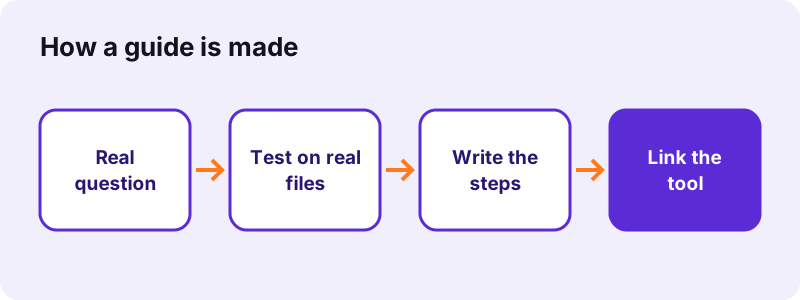
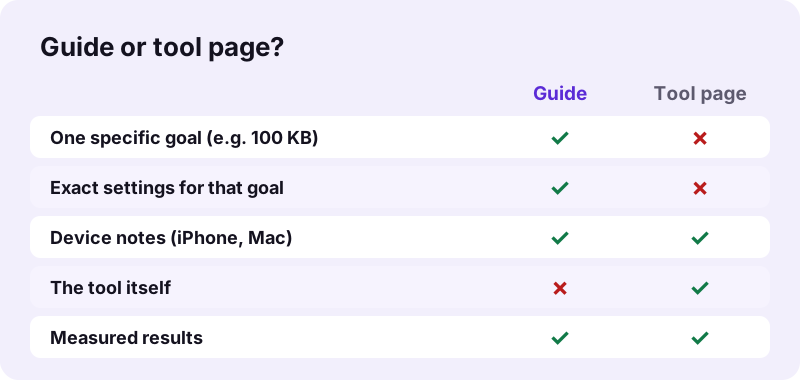
Tool pages explain everything one tool can do. pdf24 guides go the other way round: they start from a goal, for example a job portal that accepts only 2 MB or a contract that must be signed on a phone, and pick the tool and settings that reach it.
How pdf24 guides are tested
Every guide is checked against the live tools with a fixed set of 46 test files: scanned contracts, phone photos, Word, Excel and PowerPoint documents, forms, invoices and damaged PDFs. Sizes, page counts and times in a guide are the values we measured, with the date of the test; nothing is estimated or copied from elsewhere.
pdf24 guides and their dates
Each guide shows Updated with a date under the title. When a tool changes in a way that affects the steps, the guide is retested and the date moves. A guide older than the tool change is a bug: please tell us at contact@pdf24tools.org.
pdf24 guides in other languages
The guides are written in English first. Translations follow for the topics people search for most in each language, such as Mac, Android and Linux questions in German, Spanish and Portuguese.
pdf24 guides: a reading tip
Start with the Quick answer at the top of a guide. If that solves it, you are done in one minute; the sections below are for edge cases, devices and errors.
Which topics do pdf24 guides cover?
The guides cover the PDF jobs people search for most: making files smaller for email or upload limits, joining and splitting, converting to and from Word, editing text, signing on phones, unlocking and protecting documents, and trust questions such as whether a free online PDF tool is safe. New topics are added as they are tested.
| Topic | Typical question | Main tool |
|---|---|---|
| Size | How do I get this PDF under 100 KB? | compress PDF |
| Combine | How do I put 5 scans in one file? | merge PDF |
| Convert | How do I keep my Word layout? | Word to PDF, PDF to Word |
| Edit | How do I change a word in a PDF? | edit PDF |
| Sign | How do I sign on my iPhone? | sign PDF |
| Security | Why can I not edit this PDF? | unlock PDF, lock PDF |
| Scans | How do I make a scan searchable? | OCR PDF |
pdf24 guides do not cover desktop software, browser extensions or paid plans, because the site has none. Where a task needs a server, for example validated PDF/A or official e-invoice checks, a guide says so plainly instead of offering a workaround that does not really work.
Are the tools in pdf24 guides safe for private files?
Yes. Every tool used in the guides runs in your browser: files are read with the File API, processed on your device and returned as a download, and each result line shows 0 bytes uploaded. That is why the guides can recommend the same tools for contracts, IDs, payslips and medical records.
“Browsers can also display content stored locally on the user's device.”
You can check this yourself in the browser's network tab, or load a tool, switch off Wi-Fi and finish the task offline; the is pdf24 safe guide walks through it. The File API on MDN describes the browser feature that makes local processing possible.
How to get the most from pdf24 guides
Open the guide and the tool side by side: on a computer in two tabs, on a phone by keeping the guide open and tapping the tool link when you reach the first step. pdf24 guides use the same names for buttons and options as the tools, so you can follow them word for word.
- Read the Quick answer and check that the guide fits your goal and file type.
- Open the linked tool and choose your file.
- Copy the settings from the guide, for example Exact size and 100 KB.
- Compare your result with the result measured in the guide; a big difference usually means a different kind of file, such as photos instead of text.
- If the result is not good enough, read the section on limits before trying again.
pdf24 guides also link related guides at the bottom, so a question about size often leads to one about quality, and a question about signing to one about protecting the signed file. That way pdf24 guides form a path through a task instead of a single answer.
pdf24 guides for phones and computers
Because the tools are web pages, the same guide works on Windows, macOS, Linux, ChromeOS, Android and iOS. Where a device behaves differently, for example HEIC photos on an iPhone, the share sheet on iOS or the Files app on Android, the guide has its own section for it.
- iPhone and iPad: Safari, Chrome or Edge; files from Files, iCloud Drive or Photos.
- Android: Chrome, Samsung Internet or Firefox; files from Downloads, Drive or the gallery.
- Windows and Mac: any current browser; drag the file onto the box.
- Linux: Chrome, Chromium or Firefox; no install needed.
Suggest a topic for pdf24 guides
Missing a guide? Write to contact@pdf24tools.org with the exact question you would type into a search engine and, if you can, the size and type of the file. Questions that many people share are tested and turned into new pdf24 guides first.
Looking for a tool rather than a guide? The home page lists all 111 tools in 9 categories.
pdf24 guides: frequently asked questions
Are pdf24 guides free?
Yes. Every guide is free to read with no account, and the tools they use are free as well, with no watermark and no daily limit. There are no premium guides and nothing to unlock. The site does not sell software, so the guides have no reason to push you towards a paid plan.
Who writes pdf24 guides?
The pdf24tools team writes and tests every guide. We do not publish guest articles or invented expert names; the byline on each guide is the team. Measurements come from our own test runs on real files, and each quoted source is linked so that you can check it.
How often are pdf24 guides updated?
Whenever a tool changes in a way that affects the steps or the results. The Updated date under each title shows the last check. If a guide no longer matches what you see on the tool page, email contact@pdf24tools.org and we will retest it.
Do pdf24 guides work on an iPhone?
Yes. All guides use web tools that run in Safari and other iPhone browsers, and some guides are written for the iPhone in particular, for example signing a PDF with your finger. Where iOS behaves differently, such as with HEIC photos or the share sheet, the guide explains it.
Do pdf24 guides require uploading files?
No. The tools in every guide process files inside your browser, and the result line of each tool shows 0 bytes uploaded. You can confirm this in the network tab of your browser or by finishing the task offline after the page has loaded.
Can I suggest a topic for pdf24 guides?
Yes. Send the question you would type into a search engine to contact@pdf24tools.org, ideally with the file type and size. We cannot promise to cover every request, but topics that many people ask about are tested and written up first.
Why do pdf24 guides show numbers like file sizes and times?
Because a measured result is more useful than a promise. If a guide says a 2.5 MB scan reached 148 KB, you know what to expect from your own file. All numbers come from our own tests with the date stated, never from estimates or from other websites.
Do pdf24 guides cover desktop programs?
No. The guides use the browser tools on this site only, which need no installation on Windows, macOS, Linux, Android or iOS. We do not offer a desktop download, so guides on Mac or Linux explain how to do the same jobs in the browser instead.
What if a step in pdf24 guides does not work for my file?
Guides explain the limits that apply to their task, for example password-protected files, damaged PDFs or very large scans. If that does not help, write to contact@pdf24tools.org with the tool page, your browser and the message you saw. Please do not send private files.
Are pdf24 guides available in other languages?
English comes first; translations are added for the topics people search for most in each language. The language menu at the top of a page shows which versions exist. The tools themselves work the same in every language version of the site.
Are pdf24 guides published by PDF24?
No. pdf24tools is an independent website and is not affiliated with PDF24 or Geek Software GmbH. The guides describe the tools on this site, which we built ourselves, and they were tested in our own browser sessions.
pdf24 guides: sources
- File API — MDN Web Docs
- Web browser — Wikipedia
- PDF (Portable Document Format) Family — Library of Congress