How do you pdf24 merge PDF Mac files step by step?
To merge PDFs on a Mac, open Merge PDF in your browser, drag the files from Finder onto the drop area, sort them with the arrow buttons and click Merge PDF. The joined document downloads as merged.pdf to your Downloads folder, ready to rename and send.
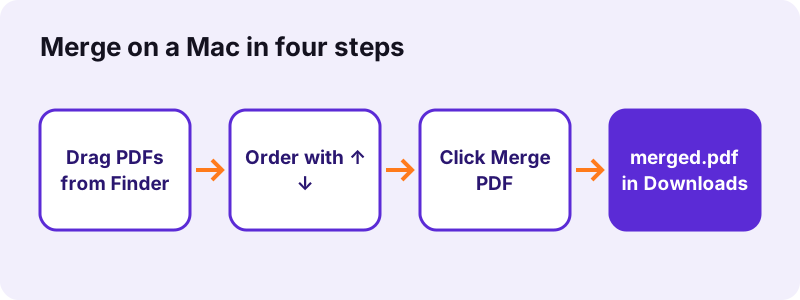
- Open Merge PDF in Safari, Chrome, Edge or Firefox.
- Select the PDFs in Finder (Cmd-click for several) and drag them onto the box, or click Choose PDF files.
- Put them in order with ↑ and ↓; the top file supplies the first pages.
- Click Merge PDF.
- Click the download link; merged.pdf appears in Downloads.
pdf24 merge PDF Mac: picking files in the right order
Finder hands files over in the order of the current view. Sort the folder by name before dragging, and number the files (01, 02, 03) if the order matters. That saves clicks on the arrow buttons, especially when you merge ten or more documents.
pdf24 merge PDF Mac with files from iCloud Drive
Files stored only in iCloud Drive are downloaded to the Mac by Finder when you open or drag them. Wait until the cloud icon disappears before dragging, otherwise the browser may receive an empty placeholder and show an error opening the file.
pdf24 merge PDF Mac: keyboard shortcuts that help
Cmd-A selects every PDF in a Finder folder, and Cmd-click adds or removes single files. After downloading, press Cmd-Option-L in Safari or Cmd-Shift-J in Chrome to open the downloads list and drag merged.pdf straight into Mail.
pdf24 merge PDF Mac: tip for very large scans
Merging copies pages without re-compressing them, so ten scans of 8 MB give an 80 MB file. Compress the scans first with Compress PDF, or compress merged.pdf afterwards, before sending it by email.
Can you pdf24 merge PDF Mac files without installing an app?
Merging PDFs on a Mac needs no extra app with this method: the merge tool is a web page and the work runs inside the browser. macOS also ships Preview, which can combine PDFs on its own. The browser route has one advantage: the same steps work on Windows, Linux, iPhone and Android.
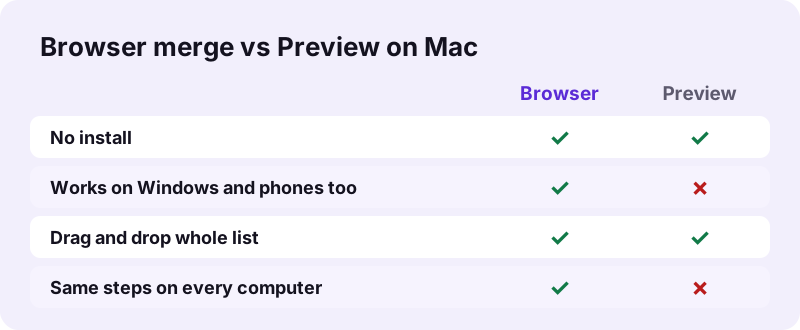
Apple describes the Preview method in its Preview User Guide: Combine PDFs. Use whichever you find faster; the browser tool is handy when you also need to compress, split or sign the result right after. Preview saves changes into the document you opened, so work on copies there; the browser tool always writes a new merged.pdf and leaves every source file untouched, which is the safer choice when the originals must stay as they are.
“Preview is the built-in image and PDF viewer of the iOS, iPadOS & macOS operating system.”
What did our pdf24 merge PDF Mac test measure?
Our merge test combined a 6-page typed PDF, a 4-page scan of 8.07 MB and a 5-page contract scan of 2.46 MB. One 15-page merged.pdf of 10.54 MB came out in 0.2 seconds; pages kept their A4 size and the typed pages kept their selectable text.
| Input | Pages | Size in | Size out | Time |
|---|---|---|---|---|
| Typed text + 2 scans | 15 | 10.54 MB | 10.54 MB | 0.2 s |
| Two typed invoices | 4 | 4.8 KB | 2.6 KB | 0.1 s |
| Merged file, then compressed | 15 | 10.54 MB | 1.85 MB | 13.3 s |
| Typed file + locked file | — | — | refused | 0.3 s |
The speed comes from copying pages instead of redrawing them. The browser on a Mac uses the same code as on Windows, so a pdf24 merge PDF Mac run on an Apple silicon or Intel machine gives an identical file.
pdf24 merge PDF Mac: what the merged file keeps
A merged PDF keeps every page as it was: text, images, page sizes and rotation are copied unchanged, so A4 and US Letter pages can sit in one document. Bookmarks and titles of the source files are not carried over, and a certificate signature in any source becomes invalid.
- Typed text stays selectable and searchable with Cmd-F.
- Scanned pages stay pictures; use OCR PDF to make them searchable.
- Fillable forms: fill them before merging, or flatten them with Flatten PDF.
- Need bookmarks again? Add them with Bookmark PDF.
pdf24 merge PDF Mac, then compress, number or sign
Merging is often only the first step on a Mac. A merged application or report may still be too large to email, may need page numbers, or may need your signature. Each of those tools takes merged.pdf directly from Downloads and runs in the same browser tab, without any upload.
| Next task | Tool | Measured or known result |
|---|---|---|
| Shrink for email | Compress PDF | 10.54 MB → 1.85 MB in 13.3 s |
| Add page numbers | Add page numbers | 6 positions, start number of your choice |
| Sign | Sign PDF | typed signature placed in 0.2 s |
| Split again | Split PDF | 6 pages → 6 files in 0.2 s |
A useful order for job applications is merge, number, compress: the page numbers then run across the whole file, and the final compression keeps the upload small. When you pdf24 merge PDF Mac files for a portal with a size limit, choose Exact size in the compressor and type the limit printed next to the upload button.
Is pdf24 merge PDF Mac private?
Merging on a Mac with this tool is private because the files stay on the computer. The browser reads them with the File API and joins the pages in JavaScript; our request log showed no POST request and the result line reported 0 bytes uploaded. No account is created and nothing is stored on a server.
That makes the method fine for tax papers, HR files or client contracts. For background on how browsers access local files without sending them, see the File API on MDN.
Why does pdf24 merge PDF Mac fail on some files?
Merging fails on a Mac for the same reasons as elsewhere: a source PDF is password-protected, a file is damaged, only one file was chosen, or an iCloud file had not finished downloading. The page names the problem, and each one has a fix that takes under a minute.
| Message or symptom | Cause | Fix |
|---|---|---|
| "This PDF is password-protected" | Open password | Unlock PDF with your password |
| Error opening a file | Damaged PDF or iCloud placeholder | Repair PDF or wait for the download |
| Merge button grey | Fewer than 2 files | Add another PDF |
| Pages in wrong order | Finder sort order | Use ↑ ↓ or Rearrange PDF pages |
If none of these fit, reload the page and repeat the pdf24 merge PDF Mac steps in another browser; Safari, Chrome and Firefox all run the same code.
pdf24 merge PDF mac: frequently asked questions
Is pdf24 merge PDF Mac free?
Yes. You can follow the pdf24 merge PDF Mac steps on pdf24tools without paying, signing up or getting a watermark. There is no daily limit. The merge runs on your own Mac inside the browser, so there is no server cost and no paid plan for larger files.
Which browser is best for pdf24 merge PDF Mac?
Any current browser works: Safari, Chrome, Edge and Firefox run the same code and give the same merged.pdf. Chrome and Edge show downloads in a bar at the top; Safari keeps them in its downloads list. Pick the one you already use. Private windows work too.
How many PDFs can pdf24 merge PDF Mac join?
At least two, with no fixed maximum. The practical limit is the memory of your Mac, because all pages are held while the new file is built. Dozens of typical PDFs merge in a second; very large scan collections are faster if you compress them first.
Does pdf24 merge PDF Mac upload my documents?
No. The files are read and joined on your Mac. The result line says 0 bytes uploaded and our request log confirmed no file data was sent. Only the web page and its scripts are loaded from the internet, never your documents. No copy is kept after you close the tab.
Can pdf24 merge PDF Mac combine PDFs and images?
Merge PDF itself takes PDF files only. To mix PDFs with JPG, PNG or HEIC pictures, use Assemble PDF, which accepts both in one list, or convert the pictures with JPG to PDF first and merge the result with your documents. Assemble keeps the order you set.
Does pdf24 merge PDF Mac reduce quality?
No. Pages are copied without re-compression, so text stays sharp and pictures keep their resolution. That is also why the merged file is roughly the sum of the inputs: 10.54 MB in gave 10.54 MB out in our test. Compress afterwards if you need a smaller file.
Where does pdf24 merge PDF Mac save the result?
The browser saves merged.pdf to your Downloads folder unless you set another location in its settings. Open it from the downloads list, rename it in Finder, or drag it straight from the list into Mail or a cloud folder. The original files stay where they were.
Does pdf24 merge PDF Mac work on older macOS versions?
It works on any Mac that runs a current version of Safari, Chrome, Edge or Firefox. On an old Mac that no longer gets Safari updates, install the latest Chrome or Firefox your macOS supports and use that browser instead. The tool needs no plug-in or extension.
Can pdf24 merge PDF Mac reorder single pages?
Merge PDF orders whole files. To move individual pages, open merged.pdf in Rearrange PDF pages, drag the pages into the order you want and save again. To drop pages you do not need, use Remove PDF pages. Both tools also run on the Mac without uploading anything.
Why does pdf24 merge PDF Mac reject a PDF?
The file is either password-protected or damaged. For a protected file, remove the password with Unlock PDF using the password you know. For a damaged one, run Repair PDF, which rebuilt our broken test file in 0.8 seconds, then merge the repaired copy.
Is pdf24 merge PDF Mac an official tool?
No. pdf24tools is an independent website and is not affiliated with PDF24 or Geek Software GmbH. Our merge tool is our own browser code, and all figures in this guide come from our own tests on 2 November 2026. Our separate code also means our own privacy rules: no file is ever sent to a server.
Does pdf24 merge PDF Mac keep bookmarks?
No. The merged file is a new document made from copied pages, so the bookmark lists of the sources are not included. The content of each page is unchanged. Add new bookmarks afterwards with Bookmark PDF if readers need to jump between sections.
Can pdf24 merge PDF Mac merge signed documents?
The pages can be merged and a visible signature image stays on its page. A certificate-based digital signature, however, stops being valid, because the merged PDF is a different file. Keep and send the signed original when its signature must be verifiable.
More pdf24 merge PDF mac tools and guides
pdf24 merge PDF mac: sources
- Combine PDFs in Preview on Mac — Apple Support
- Preview (Apple) — Wikipedia
- File API — MDN Web Docs