How to use pdf24 repair PDF in 3 steps
- Choose the damaged PDF. Tap Choose PDF files or drop one or more broken files on the box. A file your reader refuses to open is fine; the tool reads the raw bytes.
- Press the button. qpdf rebuilds the file structure first; if that fails, the objects are read one by one, and as a last resort the readable pages are redrawn.
- Download and read the result line. Save the -repaired.pdf file. The message says whether problems were fixed, the index was rebuilt, or pages were recovered as images.
What can pdf24 repair PDF fix?
pdf24 repair PDF fixes structural damage: a cross-reference table with wrong byte offsets, a missing or garbled trailer, a broken startxref pointer, or objects stored out of place. Our test file had wrong offsets and a broken startxref pointer, and was rebuilt with both pages and all 366 characters of text still selectable.
“An index table, also called the cross-reference table, is located near the end of the file”
Because the index sits at the end, a file that was cut short or edited badly loses exactly the part a reader needs first. The objects that hold pages, fonts and images are usually still there; the tool finds them by scanning the file and writes a fresh, correct index.
pdf24 repair PDF: the four methods explained
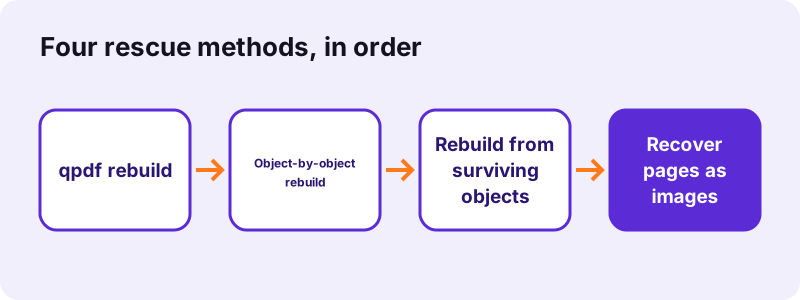
- qpdf rebuild: qpdf, compiled to WebAssembly, re-reads the file and writes it again with new object streams. The result line counts the problems it fixed.
- Object-by-object rebuild: if qpdf gives up, pdf-lib reads each object separately, skips the broken ones and saves a new file. Text stays selectable.
- Rebuild from surviving objects: for a file cut off before its end, the tool scans it for every complete object, builds a new page tree for the pages whose content survived, adds a fresh index and lets qpdf write a clean file. Text stays selectable.
- Image recovery: as a last resort, pdf.js draws every page it can still read at 144 DPI into a new PDF. Text is then part of a picture.
pdf24 repair PDF on iPhone and Android
A PDF that will not open in the Files app or in a messenger can be repaired in Safari or Chrome on the phone. Choose the file from Downloads or Files, repair it and save the new copy; all work happens on the device.
pdf24 repair PDF on Windows and Mac
On a computer the tool runs in Chrome, Edge, Firefox or Safari with nothing to install. Drop several broken files together; each one gets its own result line listing which method rescued it.
pdf24 repair PDF: tip for email attachments
Before repairing an attachment that will not open, download it again. A file cut off by a weak connection is often fine on the second download, and a complete original always beats a repaired copy.
What can pdf24 repair PDF not fix?
pdf24 repair PDF cannot recreate data that is not in the file. When a download stopped halfway, the pages after the cut are gone, but the pages before it survive: our scan cut to 60 % kept 2 of 4 pages and a text file cut to 70 % kept 4 of 6. A renamed non-PDF file still cannot be recovered.
| Test file | Before | After | Time | Result |
|---|---|---|---|---|
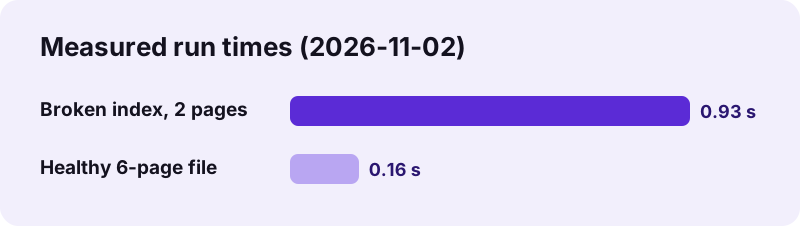
| damaged.pdf: wrong xref offsets, broken startxref | 2,430 bytes | 1,746 bytes | 0.93 s | Index rebuilt, 2 of 2 pages, text selectable |
| text-6p.pdf: healthy file | 5,238 bytes | 4,244 bytes | 0.16 s | Rebuilt and re-saved, no damage found |
| scan-4p.pdf cut to 60 % | 5,077,836 bytes | 4,244,932 bytes | 0.5 s | Cut-off file rebuilt, 2 of 4 scanned pages |
| text-6p.pdf cut to 70 % | 3,666 bytes | 3,447 bytes | 0.3 s | Cut-off file rebuilt, 4 of 6 pages, text selectable |
| ZIP file renamed to .pdf | 740 bytes | - | - | Too damaged, no page recovered |
- Password-protected files are refused with a message; repair needs an unlocked file.
- Content errors, such as a wrong page in a scan or blurry text, are not damage; the tool does not change what is printed on the page.
- A file that opens but shows blank pages may use fonts that are missing; repair rebuilds the structure but cannot add fonts that were never embedded.
pdf24 repair PDF for a truncated download
A truncated file is the most common "corrupt PDF": its end, where the index lives, is missing. The tool rebuilds such a file from the objects that survived, which saves every page stored before the cut, but pages, pictures and fonts stored after it are lost. Ask the sender for the file again or re-download it to get the complete document.
Signs that a file needs pdf24 repair PDF
A file that needs pdf24 repair PDF usually shows itself with an error before the first page appears. Typical messages are "the file is damaged and could not be repaired", "there was an error opening this document", or "failed to load PDF document" in a browser viewer. Pages that appear while others stay blank point to the same kind of damage.
- The reader says the file is damaged or corrupt.
- The browser viewer shows a grey page with a load error.
- Only some pages open; others are blank or missing.
- The file opens in one program but not in another.
- The file size is much smaller than expected, a sign of a cut-off download.
Is pdf24 repair PDF safe for private files?
pdf24 repair PDF reads the damaged file with the browser File API, and qpdf, pdf-lib and pdf.js run on your own device. In both of our successful runs the result line said 0 bytes uploaded. A broken contract or bank statement therefore never passes through a third-party server during the rescue.
The tool also never changes your original: it writes a new file named -repaired.pdf, so you can try other methods on the original later if you need to.
What to do after pdf24 repair PDF
A repaired file is a normal PDF again, so every other tool can work on it. Open it, check that all pages are present and that text can be selected, then continue with whatever you needed the file for, such as compressing, merging or signing.
| Next step | Tool |
|---|---|
| Make it smaller | Compress PDF |
| Combine with other files | Merge PDF |
| Make recovered image pages searchable | OCR PDF |
| Prepare for fast online viewing | Web-optimize PDF |
| Remove a password before repair | Unlock PDF |
pdf24 repair PDF compared with re-saving in a reader
Re-saving a file in a desktop reader works only when the reader can open it at all, and it may silently drop pages it cannot read. The repair tool works on files that do not open, tries four methods, and reports exactly what happened, including how many pages were recovered.
| Repair PDF | Open and save again | |
|---|---|---|
| Works on files that will not open | Yes | No |
| Reports what was fixed | Yes, in the result line | No |
| Keeps the original untouched | Yes, writes a new file | Depends on how you save |
| Needs software installed | No | Yes |
pdf24 repair PDF: frequently asked questions
Is pdf24 repair PDF free?
Yes. pdf24 repair PDF costs nothing, needs no account and adds no watermark. There is no daily limit on files, because the rescue runs on your own device and uses no server. Repair as many broken files as you need, alone or several at once, and keep every result.
Does pdf24 repair PDF upload my file?
No. pdf24 repair PDF reads the damaged file from your disk with the File API, and the four rescue methods run in memory on your device. The result line shows 0 bytes uploaded, and closing the tab removes everything. That makes the tool suitable for damaged contracts, statements and records.
Does pdf24 repair PDF keep the text selectable?
In the first three methods, yes: the qpdf rebuild, the object-by-object rebuild and the rebuild from surviving objects keep the original text, fonts and images. Our test file kept all 366 characters of text. Only the last-resort image recovery turns pages into pictures; run OCR PDF on that result if you need text again.
Why does pdf24 repair PDF say no damage was found?
That message means qpdf read the whole file without warnings, so the structure was fine. You still get a freshly written copy; our healthy 6-page test file went from 5,238 to 4,244 bytes. If the file still will not open, the problem is likely the viewer, a password or missing fonts.
Can pdf24 repair PDF fix a file that was only partly downloaded?
Partly. The pages stored before the cut can be rebuilt; the rest is lost. In our tests a scan cut to 60 % of its size kept 2 of its 4 pages, and a text file cut to 70 % kept 4 of 6 pages with selectable text. Downloading the file again is the reliable fix for the missing pages; repair cannot rebuild data that never arrived.
Can pdf24 repair PDF open a password-protected file?
No. An encrypted file stops the repair with a message asking you to remove the password first. If you know the password, unlock the file with Unlock PDF, then repair the unlocked copy. The tool does not guess, crack or bypass passwords.
Does pdf24 repair PDF work on several files at once?
Yes. Select or drop several damaged PDFs together. Each one is repaired in turn and they come back in a ZIP archive, with -repaired added to every name. The result line lists each file with its own outcome, so you see which ones were fixed and which could not be rescued.
Does pdf24 repair PDF work on iPhone and Android?
Yes. Open pdf24 repair PDF in Safari on iPhone or iPad, or in Chrome, Edge or Firefox on Android, choose the broken file from Files or Downloads and save the repaired copy. The same three engines run on the phone as on a computer, so results are identical.
What does pdf24 repair PDF do with a ZIP or Word file named .pdf?
It cannot turn another format into a PDF by repairing it. Our test with a ZIP file renamed to .pdf ended with the message that no page could be recovered. Rename the file back to its real extension and open it in the right program, or convert it with a matching converter.
How long does pdf24 repair PDF take?
Usually under a second for an ordinary document: our damaged 2-page file took 0.93 seconds and a healthy 6-page file 0.16 seconds. Image recovery is slower, because every readable page is drawn at 144 DPI, so a long scanned file can take noticeably longer, especially on a phone.
Is pdf24tools the official pdf24 repair PDF tool?
No. pdf24tools is an independent website and is not affiliated with PDF24 or Geek Software GmbH. Our repair tool is our own build on the open-source qpdf, pdf-lib and pdf.js projects and runs entirely in your browser. The name only describes what people search for when a PDF will not open.
Will pdf24 repair PDF change how my pages look?
Not in the first three methods: pages, fonts and images are copied as they are and only the file structure is rewritten. Image recovery keeps the look of each readable page but stores it as a 144 DPI picture, so very small print can look a little softer than in the original.
More pdf24 repair PDF tools and guides
pdf24 repair PDF: sources
- PDF — Wikipedia
- File API — MDN Web Docs
- PDF (Portable Document Format) Family — Library of Congress