How to use pdf24 web optimize PDF in 4 steps
- Choose the PDF. Tap Choose PDF files or drop one or more PDFs on the box. Each file is read from your disk, not sent anywhere.
- Keep or untick object streams. Also compress object streams is on by default; it packs the small internal objects tighter. Untick it only if an old reader needs a PDF 1.4-style file.
- Press the button. qpdf, compiled to WebAssembly, writes the linearized copy on your device. A 6-page text file took 0.16 seconds in our test.
- Download and upload it to your site. Save the -web.pdf file and put it on your server in place of the old one. Keep the same file name if pages already link to it.
What does pdf24 web optimize PDF change inside the file?
pdf24 web optimize PDF linearizes the file: the objects needed for page 1 move to the very start, a linearization dictionary and hint tables are added, and the other pages follow in order. The visible content does not change, so the 13,806 characters of text in our 6-page test file were identical afterwards.
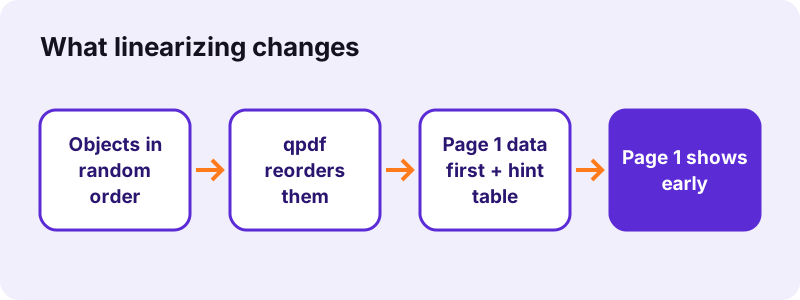
A normal PDF is written in whatever order the creating program found convenient, and its index (the cross-reference table) sits at the end. A reader that gets the file over a slow connection must wait for the end of the file before it knows where page 1 is. A linearized file puts a marker, /Linearized, in its first kilobyte and stores page 1 first, so the reader can start drawing straight away.
“Linearized PDF files (also called "optimized" or "web optimized" PDF files) are constructed in a manner that enables them to be read”
pdf24 web optimize PDF and HTTP range requests
The speed gain needs two partners: a web server that answers HTTP range requests (most do, including Apache, nginx and common CDNs) and a viewer that asks for byte ranges instead of the whole file. Desktop readers such as Acrobat label such files Fast Web View: Yes in the document properties.
pdf24 web optimize PDF on a phone
On Android and iPhone the tool runs in Chrome, Safari, Edge or Firefox with the same engine as on a computer. The 2.46 MB contract scan was linearized in 0.26 seconds on a laptop; expect a phone to take a little longer, as all work happens on the device.
pdf24 web optimize PDF on Windows, Mac and Linux
Nothing has to be installed on Windows, macOS or Linux. The page downloads the qpdf WebAssembly engine once, keeps it in the browser cache, and reuses it for every later file, so the second and third runs start faster than the first.
pdf24 web optimize PDF: tip for many files
Drop a whole folder of PDFs in one go: the tool processes them one after another and hands you a single ZIP with every -web.pdf file inside, ready to replace the originals on your server.
Does pdf24 web optimize PDF make the file smaller?
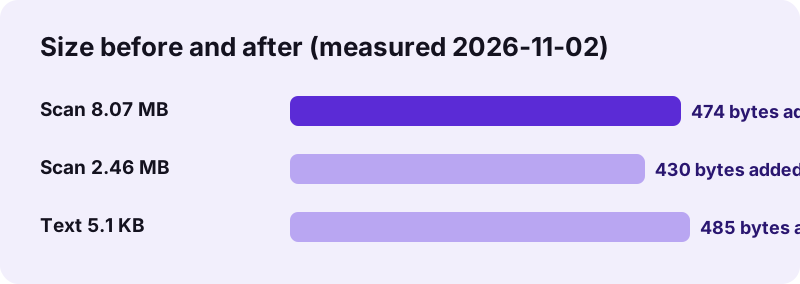
Running pdf24 web optimize PDF does not shrink a file in any meaningful way, because no image or font is re-encoded. The hint table added 430 to 485 bytes per file in our tests: an 8,463,060-byte scan became 8,463,534 bytes. For a smaller file use Compress PDF first, then web-optimize the compressed copy.
| Test file | Before | After | Time | /Linearized in first 2 KB |
|---|---|---|---|---|
| text-6p.pdf (6 pages, typed text) | 5,238 bytes | 5,723 bytes | 0.16 s | Yes |
| Same file, object streams off | 5,238 bytes | 6,050 bytes | 0.19 s | Yes |
| contract-scan-5p.pdf (5 scanned pages) | 2,583,035 bytes | 2,583,465 bytes | 0.26 s | Yes |
| scan-4p.pdf (4 scanned pages) | 8,463,060 bytes | 8,463,534 bytes | 0.52 s | Yes |
The object-streams option is the only part that can save space: with it on, the text file came out 327 bytes lighter than with it off. On files made mostly of pictures the difference disappears, because the pictures are already compressed.
pdf24 web optimize PDF after compressing
The best order for a heavy scan is Compress PDF first, then this tool. Compressing redraws the pages and writes a new file, which loses linearization, so web-optimizing must always be the last step before upload.
When should you use pdf24 web optimize PDF?
Web optimization helps whenever a PDF is opened from a link rather than from a disk: product sheets, menus, manuals and reports on a website, files in a learning platform or intranet, and documents shared by URL. Large files of 5 MB and more gain the most, because visitors would otherwise stare at a blank viewer while everything downloads.
- Catalogues, price lists and menus linked from a web page.
- Course readers in Moodle, Canvas or another learning platform.
- Annual reports and manuals of 50 pages and more.
- PDFs stored on a CDN or object storage that serves byte ranges.
It brings nothing for a file that is sent as an email attachment or opened from a USB stick, because the whole file is already on the device before the reader starts.
pdf24 web optimize PDF for SharePoint and cloud drives
Cloud drives usually render their own preview, so linearizing changes little inside the drive. It still helps when people open the direct download link in a browser viewer or a desktop reader.
pdf24 web optimize PDF compared with Compress PDF
Web optimization and compression solve different problems: one changes the order of the bytes, the other reduces how many there are. The table shows what each tool does to text, quality and size, measured on the same test files.
| Web-optimize PDF | Compress PDF | |
|---|---|---|
| Goal | Page 1 appears early online | Smaller file |
| Page content | Untouched | Pages redrawn as JPEG if that is smaller |
| Text selectable afterwards | Yes | No, when pages are redrawn |
| 8.07 MB scan result | 8.07 MB (+474 bytes) | 770 KB on Recommended |
| Use it | Last step before upload | Before email or upload limits |
The 770 KB figure comes from the same 8.07 MB scan run through Compress PDF on its Recommended level. For a fixed limit, a page such as compress PDF to 1 MB sets the target for you.
Is pdf24 web optimize PDF safe for private documents?
pdf24 web optimize PDF never uploads a file: the browser reads it through the File API and qpdf runs as WebAssembly on your own computer or phone. The result line confirmed "0 bytes uploaded" in all four of our runs, and nothing is stored after you close the tab.
Because the work is local, internal reports and contracts can be prepared for an intranet without passing through a third-party server. You can even disconnect from the network after the page has loaded and the tool keeps working.
Password-protected PDFs cannot be linearized here. Remove the password with Unlock PDF, optimize the copy, and lock it again with Lock PDF if needed.
pdf24 web optimize PDF not working? Causes and fixes
When web optimization fails, the message "This PDF could not be optimized" appears with the first line of the qpdf log. The three usual causes are a password on the file, a broken internal structure, and a file that is not really a PDF, such as a renamed Word document or a download that stopped halfway.
| Symptom | Cause | Fix |
|---|---|---|
| Error mentions a password | Encrypted file | Unlock PDF first |
| Error mentions xref or objects | Damaged structure | Run Repair PDF, then optimize |
| File opens slowly online anyway | Server ignores Range headers | Check the server or CDN settings |
| Viewer still waits for all data | Viewer downloads the full file | Normal for some browser viewers |
A damaged file can often be rescued with Repair PDF, which rebuilds the cross-reference table; the repaired copy can then be linearized normally.
How to check pdf24 web optimize PDF worked
Open the result in Acrobat Reader and look at File › Properties: Fast Web View should read Yes. Without Acrobat, open the file in a plain text editor; the word /Linearized appears within the first few lines, which our check found in all four outputs.
What does pdf24 web optimize PDF keep and remove?
pdf24 web optimize PDF keeps every page, font, image, link, bookmark, form field and annotation, because qpdf only rewrites the file structure. The document title and author stay as they were. Unused objects that no page refers to can be dropped, which is why a messy file sometimes gets slightly smaller instead of larger.
- Kept: text layer, fonts, images, links, bookmarks, form fields, comments.
- Kept: document info such as title and author.
- Dropped: orphan objects no page uses.
- Not added: compression, passwords or PDF/A conformance.
pdf24 web optimize PDF: frequently asked questions
Is pdf24 web optimize PDF free?
Yes. pdf24 web optimize PDF costs nothing, needs no account and adds no watermark. There is no daily limit on files either, because the linearization runs on your own device and no server time is used. You can process a single file or a whole batch, and every output is a normal PDF you can keep.
What is the difference between pdf24 web optimize PDF and Fast Web View?
There is none in the result. Fast Web View is the name Adobe Acrobat uses for a linearized PDF, and linearizing is exactly what this tool does with qpdf. A file optimized here shows Fast Web View: Yes in Acrobat's document properties, and other readers that support progressive loading treat it the same way.
Does pdf24 web optimize PDF reduce quality?
No. pdf24 web optimize PDF copies images, fonts and vector drawings byte for byte; only their position inside the file changes. In our test all 13,806 characters of text survived unchanged and stayed selectable. If you need a smaller file and accept some quality loss, compress the PDF first and web-optimize the compressed copy as the final step.
Why did pdf24 web optimize PDF make my file bigger?
Linearization adds a dictionary and hint tables that tell a viewer where each page starts. In our tests that cost 430 to 485 bytes per file, under 0.01 % of an 8 MB scan. Untick Also compress object streams and the overhead grows a little; leave it ticked for the smallest linearized file.
Can pdf24 web optimize PDF handle several files at once?
Yes. Select or drop as many PDFs as you like; they are linearized one after another and returned together in a ZIP archive. Each file keeps its own name with -web added before the extension, so you can copy them straight over the originals on your web server or content system.
Is a file uploaded when I use pdf24 web optimize PDF?
No. The browser reads the PDF from your disk with the File API and qpdf, compiled to WebAssembly, writes the linearized copy in memory on your device. The result line shows 0 bytes uploaded, and closing the tab clears everything. That makes the tool suitable for internal or confidential documents.
Does pdf24 web optimize PDF work on iPhone and Android?
Yes. pdf24 web optimize PDF runs in Safari on iPhone and iPad and in Chrome, Edge or Firefox on Android, with the same engine as on a computer. Files of a few megabytes finish in about a second; very large scans take longer on a phone because the memory and processor of the device do all the work.
Will pdf24 web optimize PDF speed up my website?
It speeds up how fast the first page of a PDF appears when a visitor clicks the link, provided your server supports range requests and the viewer uses them. It does not change page speed scores of your HTML pages. For overall weight, compress the PDF too, since bytes saved help every visitor.
Can pdf24 web optimize PDF process a password-protected file?
Not directly. An encrypted PDF must be decrypted before qpdf can reorder its objects. Remove the password with Unlock PDF, optimize the unlocked copy, and then add the password again with Lock PDF. Do that only for files you own or have permission to change, because the password protects the content.
Does pdf24 web optimize PDF keep links, bookmarks and form fields?
Yes. Linearizing only changes the order of objects and adds hint tables, so internal links, web links, bookmarks, fillable form fields and comments all keep working. Our check with PyMuPDF found the same page count and the same text in every output as in the input file.
Is pdf24tools the official pdf24 web optimize PDF tool?
No. pdf24tools is an independent website and is not affiliated with PDF24 or Geek Software GmbH. Our web optimizer is our own build around the open-source qpdf engine, running entirely in your browser. The name only describes what people search for when they look for a free linearization tool.
Should I run pdf24 web optimize PDF before or after other edits?
Always last. Merging, compressing, signing, rotating or editing writes a new file and usually drops the linearized layout. Finish every other change, run the optimizer as the final step, and upload that copy. If you edit the file again later, simply linearize the new version once more before you publish it.
pdf24 web optimize PDF: sources
- PDF — Wikipedia
- HTTP range requests — MDN Web Docs
- File API — MDN Web Docs
- PDF (Portable Document Format) Family — Library of Congress