How to use pdf24 rasterize PDF in 4 steps
- Choose the PDF. Tap Choose PDF file or drop the document on the box. It is read on your device and never uploaded.
- Pick the resolution. 100 DPI for the smallest file, 150 DPI for screen and email, 200 DPI for good print, 300 DPI for sharp print.
- Pick JPEG or PNG. JPEG suits photos and scans; PNG is lossless and, in our test, smaller for pages of plain text.
- Press the button and download. Each page is drawn and saved as one picture. Save the -rasterized.pdf file and check that nothing can be selected.
What does pdf24 rasterize PDF do to a page?
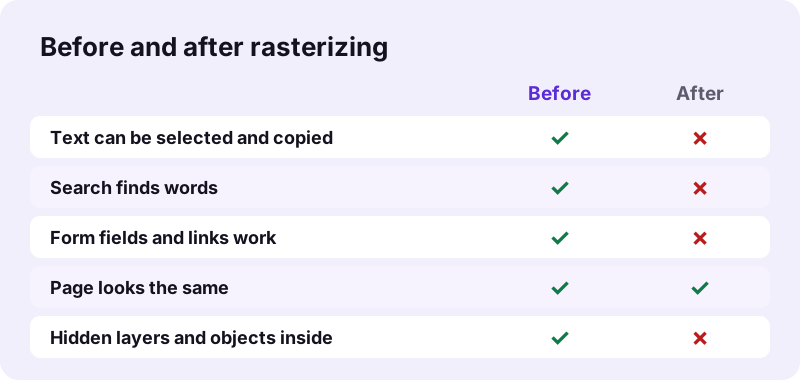
pdf24 rasterize PDF renders each page with pdf.js onto a canvas at the resolution you choose, saves that canvas as one JPEG or PNG picture, and places it on a new page of exactly the same size. Our 6-page test file had 13,806 characters of selectable text before and 0 afterwards.
“is the task of taking an image described in a vector graphics format (shapes) and converting it into a raster image”
A normal PDF stores text as characters with a font and drawings as shapes, which is why it can be zoomed without blur and searched. After rasterizing, each page is pixels only, like a scan made without OCR.
pdf24 rasterize PDF resolution: 100, 150, 200 or 300 DPI
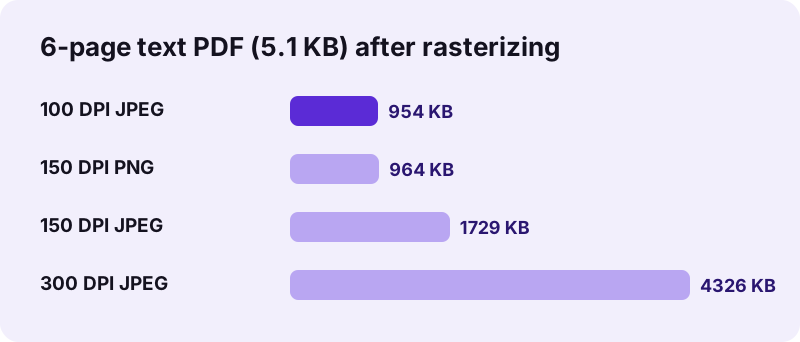
DPI decides how many pixels each page gets. An A4 page at 150 DPI is about 1,240 by 1,754 pixels; at 300 DPI it has four times as many. More pixels mean sharper small print and a heavier file: our 6-page file grew from 954 KB at 100 DPI to 4.22 MB at 300 DPI.
pdf24 rasterize PDF on iPhone and Android
The tool runs in Safari, Chrome, Edge or Firefox on a phone. Rendering 300 DPI pages needs a lot of memory, so on a phone prefer 150 DPI for long files; our 6-page file took 1.44 seconds at 150 DPI on a laptop.
pdf24 rasterize PDF on Windows and Mac
On a computer there is nothing to install. The finished file opens in every reader, because image-only pages need no fonts at all, which also removes font problems on other machines and printers.
pdf24 rasterize PDF: tip for printing
If a print shop or office printer drops fonts or prints strange symbols, a 300 DPI rasterized copy usually prints exactly as the screen shows it. Keep the original for editing.
How big is a file after pdf24 rasterize PDF?
Size depends on the content. A PDF of typed text grows a lot after pdf24 rasterize PDF, because a few characters become millions of pixels: our 5,238-byte file became 954 KB to 4.22 MB. A scanned PDF changes much less, since its pages already are pictures.
| Test file | Setting | Before | After | Time |
|---|---|---|---|---|
| text-6p.pdf, 6 pages | 100 DPI, JPEG | 5,238 bytes | 976,757 bytes | 1.06 s |
| text-6p.pdf, 6 pages | 150 DPI, JPEG | 5,238 bytes | 1,770,658 bytes | 1.44 s |
| text-6p.pdf, 6 pages | 300 DPI, JPEG | 5,238 bytes | 4,430,173 bytes | 2.09 s |
| text-6p.pdf, 6 pages | 150 DPI, PNG | 5,238 bytes | 987,375 bytes | 2.59 s |
| invoice-v1.pdf, 2 pages | 150 DPI, JPEG | 2,440 bytes | 84,946 bytes | 0.90 s |
pdf24 rasterize PDF: JPEG or PNG?
JPEG at 85 % quality is the default and suits photos, scans and colourful pages. PNG is lossless and keeps black text razor-sharp; on our page of plain text it was also smaller, 964 KB against 1.69 MB at 150 DPI, because flat white areas compress very well without loss. It took longer to write, though: 2.59 against 1.44 seconds.
pdf24 rasterize PDF and then compress
If the rasterized file is too big, Compress PDF can shrink it further, because its pages are already images. For an exact upload limit, pages such as compress PDF to 1 MB set the target for you.
Why rasterize a PDF with pdf24 rasterize PDF?
People use pdf24 rasterize PDF to stop easy copying of text, to remove everything that is not visible, to fix printing and font problems, or to make sure a file looks identical everywhere. Each reason comes with a cost, mainly lost search and accessibility, so it pays to know which one applies to you.
| Reason | Does rasterizing help? | Better tool, if any |
|---|---|---|
| Stop casual copy and paste of text | Yes | Or Secure PDF with a copy block |
| Remove hidden layers, form scripts, metadata objects | Yes, only visible pixels stay | Remove PDF metadata for document info |
| Lock form answers and comments | Yes | Flatten PDF keeps text |
| Fix missing fonts when printing | Yes | - |
| Hide confidential words | No, they stay readable | Redact PDF |
pdf24 rasterize PDF limits you should know
Rasterizing is a one-way change, and the tool says so in its result line: pages were redrawn as pictures, so the text can no longer be selected or searched. Screen readers can no longer read the pages aloud, and zooming far in shows pixels instead of sharp letters.
- Text, links, bookmarks inside pages and form fields are not kept.
- Screen readers find no text, which hurts accessibility; keep an accessible original.
- OCR software can still read the pictures, so rasterizing is not a security measure.
- File size usually grows for typed documents.
- One file at a time; very long files at 300 DPI need a lot of memory.
Need text back later? Run OCR PDF on the rasterized file to add a searchable text layer.
Is pdf24 rasterize PDF safe for private documents?
pdf24 rasterize PDF never uploads your file: the browser reads it with the File API, pdf.js draws the pages on a canvas in your device's memory and pdf-lib writes the new PDF there too. All five of our runs reported 0 bytes uploaded, and closing the tab removes the file.
Nothing of the original's internal structure travels into the new file except the picture of each page, so hidden objects, attachments and form scripts are left behind on your device.
pdf24 rasterize PDF compared with PDF to JPG
Both tools draw pages as pictures, but they deliver different files. Rasterize PDF puts the pictures back into one PDF with the original page sizes, so it can be shared and printed as a document. PDF to JPG gives you separate image files, one per page, for slides, websites or chat.
| Rasterize PDF | PDF to JPG | |
|---|---|---|
| Output | One PDF | One image per page, in a ZIP |
| Page size kept | Yes | Pixels only |
| Resolutions | 100, 150, 200, 300 DPI | 72, 150, 300 DPI |
| Formats inside | JPEG or PNG | JPG, PNG or WebP |
For separate images use PDF to JPG; for one tall picture of all pages use PDF to long image.
pdf24 rasterize PDF: frequently asked questions
Is pdf24 rasterize PDF free?
Yes. pdf24 rasterize PDF costs nothing, needs no account and adds no watermark. There is no daily limit, because the pages are drawn on your own device instead of a server. You can rasterize as many documents as you like, at any of the four resolutions, and keep every result.
Can text be copied after pdf24 rasterize PDF?
No. After pdf24 rasterize PDF, each page is one picture, so there are no characters to select or copy. Our 6-page test file went from 13,806 characters of text to 0. Keep in mind that someone can still retype the text or run OCR on the pictures, so this stops casual copying, not determined readers.
Which DPI should I choose in pdf24 rasterize PDF?
Choose 150 DPI for files read on screens or sent by email, 200 DPI for normal office printing and 300 DPI when small print must stay sharp on paper. 100 DPI gives the smallest file and suits quick previews. Higher DPI always means a larger file and more memory while rendering.
Why is my file so much bigger after pdf24 rasterize PDF?
Text and vector drawings are extremely compact, while pictures of whole pages are not. Our 5.1 KB text file became 954 KB at 100 DPI and 4.22 MB at 300 DPI. Use 100 or 150 DPI, try PNG for text-only pages, or compress the rasterized file afterwards to bring the size down.
Does pdf24 rasterize PDF upload my document?
No. The file is read from your disk with the browser File API, rendered with pdf.js and saved with pdf-lib, all in memory on your device. The result line shows 0 bytes uploaded, and nothing is stored after you close the tab, which suits contracts, reports and private records.
Is pdf24 rasterize PDF the same as redaction?
No. Rasterizing keeps every visible word readable as part of the picture, and OCR can turn it back into text. To remove words for good, use Redact PDF: it blacks out the marked areas and rasterizes only those pages, so the hidden text really disappears from the file.
Does pdf24 rasterize PDF keep the page size?
Yes. pdf24 rasterize PDF gives each new page exactly the size of the original page, such as A4 or US Letter, and the picture fills it completely. The page therefore prints at the same scale as before. Only the content inside the page changes from text and shapes to pixels.
Can pdf24 rasterize PDF remove hidden content?
Yes, as a side effect. Only what is visible on each page is drawn into the picture, so hidden layers, objects outside the page area, form scripts and attachments do not reach the new file. Document info such as title and author is not copied from the original either.
Does pdf24 rasterize PDF work on a phone?
Yes, pdf24 rasterize PDF runs in Safari on iPhone and iPad and in Chrome, Edge or Firefox on Android. Choose 150 DPI for long files, because drawing pages at 300 DPI needs much more memory and phones have less of it than computers. Save the -rasterized.pdf file to Files or Downloads when it is ready.
Can I undo pdf24 rasterize PDF?
Not in the file itself, because the text and shapes are no longer inside it. Keep your original if you might need to edit or search the document later. If the original is lost, OCR PDF can add a searchable text layer to the rasterized pages, although fonts and layout are not restored.
Is pdf24tools the official pdf24 rasterize PDF tool?
No. pdf24tools is an independent website and is not affiliated with PDF24 or Geek Software GmbH. Our rasterizer is our own build on the open-source pdf.js and pdf-lib libraries and runs entirely in your browser. The name only reflects what people search for when they want image-only PDF pages.
Does pdf24 rasterize PDF handle password-protected files?
An encrypted file must be opened with its password first. Remove the protection with Unlock PDF, rasterize the unlocked copy and protect the result again with Lock PDF if needed. Only do this for files you own or are allowed to change, since the password protects the content.
pdf24 rasterize PDF: sources
- Rasterisation — Wikipedia
- PDF — Wikipedia
- File API — MDN Web Docs