What are pdf24 tools?
pdf24 tools on this site are 111 small web programs for PDF files and pictures, grouped into 9 categories: organize, optimize, edit and sign, security, read and extract, convert to PDF, convert from PDF, create documents and image converters. Each runs completely in your browser and is free, with no account, no limit and no watermark.
| Category | Tools | Start with |
|---|---|---|
| Organize pages | 12 | merge PDF, split PDF, rotate pages |
| Optimize and repair | 7 | compress PDF, repair PDF |
| Edit, sign and annotate | 12 | edit PDF, sign PDF, fill out PDF |
| Security and properties | 6 | lock PDF, unlock PDF |
| View, read and extract | 8 | OCR PDF, scan PDF, view PDF |
| Convert to PDF | 26 | Word to PDF, JPG to PDF, Excel to PDF |
| Convert from PDF | 20 | PDF to Word, PDF to JPG, PDF to Excel |
| Create documents | 8 | create invoice, QR code |
| Image converters | 12 | HEIC to JPG, WebP to JPG |
The full list of pdf24 tools sits above, under the search box: type a word such as compress, Word or sign to filter the cards. Every card opens a tool page with the tool at the top and a tested how-to, limits and answers below it.
pdf24 tools for everyday PDF jobs
Most visits to pdf24 tools are one of five jobs: making a PDF smaller for email or an upload form, joining several files, turning a Word document or photos into a PDF, turning a PDF back into Word, and signing a document. Those five tools are tested most often and have the longest pages.
pdf24 tools for scans and photos
Paper documents photographed with a phone become clean, high-contrast PDF pages with scan PDF, and OCR PDF adds a searchable text layer: on our 4-page test scan it recognised 457 words. iPhone HEIC photos open everywhere after HEIC to JPG or HEIC to PDF.
pdf24 tools for office files
Word .docx, Excel .xlsx and .xls, PowerPoint .pptx, OpenDocument, RTF, Markdown, plain text and EPUB files convert to PDF without Office installed. In our test a 2-page Word report with a table and a photo became a PDF with real, selectable text in 5.1 seconds.
pdf24 tools: a tip for finding the right one
Search by what you want to end up with, not by the file you have: smaller finds compress, one file finds merge, editable finds PDF to Word.
Are pdf24 tools safe for private documents?
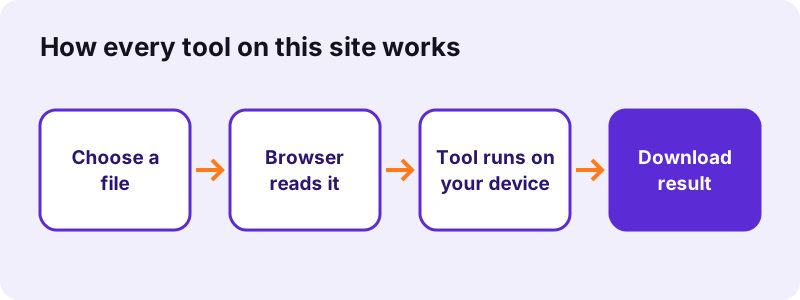
Yes. The pdf24 tools here never upload your file: the browser reads it with the File API and the tool processes it in JavaScript or WebAssembly on your device. Each result line confirms 0 bytes uploaded, and in our network logs no request carried a file. Contracts, IDs, payslips and medical records stay with you.
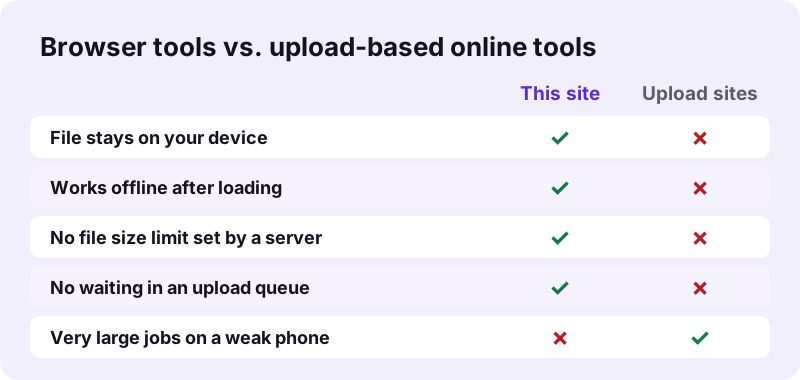
You can test pdf24 tools yourself in two ways. Open the developer tools of your browser, go to the Network tab and run a tool: you will see the page and its scripts load, but no upload. Or load a tool page, switch off Wi-Fi or turn on flight mode, and run the tool anyway; it still works, because nothing needs a server.
“Portable Document Format (PDF), standardized as ISO 32000, is a file format developed by Adobe in 1993 used to present documents”
What pdf24 tools do load from the internet
The page itself, its scripts and web fonts from Google Fonts. The OCR tool also downloads its recognition engine and language data from a public CDN on first use. None of these requests contains your document; details are in the privacy policy, which also confirms there are no analytics, no ads and no cookies.
Are pdf24 tools really free?
Yes. All 111 pdf24 tools on this site are free with no trial, no premium tier, no account, no watermark and no daily or file-count limit. Because your own device does the processing, each extra file costs us nothing, so there is no reason to cap how often you use a tool or how many files you add.
- No sign-up and no email address requested.
- No watermark, logo or footer added to your files.
- No limit on the number of files or tasks per day.
- No file size limit set by a server; only your device's memory sets the limit.
The one limit pdf24 tools can meet is memory: a phone browser may run out on a 500-page scan that a laptop handles. Split big jobs with split PDF, or run them on a computer.
Why pdf24 tools cost nothing to run
An upload site pays for servers, bandwidth and storage for every file. Here the page is a set of static files delivered once and cached, and the work is done by your processor, so a thousand extra files cost the site nothing.
How fast are pdf24 tools?
Most pdf24 tools finish in under a second on a normal laptop because there is no upload and no download queue: the file is already on your device. In our tests merging two PDFs with 10 pages took 0.9 seconds, a QR code 0.1 seconds, and compressing a 2.46 MB scan to 200 KB 35 seconds.
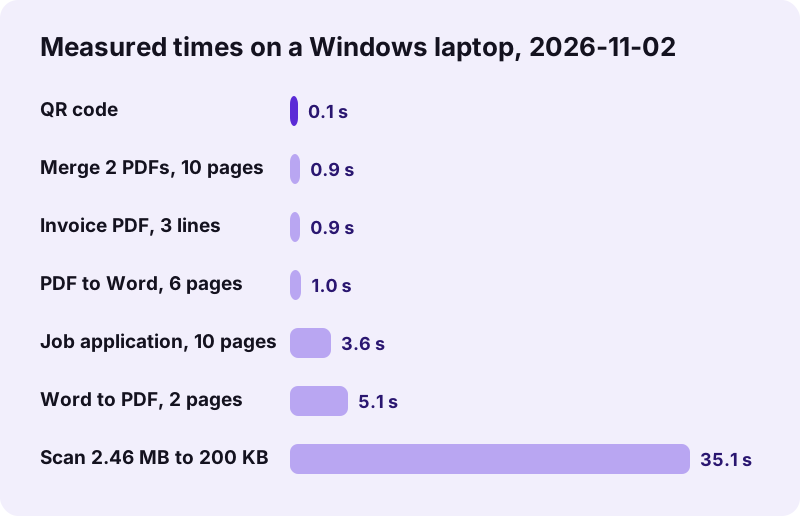
| Tool | Input | Result |
|---|---|---|
| Compress PDF, Recommended | 5-page scan, 2.46 MB | 493 KB (80 % smaller) |
| Compress PDF, exact size 200 KB | same scan | 148 KB (94 % smaller) |
| Merge PDF | 6-page text PDF + 4-page scan | 10 pages, 0.9 s |
| JPG to PDF, high quality | 3 phone photos, 10.80 MB | 3.72 MB, 1.5 s |
| PDF to Word | 6-page text PDF | editable .docx, 1.0 s |
| Create invoice | 3 item lines | 17 KB A4 PDF, 0.9 s |
| Generate password | 20 characters | about 129 bits of entropy |
Heavy jobs for pdf24 tools, such as OCR, exact-size compression of large scans or converting a scan to Word take longer, from tens of seconds to a few minutes, because they redraw or read every page. The tool shows progress while it works.
What makes pdf24 tools slower
Large scans, many pages, an older phone and battery-saving modes all add time. Closing other heavy tabs helps, and so does plugging in a laptop, which lets the browser use the full speed of the processor.
Which pdf24 tools edit, sign and fill PDFs?
The editing pdf24 tools add text, pictures, highlights and drawings with edit PDF, place a drawn, typed or uploaded signature with sign PDF, type into form fields with fill out PDF, and black out text for good with redact PDF. Annotate, watermark, page numbers and bookmarks complete the edit group of 12 tools.
- Edit PDF: add text, images, shapes and highlights to any page.
- Sign PDF: draw with a finger or mouse, type in a handwriting font, or upload a scan of your signature.
- Fill out PDF and create fillable PDF form: type into forms, or make your own.
- Redact PDF: removes the text under the black box, not just covers it.
- Add watermark and add page numbers.
Signatures placed with sign PDF are electronic signatures, the picture of your signature on the page. Certificate-based digital signatures and their trust checks need a server and are not offered.
pdf24 tools for forms
Fill out PDF types into the fields of an existing form; create fillable PDF form and make PDF fillable add fields to a plain PDF; flatten PDF burns the filled values into the page so they can no longer be changed.
pdf24 tools for converting files
Conversion is the largest group of pdf24 tools: 26 tools turn other files into PDF and 20 turn PDFs into other formats. Text-based files keep real, selectable text; pictures and scans become image pages unless you run OCR.
| From → to | What you get | Honest limit |
|---|---|---|
| Word → PDF | text, tables, pictures, fonts embedded | rare layouts can shift |
| PDF → Word | editable paragraphs and tables | scans need OCR first |
| JPG, PNG, HEIC → PDF | one page per picture | text in photos is not searchable |
| Excel → PDF | every sheet, auto-fitted to the page | check very wide sheets |
| PDF → JPG or PNG | one image per page | text becomes pixels |
| XML e-invoice → PDF | readable invoice | not a validation |
The PDF converter accepts many formats in one place if you are not sure which tool to pick.
pdf24 tools for pictures
Twelve image converters change HEIC, WebP, SVG, PNG, JPG and TIFF into JPG, PNG or WebP without making a PDF, for example to post an iPhone photo on a site that refuses HEIC.
pdf24 tools that create new documents
Eight pdf24 tools make something new instead of changing a file. Create invoice and the invoice maker with live preview turn a form into an A4 invoice with subtotal, tax and total. Job application PDF joins a cover page, letter, CV and certificates into one file. Create card prints a folding greeting card from one photo, and photo collage arranges up to 16 photos in a grid.
The password generator uses the browser's cryptographic random source, the QR code generator makes static codes as PNG and SVG that never expire, and create PDF turns typed text into a document. XML invoice to PDF prints UBL and CII e-invoices in a readable layout.
pdf24 tools on iPhone, Android, Windows, Mac and Linux
pdf24 tools are web pages, so they run in current Chrome, Edge, Firefox and Safari on every system with nothing to install. On a phone, pick files from the Files app, Google Drive, iCloud Drive or the photo gallery; the result opens in the phone's viewer or goes straight to the share sheet. On a computer, drag the file onto the box.
| Device | Good for | Watch out for |
|---|---|---|
| Windows, Mac, Linux laptop | everything, including OCR and large scans | nothing special |
| Recent Android or iPhone | most tools, signing, scanning photos | very large files need more memory |
| Older phone or tablet | small files, QR codes, passwords | slow OCR and compression |
pdf24 tools guides and help
For a specific goal, such as a PDF under 100 KB for a form, a signature on an iPhone or the question whether a free tool is safe, the guides give tested steps with measured results. Each tool page also ends with answers to the questions people ask most about that tool.
Found a bug or missing a tool? Write to contact@pdf24tools.org; the contact page explains what to include. Read about pdf24tools for how the site is built and tested.
pdf24 tools: frequently asked questions
Are pdf24 tools free to use?
Yes. Every one of the 111 tools on pdf24tools.org is free, with no trial period, no premium plan and no account. There is no watermark on your files and no daily limit. The tools run on your own device, so each extra file costs us nothing and there is nothing to charge for.
Do pdf24 tools upload my files?
No. Your files are read and processed inside your browser and never sent to a server; each tool's result line shows 0 bytes uploaded. Our own network checks found only the page, its scripts and fonts being loaded. When you close the tab, the tool keeps nothing.
Are pdf24 tools safe?
Yes, for the reason above: a file that never leaves your device cannot leak from our server. The site also sets no cookies and runs no analytics or ads. As with any download, open results in your usual PDF viewer, and keep your original files until you have checked the result.
Do pdf24 tools need to be installed?
No. pdf24 tools are web pages that run in Chrome, Edge, Firefox or Safari on Windows, macOS, Linux, Android and iOS. There is no desktop program, browser extension or app to install, and no plug-in. Bookmark the tools you use often, or add the site to your phone's home screen.
Do pdf24 tools work offline?
Yes, once a tool page has loaded. Because the work happens in your browser, you can switch off Wi-Fi and still run the tool on a file. Only the OCR tool needs the internet the first time, to download its recognition engine and language data.
Is there a file size limit in pdf24 tools?
pdf24 tools have no limit set by a server, since nothing is uploaded. The practical limit is your device's memory: a laptop handles scans of hundreds of megabytes, while a phone may struggle with very large files. If a tool stops, split the file into parts and process them one by one.
Can pdf24 tools compress a PDF to a specific size?
Yes. Compress PDF has an exact-size mode where you type a target such as 100 KB, 200 KB or 2 MB. In our test a 2.46 MB five-page scan reached 148 KB with a 200 KB target. Exact sizes work by turning pages into images, so text is no longer selectable.
Can pdf24 tools convert PDF to Word?
Yes. PDF to Word makes an editable .docx with paragraphs, headings and tables; a 6-page text PDF took 1.0 second in our test. Scanned PDFs have no text to convert, so run OCR PDF first and then convert the result. Related tools convert to ODT, RTF and plain text.
Can pdf24 tools merge PDF files?
Yes. Merge PDF joins any number of PDFs in the order you choose, and assemble PDF also accepts pictures. In our test a 6-page text PDF and a 4-page scan became one 10-page file in 0.9 seconds, with the pages unchanged and the text still selectable.
Can pdf24 tools sign a PDF?
Yes. Sign PDF lets you draw a signature with a finger or mouse, type it in a handwriting font or upload a picture of it, then place it on any page. This is an electronic signature image; certificate-based digital signatures with trust checks are not offered.
Can pdf24 tools edit text in a PDF?
Edit PDF adds new text, pictures, shapes and highlights on top of a page, which covers most corrections, notes and form filling. Rewriting the original text in place is limited, because a PDF stores positioned characters rather than paragraphs; for big text changes, convert to Word, edit and convert back.
Do pdf24 tools work on iPhone and Android?
Yes. All tools run in Safari, Chrome and other mobile browsers. On an iPhone, HEIC photos are converted automatically and results can be shared from the share sheet; on Android, files come from Downloads, Drive or the gallery. Large OCR or compression jobs take longer on a phone.
Can pdf24 tools remove a PDF password?
Yes, when you know the password. Unlock PDF removes an open password or print and copy restrictions from a file you are allowed to open. It cannot crack an unknown password. To add protection, lock PDF encrypts a file with AES-256.
Can pdf24 tools make a scanned PDF searchable?
Yes. OCR PDF recognises the text on scanned pages and adds an invisible text layer, so you can search and copy it. On our 4-page test scan it found 457 words. Recognition runs in your browser after a one-time download of the engine, so it takes longer than other tools.
Do pdf24 tools add a watermark?
No. Nothing is added to your files: no logo, no footer, no hidden mark. The only watermark you will see is one you add yourself with the add watermark tool. PDFs we create, such as invoices, carry pdf24tools only in the creator field of the document properties.
What can pdf24 tools not do?
Tasks that need a server or a certified check: converting web pages to PDF, validated PDF/A, official e-invoice validation, verifying certificate signatures and old Microsoft Publisher files. We leave those out instead of offering tools that only seem to work. Each tool page states its own limits.
Which browsers do pdf24 tools support?
Current versions of Chrome, Edge, Firefox and Safari, plus browsers built on them such as Samsung Internet, Opera and Brave. Very old browsers without WebAssembly cannot run some tools, such as lock and unlock PDF. If a tool misbehaves, update the browser and reload the page.
Who runs pdf24 tools on pdf24tools.org?
The pdf24tools team runs the site and builds and tests the tools. pdf24tools is an independent website and is not affiliated with, endorsed by or connected to PDF24 or Geek Software GmbH. Questions go to contact@pdf24tools.org.
How do I find the right one among the pdf24 tools?
Type what you want into the pdf24 tools search box at the top, for example compress, Word, sign or JPG, and the cards filter as you type. You can also browse the 9 categories, from organize pages to image converters, or start from a guide if you have a specific goal such as 100 KB.
pdf24 tools: sources
- PDF — Wikipedia
- File API — MDN Web Docs
- PDF (Portable Document Format) Family — Library of Congress
- WebAssembly — MDN Web Docs