How to use pdf24 XLS to PDF in 4 steps
- Choose the .xls file. Drop it on the box or tap Choose files; .xlsx, .ods and .csv work too.
- Pick orientation and paper. Auto turns wide sheets to landscape; A4 or Letter; gridlines on or off.
- Press Convert to PDF. The binary workbook is decoded and printed on your device.
- Download the PDF. Every sheet with data is in one PDF, in tab order.
What is an .xls file and how does pdf24 XLS to PDF read it?
An .xls file is the binary Excel 97–2003 workbook, called BIFF8, stored inside a Microsoft compound file. pdf24 XLS to PDF opens that container in your browser with an open-source spreadsheet reader, decodes the cells, number formats, column widths and merged areas, and prints each sheet as PDF pages.
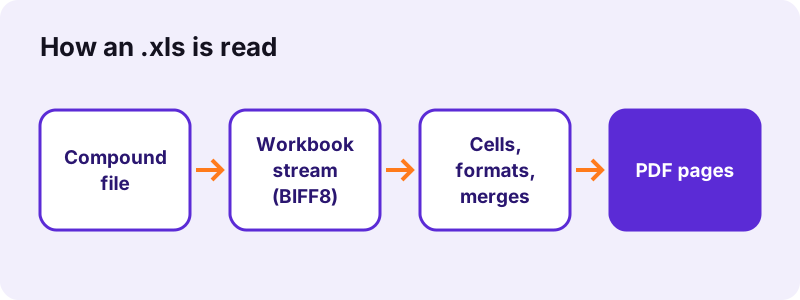
Inside the compound file, a stream called Workbook holds a sequence of binary records: one for each sheet, cell value, formula result, format and merge. Text is stored once in a shared string table and referenced by number, much like the sharedStrings part of a modern .xlsx.
“Excel forms part of the Microsoft 365 and Microsoft Office suites of software and has been developed since 1985.”
Sheet size limits in pdf24 XLS to PDF
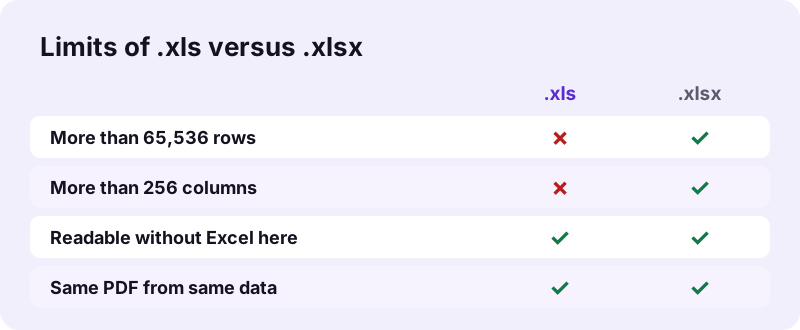
An .xls sheet holds at most 65,536 rows and 256 columns (A to IV). Anything beyond was cut off when the file was saved in that format, so it cannot appear in the PDF either.
pdf24 XLS to PDF and formulas
Every formula record in an .xls carries its last result. The PDF prints that result, formatted as in the file, so totals and averages appear even though nothing is recalculated.
pdf24 XLS to PDF for files in Compatibility Mode
Excel shows [Compatibility Mode] in the title bar for .xls files. That label changes nothing here: the file converts the same way, whether it was made in Excel 97 or saved down from Excel 365.
pdf24 XLS to PDF tip for exports from older software
Accounting, payroll and banking programs often export .xls. If a sheet looks empty in the PDF, open the export in Excel or LibreOffice and save it again; some exporters write values the reader cannot see.
Does pdf24 XLS to PDF give the same result as an .xlsx? Measured
pdf24 XLS to PDF produced exactly the same PDF from our .xls test file as from its .xlsx copy: 4 A4 pages, 3,090 extractable characters and 28,464 bytes, in 1.2 seconds. The .xls itself was 17 KB, twice the 8.2 KB .xlsx, because the binary format is not compressed.
| Copy of the workbook | File size | PDF pages | PDF size | Time |
|---|---|---|---|---|
| .xls (Excel 97–2003) | 17 KB | 4 | 28,464 B | 1.2 s |
| .xlsx (Excel 2007+) | 8.2 KB | 4 | 28,463 B | 1.2 s |
| .ods (OpenDocument) | 72 KB | 4 | 28,463 B | 1.5 s |
So there is no need to upgrade an old .xls before printing it: the data and the layout logic are the same.
The PDF is larger than either workbook because it embeds a subset of the Noto Sans font, the only font it uses. That makes the printout look the same on every device and printer, and it keeps every value searchable: you can press Ctrl+F in a PDF reader and jump to an invoice number or a customer name.
What does pdf24 XLS to PDF print and leave out?
pdf24 XLS to PDF prints every non-empty sheet with its values as formatted, column widths, row heights, merged cells, bold text and optional gridlines. It leaves out charts, pictures, cell colours, comments and page setup such as print areas, and skips hidden rows and columns.
| Item in the .xls | In the PDF |
|---|---|
| Values, dates, currencies | As displayed |
| Formula results | Last stored result |
| Merged cells | Kept, centred |
| Hidden rows and columns | Skipped |
| Charts, pictures, colours | Not drawn |
| Print area, headers, footers | Not read |
Each page shows the sheet name at the top and a page number at the bottom right, and wide sheets are split into column bands like Excel's print preview.
Is pdf24 XLS to PDF safe for old financial records?
pdf24 XLS to PDF never sends the workbook anywhere. The browser reads it with the File API, JavaScript decodes it in memory, and the result line confirms 0 bytes uploaded. Old ledgers, payroll sheets and tax records stay on your computer or phone, with no account and no copy kept.
Details on how pages read local files: File API on MDN.
pdf24 XLS to PDF without Excel: phones, Mac, Linux and Chromebooks
Many people keep .xls files long after they stopped using Excel. The converter needs only a browser, so an old workbook prints to PDF on an iPhone, an Android phone, a Mac without Office, a Linux laptop or a Chromebook.
- iPhone/iPad: Safari → Choose files → Browse.
- Android: Chrome → Choose files → Download or Drive.
- Mac, Linux, Chromebook: drag the file onto the box.
pdf24 XLS to PDF for a folder of archive files
Convert files one at a time on this page; to combine the PDFs afterwards, use Merge PDF.
pdf24 XLS to PDF problems and fixes
Old workbooks fail for a handful of reasons: a password, an even older Excel format, or a file that is really HTML or text with an .xls name. Each one is easy to fix in Excel or LibreOffice.
- Password to open: remove it in Excel and save a copy.
- Excel 5.0/95 workbook: open in LibreOffice and save as .xlsx.
- ".xls" export that is really a web page or CSV: open it in Excel or LibreOffice and save as a real .xlsx.
- ### in cells: widen the column before converting.
- Charts needed: copy them to Word and use Word to PDF.
Other converters next to pdf24 XLS to PDF
Spreadsheets come in several formats; each has a page with its own details, and all of them print the same way.
- Excel to PDF: all options explained.
- XLSX to PDF: the modern Excel format.
- ODS to PDF: LibreOffice Calc.
- PDF to Excel: the other direction.
pdf24 XLS to PDF: frequently asked questions
Is pdf24 XLS to PDF free?
Yes. There is no price, no sign-up and no watermark, and no limit on how many old workbooks you convert, because the work runs on your own device. pdf24tools is an independent website, not affiliated with PDF24 or Geek Software GmbH; we use the name because people search for it.
Does pdf24 XLS to PDF need Microsoft Excel?
No. An open-source spreadsheet reader inside the page decodes the Excel 97–2003 binary format itself. That is why the converter works on Macs without Office, Linux laptops, Chromebooks, iPhones and Android phones. All you need is a current browser such as Chrome, Edge, Firefox or Safari, and nothing is installed.
Does pdf24 XLS to PDF upload my file?
No. The browser reads the .xls from your disk and decodes it in memory. The result line under the download link shows the bytes read and 0 bytes uploaded. Only the converter code is downloaded; your data never travels to a server.
Should I convert my .xls to .xlsx before using pdf24 XLS to PDF?
Not for printing. Our .xls and .xlsx copies of the same workbook gave identical PDFs: 4 pages, 3,090 characters and the same size. Converting to .xlsx is worth it only if you will keep editing the file, because .xlsx is smaller and allows larger sheets.
Does pdf24 XLS to PDF print all sheets?
Yes. Every sheet with at least one value is printed in tab order, each on new pages with its name at the top. Empty sheets are skipped. Hidden sheets that hold data are printed too, so delete them in a copy if they should not be shared.
Does pdf24 XLS to PDF show formula results?
Yes. Each formula in an .xls stores its last result, and that result is printed, formatted as in the workbook. Nothing is recalculated. If the stored values are outdated, open the file in Excel or LibreOffice, press F9 to recalculate, save and convert again.
Can pdf24 XLS to PDF open a password-protected .xls?
No. A workbook encrypted with a password to open cannot be decoded without it. Open it in Excel with the password, remove it under File, Info, Protect Workbook, save a copy and convert that. Protection that only locks cells from editing is not a problem.
Why is a wide .xls split over pages in pdf24 XLS to PDF?
A sheet wider than the page is scaled down to 60 % at most, then the remaining columns move to further pages, printed down then over like Excel. Choose landscape, hide columns you do not need or narrow them to keep more columns on one page.
Can pdf24 XLS to PDF convert Excel 95 or Excel 5 files?
These older formats are different from Excel 97–2003 and may not open. LibreOffice Calc reads most of them: open the file there, save it as .xlsx, and convert that copy. The data is kept, and the PDF looks the same as for any other workbook.
Does pdf24 XLS to PDF keep accents and other alphabets?
Yes. Text in an .xls is stored as Unicode or as a code page, and the reader decodes both, so accented letters, Greek and Cyrillic print as real, selectable text. Cells in Arabic, Hebrew or Asian scripts are drawn by the browser as small images.
What paper size does pdf24 XLS to PDF use?
A4 or Letter, portrait or landscape, with 30-point margins and 8.5-point text before scaling. Auto chooses landscape for sheets wider than a portrait page. The page setup saved in the .xls, such as print areas, scaling or margins, is not read.
More pdf24 XLS to PDF tools and guides
pdf24 XLS to PDF: sources
- Microsoft Excel — Wikipedia
- Spreadsheet — Wikipedia
- File API — MDN Web Docs