How to use pdf24 PDF to Excel in 4 steps
- Choose the PDF. Tap Choose a file or drop one PDF on the box. Your browser reads it; nothing is sent to a server.
- Pick the sheet layout. One sheet per page keeps pages apart. Everything on one sheet stacks all pages, with an empty row between them.
- Press Convert to Excel. A text PDF converts in about a second. The result line tells you how many cells were written.
- Download the .xlsx. Open it in Excel, Google Sheets, Numbers or LibreOffice, then check the column order and the totals.
What does pdf24 PDF to Excel do with a PDF?
pdf24 PDF to Excel reads the text layer of every page, sorts it into lines and finds where the columns of a table start and end. Each line becomes a spreadsheet row and each text column a cell, and values such as 2, 25.50 or 15% are stored as numbers, ready for SUM and charts.
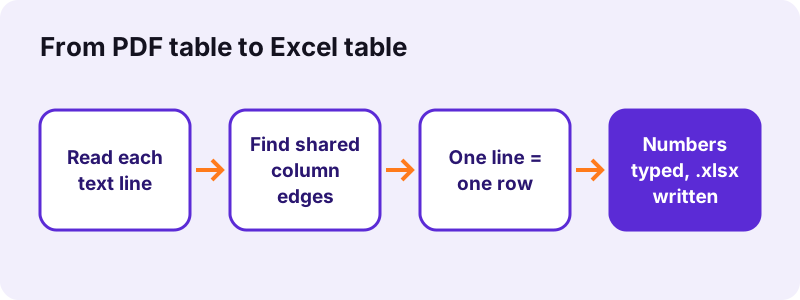
A PDF does not store a table as a table. It stores words at x and y positions on the page. The converter looks at every line that has two or more separate text pieces, collects the left and right edges of those pieces and merges edges that overlap into columns. Every line of the page is then placed into those columns, so the header row, the item rows and the total row line up.
“The program operates on data entered in cells of a table.”
pdf24 PDF to Excel on an invoice: what we got
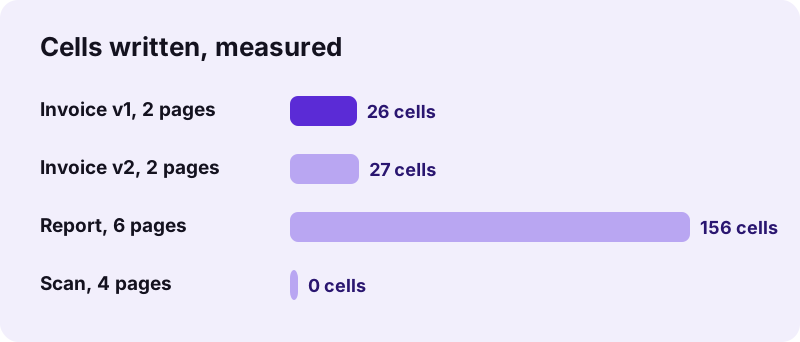
Our test invoice has a title, an address line, a 4-column table (Item, Qty, Unit price, Total) with 4 items and a total, then a payment sentence. The Excel file had a sheet named Page 1 with 9 rows and 4 columns, and a sheet named Page 2 with the one sentence of that page: 26 filled cells in all. Quantity 2 arrived as a whole number, 25.50 as the number 25.5 and 51.00 as 51.
pdf24 PDF to Excel and number formats
Because values are real numbers, Excel drops the trailing zero of 25.50 in the default format. Select the price columns and choose Number with 2 decimals, or Currency, to show it again. Both 1,234.56 and the European 1.234,56 are read as the same number, 15% becomes 0.15, and an amount in brackets such as (25) becomes −25, as in accounting statements.
pdf24 PDF to Excel with dates and codes
Dates written like 19.10.2026 are left as text on purpose, so they are not turned into a wrong number. Codes that are pure digits, such as a postcode or an item number, do become numbers and can lose leading zeros.
pdf24 PDF to Excel tip for leading zeros
If an article number like 00412 shows as 412, format the column as Text in Excel and type the zeros back, or use a custom number format such as 00000 so every code shows 5 digits again.
pdf24 PDF to Excel: one sheet per page or everything on one sheet?
The pdf24 PDF to Excel option One sheet per page gives every PDF page its own tab named Page 1, Page 2, which suits statements where each page stands alone. Everything on one sheet stacks all pages on a tab called All pages, with an empty row between pages, which suits long lists you want to sort or filter.
| Test file | One sheet per page | Everything on one sheet |
|---|---|---|
| Invoice v1, 2 pages | 2 sheets: 9 rows × 4 cols + 1 row; 9.9 KB; 1.3 s | 1 sheet: 11 rows × 4 cols; 9.3 KB; 0.6 s |
| Invoice v2, 2 pages | — | 1 sheet: 12 rows × 4 cols; 27 cells; 0.6 s |
| Report, 6 pages | 6 sheets × 26 rows × 1 col; 14.7 KB | — |
Use one sheet when a table runs over several pages: the rows follow each other, and you only need to delete the repeated header rows and the empty separator rows before you sort. With an Excel filter on the first column, repeated headers are easy to find and remove in one go.
Can pdf24 PDF to Excel read a scanned PDF?
A scanned PDF holds pictures of pages without a text layer, so pdf24 PDF to Excel finds no words to place in cells. Our 4-page scan gave an empty sheet and the message that no text was found. Run OCR on the scan first to add a text layer, then convert the OCR result to Excel.
Use OCR PDF, download the searchable PDF, and run it here again. OCR works best on straight, sharp scans of 300 dpi or more; check digits afterwards, because a misread 8 or 0 in a price column changes every total below it. If only a few numbers are needed, Copy from PDF may be quicker than a whole spreadsheet.
Why are my columns wrong after pdf24 PDF to Excel?
Columns go wrong in pdf24 PDF to Excel when the text of a PDF table is not aligned the way the eye sees it. The converter builds columns from text edges, so a wrapped cell, a merged heading or a number that sticks out can shift values into a neighbour column or add an extra row.
| Symptom | Cause in the PDF | Fix in Excel |
|---|---|---|
| One cell split over two rows | Text wrapped inside the cell | Join with =A5&" "&A6, delete the second row |
| Two columns merged into one | Columns too close together | Data → Text to Columns |
| Values one column to the right | A wide heading spans two columns | Move the cells, or delete the empty cell |
| Extra empty columns | Text that overlaps no other column | Delete the empty columns |
Paragraph text is not a table, so it lands in one column: our 6-page report became 6 sheets of 26 rows with 1 column each, one row per printed line. That is correct behaviour, not an error; for prose use PDF to Word instead.
Is pdf24 PDF to Excel safe for bank statements and payroll?
pdf24 PDF to Excel is safe for bank statements, payslips and price lists because the file never leaves your phone or computer. Your browser reads the PDF with the File API and builds the spreadsheet in JavaScript; in every test run the page sent 0 upload requests and the result line confirmed 0 bytes uploaded. Nothing is stored afterwards.
You can check it: open the developer tools with F12, choose Network and run a conversion. You will see the page and the spreadsheet library load, then no request that carries your file. The File API on MDN explains how a page reads a local file without uploading it.
- No account, no e-mail address, no daily limit.
- No watermark or extra sheet is added to your workbook.
- Close the tab and the data is gone from the page memory.
pdf24 PDF to Excel on iPhone, Android, Mac and Windows
pdf24 PDF to Excel runs in Chrome, Edge, Firefox and Safari on Windows, macOS, Linux, Android, iPhone and iPad. Excel is not needed to convert: the .xlsx also opens in the free Excel mobile app, Google Sheets, Apple Numbers and LibreOffice Calc.
- iPhone and iPad: pick the PDF from Files; the .xlsx is saved in Files → Downloads and opens in Numbers or Excel.
- Android: choose the PDF from Downloads or Drive; open the result in Google Sheets.
- Windows and Mac: drag the PDF onto the box; the workbook goes to your Downloads folder.
- Chromebook: upload the .xlsx to Drive yourself if you want to edit it in Sheets.
What does pdf24 PDF to Excel keep, and what does it drop?
pdf24 PDF to Excel keeps the words and numbers of every text line in reading order, the column structure of aligned tables, numeric values, percentages and negative amounts, plus a column width that fits the longest entry up to 60 characters. Formulas, cell colours, borders, merged cells, images and the text of scanned pages are not carried over.
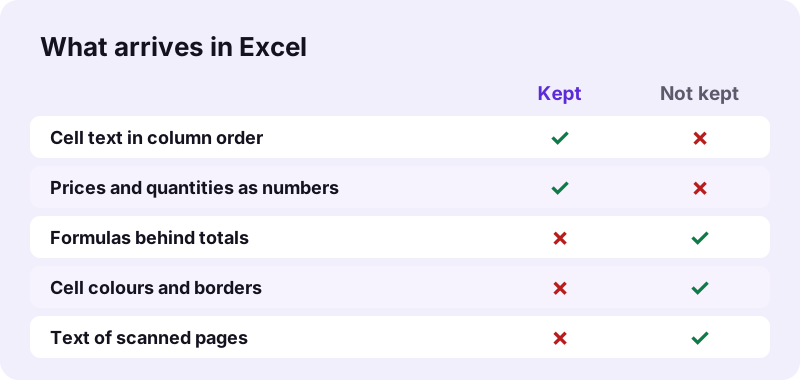
A total printed in a PDF is just a number; the formula that made it is not in the file. After converting, replace the total with =SUM() over the column so that it updates when you change an item. A quick check: if your SUM differs from the printed total, a row was split or a value shifted into the wrong column.
pdf24 PDF to Excel for password-protected files
pdf24 PDF to Excel cannot read a PDF that needs a password to open until that password is removed. In our test such a file stopped with the message No password given. Remove it with Unlock PDF using the password you know, then convert the unlocked copy; files that only block printing or copying convert directly.
Open Unlock PDF, enter the password, download the copy and run it here. A bank statement downloaded from online banking is often protected with your date of birth or account number; the bank's help page tells you which.
pdf24 PDF to Excel, XLSX, ODS or CSV: which file do you need?
Excel's .xlsx is the right choice for most people, because Excel, Google Sheets, Numbers and LibreOffice all open it. The OpenDocument spreadsheet suits LibreOffice and offices that must use open formats; plain text with tabs suits pasting a table into another program.
| Target | Best for | Our tool |
|---|---|---|
| XLSX | Excel 2007+, Google Sheets, Numbers | PDF to XLSX |
| ODS | LibreOffice Calc, open-format rules | PDF to ODS |
| TXT with tabs | Paste into any program | PDF to TXT |
| Markdown table | Docs, wikis, README files | PDF to Markdown |
Going back the other way, Excel to PDF turns the finished workbook into a PDF on your device.
pdf24 PDF to Excel not working? Causes and fixes
When the spreadsheet comes out empty or messy, the reason is nearly always the PDF itself: a scan without text, an open password, a damaged download or a table drawn with wrapped cells. The line under the Convert to Excel button names the case, and each one has a short fix.
| Message or symptom | Cause | Fix |
|---|---|---|
| No text was found | Scanned PDF | OCR PDF, then convert again |
| No password given | Open password set | Unlock PDF |
| File will not open | Broken or cut-off file | Repair PDF or download it again |
| Everything in column A | Prose, not a table | Use PDF to Word for text |
| Numbers shown as text | Odd characters inside the value | Find and Replace, then VALUE() |
Only one table needed from a 40-page report? Cut the pages first with Extract PDF pages and convert just those; the workbook is smaller and cleaner.
Who uses pdf24 PDF to Excel, and for what?
Accountants, small business owners, students and researchers use a PDF to Excel converter when numbers arrive as a PDF but must be added up, compared or charted: bank statements, supplier price lists, invoices, timetables, survey results and the tables of official reports.
- Bank statement: one sheet for all pages, then filter by payee and sum.
- Price list: compare this year's prices with last year's using VLOOKUP.
- Invoices: collect totals of many invoices into one bookkeeping sheet.
- Report tables: chart the figures of a statistics report without retyping them.
pdf24 PDF to excel: frequently asked questions
Is pdf24 PDF to Excel free?
Yes. The converter is free, with no sign-up, no trial period, no watermark and no limit on files per day. It can be free because the conversion runs on your own device, so there is no server cost per file. Convert as many PDFs as you need, one after another, and keep every workbook.
Does pdf24 PDF to Excel keep numbers as numbers?
Yes. Values such as 2, 25.50, 1.234,56, 15% or (25) are stored as real numbers, so SUM, AVERAGE and charts work at once. Dates written like 19.10.2026 stay text so they are not changed by mistake. Format the columns afterwards if you want 2 decimals or a currency sign.
How long does pdf24 PDF to Excel take?
Text PDFs take about a second: our 2-page invoices took 0.6 to 1.3 seconds and our 6-page report 0.7 seconds in Chrome on a Windows laptop. A 4-page, 8 MB scan took 15.6 seconds only to find that it had no text, so run OCR on scans first.
Can pdf24 PDF to Excel convert a scanned bank statement?
Not on its own. A scan is a picture, so there are no words to place in cells, and the sheet stays empty with a note telling you so. Run OCR PDF on the statement first, then convert the searchable PDF. Check the amounts afterwards, as OCR can confuse similar digits.
Does pdf24 PDF to Excel upload my file?
No. The PDF is read by your browser and the spreadsheet is built locally with JavaScript. During our tests the page sent 0 upload requests, and the result line shows 0 bytes uploaded. That matters for bank statements and payroll files, which should never sit on somebody else's server.
Is this pdf24 PDF to Excel tool made by PDF24?
No. pdf24tools is an independent website and is not affiliated with PDF24 or Geek Software GmbH. The converter is our own code: it runs in your browser, uploads nothing and needs no account. We use plain, familiar page names so the tool is easy to find, but the site and the team are separate.
Why is everything in one column after pdf24 PDF to Excel?
The PDF page held paragraphs, not a table, so each printed line became one row in column A. Our 6-page report gave 26 rows with 1 column per page. That is expected: columns only appear where lines share column edges. For running text, PDF to Word gives a much better result.
Can I use pdf24 PDF to Excel on an iPhone?
Yes. Open the page in Safari or Chrome, tap Choose a file, pick the PDF in Files and tap Convert to Excel. The .xlsx is saved in Files → Downloads and opens in Numbers or the free Excel app. Nothing has to be installed, and the file stays on the iPhone.
Does pdf24 PDF to Excel keep formulas?
No, because a PDF contains no formulas, only the printed results. Totals and subtotals arrive as plain numbers. Replace them with =SUM() over the column after converting, so the total updates when you change a value. Comparing your SUM with the printed total is also a good check of the conversion.
What is the maximum file size for pdf24 PDF to Excel?
There is no fixed limit; the limit is the memory of your device, because the whole PDF is read into the browser. Text PDFs are light, our invoices were 2.4 KB each. For a long report, extract only the pages with the table you need and convert those for a cleaner workbook.
Can pdf24 PDF to Excel open a password-protected PDF?
Only after the password is removed. A file with an open password stops with the message No password given. Use Unlock PDF with the password you know, then convert the unlocked copy. Files restricted only against printing or copying usually convert without that step.
Which programs open a pdf24 PDF to Excel file?
The result is a standard .xlsx workbook, so it opens in Excel 2007 and later, Excel for Mac, Excel on the web, the Excel mobile apps, Google Sheets, Apple Numbers and LibreOffice Calc. Sheet names are Page 1, Page 2 and so on, or All pages when you choose one sheet.
Does pdf24 PDF to Excel work offline?
The conversion itself needs no internet, because nothing is sent to a server; only the page and its spreadsheet library must load. Run one conversion while online so the library is loaded, then further files convert without a connection as long as the tab stays open. Reloading needs the internet again.
How do I fix split rows after pdf24 PDF to Excel?
A cell whose text wrapped onto two lines in the PDF becomes two rows. Join them with a formula such as =A5&" "&A6, paste the result as values and delete the extra row. For many split rows, sort by a column that is only filled on the real rows and delete the others together.
Can pdf24 PDF to Excel convert tables with Arabic or other languages?
Yes, as long as the PDF has a real text layer. Words in any script, including Arabic, Greek, Cyrillic and Chinese, are copied into cells as Unicode text, and numbers are still typed as numbers. Scanned pages in any language need OCR before their text can be placed in cells.
More pdf24 PDF to excel tools and guides
pdf24 PDF to excel: sources
- Spreadsheet — Wikipedia
- Office Open XML — Wikipedia
- File API — MDN Web Docs
- Optical character recognition — Wikipedia