How to use pdf24 PDF to Markdown in 4 steps
- Choose the PDF. Tap Choose a file or drop one PDF on the box; it is read on your device.
- Set page breaks. Mark page breaks adds a --- rule and an HTML comment with the page number between pages; it is off by default.
- Press Convert to Markdown. Text PDFs are converted in about half a second.
- Save the .md. Open it in any editor, paste it into GitHub, Obsidian or a wiki, or feed it to a chatbot.
What does pdf24 PDF to Markdown write into the .md file?
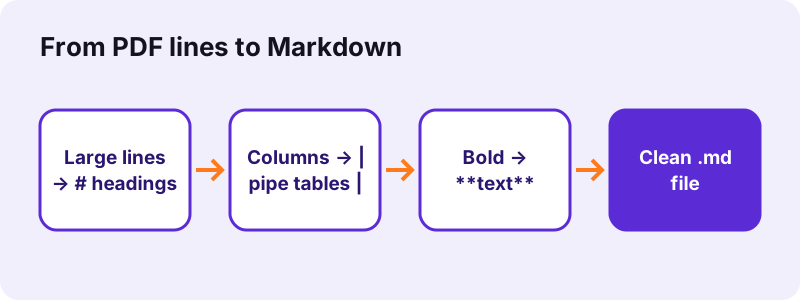
pdf24 PDF to Markdown writes plain UTF-8 text with Markdown marks: # to ### for headings found by font size, - for bullet lines, **double asterisks** for bold, *single asterisks* for italic and GitHub-style pipe tables for column-aligned text. Paragraphs are separated by one empty line, as the syntax expects.
“Markdown is a lightweight markup language for creating formatted text using a plain-text editor.”
This is the start of the file we got from our invoice test PDF. The title line became a level-1 heading and the four columns became a table with a --- separator row:
# Invoice INV-2026-0142| Item | Qty | Unit price | Total || --- | --- | --- | --- || Laptop stand | 2 | 25.50 | 51.00 |
pdf24 PDF to Markdown headings
A line at least 1.6 times the body text size becomes #, at least 1.3 times becomes ##, and other headings (18 % larger, or short bold lines without a full stop) become ###. That gives a clean outline that table-of-contents plugins, static-site generators and wiki engines can use directly.
pdf24 PDF to Markdown tables
Lines whose pieces share column edges become one table. The first row is used as the header, followed by the | --- | separator, so the result renders as a table on GitHub, GitLab and in most Markdown viewers. A | inside a cell is escaped as \| so it does not break the columns.
pdf24 PDF to Markdown escaping
Characters that Markdown would read as formatting, the asterisk, underscore, backtick and backslash, are escaped with a backslash when they appear in normal text. A price list with 5*10 or a file name like report_final therefore shows exactly as in the PDF instead of turning italic.
pdf24 PDF to Markdown tip for bullet lists
Bullets drawn as •, ▪, ◦, – or similar symbols are rewritten as - list items, so lists render properly. Numbered lines keep their numbers; if a list renders as one paragraph in your viewer, add an empty line before it.
Why convert with pdf24 PDF to Markdown instead of TXT or Word?
Markdown sits between plain text and Word: it is still readable as text, but keeps headings, lists, emphasis and tables in a form that software understands. That suits documentation, README files, wikis, note apps such as Obsidian or Notion, static websites and large language models, which read Markdown structure well.
| Format | Keeps structure | Readable as text | Best for |
|---|---|---|---|
| Markdown (.md) | Headings, lists, tables, bold | Yes | Docs, wikis, notes, AI prompts |
| Plain text (.txt) | No | Yes | PDF to TXT: words only |
| Word (.docx) | Yes, plus sizes and page setup | No | PDF to Word: editing |
| HTML | Yes | Partly | PDF to HTML: web pages |
What are the page breaks in pdf24 PDF to Markdown?
Page breaks are optional separators that pdf24 PDF to Markdown inserts between PDF pages when Mark page breaks is ticked: a --- horizontal rule followed by an HTML comment such as <!-- page 2 -->. The comment is invisible when the Markdown is rendered, but lets you find where each PDF page started.
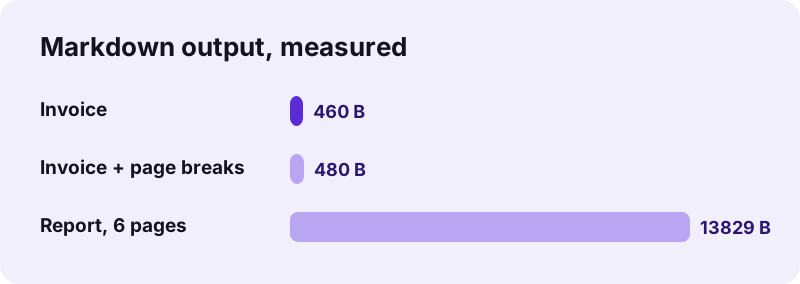
On our invoice the option added 20 bytes (460 to 480 bytes) and the word count rose from about 107 to 112 because of the markers. Leave it off for clean prose; turn it on when you need to cite page numbers or compare the Markdown with the original PDF.
pdf24 PDF to Markdown results we measured
We converted four test files in Chrome on Windows 10. Text PDFs gave Markdown in about half a second, with headings and tables rebuilt; the scan gave an empty file because it has no text layer. Every run sent 0 bytes to a server, as the network log and the result line confirmed.
| Test PDF | Option | .md size | Time | Result line |
|---|---|---|---|---|
| Report, 6 pages, 5.1 KB | default | 13.8 KB | 0.5 s | about 1,951 words |
| Invoice, 2 pages, 2.4 KB | default | 460 B | 0.4 s | about 107 words, 1 table |
| Invoice, 2 pages | Mark page breaks | 480 B | 0.5 s | about 112 words |
| Scan, 4 pages, 8.07 MB | default | 1 B | 9.5 s | 4 pages had no text |
Why is pdf24 PDF to Markdown output empty for a scan?
A scanned PDF stores photos of pages, not characters, so pdf24 PDF to Markdown has nothing to turn into headings or paragraphs. Our 4-page scan produced a 1-byte file and the message that 4 pages had no text. Images are never embedded in the Markdown, so a scan needs OCR first.
- Run OCR PDF to add a text layer, then convert again.
- Need the pictures of a PDF for your Markdown? Save them with Extract images and link them with .
- Check whether text is selectable in a PDF viewer before converting: no selection means a scan.
Is pdf24 PDF to Markdown private?
pdf24 PDF to Markdown is private because the PDF never leaves your device. The browser reads it through the File API and JavaScript writes the .md in memory; in our tests the network log showed 0 upload requests. That matters when internal documents end up in a company wiki or a notes vault.
No account and no server copy. The File API on MDN explains how a web page reads a local file without sending it. The syntax itself is described in the RFC 7763 text/markdown media type.
pdf24 PDF to Markdown on any device
pdf24 PDF to Markdown runs in Chrome, Edge, Firefox and Safari on Windows, macOS, Linux, Android and iOS, with nothing to install. The .md file opens in VS Code, Obsidian, Typora, iA Writer, any text editor and on GitHub, where it renders straight away.
Want a PDF again after editing the Markdown? Use Markdown to PDF, which also runs in your browser.
pdf24 PDF to markdown: frequently asked questions
Is pdf24 PDF to Markdown free?
Yes. It is free with no sign-up, no watermark and no file limit. The conversion runs on your own device, so there is no server cost per file. Convert a PDF, save the .md, and pick the next one; every Markdown file is yours to edit, publish and share.
Which Markdown flavour does pdf24 PDF to Markdown use?
Standard Markdown with GitHub-style pipe tables. Headings use #, lists use -, bold uses ** and italic uses *. Everything renders on GitHub, GitLab, Obsidian, VS Code previews and most static-site generators. Tables need a viewer that supports the GitHub table extension, which almost all modern ones do.
Does pdf24 PDF to Markdown keep tables?
Yes, when the PDF text is aligned in columns. Those rows become a pipe table with a header row and a --- separator; our invoice gave a table of 6 rows and 4 columns. Tables with merged cells may come out as separate lines that you can fix by hand in a minute.
Does pdf24 PDF to Markdown include images?
No. The Markdown output contains text only, so photos, charts and scanned pages are not embedded or linked. Save the pictures with Extract images, put them next to the .md file and add them with the  syntax where you want them to appear.
Can pdf24 PDF to Markdown convert a scanned PDF?
Not directly. A scan holds pictures of letters, so there is no text to convert; our 4-page scan gave an empty file. Run OCR PDF first to recognise the text, then convert the OCR result to Markdown for headings, paragraphs and tables you can edit.
Does pdf24 PDF to Markdown upload my PDF?
No. The PDF is read and converted inside your browser. We logged every request during our tests: 0 uploads, and the result line shows 0 bytes uploaded. You can confirm it in the Network tab of the developer tools while a conversion runs.
Is this pdf24 PDF to Markdown tool part of PDF24?
No. pdf24tools is an independent website, not affiliated with PDF24 or Geek Software GmbH. Our converter is our own code: it runs in your browser, uploads nothing and needs no account. We use simple page names so the tool is easy to find, but the site, code and team are separate.
Is pdf24 PDF to Markdown good for ChatGPT and other AI tools?
Yes. Language models read Markdown structure well: headings mark sections, tables keep rows and columns together, and there is no layout noise from the PDF. Convert, then paste the .md content into the prompt or upload the file. Leave page breaks off unless the model needs page numbers.
Why are some words bold or italic after pdf24 PDF to Markdown?
Because they were bold or italic in the PDF. The converter reads the font style of each run of text and wraps bold runs in ** and italic runs in *. Headings are not wrapped, since # already marks them. Remove the marks in your editor if you want plain text.
Can pdf24 PDF to Markdown handle Arabic or Chinese?
Yes, for PDFs with a real text layer. The .md file is UTF-8, so every script is stored correctly, and right-to-left lines keep their reading order. Rendering depends on your viewer and its fonts. Scanned pages in any language still need OCR before conversion.
Can I use pdf24 PDF to Markdown on an iPhone?
Yes. Open the page in Safari, tap Choose a file, pick the PDF from Files and tap Convert to Markdown. The .md is saved to Files → Downloads, where Obsidian, iA Writer or any text app opens it. Nothing is installed and the PDF stays on the phone.
How large a PDF can pdf24 PDF to Markdown handle?
There is no fixed limit; your device's memory sets it, because the whole PDF is read into the browser. Text PDFs are fast: our 6-page report took 0.5 seconds for about 1,951 words. Split very long documents with Split PDF if you want one Markdown file per chapter.
pdf24 PDF to markdown: sources
- Markdown — Wikipedia
- RFC 7763: The text/markdown Media Type — RFC Editor (IETF)
- File API — MDN Web Docs