How to use pdf24 PDF to JPG in 4 steps
- Choose the PDF. Tap Choose a file or drop one PDF on the box. A preview of the pages appears; the file stays in your browser.
- Set format and resolution. Keep JPG and pick 72 DPI for screens, 150 DPI for most uses or 300 DPI for print.
- Pick pages (optional). Leave Pages empty for all pages, or type a range such as 1-3, 7.
- Convert and download. Press Convert to images. One page downloads as a .jpg file; two or more pages come as one ZIP.
What does pdf24 PDF to JPG do with your PDF?
pdf24 PDF to JPG renders every page of the PDF onto a white canvas at the resolution you choose and saves it as a JPEG image at 90 % quality. Text, drawings, photos and scans all end up in the picture exactly as they look on screen, ready for chats, slides, websites or printing.
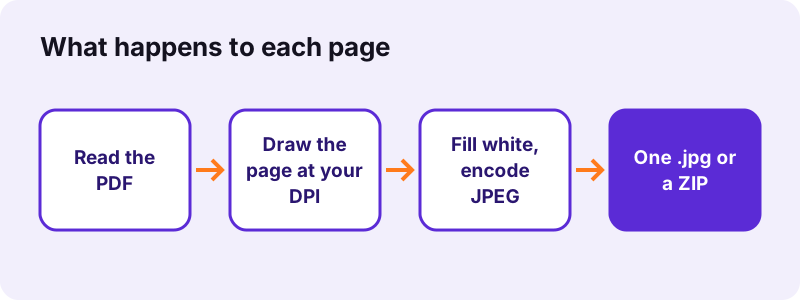
Each page becomes one image named after the PDF, such as report-page-1.jpg. The picture has the page proportions of the original: an A4 page at 150 dpi is 1,240 × 1,754 pixels. Because JPEG has no transparency, the page background is filled with white first, so pages never turn black or grey in apps that ignore transparency.
“JPEG is a commonly used method of lossy compression for digital images, particularly for those images produced by digital photography.”
pdf24 PDF to JPG for a single page
When you convert one page, or a PDF that has only one page, you get the .jpg file directly. Our invoice page at 150 dpi came out as a 65.7 KB JPG in 0.4 seconds, small enough for any chat app or web form.
pdf24 PDF to JPG for many pages at once
Two or more pages are packed into one ZIP so the browser does not ask to save each file. Our 6-page PDF at 150 dpi gave a 2.01 MB ZIP holding six JPGs of about 335 KB. Unzip it with a double-click on Windows or Mac, or with the Files app on iPhone and Android.
pdf24 PDF to JPG with a page range
Type pages in the Pages field: 2-3 gave us a 671 KB ZIP with just those two pages, and 1 gives a single .jpg. Commas combine ranges, so 1-3, 7 saves four pages. The preview above the options helps you find the page numbers.
pdf24 PDF to JPG tip for one page of a long file
For a slide or a receipt buried in a 200-page file, type only its number. Only that page is drawn, so you skip waiting for the rest and you skip unzipping.
Which resolution should you choose for pdf24 PDF to JPG?
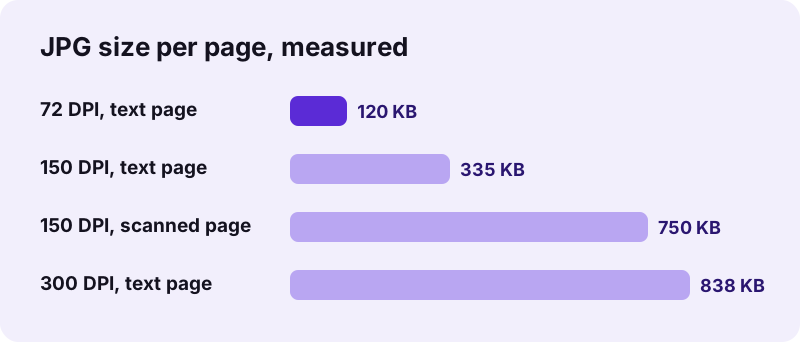
The right resolution for pdf24 PDF to JPG depends on where the image goes. 72 DPI gives screen-size pictures for chats and previews, 150 DPI is sharp on phones and laptops and readable when zoomed, and 300 DPI is for printing or for small text that must stay crisp. Higher resolution means larger files.
| Resolution | A4 page in pixels | Text page (JPG) | Time, 6 pages | Best for |
|---|---|---|---|---|
| 72 DPI (screen) | 595 × 842 | about 120 KB | 0.5 s | Chats, thumbnails, email previews |
| 150 DPI (standard) | 1,240 × 1,754 | about 335 KB | 0.7 s | Websites, slides, reading on a phone |
| 300 DPI (print) | 2,479 × 3,508 | about 838 KB | 1.8 s | Printing, fine print, archives |
Doubling the DPI makes four times as many pixels, but our JPG files grew only about 2.5 times from 150 to 300 dpi, because white page areas compress very well. Scanned pages are heavier: a 150 dpi page of our 4-page scan was about 750 KB.
pdf24 PDF to JPG quality: what to expect from JPEG
JPEG is a lossy format, so the converter saves pages at 90 % quality: photos and scans look the same as in the PDF, while very sharp edges such as small black text can show faint grey speckles when you zoom in. For crisp text, pick 300 DPI or use PNG instead.
- Photos and scans: JPG is the natural choice; quality loss is not visible at 90 %.
- Text, tables, diagrams: fine at 150 dpi; for logos or line art, PDF to PNG keeps edges perfect.
- Smallest files: WebP is offered in PDF to images; our invoice page was 31.7 KB as WebP against 65.7 KB as JPG.
- Text you can copy: a picture has no text layer; use PDF to TXT for the words.
Is pdf24 PDF to JPG safe for private files?
pdf24 PDF to JPG is safe for IDs, bank statements and contracts because the PDF is never sent anywhere. Your browser reads the file with the File API and draws the pages with JavaScript; in every one of our test runs the page made 0 upload requests, and the result line confirmed 0 bytes uploaded.
You can confirm it in the Network tab of the browser developer tools (F12): only the page and its scripts load. The File API on MDN describes how a page reads a local file without uploading it. Nothing is stored after you close the tab, and the JPGs carry no watermark.
pdf24 PDF to JPG on iPhone, Android, Windows and Mac
pdf24 PDF to JPG runs in Safari, Chrome, Edge and Firefox on iPhone, iPad, Android, Windows, macOS, Linux and Chromebook, with no app to install. Pick the PDF from Files, Drive or Downloads, convert, and save the JPG or ZIP where your device keeps downloads.
- iPhone and iPad: the file lands in Files → Downloads; open a single JPG and tap Share → Save Image to put it in Photos. A ZIP opens with a tap in Files.
- Android: the JPG appears in Downloads and in Google Photos under Device folders.
- Windows and Mac: drag the PDF onto the box; images go to the Downloads folder.
Very large pages at 300 dpi need a lot of memory; on an older phone, convert fewer pages at a time with the Pages field.
pdf24 PDF to JPG problems and fixes
Most problems with PDF to JPG come from the PDF, not the images: a password that blocks opening, a damaged download, or pages so large that a phone runs out of memory. The message under the button tells you which one applies, and each has a quick fix.
| Symptom | Cause | Fix |
|---|---|---|
| Password error | The PDF needs a password to open | Unlock PDF with your password |
| File will not open | Broken or cut-off file | Repair PDF, then convert |
| Text looks blurry | 72 DPI chosen | Convert again at 150 or 300 DPI |
| Files too big to send | 300 DPI or scans | Use 150 DPI or Compress PDF first |
| Phone stops halfway | Many large pages | Convert in smaller page ranges |
pdf24 PDF to JPG compared with other image tools
pdf24 PDF to JPG pictures whole pages. If you only want the photos that sit inside a PDF at their original size, Extract images is the better tool; if you want all pages in one scrolling picture, use PDF to long image; for a fax-style archive, PDF to TIFF keeps every page in one file.
| You want | Use | Output |
|---|---|---|
| Every page as a picture | PDF to JPG (this page) | JPG per page, ZIP for several |
| Pages without any quality loss | PDF to PNG | PNG per page |
| The photos inside the PDF | Extract images | Original-size pictures |
| All pages in one tall image | PDF to long image | One JPG or PNG |
| One multi-page image file | PDF to TIFF | One .tiff |
| Back from pictures to PDF | JPG to PDF | One PDF |
pdf24 PDF to JPG: frequently asked questions
Is pdf24 PDF to JPG free?
Yes. The converter is free, with no account, no watermark and no limit on the number of files or pages. It can stay free because all the work is done by your own browser, so there is no server cost for each conversion. Convert as many PDFs as you need, one after another.
Does pdf24 PDF to JPG upload my PDF?
No. The file is read and drawn inside your browser, and the JPGs are created on your device. During our tests we logged every network request: 0 uploads in every run, and the result line says 0 bytes uploaded. That makes it suitable for passports, payslips and medical letters.
What resolution does pdf24 PDF to JPG use?
You choose 72, 150 or 300 DPI; 150 is the default. For an A4 page that means 595 × 842, 1,240 × 1,754 or 2,479 × 3,508 pixels. Use 72 for chat previews, 150 for screens and websites, and 300 for printing or when you need to zoom into small text.
How big are the JPG files from pdf24 PDF to JPG?
On our A4 text pages a JPG was about 120 KB at 72 dpi, 335 KB at 150 dpi and 838 KB at 300 dpi. A scanned page at 150 dpi was about 750 KB, and a simple invoice page only 65.7 KB. Pages with photos or scans are heavier than pages of plain text.
Can pdf24 PDF to JPG convert only some pages?
Yes. Type the pages in the Pages field, for example 2-3 or 1-3, 7, and only those pages are drawn and saved. Leave the field empty to convert every page. A single page downloads as one .jpg file; two or more pages come in one ZIP.
Why does pdf24 PDF to JPG give me a ZIP file?
When two or more pages are converted, the images are packed into one ZIP so your browser does not ask you to save each file separately. Our 6 pages at 150 dpi made a 2.01 MB ZIP. Open it with a double-click on a computer or a tap in the Files app on a phone.
Is this pdf24 PDF to JPG tool made by PDF24?
No. pdf24tools is an independent website and is not affiliated with PDF24 or Geek Software GmbH. The converter on this page is our own code: it runs in your browser, uploads nothing and needs no sign-up. The site, the code and the team are separate from PDF24.
Can I use pdf24 PDF to JPG on an iPhone?
Yes. Open this page in Safari, tap Choose a file, pick the PDF in Files and tap Convert to images. A single page lands in Files → Downloads as a JPG; tap Share → Save Image to add it to Photos. Several pages arrive as a ZIP that Files opens with a tap.
Does pdf24 PDF to JPG keep the text selectable?
No. A JPG is a picture made of pixels, so the words can no longer be selected, searched or copied. Keep the PDF for that, or extract the words with PDF to TXT. If you need text from the image later, OCR tools can read it back, with some errors.
Why does pdf24 PDF to JPG give a white background?
JPEG cannot store transparency, so the converter fills each page with white before drawing it. That matches how the PDF looks in a reader and avoids black or grey backgrounds in apps that handle transparency badly. PNG pages from our tool are white too; we checked every pixel of our test pages, and none was transparent.
How long does pdf24 PDF to JPG take?
Text pages are quick: our 6-page PDF took 0.5 s at 72 dpi, 0.7 s at 150 dpi and 1.8 s at 300 dpi in Chrome on a Windows laptop. Scans take longer because each large photo must be decoded first; our 4-page, 8 MB scan took 8.8 s at 150 dpi.
Can pdf24 PDF to JPG open a password-protected PDF?
Only once the open password is removed. If the PDF asks for a password before it opens, use Unlock PDF with the password you know, then convert the unlocked copy. A file that is only restricted against copying or printing usually converts without that extra step.
More pdf24 PDF to JPG tools and guides
pdf24 PDF to JPG: sources
- JPEG — Wikipedia
- Dots per inch — Wikipedia
- File API — MDN Web Docs