How to use pdf24 PDF to XLSX in 4 steps
- Choose the PDF. Tap Choose a file or drop one PDF on the box; the file is read on your device.
- Pick the sheets. One sheet per page makes tabs named Page 1, Page 2; Everything on one sheet makes a single tab called All pages.
- Press Convert to Excel. The .xlsx is written in your browser, usually in about a second for a text PDF.
- Save and open the .xlsx. Open it in Excel, Google Sheets, Numbers or LibreOffice Calc and format the number columns.
What is an .xlsx file, and what does pdf24 PDF to XLSX put in it?
An .xlsx file is a ZIP package of XML parts defined by the Office Open XML standard (ECMA-376, ISO/IEC 29500). pdf24 PDF to XLSX writes one workbook with a worksheet per page or one combined sheet, fills cells with the PDF's text and stores amounts as numeric cells, with column widths fitted to the content.
“Office Open XML is a zipped, XML-based file format developed by Microsoft for representing spreadsheets, charts, presentations and word processing documents.”
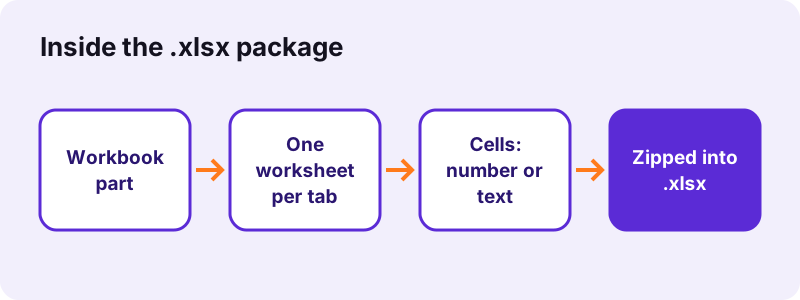
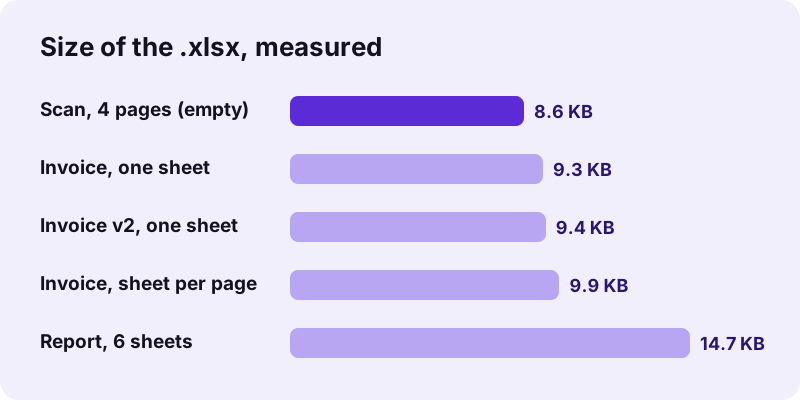
Inside the package, a workbook part lists the sheets and each worksheet part holds rows of cells. A cell is either a number (stored as a value Excel can calculate with) or a text string. Because the format is zipped XML, the files stay small: our 2-page invoice workbook was 9.9 KB, and even an empty one is about 8 KB of package structure.
pdf24 PDF to XLSX cell types
Each cell value is checked before it is written. Digits with an optional sign, currency symbol, thousands separator, decimal mark or percent sign become a number: 2 is stored as 2, 25.50 as 25.5, 15% as 0.15 and (25) as −25. Everything else, including dates like 19.10.2026, is written as text, so nothing is guessed wrongly.
pdf24 PDF to XLSX column widths
Column widths are set from the longest entry in each column, plus 2 characters, with a minimum of 6 and a maximum of 60 characters. A long address line therefore does not make column A 200 characters wide; it simply overflows into the empty cells to its right, as in any Excel sheet.
pdf24 PDF to XLSX sheet names
Tabs are named Page 1, Page 2 and so on, or All pages in one-sheet mode. Excel allows at most 31 characters in a sheet name, and the names are kept inside that limit, so the workbook opens without a repair prompt.
pdf24 PDF to XLSX tip: rename tabs after converting
For a monthly statement split by page, rename the tabs to January, February and so on by double-clicking them; formulas that point at other sheets are easier to read with real names.
Which programs open a pdf24 PDF to XLSX workbook?
A pdf24 PDF to XLSX workbook opens in every program that reads Office Open XML spreadsheets: Excel 2007 and later on Windows, Excel for Mac, Excel on the web and the Excel apps, Google Sheets, Apple Numbers and LibreOffice Calc. Excel 2003 and older need the free compatibility pack or a newer program.
| Program | How to open the .xlsx | Notes |
|---|---|---|
| Excel (Windows, Mac) | Double-click the file | Numbers and widths as written |
| Google Sheets | Drive → New → File upload, then Open with Sheets | Can stay .xlsx or be converted |
| Apple Numbers | Tap the file in Files | Each tab becomes a sheet |
| LibreOffice Calc | File → Open | Saves back to .xlsx or .ods |
| Excel mobile app | Open from Files or Downloads | Free for viewing and basic edits |
Google Sheets can edit the .xlsx directly in Office compatibility mode, or convert it to a Sheets file; converting is better if several people will edit it together.
One sheet per page or one combined sheet in pdf24 PDF to XLSX?
Choose one sheet per page in pdf24 PDF to XLSX when each PDF page is a separate table, such as one invoice per page. Choose Everything on one sheet when a single long table runs across pages, such as a statement; all rows then sit on one tab called All pages, with one empty row marking each page change.
| Test file | Mode | Rows × columns | Cells | Size |
|---|---|---|---|---|
| Invoice v1 | Sheet per page | Page 1: 9 × 4, Page 2: 1 × 1 | 26 | 9.9 KB |
| Invoice v1 | One sheet | All pages: 11 × 4 | 26 | 9.3 KB |
| Invoice v2 | One sheet | All pages: 12 × 4 | 27 | 9.4 KB |
| Report, 6 pages | Sheet per page | 6 sheets of 26 × 1 | 156 | 14.7 KB |
Why use pdf24 PDF to XLSX instead of a CSV file?
An .xlsx keeps what a CSV cannot: several sheets in one file, real numeric cells, column widths and Unicode text that never depends on the right import setting. pdf24 PDF to XLSX output opens with a double-click and the numbers are already numbers, while a CSV often turns 1,50 into text or splits it at the comma.
“CSV is commonly used in software that generally deals with tabular data such as a database or a spreadsheet.”
Need a CSV anyway, for an import into accounting software? Open the .xlsx in Excel or Sheets and use File → Save As (or Download) → CSV for the active sheet. Tab-separated text is also available straight from PDF to TXT.
Is pdf24 PDF to XLSX private?
pdf24 PDF to XLSX is private because the workbook is built inside your browser: the PDF is read with the File API, the .xlsx is assembled in JavaScript and offered as a download. In our runs the page made 0 upload requests and reported 0 bytes uploaded, so statements and payroll tables never reach a server.
Check it in the browser's Network panel (F12) while you convert: only the page and the spreadsheet library load. The MDN File API guide describes how local files are read without leaving the device.
pdf24 PDF to XLSX limits you should know
The converter only sees text that the PDF really contains. Scanned pages produce no cells, prose lands in a single column, wrapped cells split into two rows, and formulas, colours, borders, merged cells and pictures are not part of the result. Knowing these limits saves checking time.
- Scans: our 4-page scan gave an empty Sheet1 (8.6 KB); run OCR PDF first.
- Prose: our 6-page report became 26 rows × 1 column per sheet.
- Formulas: a PDF holds printed totals only; rebuild them with =SUM().
- Leading zeros: numeric codes such as 00412 become 412; format the column as Text.
- Passwords: an open password stops the conversion; use Unlock PDF first.
For layout-heavy tables, a look at the general PDF to Excel guide shows how to fix shifted columns and split rows in a few clicks.
pdf24 PDF to XLSX on phones and tablets
The tool works the same in Safari and Chrome on iPhone, iPad and Android as on a computer. The .xlsx is saved to Files → Downloads on iOS or to Downloads on Android, and the free Excel app, Google Sheets or Numbers open it for viewing, sorting and simple edits.
On a phone, the one-sheet mode is easier to work with, because switching between many tabs on a small screen is slow. Large scans are heavy for phone memory; extract only the pages you need with Extract PDF pages and run OCR on those.
pdf24 PDF to XLSX: frequently asked questions
Is pdf24 PDF to XLSX free?
Yes. There is no fee, no account, no watermark and no daily limit. The conversion runs on your own device, so each file costs us nothing to process. Convert as many PDFs to .xlsx as you need; every workbook is a normal file you can keep, edit and share.
What is the difference between pdf24 PDF to XLSX and PDF to Excel?
Both create the same .xlsx workbook with the same converter. This page explains the .xlsx format itself: its parts, cell types, sheet names and which programs open it. The PDF to Excel page focuses on getting tables right, fixing columns and using the result for bookkeeping.
Which Excel versions open a pdf24 PDF to XLSX file?
Excel 2007 and every later version on Windows, all Excel for Mac versions that read .xlsx, Excel on the web and the Excel mobile apps. Excel 2003 and older cannot open .xlsx without Microsoft's old compatibility pack; open the file in a newer program and save it as .xls if you must.
Does pdf24 PDF to XLSX store numbers or text?
Both, cell by cell. Values made of digits with an optional sign, currency symbol, separators or percent sign become numbers, such as 25.50 stored as 25.5 or 15% stored as 0.15. Names, descriptions and dates like 19.10.2026 stay text. Set the number format afterwards to show decimals or currency.
Can I open a pdf24 PDF to XLSX file in Google Sheets?
Yes. Upload the .xlsx to Google Drive and open it with Google Sheets. You can edit it in compatibility mode and keep the .xlsx format, or choose File → Save as Google Sheets for full sharing and comments. All tabs, numbers and column contents carry over.
Does pdf24 PDF to XLSX upload my PDF?
No. Your browser reads the PDF and writes the workbook locally. During our tests, 0 upload requests left the page and the result line confirmed 0 bytes uploaded. Nothing is stored after you close the tab, which is why statements and salary lists are safe to convert here.
Is pdf24 PDF to XLSX part of PDF24?
No. pdf24tools is an independent site, not affiliated with PDF24 or Geek Software GmbH. This converter is our own browser code: no upload, no account and no installation. Only the short page names look familiar, so the tool is easy to find; the website and its team are separate.
Why is a pdf24 PDF to XLSX workbook empty?
The PDF has no text layer, so there was nothing to place in cells; this is typical of scans and phone photos saved as PDF. Our 4-page scan gave an empty sheet with a note to run OCR. Use OCR PDF to add text, then convert the searchable PDF again.
Can pdf24 PDF to XLSX convert several PDFs at once?
No, it takes one PDF per conversion so each workbook stays clear. For several files, convert them one after another, or join them first with Merge PDF and use Everything on one sheet: the rows of all files then sit on one tab, separated by empty rows.
How big can a pdf24 PDF to XLSX file be?
There is no fixed limit; your device's memory is the only limit. Workbooks are small because .xlsx is zipped XML: our results were 8.6 to 14.7 KB. Only very long PDFs with thousands of table rows produce noticeably larger workbooks, and they still open quickly.
Does pdf24 PDF to XLSX keep cell colours and borders?
No. Only cell contents and column widths are written; fills, borders, fonts and merged cells from the PDF are not copied, because a PDF stores them as drawings, not as table formatting. Apply a table style in Excel with Ctrl+T to get borders and banded rows in one step.
Can I convert the pdf24 PDF to XLSX result back to PDF?
Yes. Edit the workbook, then use Excel to PDF on this site, which also runs in your browser, or File → Save As → PDF in Excel. Set the print area and orientation first, so wide tables fit the page width instead of spilling onto extra pages.
More pdf24 PDF to XLSX tools and guides
pdf24 PDF to XLSX: sources
- Office Open XML — Wikipedia
- Comma-separated values — Wikipedia
- File API — MDN Web Docs