How to use pdf24 extract pages from PDF in 4 steps
- Choose the PDF. Tap Choose a PDF or drop the file on the box. Page thumbnails with numbers appear below.
- Type the pages. In the Pages box, type the pages to keep, separated by commas: 3, 7-9, 12. Extract pages is already selected on this page.
- Press Split PDF. The listed pages are copied into one new document on your device.
- Download the PDF. Save the file, named after the original with the pages added, and open it to check.
What does pdf24 extract pages from PDF do?
pdf24 extract pages from PDF copies the pages you list from a PDF into one new PDF and leaves the original file as it was. Pages are copied, not redrawn, so the text stays selectable and scans keep their resolution. You choose the pages by number, and the new file follows the order in which you type them.
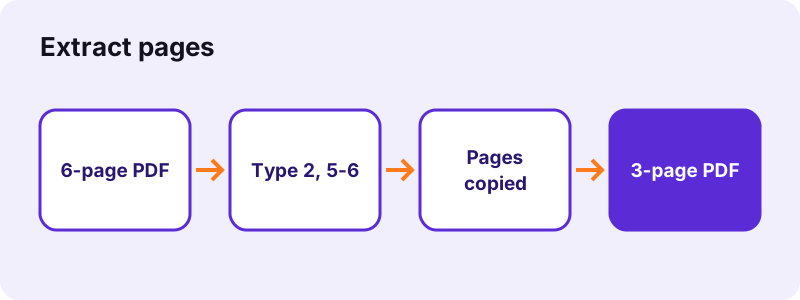
The difference to splitting is the output: a split makes several files, extracting makes exactly one. That suits the common job of sending only the relevant pages of a long document, such as page 4 of a bank statement or the signature page of a contract.
- Students: the 12 pages of a 300-page course reader that the exam covers.
- Job seekers: only the certificate page from a long diploma file.
- Tenants: the pages of a lease that a landlord asked to see again.
- Accountants: one invoice out of a monthly batch scan.
- Teachers: one worksheet from a workbook PDF for printing.
pdf24 extract pages from PDF in a custom order
The list is read from left to right. Typing 5, 2, 1 gives a file that starts with page 5, then page 2, then page 1. A run such as 7-9 always counts upwards, and typing a page twice, such as 1, 4, 1, puts it in the file twice, which helps when a cover sheet should open and close a pack.
pdf24 extract pages from PDF: the last pages
An open-ended run takes everything up to the last page: 10- means page 10 to the end, whatever the page count is. -3 means pages 1 to 3. This saves counting pages in a long report.
pdf24 extract pages from PDF with the thumbnails
Every thumbnail shows its page number underneath, for up to 200 pages. Scroll through, note the numbers you need, and type them into the box. Numbers beyond the last page are ignored.
pdf24 extract pages from PDF: one quick check
Because nothing is redrawn, an extracted page prints exactly like the same page of the source file. Before sending, open the new file and look at the page count in your reader. It should match the number of pages you typed, counting repeated pages each time.
How do I write the page list in pdf24 extract pages from PDF?
pdf24 extract pages from PDF reads a simple list: single page numbers, runs with a dash, and commas between them. 2, 5-7 means pages 2, 5, 6 and 7. Spaces and semicolons also separate entries, Arabic and Persian digits are understood, and a run typed backwards such as 9-7 is read as 7-9.
| You type | Pages in the new PDF |
|---|---|
| 4 | page 4 |
| 2, 5-7 | 2, 5, 6, 7 |
| 5, 2, 1 | 5, 2, 1 (in that order) |
| 10- | 10 to the last page |
| -3 | 1, 2, 3 |
| 1, 4, 1 | 1, 4, 1 (page 1 twice) |
- The box starts with the example 1-2, 3-4; replace it with your own pages.
- If no listed page exists in the file, the tool tells you how many pages the PDF has.
How big is the file after pdf24 extract pages from PDF?
An extracted file weighs roughly what its pages weighed inside the original PDF. Typed pages are small: three pages of our test file made 2,443 bytes. A scanned page carries its own picture, so extracting page 2 of an 8.07 MB scan gave 2.04 MB, a quarter of the data for a quarter of the pages.
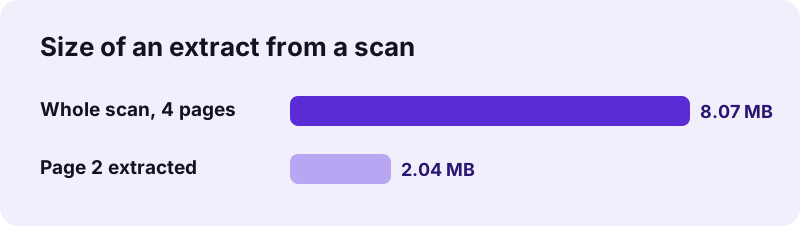
Fonts and images used by several pages are copied once into the new file. If the extract is still too large for an email or a form, shrink it with Compress PDF, which can aim at a size such as 500 KB.
Is pdf24 extract pages from PDF private?
pdf24 extract pages from PDF is private because it works only inside your browser. The PDF is read from your storage with the File API, the chosen pages are copied in the same tab, and the new file is handed to you as a download. No server sees the document, and nothing remains once the tab is closed.
“You can add individual pages from one PDF to another PDF.”
On a Mac, Preview can do the same by dragging thumbnails, as Apple describes. In the browser you get the same result on Windows, Android, iPhone and Chromebook, with a typed list instead of dragging, which is quicker for long documents.
pdf24 extract pages from PDF compared with other page tools
Extracting is the right choice when you want one file with a few pages. To get many files, split the PDF. To keep almost everything and drop a few pages, removing them is shorter to type. To reorder all pages, the rearrange tool gives arrows for each page. All four tools run on your device.
| You want | Tool | Example |
|---|---|---|
| One file with pages 2 and 9 | Extract PDF pages | 2, 9 |
| One file per page | Split PDF | Every page |
| The file without page 3 | Remove PDF pages | 3 |
| All pages, new order | Rearrange PDF pages | arrows |
Extracted pages can be combined with pages from other files afterwards in Merge PDF.
pdf24 extract pages from PDF: frequently asked questions
Is pdf24 extract pages from PDF free?
Yes. The extract tool costs nothing, needs no account and adds no watermark. There is no limit on how often you use it, because the work is done by your own device rather than a server. You can run it again with a different page list as often as you need.
Does pdf24 extract pages from PDF change the original file?
No. The original is only read, never written. The extracted pages go into a new file in your downloads, and the source PDF still has all its pages. If you want the pages gone from the original as well, use Remove PDF pages on it, which saves a copy without them.
Can pdf24 extract pages from PDF keep the order I type?
Yes. The pages appear in the new file in the order of your list, so 6, 1, 3 starts with page 6. Runs such as 4-6 count upwards. A page typed twice appears twice. That makes it possible to pull pages out and reorder them in a single step.
Does pdf24 extract pages from PDF upload my document?
No. The document is opened by your browser, the pages are copied with JavaScript on your device, and the new PDF is offered as a download. No byte is sent to a server, and the result line says 0 bytes uploaded. The tool keeps working with the network switched off.
Does pdf24 extract pages from PDF keep quality?
Yes. The pages are copied with their original fonts, images and vector drawings; nothing is converted to a picture or re-compressed. A scanned page kept its 2 MB size in our test, and typed text in the new file can still be selected, copied and searched.
How do I extract one page with pdf24 extract pages from PDF?
Type only that page number, for example 7, and press the button. The download is a 1-page PDF named after the original with the page number added. For several single pages as separate files, use Split PDF with Every page or with ranges such as 3, 7, 9 instead.
Why does pdf24 extract pages from PDF say no valid pages?
None of the numbers you typed exist in the file. The message states how many pages the PDF really has, for example 6, so a list like 8-10 cannot work. Check the thumbnails, correct the numbers and press the button again. Letters and other symbols in the list are ignored.
Can pdf24 extract pages from PDF work on a phone?
Yes, in Chrome, Samsung Internet or Safari on Android and iPhone, without an app. Type the page list with the number keyboard, press the button, and the new PDF lands in your downloads, ready to share by mail or messenger straight from the phone's file app.
Are bookmarks and links kept by pdf24 extract pages from PDF?
Links and comments that sit on an extracted page come along with it. The bookmark outline belongs to the whole document and is not copied. If the new file is long enough to need bookmarks, add them with Bookmark PDF, which proposes one entry per page.
Can pdf24 extract pages from PDF read a protected file?
Not while it needs a password to open. The tool stops with a message, and you can remove the password first with Unlock PDF, provided you know it. Extract the pages from the unlocked copy, then add a password to the new file with Lock PDF if it must stay protected.
Is this the official pdf24 extract pages from PDF tool?
No. pdf24tools is an independent website and is not affiliated with PDF24 or Geek Software GmbH. This tool is our own code that runs in your browser. We use the name only because people search for it, and your files are processed on your device, never on our servers.
More pdf24 extract pages from PDF tools and guides
pdf24 extract pages from PDF: sources
- Combine PDFs in Preview on Mac — Apple Support
- File API — MDN Web Docs
- PDF — Wikipedia