How to use pdf24 JPG to PDF in 4 steps
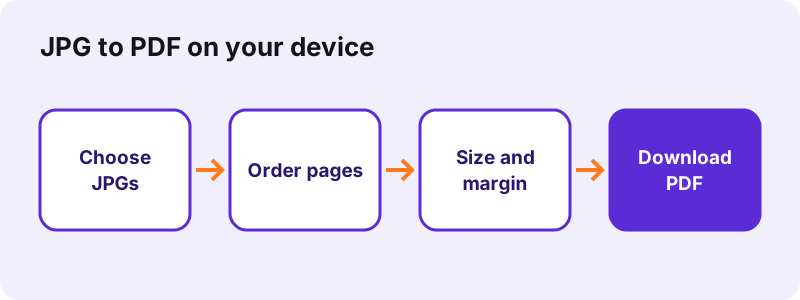
- Choose the JPG files. Tap Choose images or drop the photos on the box. Select several at once; each picture becomes one page.
- Put them in order. Use the ↑ and ↓ arrows in the file list to set the order of the pages in the PDF.
- Set page size, margin and quality. A4 with a small margin suits most forms. Use Same as image with no margin for borderless pages, and Small file for email or upload portals.
- Convert and download. Press Convert to PDF. The file is built on your device; save it and open it to check every page.
What does pdf24 JPG to PDF do with your photos?
pdf24 JPG to PDF places each JPG picture on its own PDF page, scaled to fit A4, US Letter or the picture's own size. In Original quality the JPEG data is copied into the PDF without re-compression, so three photos of 10.80 MB became a PDF of 10.80 MB that looks exactly like the camera files.
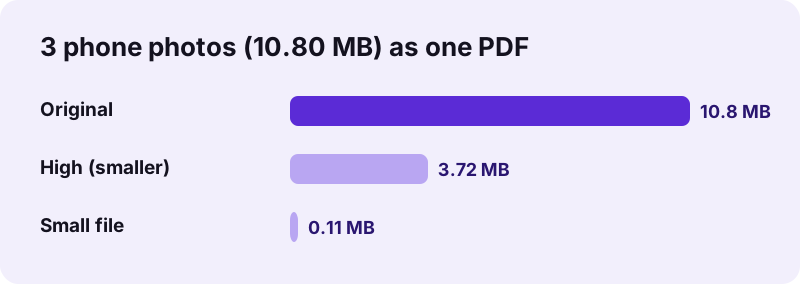
A PDF can hold JPEG data natively, which is why no quality is lost in the default mode. The PDF adds only page structure, about 1–2 KB per page in our tests. If the result is too big, the two smaller modes redraw each picture before embedding it.
| Quality option | What happens to each picture | Result | Time |
|---|---|---|---|
| Original | JPEG copied unchanged | 10.80 MB | 0.6 s |
| High (smaller) | Long side 3,000 px, JPEG 88 % | 3.72 MB | 1.5 s |
| Small file | Long side 1,600 px, JPEG 60 % | 113 KB | 1.1 s |
“JPEG typically achieves 10:1 compression with a loss in image quality that, while perceptible, is widely agreed upon to be acceptable.”
pdf24 JPG to PDF page sizes and margins
Three page sizes are offered. A4 (210 × 297 mm) is the default and is what most European and Asian portals expect. US Letter (8.5 × 11 in) suits North American forms. Same as image makes the page exactly as large as the picture, counting one pixel as one point, so a 3024 × 4032 photo gives a 3024 × 4032 pt page.
Orientation is automatic: a landscape picture gets a landscape page, a portrait picture a portrait page, and you can force either one. The margin is None, Small (20 pt, about 7 mm) or Large (40 pt, about 14 mm); the picture is centred and never cropped or stretched.
pdf24 JPG to PDF without margins or white borders
Choose Same as image and set the margin to None. The page then matches the photo edge to edge, with no white frame, which is what photo books, portfolios and image-only handouts need. On A4 or Letter a white band always remains on two sides when the photo's shape differs from the paper, because the picture is fitted, not cut.
pdf24 JPG to PDF for scanned pages and receipts
Phone scans of paper documents are usually large: our four A4 scans at 2480 × 3508 px weighed 8.07 MB together. With Small file the same four pages came out at 1.13 MB, still readable on screen and when printed. Keep A4 so every page prints at the real paper size, and run OCR on the PDF afterwards if you need searchable text.
pdf24 JPG to PDF: tip for strict upload limits
When a portal states a hard limit such as 100 KB or 200 KB, use a page with that limit built in, for example JPG to PDF under 100 KB. It rebuilds the PDF with gradually smaller pictures, up to 10 tries, until the file fits, and tells you if it cannot.
How does pdf24 JPG to PDF order the pages?
pdf24 JPG to PDF builds the pages in the order of the file list, from top to bottom, one JPG per page. The list starts in the order your system hands the files over, often by name, and the ↑ and ↓ arrows move any photo before you press Convert to PDF.
Name photos with leading numbers, such as 01-front.jpg and 02-back.jpg, if you select many at once: most file pickers then hand them over already sorted. A multi-page TIFF added to the same list expands into all its pages at its position.
Does pdf24 JPG to PDF reduce the quality of a photo?
pdf24 JPG to PDF keeps the full photo quality in the default Original mode, because the JPEG bytes are copied into the PDF untouched and the 3024 × 4032 pixels stay 3024 × 4032. Quality changes only when you choose High or Small file, which resize and re-encode each picture to make the PDF lighter.
Original is the right choice for printing, archiving and legal evidence. High keeps 3,000 pixels on the long side, which still prints a sharp A4 page at more than 250 dpi, and cut our three photos from 10.80 MB to 3.72 MB. Small file is meant for screens and email: 1,600 pixels on the long side, about 137 dpi on A4.
- Original: no visible change, the same file size as the photos plus about 1 KB per page.
- High (smaller): about 65 % smaller for phone photos, hard to tell apart on screen.
- Small file: about 99 % smaller for phone photos; fine text in scans stays readable.
- Need it even smaller later? Compress the PDF to an exact size.
pdf24 JPG to PDF and the text in the picture
A photo of a page is still a picture inside the PDF: the words cannot be selected, searched or copied. That is how every JPG to PDF conversion works, because a JPG contains pixels, not letters. Run OCR afterwards to add a hidden text layer, or keep the JPG next to the PDF if you only need to show it.
Will my phone photo be sideways after pdf24 JPG to PDF?
No. Phones often store a picture lying on its side with an EXIF orientation tag that tells viewers to turn it. pdf24 JPG to PDF reads that tag in every mode: Original keeps the JPEG bytes untouched and turns the picture on the page, High and Small file redraw it upright.
We tested this with a 1200 × 800 JPG tagged to display as portrait (orientation 6): Original, High (smaller) and Small file all gave a portrait A4 page with the picture upright, and in Original the embedded JPEG was still the untouched file from the phone. The tag is part of the Exif standard that cameras use for photo details. If a page still needs turning, fix it afterwards with rotate PDF pages.
- Sideways page: every quality mode reads the phone's orientation tag now; if a page is still turned, rotate it afterwards.
- Wrong order: move files with the arrows before converting.
- File too large: choose Small file or a size page such as under 100 KB.
- Error on one file: the picture may be damaged; open and save it again in a viewer.
Is pdf24 JPG to PDF safe for ID cards and private photos?
pdf24 JPG to PDF never uploads your pictures: the browser reads them with the File API and builds the PDF in JavaScript on your own device. The result line confirms 0 bytes uploaded, nothing is stored on a server, and closing the tab removes everything, which matters for passports, ID cards and medical papers.
The browser reads files through the File API, which gives the page your file's bytes without sending them anywhere. You can check this yourself: load the page, switch the phone or laptop to airplane mode, and the conversion still works. The PDF is made with the open-source pdf-lib library, and the page has no account, no email field and no watermark.
| Question | Answer |
|---|---|
| Price | 0, no sign-up |
| Bytes uploaded | 0 |
| Watermark | None |
| Files per PDF | As many as your device memory holds; we tested 6 at once |
| Formats accepted | JPG, JPEG, PNG, WebP, HEIC, TIFF, SVG, GIF, BMP |
| Works offline | Yes, once the page has loaded |
pdf24 JPG to PDF on iPhone, Android, Windows and Mac
The tool runs in any current browser, so the same page works on every device.
On an iPhone or iPad, tap Choose images and pick Photo Library; Safari hands the photos over as JPG. On Android, Chrome opens the gallery or the Files app. On Windows, macOS and Linux you can also drag the files from a folder onto the box. A phone needs a little longer for large photos because all the work happens on the device itself.
pdf24 JPG to PDF with many photos at once
Select all the pictures in one go; each becomes a page in the order shown, and the ↑ and ↓ arrows change the order before converting. Our six-file test with mixed formats finished in 2.0 s on a laptop. For very long photo sets on a phone, use Small file so memory stays low. Already have several PDFs? Merge them into one.
Why is my pdf24 JPG to PDF file so large?
A pdf24 JPG to PDF file in Original quality is as large as the photos you put in, because the JPEG data is kept unchanged. Modern phones take 12-megapixel pictures of 3–4 MB each, so ten photos give a PDF of 30–40 MB, too big for most email and upload forms.
Choose High (smaller) to keep print quality at about a third of the size, or Small file when the PDF only has to be read on screen. In our measurement Small file turned 10.80 MB into 113 KB, a reduction of 99 %. The opposite tool is PDF to JPG, which turns pages back into pictures.
pdf24 JPG to PDF for applications and official forms
Visa, university, job and benefit portals often ask for every document as one PDF.
Photograph each page in good light, put the photos in order, keep A4 (or US Letter for North American forms) and choose Small file if the portal sets a limit of 1 or 2 MB. Our four A4 scans fitted in 1.13 MB that way. Check the finished PDF on a phone screen: if you can read the smallest print there, the reviewer can too.
pdf24 JPG to PDF file names and downloads
The download name tells you what the tool did.
A single photo keeps its name, so photo0.jpg becomes photo0.pdf. Two or more pictures produce one file called images.pdf. Browsers save it to the Downloads folder on Windows, macOS and Android, and to the Files app on iPhone. Rename it before sending, for example to passport-and-visa.pdf, so the receiver knows what it contains.
pdf24 JPG to PDF compared with printing to PDF
Operating systems can also make a PDF from a photo through their print dialog.
Printing to PDF works, but each photo usually becomes a separate job, margins depend on the printer driver, and many phone apps do not offer it at all. The browser tool takes many photos at once, lets you choose the exact page size and margin, keeps JPEG data unchanged in Original mode, and works identically on every device. For documents that will be printed on paper, both routes give a similar page.
pdf24 JPG to PDF and the other picture formats
The same converter has pages tuned to other formats.
Screenshots and charts are usually PNG, see PNG to PDF. iPhone photos are HEIC, see HEIC to PDF. Pictures saved from websites are often WebP, see WebP to PDF. Scanner files are TIFF, see TIFF to PDF. For a mix of everything, images to PDF takes all nine formats in one run. Each page explains what happens to its format; the JPG route is the only one that copies the picture into the PDF without re-encoding, which is why pdf24 JPG to PDF keeps photos exactly as the camera saved them.
pdf24 JPG to PDF: frequently asked questions
Is pdf24 JPG to PDF free?
Yes. pdf24 JPG to PDF costs nothing and has no account, no watermark and no daily limit. All the work happens in your own browser, so there are no server costs to recover from you. You can convert as many photos as your phone or computer can hold in memory, as often as you like.
Is pdf24 JPG to PDF the official PDF24 tool?
No. pdf24tools is an independent website and is not affiliated with PDF24 or Geek Software GmbH. We use the phrase in our page titles because many people search for it, but the converter, the code and the measurements on this page are our own. Your photos are processed only in your browser and never sent to us.
Does pdf24 JPG to PDF upload my photos?
No. The page reads the pictures with the browser File API and builds the PDF on your device with JavaScript. The result line shows 0 bytes uploaded. Nothing is stored, so there is nothing to delete afterwards, and the tool keeps working in airplane mode once the page has loaded.
Can pdf24 JPG to PDF combine many JPGs into one PDF?
Yes. Select all the JPG files at once or add more with Add more files. Each picture becomes one page, in the order shown in the list, and the ↑ and ↓ arrows move a page up or down before you press Convert to PDF. The download is a single file named images.pdf when you use more than one picture.
How do I make a borderless PDF with pdf24 JPG to PDF?
Set Page size to Same as image and Margin to None. Each page then has exactly the size of its photo, one pixel per point, and the picture fills it edge to edge. With A4 or US Letter a white band stays on two sides whenever the photo's shape differs from the paper shape.
Does pdf24 JPG to PDF work on iPhone and Android?
Yes. It works in current Safari, Chrome, Edge and Firefox on iPhone, iPad and Android. Tap Choose images, pick the photos from the library or gallery, and the PDF downloads to the Files app or the Downloads folder. Large batches take longer on a phone, so Small file helps with long sets.
Why can I not select the text after pdf24 JPG to PDF?
A JPG stores pixels, not letters, so the page in the PDF is a picture of the text. Selecting, searching and copying need a text layer, which you can add afterwards with the OCR tool on this site. The converter itself never changes what you see on the page.
How small can pdf24 JPG to PDF make a file?
With Small file, three 12-megapixel phone photos went from 10.80 MB to 113 KB and four A4 scans from 8.07 MB to 1.13 MB in our tests. For a fixed limit such as 100 KB, use the matching size page, which keeps shrinking the pictures until the PDF fits or reports that it cannot.
Does pdf24 JPG to PDF keep the photo's EXIF data?
In Original quality the JPEG bytes are copied as they are, so the data inside the picture travels with it. High and Small file redraw each picture on a canvas and write a new JPEG, which leaves out EXIF details such as camera model and GPS position. Choose one of those modes before sharing location-sensitive photos.
Which formats does pdf24 JPG to PDF accept besides JPG?
The same box accepts JPEG, PNG, WebP, HEIC and HEIF, TIFF including multi-page files, SVG, GIF and BMP. JPG and PNG go into the PDF unchanged in Original mode; the other formats are converted on your device first, because a PDF cannot store them directly. Mixed sets work in one run.
Does pdf24 JPG to PDF work without internet?
Yes, after the page has loaded once. The converter and its pdf-lib library run in the browser, so you can switch to airplane mode and keep converting. Only the first visit needs a connection, to download the page and its PDF library; after that no network request is made for converting.
Does pdf24 JPG to PDF turn sideways phone photos upright?
Yes. Your phone stores many photos on their side with an orientation tag, and the tool reads that tag in all three quality modes, so the picture lands upright on a page of the right shape. Original still copies the JPEG bytes unchanged and only turns them on the page. If a page is still sideways, the photo itself was taken that way; turn the page with the rotate tool on this site.
Can pdf24 JPG to PDF make A4 pages from photos?
Yes. A4 is the default page size. Each photo is scaled to fit inside the page with the margin you choose and centred, never cropped. Portrait photos get portrait pages and landscape photos landscape pages when orientation is set to Automatic, which is also the default setting.
How many photos can pdf24 JPG to PDF handle?
There is no fixed limit; your device's memory decides. Three 12-megapixel photos took 0.6 s on a laptop in Original mode. Long sets of large photos make large PDFs, roughly 3–4 MB per photo, so choose Small file for sets that will be emailed or uploaded.
Can I change the page order after pdf24 JPG to PDF?
Yes. Before converting, use the arrows in the file list. After converting, open the PDF in the rearrange pages tool on this site and move pages into a new order, or remove pages you do not need. Converting again with a corrected list is just as quick.
Does pdf24 JPG to PDF add a watermark?
No. The PDF contains only your pictures on plain pages, with no logo, text or watermark added. What you see in the preview of your photos is exactly what appears on the pages of the PDF, so the file is ready to send to an employer, a school or an office as it is.
Is pdf24 JPG to PDF good for printing photos?
Yes, in Original quality. The photo keeps all its pixels, so a 3024 × 4032 phone photo prints on A4 at about 360 dpi. Choose Same as image with no margin if a photo lab will scale the pages, or A4 with a small margin for a home printer.
More pdf24 JPG to PDF tools and guides
pdf24 JPG to PDF: sources
- JPEG — Wikipedia
- File API — MDN Web Docs
- Image file type and format guide — MDN Web Docs
- PDF (Portable Document Format) Family — Library of Congress