How to use pdf24 tools HEIC to PDF in 4 steps
- Choose the HEIC photos. Tap Choose images or drop the .heic or .heif files on the box. Each photo becomes one page.
- Set the order. Use the ↑ and ↓ arrows in the file list to put the photos in order.
- Pick page size and quality. A4 or US Letter for printing, Same as image for a borderless photo PDF, Small file for email.
- Convert and download. Press Convert to PDF. The first run loads the HEIC decoder once; then save the PDF.
How does pdf24 tools HEIC to PDF read iPhone photos?
pdf24 tools HEIC to PDF decodes each HEIC file in the browser with the open-source heic2any library, then saves the photo as a JPEG at 88 % quality on a PDF page. The PDF format cannot hold HEIC data, so this re-encoding is required; the pixel size is kept up to 4,000 pixels on the long side.
Decoding HEIC is heavy work for a browser. The first conversion took 4.7 s in our test because the decoder had to load; later photos in the same session go faster. A 12-megapixel iPhone photo of 4032 × 3024 pixels fits under the 4,000-pixel cap almost exactly and is only reduced by 32 pixels.
“High Efficiency Image File Format (HEIF) is a digital container format for storing individual digital images and image sequences.”
pdf24 tools HEIC to PDF on Windows
Windows needs the HEIF and HEVC extensions from the Microsoft Store to show HEIC photos, and one of them is paid. The browser converter needs neither: drop the photos copied from the iPhone or downloaded from iCloud, and the PDF opens in any PDF reader on Windows.
pdf24 tools HEIC to PDF on Android
HEIC photos sent from an iPhone by email or a file transfer app often arrive on Android as files that the gallery cannot preview. Open this page in Chrome, tap Choose images, pick the files from Downloads, and the converter turns them into a PDF you can forward or print.
pdf24 tools HEIC to PDF with burst and sequence files
HEIF can store a sequence of images in one file. The converter asks the decoder for every image in the file, so a sequence gives one PDF page per image. A Live Photo is different: its motion part is a separate video file, and only the still HEIC photo is used.
pdf24 tools HEIC to PDF: tip for iPhone settings
If you always need JPG or PDF, iPhone can shoot in JPEG instead: Settings › Camera › Formats › Most Compatible. Photos then take more space on the phone, because HEIC stores the same quality in less space; for occasional documents, converting HEIC when needed is the lighter choice.
Does pdf24 tools HEIC to PDF keep the photo quality?
pdf24 tools HEIC to PDF keeps the photo visually intact: the picture is saved as JPEG at 88 % quality and full size up to 4,000 pixels, which looks identical on screen and in a printed A4 page. HDR and 10-bit colour in a HEIC are reduced to standard 8-bit colour, as browsers draw images that way.
| Quality option | Page encoding | Long side cap |
|---|---|---|
| Original | JPEG 88 % | 4,000 px |
| High (smaller) | JPEG 88 % | 4,000 px |
| Small file | JPEG 88 % | 1,600 px |
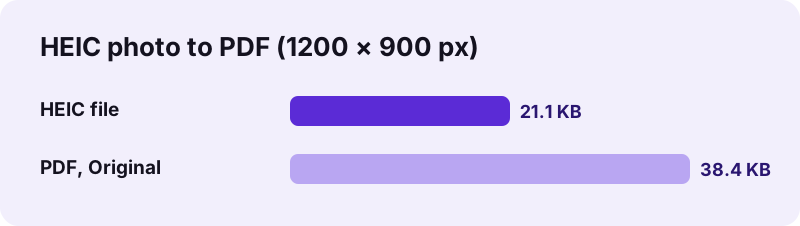
For HEIC, Original and High give the same result, because the photo must be re-encoded either way. Small file shrinks the pixel size, which is the quickest way to bring a long photo series under an email limit of 20–25 MB. A JPEG is larger than the HEIC it came from: our photo grew from 21.1 KB to 38.4 KB.
pdf24 tools HEIC to PDF and photo location data
The photo is redrawn before it is saved, so the new JPEG inside the PDF carries no EXIF data such as GPS position or camera model. That is useful when you send photos of documents to strangers, and something to know if you need that data for evidence.
Is pdf24 tools HEIC to PDF safe for personal photos?
pdf24 tools HEIC to PDF is safe for family photos, ID scans and receipts because nothing is uploaded: the browser reads the HEIC files with the File API, the decoder runs in JavaScript on your device, and the PDF is assembled locally. The result line confirms 0 bytes uploaded, and nothing is stored.
- No account, no watermark and no app to install.
- Works offline once the page and decoder have loaded.
- Mix HEIC with JPG, PNG or WebP on images to PDF.
- Need picture files instead of a PDF? Use HEIC to JPG.
pdf24 tools HEIC to PDF on iPhone and Mac
On Apple devices the page works in Safari as well as in Chrome and Firefox.
When you pick photos from the Photos library in Safari, iOS may hand the page a JPEG copy instead of the HEIC original; both convert the same way. To be sure you work from the HEIC file, save it to Files first and choose it from there. On a Mac, drag the photos out of the Photos app or pick them in Finder.
Apple has used HEIF with HEVC compression as the default camera format since iOS 11 in 2017. The format stores a photo of the same visible quality in less space than JPEG, which is why iPhones keep it. The catch appears when the photo leaves the Apple world: forms, print shops and older software expect JPG or PDF, and a PDF also keeps several photos together in one file.
pdf24 tools HEIC to PDF: frequently asked questions
Is pdf24 tools HEIC to PDF free?
Yes. pdf24 tools HEIC to PDF on this site is free, with no account, no watermark and no limit on photos. The HEIC decoder and the PDF builder both run in your browser, so there is no server cost to pay for. You do not need to install an app or a codec.
Is pdf24 tools HEIC to PDF from PDF24?
No. pdf24tools is an independent website and is not affiliated with PDF24 or Geek Software GmbH. We use the search phrase in our titles because people type it, but the converter, its code and the measured numbers on this page are our own. Your photos never leave your device.
Does pdf24 tools HEIC to PDF upload my photos?
No. The HEIC files are read with the browser File API and decoded on your device with the heic2any library. The PDF is built locally with pdf-lib, the result line reports 0 bytes uploaded, and nothing is stored on any server. It still works after you switch to airplane mode.
Why is pdf24 tools HEIC to PDF slow the first time?
The first conversion loads the HEIC decoder into the page, and decoding HEVC-compressed photos is demanding. Our first photo took 4.7 s on a laptop, including that loading. Further photos in the same visit start immediately. Phones need longer for large photo sets, because all the work happens on the device.
Can pdf24 tools HEIC to PDF put many iPhone photos in one PDF?
Yes. Select all the HEIC files at once or use Add more files. Each photo becomes a page in the order shown, and the arrows in the list move a photo up or down. The download is one PDF named images.pdf when more than one photo is used.
Does pdf24 tools HEIC to PDF work on Windows without extensions?
Yes. Windows needs extra HEIF and HEVC extensions to show HEIC photos, but this converter decodes the files inside the browser, so neither is required. Chrome, Edge or Firefox is enough. The finished PDF opens in any PDF reader, including the one built into the browser.
Does pdf24 tools HEIC to PDF keep the GPS location of my photos?
No. Each photo is redrawn and saved as a new JPEG inside the PDF, which leaves out EXIF data such as GPS coordinates, date and camera model. The picture itself is unchanged. If you need that data for records, keep the original HEIC files as well.
Does pdf24 tools HEIC to PDF support HEIF files?
Yes. The box accepts .heic and .heif files and files labelled image/heic or image/heif. Both are the same HEIF container; .heic is the name Apple uses for photos compressed with HEVC. Files from Samsung and other Android phones that shoot in HEIF also work.
What happens to a Live Photo in pdf24 tools HEIC to PDF?
Only the still picture is used. A Live Photo consists of a HEIC still and a separate short video file; the video is not part of the HEIC and is ignored. The PDF page shows the key photo, exactly as the Photos app shows it when the photo is not playing.
How do I make the PDF smaller in pdf24 tools HEIC to PDF?
Choose Small file before converting. It reduces each photo to 1,600 pixels on the long side, enough for reading on any screen, which cuts the PDF size strongly for long series. For an exact limit, run the compress tool on the finished PDF and type the size you need.
Why did pdf24 tools HEIC to PDF make a bigger file than my HEIC?
HEIC compresses photos more efficiently than JPEG, and a PDF can only store the photo as JPEG. Our 21.1 KB HEIC became a 38.4 KB PDF for that reason. The quality is the same; only the storage method differs. Small file reduces the size if you need it.
More pdf24 tools HEIC to PDF tools and guides
pdf24 tools HEIC to PDF: sources
- High Efficiency Image File Format — Wikipedia
- Using HEIF or HEVC media on Apple devices — Apple Support
- File API — MDN Web Docs