How to use pdf24 Word to PDF in 4 steps
- Choose the Word file. Tap Choose files or drop one or more .docx documents on the box. Several files become several PDFs.
- Pick the page size. A4 (210 × 297 mm) is the default; choose Letter (8.5 × 11 in) for US paper.
- Press Convert to PDF. The document is read and laid out by JavaScript on your device; nothing is sent to a server.
- Download the PDF. Save report.pdf, or a ZIP when you converted several files, and open it to check the pages.
What does pdf24 Word to PDF do with a .docx file?
pdf24 Word to PDF opens the .docx package in your browser, reads its paragraphs, runs, lists, tables and pictures, and sets them again on A4 or Letter pages with the Noto Sans font. The PDF holds real text: in our 2-page test, 686 characters could be selected and copied.
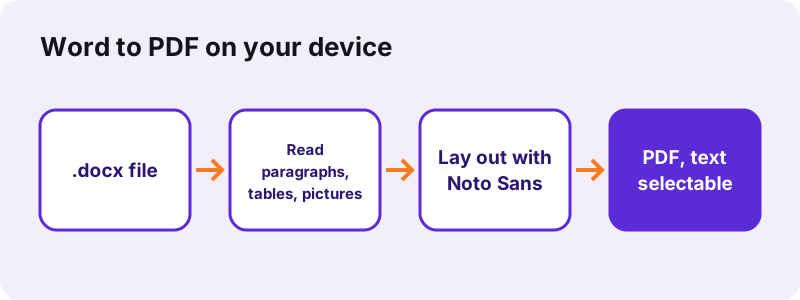
A .docx file is a ZIP archive of XML parts. The converter reads word/document.xml, the main story of the document, and turns each paragraph into lines of words measured with real font metrics. Headings that use Word's built-in styles (Title, Subtitle, Heading 1 to Heading 6) get larger bold type, so the structure of a report survives.
“Office Open XML (also informally known as OOXML) is a zipped, XML-based file format developed by Microsoft”
Word to PDF text stays selectable with pdf24 Word to PDF
Each word is drawn as text with an embedded font subset, not as a picture, so search (Ctrl+F), copy and screen readers work in the result. Only lines in scripts the bundled font lacks, such as Arabic, Hebrew, Hindi, Thai or Chinese, are shaped by the browser and placed as images.
pdf24 Word to PDF and complex scripts
For right-to-left lines the base direction is taken from the first strong letter, the way the Unicode bidi rules do it. The line looks right in the PDF, but because it is an image you cannot select that line's text afterwards.
pdf24 Word to PDF on Arabic or Hebrew reports
If you need copyable Arabic or Hebrew text in the PDF, export from Word itself or run the result through OCR PDF, which adds a text layer to image lines.
pdf24 Word to PDF tip for mixed-language files
Latin words inside an Arabic line are drawn with the same font family, so a mixed line keeps one look instead of two.
Is pdf24 Word to PDF free and private?
pdf24 Word to PDF is free, needs no account and adds no watermark. The .docx is read with the browser's File API and processed by JavaScript on your device, so the result line reports 0 bytes uploaded. Contracts, CVs and medical letters never leave your phone or computer.
No copy is stored: when you close the tab, the file and the PDF exist only where you saved them. That also means there is no daily limit and no queue: the speed depends on your device, not on a server.
- Free: no price, no trial, no sign-up.
- Private: 0 bytes uploaded, checked on every run.
- No watermark or added pages.
- Read how the browser opens local files: File API on MDN.
Which Word features does pdf24 Word to PDF keep?
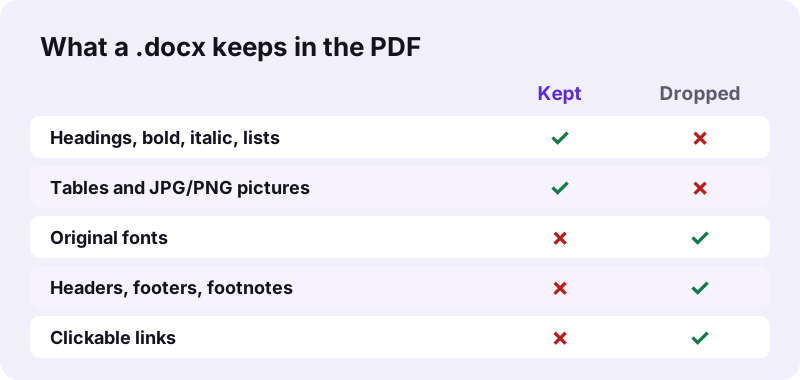
The Word to PDF converter keeps the content and the reading order of a document: headings, bold, italic, underline, strike-through, font sizes, superscript, lists, tables, page breaks, alignment, indents and JPG or PNG pictures. It does not keep the original fonts, headers, footers or footnotes, and links are not clickable.
| Word element | In the PDF | Note |
|---|---|---|
| Headings (built-in styles) | Kept, larger bold type | Title 26 pt, Heading 1 20 pt, Heading 2 16 pt |
| Bold, italic, underline, strike | Kept | Also ALL CAPS, superscript, subscript |
| Numbered and bulleted lists | Kept | Nested levels get •, ◦ and ▪ markers |
| Tables | Kept | A row is never split over two pages |
| JPG and PNG pictures | Kept at the size set in Word | Embedded as they are, not recompressed |
| EMF/WMF drawings | Skipped | Browsers cannot draw these formats |
| Fonts | Replaced by Noto Sans | Regular, Bold, Italic, Bold Italic |
| Headers, footers, footnotes | Not included | The tool says so after each run |
| Hyperlinks | Blue, underlined text | 0 link annotations in our tests |
How fast is pdf24 Word to PDF? Measured results
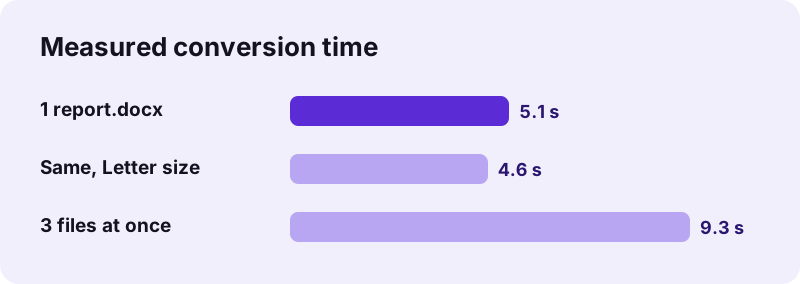
pdf24 Word to PDF took 5.1 seconds for our 2.01 MB test report in Chrome on a Windows 10 laptop, and 4.6 seconds for the same file on Letter paper. Three copies at once took 9.3 seconds and came back as one ZIP with three PDFs.
| Test | Input | Output | Pages | Time |
|---|---|---|---|---|
| report.docx, A4 | 2.01 MB | 2.04 MB | 2 | 5.1 s |
| report.docx, Letter | 2.01 MB | 2.04 MB | 2 | 4.6 s |
| 3 × report.docx | 6.03 MB | ZIP, 3 PDFs | 2 each | 9.3 s |
Most of that time and size comes from one 2.1 MB photo inside the document: pictures are embedded as they are. A text-only letter converts in about a second.
Why is the PDF from pdf24 Word to PDF as big as the Word file?
pdf24 Word to PDF copies every JPG and PNG picture into the PDF without recompressing it, so a document that is mostly photos stays about the same size. Our 2.01 MB report held a 2.1 MB photo and produced a 2.04 MB PDF; text alone adds only a few kilobytes.
To get a smaller file for an email or an upload form, run the PDF through Compress PDF afterwards, or shrink the pictures in Word (Picture Format → Compress Pictures) before converting.
Compressing after conversion can turn pages into images; keep the uncompressed PDF if you need selectable text.
pdf24 Word to PDF on iPhone, Android, Windows and Mac
The converter runs in any current browser, so the same page works on iPhone and iPad (Safari), Android (Chrome), Windows, macOS, Linux and ChromeOS. Nothing is installed. On a phone, pick the .docx from Files or Google Drive after downloading it to the device.
- iPhone/iPad: Safari → Choose files → Browse → pick the .docx; the PDF lands in Downloads.
- Android: Chrome → Choose files → Files or Drive; the PDF is saved to Download.
- Windows and Mac: drag the file from Explorer or Finder onto the drop box.
pdf24 Word to PDF on a phone with large files
Phones have less memory than laptops. A document with dozens of photos can be slow on an older phone; if a tab reloads, convert on a computer or split the document into parts first.
pdf24 Word to PDF for DOC, ODT and RTF files
pdf24 Word to PDF reads only the modern .docx format. Old Word 97–2003 .doc files, OpenDocument .odt files and Rich Text .rtf files each have their own converter on pdf24tools, because each format stores text and formatting differently and needs its own reader.
- DOCX to PDF: the same engine, explained for the .docx format itself.
- DOC to PDF: legacy .doc, converted text-first.
- ODT to PDF: LibreOffice and OpenOffice text documents.
- RTF to PDF: WordPad and TextEdit files.
- PDF converter: mix Word, Excel, slides and images in one go.
pdf24 Word to PDF versus Save as PDF in Word
The browser converter is for moments when Word is not at hand: a phone, a shared computer or a Chromebook. Word's own Save as PDF keeps your exact fonts, headers and footers, and clickable links, because it uses Word's layout engine. Use Word when exact layout matters most.
| Need | Browser converter | Word desktop |
|---|---|---|
| No install, any device | Yes | No |
| 0 bytes uploaded | Yes | Yes (local app) |
| Original fonts | No (Noto Sans) | Yes |
| Headers and footers | No | Yes |
| Batch of files | Yes, as a ZIP | One at a time |
pdf24 Word to PDF problems and how to fix them
Conversion problems usually come from the file type or from features it does not draw. A .doc renamed to .docx will not open, missing logos are often EMF drawings, and missing page numbers live in the footer, which is not converted. Each case has a simple fix.
- "Could not open": the file is not a real .docx. Open it in Word or LibreOffice and save it again as .docx.
- Logo missing: the picture is EMF/WMF. Replace it with a PNG in Word.
- Page numbers missing: add them to the PDF with Add page numbers.
- Layout differs from Word: lines wrap with Noto Sans metrics, so page breaks can move.
pdf24 Word to PDF for CVs, reports and school work
Different documents need different checks after conversion. A CV must fit its pages, a report must keep its tables, and homework must keep its numbering. The notes below say what to look at for each, based on what the converter keeps and drops.
pdf24 Word to PDF for a CV or cover letter
Check that the page count did not grow: Noto Sans can push one line onto a new page. Shorten a line or reduce a space before converting. Write your portfolio address in full, because links are not clickable.
pdf24 Word to PDF for reports with tables
Rows stay whole, so a tall row moves to the next page instead of being cut. Very wide tables shrink to the 451-point text width of an A4 page with one-inch margins.
pdf24 Word to PDF for homework and handouts
Numbered lists restart and continue the way Word stores them, and checkboxes become ☐ or ☒ symbols. Put the page number in the text if your teacher needs it, since footers are not converted.
After pdf24 Word to PDF: merge, sign or protect the PDF
The converter gives you a normal PDF that every other tool on the site accepts. Typical next steps are joining several converted documents, signing a contract, adding a password, or turning the PDF back into Word when someone sends edits.
- Merge PDF to join a cover letter and a CV.
- Sign PDF to add a signature.
- Lock PDF to add a password.
- PDF to Word to go back to an editable file.
pdf24 word to PDF: frequently asked questions
Is pdf24 Word to PDF free to use?
Yes. pdf24 Word to PDF on pdf24tools costs nothing, needs no account and adds no watermark. There is no file limit per day, because the conversion runs on your own device instead of a paid server. pdf24tools is an independent site and is not affiliated with PDF24 or Geek Software GmbH; we only share the tool name people search for.
Does pdf24 Word to PDF upload my document?
No. The browser reads the .docx locally with the File API and JavaScript builds the PDF in memory. The line under the download button shows what was read and confirms 0 bytes uploaded. Only the converter code itself is downloaded when you start; your document never travels the other way.
Does pdf24 Word to PDF keep my fonts?
No. Every font is replaced by Noto Sans in regular, bold, italic or bold italic, embedded as a small subset. Bold, italic and sizes are kept, so the hierarchy stays clear, but a document set in a decorative font will look plainer. For exact fonts, use Save as PDF inside Word on a computer.
Can pdf24 Word to PDF convert several files at once?
Yes. Select or drop several .docx files together and press Convert once. Each document becomes its own PDF with the same name, and the set downloads as one ZIP. In our test three 2.01 MB reports took 9.3 seconds in total. To get one PDF instead, merge the results afterwards.
Does pdf24 Word to PDF keep hyperlinks?
The link text is kept and drawn blue and underlined, so readers can see where a link was. The link is not clickable, though: our test PDFs contained 0 link annotations. If clickable links matter, for example in a CV with a portfolio URL, export from Word or write the full address in the text.
Why are headers and footers missing after pdf24 Word to PDF?
The converter reads the main body of the document only. Headers, footers and footnotes sit in separate parts of the .docx and are not laid out, and the tool says so after every run. Page numbers can be added back with the Add page numbers tool; a letterhead can be stamped on with Overlay PDF.
Does pdf24 Word to PDF work on iPhone?
Yes. Open the page in Safari, tap Choose files, then Browse, and pick the .docx from Files, iCloud Drive or a downloaded attachment. The PDF is saved to Downloads in the Files app. Nothing is installed and the file stays on the iPhone, the same as on Android, Windows and Mac.
Can pdf24 Word to PDF open old .doc files?
Not this page: it accepts .docx only. Use DOC to PDF for Word 97–2003 files. That tool reads the text, paragraphs, line breaks and tables of a .doc but not its fonts, colours or pictures. For a closer copy, open the .doc in Word or LibreOffice, save it as .docx and convert that file here.
Is the text selectable after pdf24 Word to PDF?
Yes, for Latin, Greek and Cyrillic text: it is drawn as real text with an embedded font, so you can search, copy and highlight it. In our test 686 characters were extractable from a 2-page report. Lines in Arabic, Hebrew, Indic, Thai or Chinese scripts are placed as images and are not selectable.
Why does pdf24 Word to PDF break pages differently from Word?
Word lays out lines with your original fonts; the converter uses Noto Sans, whose letters have slightly different widths. Lines therefore wrap at other words and page breaks can move by a few lines. Manual page breaks set in Word are respected, and table rows are kept together on one page.
Does pdf24 Word to PDF keep pictures and tables?
Yes. JPG and PNG pictures are placed at the size set in Word and embedded without recompression; GIF, BMP and WebP pictures are redrawn as PNG. Tables keep their rows and cells, and each row is kept on one page. EMF and WMF drawings, often used for logos and charts, are skipped.
What page size does pdf24 Word to PDF use?
A4 by default, 595 × 842 points, with 72-point (one-inch) margins on every side. Choose Letter, 612 × 792 points, before converting if the document is for US paper. The page size of the original Word file is not read, so a landscape document becomes portrait pages.
More pdf24 word to PDF tools and guides
pdf24 word to PDF: sources
- Office Open XML — Wikipedia
- Microsoft Word — Wikipedia
- File API — MDN Web Docs
- Noto fonts — Wikipedia