How to use pdf24 DOC to PDF in 4 steps
- Choose the .doc file. Drop one or more .doc, .dot or .docx files on the box, or tap Choose files.
- Pick A4 or Letter. The page size applies to every file in the batch.
- Press Convert to PDF. The binary file is decoded on your device; .docx files go to the full Word engine.
- Download and check. Save the PDF (or the ZIP for several files) and read it through once.
What is a .doc file and how does pdf24 DOC to PDF read it?
A .doc file is the binary Word format used from Word 97 to Word 2003, stored inside a Microsoft compound file. pdf24 DOC to PDF opens that container in your browser, finds the WordDocument stream and its piece table, and pulls out every run of text in reading order.
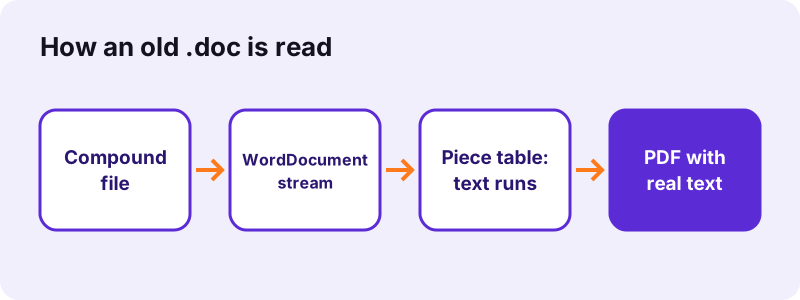
Unlike a .docx, a .doc is not ZIP and XML. It is a small file system of its own, with streams such as WordDocument, 0Table or 1Table, and Data. The piece table says where each run of characters sits and whether it is stored as 8-bit Windows-1252 or as 16-bit Unicode, so accented letters and Cyrillic both come out right.
“Microsoft has used the extension since 1983.”
How pdf24 DOC to PDF handles fields and special marks
Word stores fields (dates, page references, mail-merge values) as a code plus its last result. The converter keeps the result you saw on screen and drops the code. Non-breaking hyphens become normal hyphens, and optional hyphens disappear.
pdf24 DOC to PDF and tables
Every table cell in a .doc ends with a special mark, and an empty cell mark ends the row. The converter rebuilds rows and columns from those marks, so a price list or timetable comes out as a real grid.
pdf24 DOC to PDF with merged or nested tables
Merged cells are not stored as such in the text stream, so they appear as separate cells. Nested tables are flattened into the outer one.
pdf24 DOC to PDF tip for forms
Old .doc forms with text fields keep the filled-in values, because those are stored as field results.
What does pdf24 DOC to PDF keep, and what does it drop?
pdf24 DOC to PDF converts text-first: paragraphs, line breaks, page breaks and tables are kept, and the text stays selectable. Fonts, colours, bold, italic, heading sizes and pictures are not read from the binary format. The tool shows this note after every run, so nothing is lost silently.
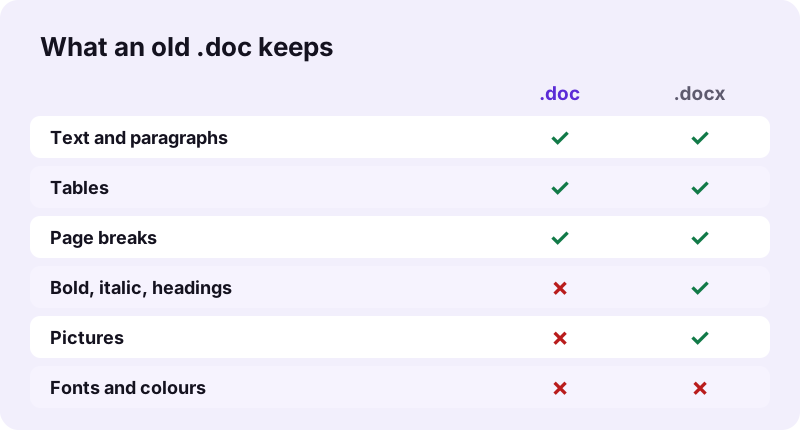
| In the .doc | In the PDF |
|---|---|
| Paragraphs and line breaks | Kept |
| Manual page breaks | Kept |
| Tables | Kept as a grid |
| Field results (dates, totals) | Kept |
| Bold, italic, heading sizes | Not kept (plain Noto Sans) |
| Pictures and drawings | Not kept |
| Headers, footers, footnotes | Not kept |
For a closer copy, open the .doc in Word, LibreOffice or Google Docs, save it as .docx and convert it on Word to PDF, which keeps headings, lists and pictures.
How fast is pdf24 DOC to PDF? Measured on two old files
pdf24 DOC to PDF finished our two legacy test files in under a second each: a 27 KB .doc became a 2-page, 8,461-byte PDF in 0.9 seconds, and a 19 KB .doc with a list became a 1-page, 8,035-byte PDF in 0.7 seconds, both in Chrome on Windows 10.
| File | Input | Output | Pages | Time | Characters |
|---|---|---|---|---|---|
| dc-sample.doc | 27 KB | 8,461 B | 2 | 0.9 s | 136 |
| dc-list.doc | 19 KB | 8,035 B | 1 | 0.7 s | 195 |
The PDFs are smaller than the .doc files because a .doc reserves space in fixed-size sectors of 512 bytes, while the PDF stores only the text and a small font subset.
pdf24 DOC to PDF for Word 97–2003 files, exports and archives
Most .doc files today come from archives: letters from the early 2000s, school papers, templates from old intranets, or exports from other word processors that offered a Word 97 option. All of them use the same binary structure, which the converter reads.
- Word 97, 2000, XP (2002) and 2003: fully supported structure.
- Word 6.0/95 files: an older layout that is refused; save as .docx in LibreOffice first.
- .dot templates: accepted and read like a .doc.
- .docx files dropped here are sent to the full Word engine automatically.
Is pdf24 DOC to PDF safe for archived letters and contracts?
pdf24 DOC to PDF works entirely in your browser: the file is read with the File API and decoded by JavaScript on your device, and the result line confirms 0 bytes uploaded. Nothing is stored, so old contracts, medical letters and personnel files stay on your own disk.
This matters for archive work, where a folder of old .doc files often holds personal data. You can convert a whole batch at once and the files never leave the computer.
See the File API on MDN for how a web page reads a local file without sending it.
pdf24 DOC to PDF problems: encrypted, damaged or very old files
The converter stops with a clear message when a file cannot be read. The three usual causes are a password-protected .doc, a damaged compound file, and a file that is not Word 97–2003 at all, such as Word 6 or a renamed RTF. Each one has a workaround.
- Password-protected .doc: open it in Word with the password, remove protection, save, convert.
- Damaged file: LibreOffice often opens files Word refuses; save as .docx there.
- Renamed RTF (a .doc that starts with {\rtf): use RTF to PDF.
- No text found: the .doc may hold only a scanned picture; use OCR PDF on a PDF of it.
pdf24 DOC to PDF on phones
The converter runs in Safari on iPhone and Chrome on Android. Save the .doc attachment to Files or Download first, then pick it with Choose files.
Should you use pdf24 DOC to PDF or save as DOCX first?
pdf24 DOC to PDF is the fastest route when you only need the words and tables, for example to archive, print or quote a document. When the look matters, saving as .docx first and using the Word converter keeps headings, bold, lists and pictures, at the cost of one extra step.
| Goal | Best route |
|---|---|
| Read or print the text | Convert the .doc directly |
| Keep headings and pictures | Save as .docx, then Word to PDF |
| Many archive files at once | Convert the .doc batch directly |
| Edit the text later | Save as .docx and keep it |
pdf24 DOC to PDF: frequently asked questions
Is pdf24 DOC to PDF free?
Yes. The converter is free, has no sign-up and adds no watermark, and there is no daily limit because your device does the work. pdf24tools is an independent site, not affiliated with PDF24 or Geek Software GmbH; the name just describes the search. All tools on the site work the same private way.
Does pdf24 DOC to PDF upload my .doc file?
No. The browser reads the file from your disk and JavaScript decodes the binary Word format in memory. The result line shows the bytes read and 0 bytes uploaded. Only the converter code is downloaded from our server; your document is never sent anywhere.
Why are bold and pictures missing after pdf24 DOC to PDF?
The binary .doc stores formatting and pictures in complex tables that the converter does not decode; it reads the text stream only. Paragraphs, page breaks and tables are kept. For formatting and pictures, open the .doc in Word or LibreOffice, save it as .docx and convert that file on Word to PDF.
Can pdf24 DOC to PDF convert .docx files too?
Yes. You can drop .docx files on this page as well; they are handed to the full Word engine, which keeps headings, lists, tables and pictures. A mixed batch of .doc and .docx files therefore works in one go, and each file gets the converter that suits it.
Does pdf24 DOC to PDF need Microsoft Word?
No. The converter reads the Word 97–2003 binary format itself, so it works on computers and phones without Office: a Chromebook, a Linux laptop, an iPhone or an Android phone. Only a current browser such as Chrome, Edge, Firefox or Safari is needed, and nothing is installed. That makes it handy on shared or work computers where you cannot add software.
Does pdf24 DOC to PDF keep accents and Cyrillic letters?
Yes. The piece table says whether each text run is stored as Windows-1252 or as 16-bit Unicode, and the converter decodes both, including curly quotes, dashes and the euro sign. Latin, Greek and Cyrillic text stays selectable; Arabic, Hebrew and Asian scripts are placed as images.
Can pdf24 DOC to PDF open a password-protected .doc?
No. An encrypted .doc cannot be decoded without the password, and the tool says so. Open the file in Word or LibreOffice with the password, remove the protection, save it, and convert the saved copy. The protection setting is not carried into the PDF anyway.
How many .doc files can pdf24 DOC to PDF convert at once?
As many as your device can hold in memory. Select a whole folder of .doc files; each becomes its own PDF and the set downloads as a ZIP. Our test files took 0.7 to 0.9 seconds each, so at that rate a folder of 50 short letters needs about 40 seconds.
Does pdf24 DOC to PDF keep tables?
Yes. Each cell and row is rebuilt from the cell marks in the text stream, so lists of prices, timetables and forms come out as a grid. Merged cells appear as separate cells and nested tables are flattened, because the text stream does not record those details.
What page size does pdf24 DOC to PDF use?
A4 by default, with 56-point margins, or Letter if you choose it before converting. The page size and margins stored in the old .doc are not read. Text is set in 11-point Noto Sans, so page breaks can differ from the original even where manual breaks are kept.
Why does pdf24 DOC to PDF say no text was found?
The file holds no text in its WordDocument stream, which happens when a .doc contains only a pasted scan or a drawing. Print it to PDF from Word or LibreOffice, then use OCR PDF to recognise the text. Very old Word 6 or Word 95 files can also fail; save them as .docx first.
More pdf24 DOC to PDF tools and guides
pdf24 DOC to PDF: sources
- Doc (computing) — Wikipedia
- Microsoft Word — Wikipedia
- File API — MDN Web Docs