Is there a pdf24 linux version to download?
No Linux build exists on pdf24tools, and none is needed: every tool is a web page that runs in Firefox, Chromium, Chrome or any current browser on Ubuntu, Debian, Fedora, Arch or Linux Mint. You pick a file from your home folder, the work runs locally, and the result is saved to ~/Downloads.
Nothing touches your package manager, so there are no repositories to add, no dependencies to resolve and no root password to type. The same pdf24 linux workflow also works on a Raspberry Pi desktop or a Chromebook with the Linux container, as long as the browser is current.
Updates arrive with the page itself: when a pdf24 linux tool gains an option, you see it on the next visit without running apt, dnf or pacman.
pdf24 linux in Firefox, step by step
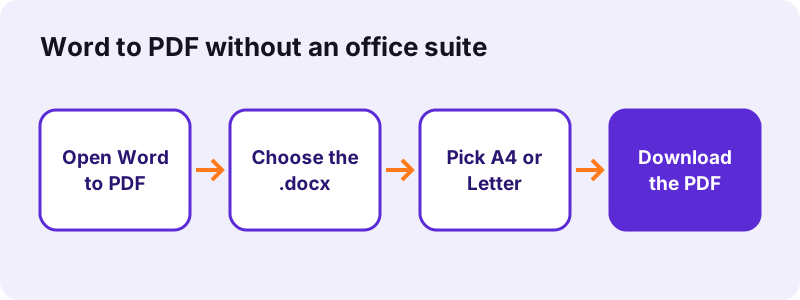
- Open a tool page, for example Word to PDF, in Firefox.
- Click the choose button or drag the file from Nautilus, Dolphin or Thunar.
- Set the options, such as A4 or Letter.
- Press the button and wait for the result line.
- Download the file; Firefox saves it to ~/Downloads.
pdf24 linux: Snap and Flatpak browsers
Ubuntu ships Firefox as a Snap, and some distributions use Flatpak browsers. Sandboxed browsers can only see certain folders through the file picker portal; if a file in another folder does not show up, copy it to ~/Downloads or ~/Documents first, then pick it again.
pdf24 linux on low-memory machines
The browser holds every page in memory while it works, so a laptop with 4 GB of RAM handles text PDFs easily but may struggle with a 100-page colour scan. Close other tabs, or split the scan into parts with Split PDF before compressing or running OCR.
pdf24 linux: tip for keyboard users
Every button on the tool pages is a real button element, so Tab moves through the options and Enter or Space presses them. After a run, focus jumps to the download link, which means Enter saves the result without reaching for the mouse.
How does pdf24 linux convert Word to PDF without an office suite?
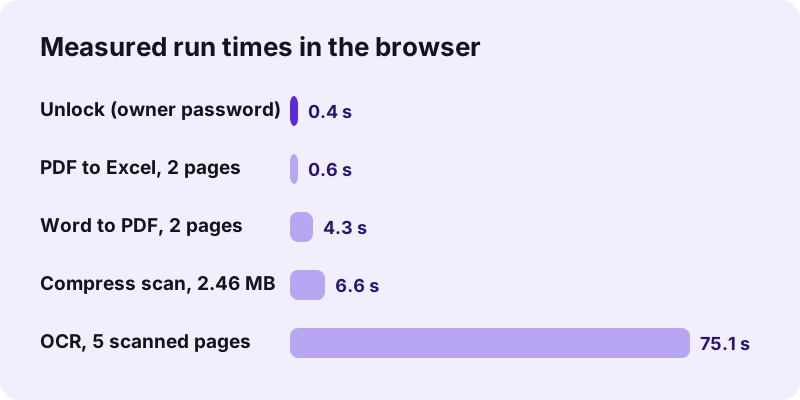
Word to PDF on Linux reads the .docx file in the browser, lays out paragraphs, headings, lists, tables and pictures, and writes a PDF with real, selectable text. No office suite has to be installed. Our 2.01 MB report.docx became a 2-page, 2.05 MB PDF in 4.3 seconds, or 3.5 seconds with Letter pages.
| Setting | Pages | Page size | Time |
|---|---|---|---|
| A4 | 2 | 595 × 842 pt | 4.3 s |
| Letter | 2 | 612 × 792 pt | 3.5 s |
Be aware of the limits: fonts are replaced by Noto Sans, and headers, footers and footnotes are not included; links are coloured and underlined but not clickable. When the exact fonts matter, export from the office suite you edited the file in. For a quick, readable PDF on a fresh pdf24 linux setup, the browser route is enough.
Which pdf24 linux tasks run in the browser?
Browser tasks on Linux cover converting to and from PDF, compressing, merging, splitting, signing, redacting, OCR, unlocking and repairing. The heavier ones use WebAssembly, the same technology that runs compiled programs inside the browser, so encryption and file repair work without any native library on the system.
| Task | Tool | Measured result |
|---|---|---|
| Shrink a scan | Compress PDF | 2.46 MB → 493 KB |
| Join files | Merge PDF | 15 pages in 0.2 s |
| Tables to a sheet | PDF to Excel | 26 cells, real numbers |
| Remove print limits | Unlock PDF | 6 pages in 0.4 s |
| Searchable scan | OCR PDF | 2,575 words, 75.1 s |
For pdf24 linux users the practical gain is that the same tool behaves the same on every distribution. A colleague on Fedora and one on Mint get byte-identical output from the same input, because the browser runs the same JavaScript and WebAssembly code. There is no version drift between distro packages to worry about.
Is pdf24 linux use private enough for work files?
The Linux browser tools are private enough for work files because nothing is uploaded. The browser opens the file with the File API and processes it locally; in our tests the request log showed 0 POST requests and the result line said 0 bytes uploaded. Only OCR downloads its engine and language data, never your document.
“Ubuntu is a Linux distribution based on Debian and composed primarily of free and open-source software.”
You can verify the pdf24 linux privacy claim yourself: press F12, open the Network tab and run a tool. See the File API on MDN for how browsers read local files.
pdf24 linux versus command-line PDF tools
Command-line tools are ideal for scripts and batch jobs on a server. The browser tools suit one-off tasks where you want to see pages, place a signature, draw redaction boxes or check a result before saving. Both keep files local; the browser needs no installation, while command-line tools need packages and syntax.
- Browser: visual page tools (sign, redact, edit, crop), exact-size compression, OCR without setup.
- Command line: hundreds of files in a loop, cron jobs, headless servers.
- Both: merge, split, rotate and decrypt without uploading anything.
Many pdf24 linux users mix the two: a script for the nightly batch, the browser for the contract that needs a signature at 5 pm.
A pdf24 linux browser tab also helps on machines you do not administer, such as a university lab or a shared office PC, where installing a PDF package is not possible. Nothing is left behind except the files you chose to download.
What if pdf24 linux tools do not start in my browser?
Linux browser problems usually come from an old browser version, a sandbox that hides the file, strict script blockers or a locked PDF. Update Firefox or Chromium, move the file to ~/Downloads, allow scripts for the site, and unlock password-protected files first. A locked PDF stops with a clear message.
- Long-term-support distributions may ship an older browser; install the current release from the vendor.
- Extensions that block WebAssembly or workers stop OCR and unlocking.
- Try Repair PDF when a file opens in no reader.
If the result line shows an error, read it before retrying: the messages name the actual cause, such as a missing password, a file type the tool does not accept, or a page range outside the document. Fixing that one point is usually enough, and the original file on your disk is never changed by a failed run.
Every tool below runs the same pdf24 linux way, inside the browser.
pdf24 linux: frequently asked questions
Is pdf24 linux free?
Yes. pdf24 linux use costs nothing: no licence, no account, no subscription and no watermark. Because the work happens on your computer instead of a server, there is no per-file cost to charge for, and there is no daily limit on the number of files you process.
Do I need root to use pdf24 linux?
No. Nothing is installed, so there is no sudo, no package and no repository. Any user account that can run Firefox or Chromium can use the tools. That also suits locked-down work laptops where installing software is not allowed by the IT department.
Does pdf24 linux work on Ubuntu 24.04?
Yes. The Snap version of Firefox that Ubuntu ships runs the tools, and so do Chromium and Chrome. If a file does not appear in the file picker because of the Snap sandbox, move it to the Downloads or Documents folder and choose it again.
Can pdf24 linux convert Word to PDF without LibreOffice?
Yes. Word to PDF reads .docx files directly in the browser and writes a PDF with selectable text, so no office suite is required. Fonts are replaced by Noto Sans, and headers, footers and footnotes are left out, which the result line states after every conversion.
Is my file uploaded when I use pdf24 linux?
No. The browser opens the file locally and processes it in the page. Our request logs showed no POST request in any test, and every result line reports 0 bytes uploaded. The only extra download is the OCR engine with its language data, which never includes your file.
Can pdf24 linux run OCR on scanned PDFs?
Yes. OCR PDF loads the Tesseract engine in the browser and adds a searchable text layer. Our 5-page contract scan gave 2,575 recognised words in 75.1 seconds, including the first download of the engine. Eleven languages are available, including English, French, German, Arabic and Russian.
Does pdf24 linux work on a Raspberry Pi?
It works in Chromium on Raspberry Pi OS, but slowly on large files, because the small processor does all the work. Merging, splitting and text conversions are fine; for pdf24 linux jobs on long scans, compression and OCR take much longer than on a laptop, so test with a short file first.
Can pdf24 linux compress a PDF to a set size?
Yes. Compress PDF has an exact size option where you type the limit in KB, from 20 to 20,000. Our 5-page, 2.46 MB scan reached 148 KB with a 200 KB target and 82 KB with a 100 KB target, in about 36 seconds each.
Does pdf24 linux need an internet connection?
The page, and the libraries a tool loads on first use, have to come from the internet once. After that the processing itself runs locally and sends nothing. If the connection drops before a tool finished loading its library, reload the page when you are back online and try again.
Can pdf24 linux sign PDFs?
Yes. Sign PDF lets you draw a signature with the mouse or touchpad, type it or upload an image, and place it on any page. It is a visible signature placed as an image, not a certificate-based digital signature; for those you need a certificate and a signing application.
Is pdf24 linux an official port?
No. pdf24tools is an independent website and is not affiliated with PDF24 or Geek Software GmbH. Our tools are separate code that runs in any modern browser, Linux included. The figures in this guide are our own measurements from 2 November 2026.
Which browser is best for pdf24 linux?
Current Firefox, Chromium and Chrome all run the tools, and the output files are identical. Chromium-based browsers are often a little faster on heavy scans; Firefox is the default on most distributions and runs pdf24 linux tasks without extra setup. Keep whichever you use up to date.
Can pdf24 linux unlock a protected PDF?
Yes, if you have the right to open it. Unlock PDF removes print and copy limits without a password, as on our test file in 0.4 seconds, and removes an open password when you type it. A file whose open password you do not know cannot be opened.
More pdf24 linux tools and guides
pdf24 linux: sources
- Linux — Wikipedia
- Ubuntu — Wikipedia
- WebAssembly — Wikipedia
- File API — MDN Web Docs