How to use pdf24 PDF to Word in 4 steps
- Choose the PDF. Tap Choose a file or drop one PDF on the box. It is read by your browser and never sent to a server.
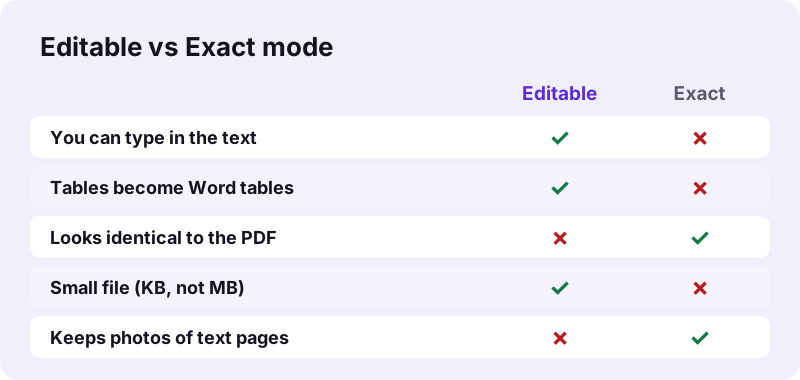
- Pick Editable or Exact. Editable rebuilds paragraphs, headings and tables you can type in. Exact places each page as a picture, so it looks identical but cannot be edited.
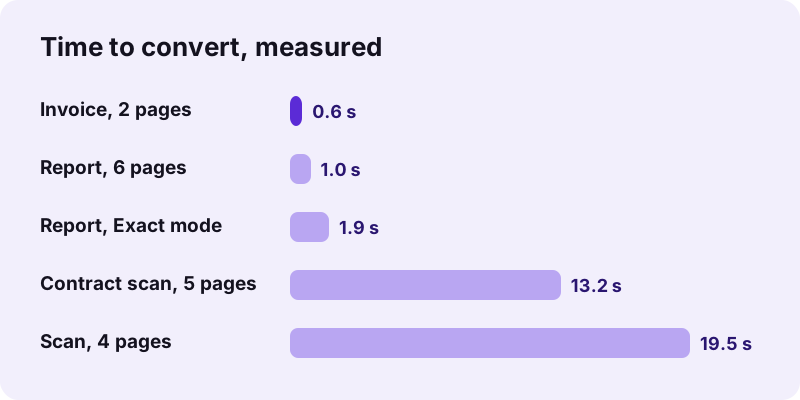
- Press Convert. Text pages convert in about a second; scanned pages take longer because each one is drawn as an image.
- Download the .docx. Save the file, open it in Word, Google Docs, Pages or LibreOffice and check headings, lists and tables.
What does pdf24 PDF to Word do with your file?
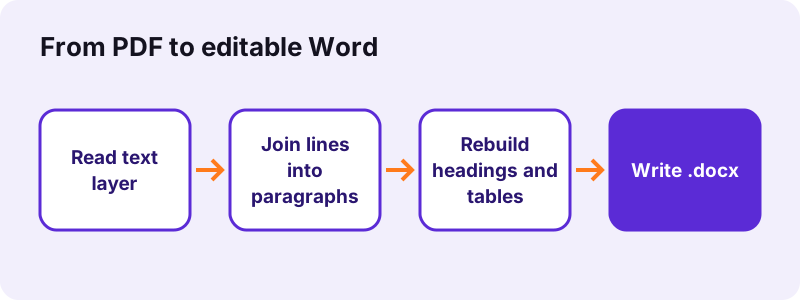
pdf24 PDF to Word reads the text layer of each page, groups lines into paragraphs, spots headings by font size and rebuilds column-aligned text as Word tables. It writes a standard .docx that opens in Word 2007 or later, Google Docs, Pages and LibreOffice, with bold, italic and font sizes kept.
A PDF stores letters at fixed positions, not paragraphs. The tool sorts every text piece by line, joins lines that belong together, removes the hyphen when a word was split at the end of a line, and starts a new paragraph at a gap, an indent or a sentence that ends early. Lines at least 18 % larger than the body text become Heading 1, 2 or 3, so the Word navigation pane works straight away.
“Office Open XML is a zipped, XML-based file format developed by Microsoft for representing spreadsheets, charts, presentations and word processing documents.”
pdf24 PDF to Word in Editable mode
Editable is the default. On our 6-page test report (1,968 words, 5.1 KB) it produced 12 Word paragraphs: 6 headings styled as Heading 1 and 6 body paragraphs, each rebuilt from 26 PDF lines. The page size of the PDF (A4 here, 595 × 842 points) is copied, with 0.75-inch margins, and the text is set in Calibri at the sizes found in the PDF.
pdf24 PDF to Word with tables
When two or more lines share the same column edges, the tool turns them into a real Word table with borders. Our 2-page invoice gave a 6-row, 4-column table (Item, Qty, Unit price, Total) whose cells you can edit, sort or extend. Tables drawn as one text block, or with merged cells, may come out as plain lines and need a quick fix.
pdf24 PDF to Word with pictures on the page
Editable mode copies text, not artwork. On a test page with a heading, two photos and a chart, the Word file kept the heading and the sentence but not the three pictures. Pages with almost no text (fewer than 15 characters) are treated as scans and placed as one picture instead, which is why a photo page still shows up.
pdf24 PDF to Word tip for brochures and photo pages
If the pictures matter more than editing, run the file again in Exact mode. To get both, convert in Editable mode for the text and save the photos separately with Extract images, then drag them into the Word document where you want them.
Editable or Exact: which pdf24 PDF to Word mode should you pick?
pdf24 PDF to Word in Editable mode is right when you need to change words, fix numbers or reuse paragraphs, because it rebuilds real text and tables in a small file. Exact mode suits forms, certificates and designed pages that must look the same, since every page becomes a 200 dpi picture inside Word that cannot be typed into.
| Test file | Editable result | Exact result |
|---|---|---|
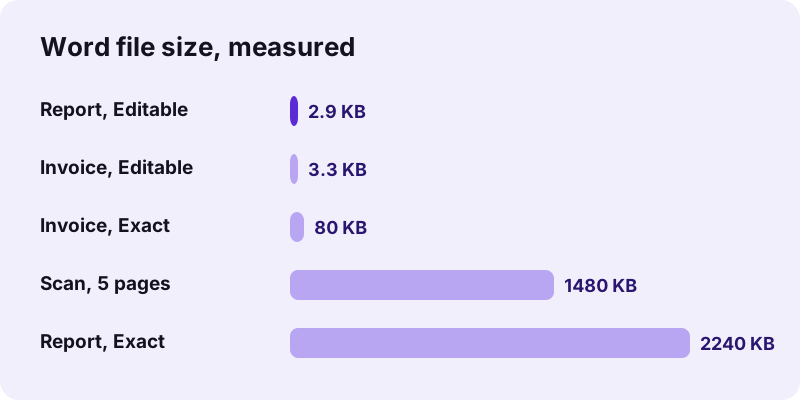
| Report, 6 pages, 5.1 KB | 2.9 KB .docx in 1.0 s, text editable | 2.24 MB .docx in 1.9 s, 6 page pictures |
| Invoice, 2 pages, 2.4 KB | 3.3 KB .docx in 0.6 s, 1 Word table | 80 KB .docx in 1.8 s, 2 page pictures |
| Scan, 4 pages, 8.07 MB | 2.33 MB .docx in 19.5 s, 4 pictures | same: a scan has no text to rebuild |
Exact mode files are about 750 times larger on text PDFs (2.24 MB against 2.9 KB) because each page is stored as a JPEG. Choose it to send a copy that nobody should edit, or when a layout with columns, text boxes and logos must stay pixel-perfect.
Can pdf24 PDF to Word convert a scanned PDF?
A scanned PDF holds photos of pages, not letters, so pdf24 PDF to Word cannot rebuild its text on its own. Each scanned page is placed in Word as a picture and the result line tells you how many pages had no text layer. Run OCR first to add real text, then convert again.
Our 4-page scan (8.07 MB, 2,480 × 3,508 pixel pages) took 19.5 seconds and gave a 2.33 MB Word file with 4 page pictures and the note: 4 page(s) had no text layer. A 5-page contract scan behaved the same in 13.2 seconds. After OCR PDF has added a text layer, the same file converts into editable paragraphs.
pdf24 PDF to Word after OCR: tips for clean text
OCR quality decides how much cleaning the Word file needs afterwards. These four habits gave us the fewest errors:
- Scan at 300 dpi or more: small, blurry letters are what OCR misreads most.
- Straighten crooked pages first with Rotate PDF pages.
- Check numbers and names after OCR; a 0 and an O look alike on paper.
- Mixed files work: text pages are rebuilt, scanned pages become pictures in the same .docx.
Why does pdf24 PDF to Word change my formatting?
pdf24 PDF to Word changes some formatting because a PDF has no paragraphs, columns or text boxes, only letters placed on a page. The tool rebuilds a flowing document from those positions, so multi-column layouts become one column, text boxes become normal paragraphs and the original fonts are replaced by Calibri at the same size.
These are the changes to expect, and how to fix each one in Word:
| What you see | Why | Quick fix |
|---|---|---|
| Two columns merged into one | Word gets one text flow | Layout → Columns → Two |
| Different font | Embedded fonts are not copied | Select all, pick the font |
| Headers or footers inside the text | They are normal lines in a PDF | Delete them, then use Insert → Header |
| A table came out as lines | No shared column edges found | Insert → Table → Convert Text to Table |
| Links are plain text | Only text is rebuilt | Select the text, press Ctrl+K |
Arabic and Hebrew lines are detected and written right to left, and centred titles stay centred. Bullets and numbered lines keep a hanging indent so they still read as a list.
Is pdf24 PDF to Word safe for private documents?
pdf24 PDF to Word is safe for contracts, payslips and medical letters because the file never leaves your device. Your browser reads it with the File API and builds the .docx in JavaScript; in our test the page sent 0 upload requests and the result line confirmed 0 bytes uploaded. Nothing is stored after you close the tab.
You can check this yourself: open the browser developer tools (F12), choose the Network tab and run a conversion. Only the page and its script files load; no request carries your document. The File API on MDN explains how a page reads a local file without uploading it.
pdf24 PDF to Word privacy check in 30 seconds
Because nothing is uploaded, there is also no queue, no daily limit and no watermark in the Word file.
Because nothing is uploaded, there is also no queue, no daily limit and no watermark in the Word file.
pdf24 PDF to Word on iPhone, Android, Windows and Mac
pdf24 PDF to Word works in any current browser: Chrome, Edge, Firefox and Safari on Windows, macOS, Linux, Android, iPhone and iPad. No app or Word licence is needed to convert, and the .docx opens in the free Word app, Google Docs, Pages or LibreOffice.
- iPhone and iPad: tap Choose a file, pick the PDF from Files, then Download; the .docx lands in Files → Downloads.
- Android: pick the PDF from Downloads or Drive; open the result with Google Docs or Word.
- Windows and Mac: drag the PDF onto the box; the Word file goes to your Downloads folder.
- Chromebook: works the same; open the .docx in Google Docs.
Long scans take longer on a phone than on a laptop because each page is drawn at full size in memory; split a long scan with Split PDF if a phone struggles.
What does pdf24 PDF to Word keep, and what does it drop?
pdf24 PDF to Word keeps the words, their order, bold and italic, font sizes, headings, bullet lists, centred lines, right-to-left text and column tables. It drops what a PDF stores outside the text: photos on text pages, vector drawings, form fields, comments, bookmarks, links and the original font files.
| Element | Editable mode | Exact mode |
|---|---|---|
| Text and paragraphs | Kept, editable | Picture only |
| Bold, italic, size | Kept | Picture only |
| Headings (H1–H3) | Detected by size | No |
| Tables | Rebuilt as Word tables | Picture only |
| Photos and charts | Not on text pages | Kept in the page picture |
| Form fields, links, bookmarks | Dropped | Dropped |
Need the form fields instead? Fill the PDF directly with Fill out PDF. To edit a few words without leaving PDF, Edit PDF is quicker than a round trip through Word.
pdf24 PDF to Word for locked or password-protected files
Password-protected PDFs need one extra step. A file that asks for a password to open cannot be read until you remove the password with the Unlock tool, using the password you already know. A file locked only against copying or editing usually opens and converts normally.
Open Unlock PDF, type the password, download the unlocked copy and convert that copy. Removing a password you do not have is not possible here, and it should not be: that protection is there to keep the content private.
pdf24 PDF to Word, DOCX, ODT or RTF: which file do you need?
Word is the right target for most people: the .docx file opens in every major office suite. OpenDocument Text suits LibreOffice and public bodies that require open formats, RTF suits very old editors, and plain text suits copying words into another system.
| Format | Best for | Our tool |
|---|---|---|
| DOCX | Word, Google Docs, Pages | PDF to DOCX |
| ODT | LibreOffice, open-format rules | PDF to ODT |
| RTF | WordPad, old editors, email | PDF to RTF |
| TXT | Words only, any program | PDF to TXT |
Going the other way? Word to PDF turns the edited .docx back into a PDF on your device.
pdf24 PDF to Word not working? Causes and fixes
When the conversion fails or the result looks wrong, the cause is almost always in the PDF itself: a scan without text, a password, a damaged file or a layout with many text boxes. The message under the Convert button names the problem, and each one below has a fix that takes a minute.
| Message or symptom | Cause | Fix |
|---|---|---|
| Pages placed as pictures | Scan, no text layer | OCR PDF, then convert again |
| Password error | PDF needs a password to open | Unlock PDF with your password |
| File will not open | Broken or cut-off download | Repair PDF, or download it again |
| Words run together or split | Odd spacing in the PDF | Use Find and Replace in Word on double spaces |
| Nothing happens on a phone | Very large scan, low memory | Split the PDF and convert the parts |
Strange characters instead of letters mean the PDF uses a font without a proper character map; the visible shapes do not tell the computer which letters they are. OCR fixes this too, because it reads the shapes again.
pdf24 PDF to Word file size and page limits
pdf24 PDF to Word has no fixed page or megabyte limit; the only limit is your device's memory. Text pages add only a few kilobytes each, while scans grow the Word file because each page is stored as a 150 dpi JPEG of about 600 KB.
In our runs a 4-page scan produced 4 page pictures of 608–615 KB each. If the Word file is too large to email, shrink the scan first with Compress PDF, or run OCR so the pages become text: our 6-page text report made a 2.9 KB .docx, against 2.33 MB for the 4-page scan.
pdf24 PDF to Word with very long documents
For a long scanned book, split it into parts of 20–50 pages with Split PDF, run OCR on each part and convert them one by one. Word handles several small files more smoothly than one file with hundreds of page pictures, and a failed part is quicker to redo.
Who uses pdf24 PDF to Word, and for what?
Students, office staff and freelancers use a PDF to Word converter whenever the original document is lost and only the PDF is left: updating a CV, correcting a contract draft, reusing a report, quoting a paper or translating a letter. Each of these needs editable paragraphs, not a picture of the page.
- CV update: change dates and jobs without retyping the whole page.
- Contract draft: track changes in Word, then send back a new PDF.
- Invoice or price list: table cells come back editable.
- Translation: paste the paragraphs into a translation tool, keeping headings.
pdf24 PDF to Word for a CV or a contract
A CV or contract usually has one column, clear headings and short paragraphs, which is the easiest layout to rebuild. Convert in Editable mode, turn on Track Changes in Word before you edit, and export a new PDF with Word to PDF when you are done.
pdf24 PDF to word: frequently asked questions
Is pdf24 PDF to Word free?
Yes. The converter is free with no sign-up, no trial, no watermark and no daily limit. It can be free because the conversion runs on your own device, so there are no server costs per file. You can convert as many PDFs as you like, one after another, and every Word file is yours to keep and share.
Does pdf24 PDF to Word keep the formatting?
It keeps the text, bold, italic, font sizes, headings, lists and column tables. It does not keep multi-column layouts, text boxes, the original fonts or photos on text pages, because a PDF has no such structure to read. For a copy that looks identical, choose Exact mode; every page then becomes a picture you cannot edit.
How long does pdf24 PDF to Word take?
Text PDFs take about a second: our 2-page invoice took 0.6 s and our 6-page report 1.0 s in Chrome on a Windows laptop. Scans take longer because every page is drawn as an image; a 4-page, 8 MB scan took 19.5 s. Big scans are slower on phones, which have less memory.
Can pdf24 PDF to Word edit a scanned document?
Not directly. A scan is a picture of text, so the converter places each scanned page in Word as an image and tells you how many pages had no text layer. Run OCR PDF first to add real text to the scan, then convert again to get editable paragraphs. Check names and numbers after OCR.
Why is my pdf24 PDF to Word file not editable?
There are two usual causes. Either the PDF is a scan, so the pages were placed as pictures, or you chose Exact mode, which always makes page pictures. Switch to Editable mode for a text PDF, or run OCR PDF on a scan first. The result line under the download button names the cause.
Does pdf24 PDF to Word upload my file?
No. Your browser reads the PDF and builds the .docx locally with JavaScript. We checked the network traffic during our tests: 0 upload requests were sent, and the result line shows 0 bytes uploaded. This matters for contracts, IDs and medical letters, which should not sit on someone else's server.
Is this pdf24 PDF to Word tool made by PDF24?
No. pdf24tools is an independent website and is not affiliated with PDF24 or Geek Software GmbH. Our converter is our own code: it runs in your browser, uploads nothing and needs no account. We use the same simple slugs so the tool is easy to find, but the site, the code and the team are separate.
Can I use pdf24 PDF to Word on an iPhone?
Yes. Open this page in Safari or Chrome, tap Choose a file, pick the PDF from Files and tap Convert. The .docx is saved to Files → Downloads, and the free Word app, Pages or Google Docs opens it. No App Store download is needed, and the file stays on the iPhone throughout the conversion.
Does pdf24 PDF to Word work offline?
The conversion itself does not need the internet, because nothing is sent to a server; only the page and its converter script must load. Run one conversion while online so the script is loaded, then further files convert without a connection as long as the tab stays open. A reload needs the internet again.
What is the maximum file size for pdf24 PDF to Word?
There is no fixed maximum. The limit is your device's memory, since the whole PDF is read into the browser. Text PDFs are light: our 6-page report was 5.1 KB. Large scans use the most memory, so a long scan may be slow on a phone; split it first with Split PDF and convert the parts one by one.
Does pdf24 PDF to Word keep tables?
Yes, when the table text is aligned in columns. Lines that share column edges become a Word table with borders; our invoice came out as a 6-row, 4-column table. Tables with merged cells or text drawn as one block may come out as plain lines; in Word, use Insert → Table → Convert Text to Table.
Can pdf24 PDF to Word convert Arabic or Hebrew PDFs?
Yes, for PDFs with a real text layer. Lines with mostly right-to-left characters are written as right-to-left paragraphs in Word, so Arabic, Hebrew, Persian and Urdu read in the correct direction. Scanned pages in these languages still need OCR first, like any other scan.
Why are the pictures missing after pdf24 PDF to Word?
Editable mode rebuilds text only, so photos, charts and logos on text pages are not copied. Choose Exact mode to keep everything as page pictures, or save the pictures with Extract images and insert them into the Word file yourself. Pages with almost no text are kept as a full-page picture.
Can pdf24 PDF to Word open a password-protected PDF?
Only after the password is removed. If the PDF asks for a password to open, use Unlock PDF with the password you know, then convert the unlocked copy. Files that are only restricted against printing or copying usually open and convert without that step.
Which Word versions open a pdf24 PDF to Word file?
The result is a standard .docx (Office Open XML), so it opens in Word 2007 and every later version, Word for Mac, Word on the web, the Word mobile apps, Google Docs, Apple Pages and LibreOffice Writer. For Word 2003 or older, save it again as .doc from one of those programs.
Does pdf24 PDF to Word keep links and bookmarks?
No. Only text and its styling are rebuilt, so web links become plain text and the PDF outline is not copied. Headings are styled as Heading 1 to 3, so Word's navigation pane and automatic table of contents still work. Re-add a link in Word by selecting the text and pressing Ctrl+K.
How do I turn a pdf24 PDF to Word file back into a PDF?
Use Word to PDF on this site, which also runs in your browser, or use File → Save As → PDF in Word. Both keep your edits. If the new PDF is too large for email, run it through Compress PDF afterwards; text-only files are usually already small.
More pdf24 PDF to word tools and guides
pdf24 PDF to word: sources
- Office Open XML — Wikipedia
- File API — MDN Web Docs
- Optical character recognition — Wikipedia
- PDF (Portable Document Format) Family — Library of Congress