How to use pdf24 rotate PDF pages in 4 steps
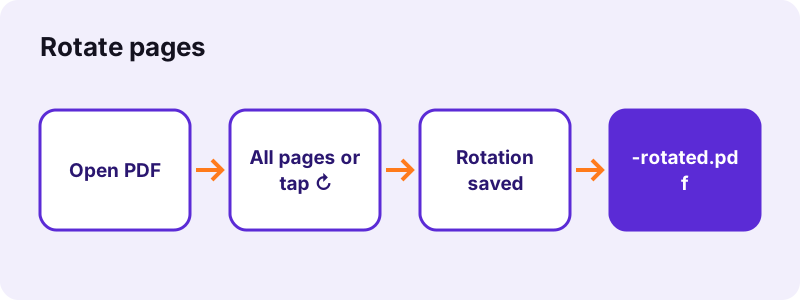
- Choose the PDF. Tap Choose a PDF or drop the file on the box. Every page appears as a thumbnail.
- Pick the rotation. For all pages, choose 90° right, 180° or 90° left. For single pages, tap ↻ under each one; every tap adds 90° and the thumbnail turns with it.
- Press Rotate PDF. The new orientation is written into the file on your device in a fraction of a second.
- Download the file. Save the file ending in -rotated.pdf and open it to check. The original is not changed.
What does pdf24 rotate PDF pages change in the file?
pdf24 rotate PDF pages changes one value per page: the rotation that tells every PDF reader how to show it. The text, pictures and fonts of the page are not touched, so the quality cannot drop. A sideways scan becomes upright, a landscape table stays sharp, and the file size stays almost the same.
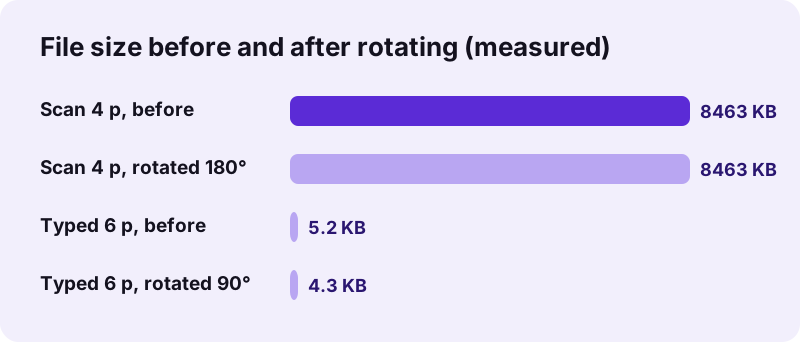
Our 4-page scan of 8,463,060 bytes was 8,462,611 bytes after a 180° turn, a difference of less than 0.01 %, because no image was re-encoded. A 6-page typed file rotated by 90° took 0.2 seconds; all six pages changed from 595 × 842 to 842 × 595 points as displayed.
“The two most common types of orientation are portrait and landscape.”
pdf24 rotate PDF pages: all pages at once
Pick the angle under Turn all pages and press the button without tapping any thumbnail. 90° right turns clockwise, 90° left turns anticlockwise, and 180° flips pages that were scanned upside down. Pages that already had a rotation get the new angle added on top.
pdf24 rotate PDF pages one by one
Tap ↻ under a page to turn just that page by 90° clockwise; tap twice for 180°, three times for 90° left, four times to return to the start. As soon as one page has been tapped, only the tapped pages turn and the all-pages angle is ignored.
pdf24 rotate PDF pages in a mixed scan
A batch scan often has a few landscape sheets among portrait ones. Tap ↻ under each sideways page until its thumbnail stands upright, then save once. The upright pages stay as they are.
pdf24 rotate PDF pages: tip for upside-down stacks
A stack loaded the wrong way round in a sheet feeder gives every page upside down. If a whole stack went into the feeder upside down, rotate every page by 180°, then check whether the page order is also reversed; fix that with Rearrange PDF pages.
Why do I need pdf24 rotate PDF pages for sideways files?
A PDF opens sideways when the page was scanned, photographed or exported in the wrong orientation. Phones save photos with an orientation flag that some converters ignore, and scanners feed landscape sheets on their long edge. The fix is the same in every case: set the rotation so the content reads upright, then save it into the file.
| Symptom | Likely cause | Rotation |
|---|---|---|
| Text runs bottom to top | Page turned 90° left | 90° right |
| Text runs top to bottom | Page turned 90° right | 90° left |
| Text upside down | Sheet fed upside down | 180° |
| Only some pages wrong | Mixed portrait and landscape sheets | ↻ on those pages |
Turning a page in a reader's view menu only changes your screen for the moment. Saving the rotation into the file means the receiver sees it upright too, which is what this tool does.
Is pdf24 rotate PDF pages lossless?
pdf24 rotate PDF pages is lossless because it never redraws a page. A PDF stores the rotation of each page as a separate value, and the tool only sets that value. Images are not decoded or re-saved, text is not converted to pictures, so the rotated file looks exactly as sharp as the original.
- Text stays selectable and searchable.
- Scans keep their resolution and size.
- Links and form fields stay on the page.
- Rotating back by the opposite angle gives the original view again.
Is pdf24 rotate PDF pages safe for private scans?
pdf24 rotate PDF pages is safe for private scans because the file never leaves your device. The browser reads the PDF, shows thumbnails, writes the new rotation and offers the download, all inside the open tab. No server receives the scan, there is no account, and the document disappears from memory when you close the tab.
The result line confirms 0 bytes uploaded after each run. Rotation works on IDs, medical letters and signed contracts alike. Note that a certificate signature covers the exact file, so it will not validate after any change, including a rotation.
For more page work in the same session, see Rearrange PDF pages, Remove PDF pages and Crop PDF. To shrink the rotated scan for email, use Compress PDF.
pdf24 rotate PDF pages on phone and computer
The rotate tool works in Safari on iPhone and iPad, in Chrome or Samsung Internet on Android, and in Chrome, Edge, Firefox or Safari on Windows, Mac, Linux and Chromebook. No app is installed. The ↻ buttons are large enough to tap on a phone, and the file is saved to your usual downloads.
On iPhone, open the saved file from Downloads in the Files app; on Android it appears in the Download folder. Desktop browsers usually open the PDF in a tab, where you can see at once that the pages now stand upright.
pdf24 rotate PDF pages: frequently asked questions
Is pdf24 rotate PDF pages free?
Yes. pdf24 rotate PDF pages costs nothing, needs no account and adds no watermark. There is no daily limit, because the work runs on your own phone or computer. You can rotate the same file again, for example to undo a turn, as often as you need.
Can I rotate only one page with pdf24 rotate PDF pages?
Yes. Tap ↻ under that page; each tap adds 90° clockwise and the thumbnail shows the result. When at least one page has been tapped, only the tapped pages turn and the angle for all pages is ignored. Press Rotate PDF and the other pages keep their orientation.
Does pdf24 rotate PDF pages reduce quality?
No. The tool only sets the rotation value stored with each page; it does not redraw or re-compress anything. Our 8.46 MB scan kept its size after a 180° turn, and typed text stays selectable. Rotating is therefore safe to repeat as often as you like.
Does pdf24 rotate PDF pages upload my file?
No. The PDF is opened and changed in your browser, and the new file is offered as a download from your device's memory. No byte is sent to a server, and the result line says 0 bytes uploaded. After the page has loaded, rotation even works with the network switched off.
Will pdf24 rotate PDF pages keep the rotation when I send the file?
Yes. The rotation is written into the PDF, not into your viewer settings, so every reader shows the pages the new way: Adobe Reader, browser viewers, Preview on Mac, and the readers on Android and iPhone. That is the difference to turning the view, which only changes your own screen.
Which way does 90° right turn in pdf24 rotate PDF pages?
90° right turns the page clockwise, like turning a sheet on a table to the right; 90° left turns it anticlockwise. If text runs from bottom to top, choose 90° right; if it runs from top to bottom, choose 90° left. 180° flips a page that is upside down.
Can pdf24 rotate PDF pages rotate a picture inside a page?
No. The tool turns whole pages. A photo that sits sideways on an upright page needs the page content edited, which this tool does not do. If the PDF came from photos, rotate the photos first in the phone's gallery, then convert them again with JPG to PDF.
Can pdf24 rotate PDF pages open a password-protected file?
Not while it needs a password to open. The tool stops with a message asking you to remove the password. Use Unlock PDF with the password you know, rotate the unlocked copy, and protect it again with Lock PDF if it has to stay locked.
Does pdf24 rotate PDF pages keep form fields and links?
Yes. Rotation changes how the page is shown, not what is on it, so links, comments and form fields stay in place relative to the page content. A digital signature, however, stops validating, because the file has changed; sign again after rotating if a valid signature is needed.
How long does pdf24 rotate PDF pages take?
A fraction of a second for normal files. Our tests took 0.2 seconds for 6 typed pages and 0.3 seconds for an 8.46 MB scan on a desktop computer. Because nothing is re-encoded, even large scans rotate quickly; phones need a little longer to draw the thumbnails.
Can pdf24 rotate PDF pages turn several files at once?
The tool takes one PDF per run, so that the thumbnails and the ↻ buttons belong to one document. For several files, rotate them one after another; each run takes well under a second. If all files need the same turn, merge them first, rotate the merged file once, and split it again if needed.
Is this the official pdf24 rotate PDF pages tool?
No. pdf24tools is an independent website and is not affiliated with PDF24 or Geek Software GmbH. This rotate tool is our own code that runs in your browser. We use the name only because people search for it; your files are processed on your device, never on our servers.
pdf24 rotate PDF pages: sources
- Page orientation — Wikipedia
- PDF — Wikipedia
- File API — MDN Web Docs