How to use pdf24 halve PDF pages in 4 steps
- Choose the PDF. Tap Choose a PDF or drop the file on the box, for example a scan of an open book.
- Pick the cut direction. Left and right halves cuts down the middle (book spreads); Top and bottom halves cuts across (two items stacked on one page).
- Set the reading order. For Arabic, Hebrew or Japanese books, tick Right half first, so the right half comes before the left one.
- Press Halve pages and download. Every page becomes two pages in a file ending in -halved.pdf. Open it and check the order.
What does pdf24 halve PDF pages do?
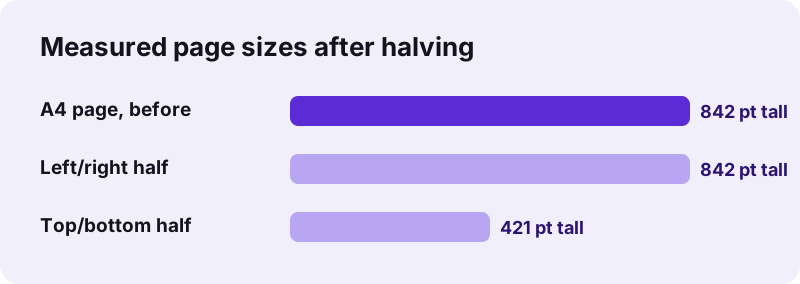
pdf24 halve PDF pages turns every page of a PDF into two pages, each showing one half. In left-and-right mode an A4 page of 595 × 842 points becomes two pages of 297.5 × 842 points; in top-and-bottom mode it becomes two pages of 595 × 421 points. Nothing is redrawn, so scans stay sharp.
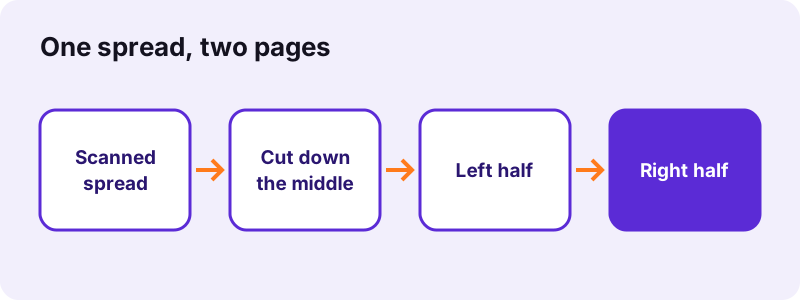
Our 6-page typed file became 12 pages in 0.2 seconds, and the 4-page scan of 8.07 MB became 8 pages of the same total size. Halves follow each other in reading order: page 1 left, page 1 right, page 2 left, and so on. A 200-page book scanned as 100 spreads therefore comes out as 200 single pages, ready for page numbers or OCR.
pdf24 halve PDF pages for scanned books
Scanning a book open on a flatbed gives two book pages per scan. Halving turns that into one book page per PDF page, which reads better on a phone, prints on normal paper and lets you search, number or extract single pages later.
pdf24 halve PDF pages for right-to-left books
In Arabic, Hebrew, Persian or Japanese books the right page comes first. Tick Right half first and the tool puts the right half before the left half for every spread, so the halved file reads in the right order without any reordering.
pdf24 halve PDF pages with rotated scans
If a spread was scanned sideways and the PDF stores a rotation for it, the cut follows the page as you see it, not as it is stored. Left and right therefore mean left and right on screen, whatever the page's rotation value.
pdf24 halve PDF pages: tip for off-centre spreads
The cut is always at the exact middle. If the book sat off-centre on the scanner, one half will show a strip of the other page; trim it afterwards with Crop PDF.
pdf24 halve PDF pages with top and bottom halves
Top and bottom halves suits pages that hold two items stacked: two receipts scanned on one sheet, two tickets, two A5 forms printed on one A4 page, or a 2-up handout printed in landscape and scanned upright. The top half becomes the first page, the bottom half the second.
Is anything erased when pdf24 halve PDF pages cuts a page?
Nothing is erased. pdf24 halve PDF pages copies each page twice and sets a visible area on each copy, the left half on one and the right half on the other. The hidden half is still stored inside the file, which is why the file size stays the same, and why halving is not a way to remove content.
“Within each page, there are one or multiple content streams that describe the text, vector and images being drawn on the page.”
The visible area is a frame laid over that content. To remove private parts for good, use Redact PDF. To make the halved file smaller, use Compress PDF, which can redraw the pages as smaller images.
Which direction should pdf24 halve PDF pages cut?
With pdf24 halve PDF pages, the cut direction depends on how the two parts sit on the page. Choose left and right halves when they stand side by side, as in a book spread or a 2-up sheet. Choose top and bottom halves when they are stacked, as with two receipts or two A5 forms on one A4 sheet.
| Your page | Mode | Each half |
|---|---|---|
| Scanned book spread | Left and right | Single book page |
| A3 landscape scan of two A4 sheets | Left and right | A4 size |
| Two A5 forms on portrait A4 | Top and bottom | A5 landscape |
| Two receipts one above the other | Top and bottom | One receipt |
| Right-to-left book spread | Left and right + Right half first | Single page, right first |
Is pdf24 halve PDF pages private?
pdf24 halve PDF pages runs entirely in your browser, so scanned books, contracts and receipts are never uploaded. The file is read from your device, the halves are built in the open tab, and the download comes from your own memory. No server keeps a copy, and nothing remains after you close the tab.
The result line confirms 0 bytes uploaded after each run. The tool works in current Chrome, Edge, Firefox and Safari on Windows, Mac, Linux, Android and iPhone without an app; once the page is loaded, it even works offline.
After pdf24 halve PDF pages: next steps
A halved file is often the first step of a small clean-up. Book scans usually need the cover halves or blank halves removed, sometimes a page order fix, and page numbers for the new single pages. Each of these steps has its own tool, and all of them work on your device like this one.
- Delete blank or cover halves with Remove PDF pages.
- Fix the order with Rearrange PDF pages.
- Trim dark scanner edges with Crop PDF.
- Make the text searchable with OCR PDF.
- Go the other way, two pages on one sheet, with Pages per sheet.
pdf24 halve PDF pages: frequently asked questions
Is pdf24 halve PDF pages free?
Yes. pdf24 halve PDF pages is free, with no account, no watermark and no page limit. The work is done by your own device, so there is no server cost. You can halve as many files as you like and try both cut directions on the same file to see which one fits.
Does pdf24 halve PDF pages reduce quality?
No. Each half is the original page content with a smaller visible frame; nothing is converted to a picture or re-compressed. Scans keep their resolution and typed text stays selectable, though selecting text near the cut may also pick up words from the hidden half.
Why is the file from pdf24 halve PDF pages not smaller?
Because both halves still contain the whole original page, with only one half visible. Our 8.07 MB scan stayed 8.07 MB after halving. If you need a smaller file, run Compress PDF on the result; its stronger levels redraw each page as a smaller picture.
Can pdf24 halve PDF pages cut in the middle of a single page?
It always cuts at the exact centre, either down the middle or across it. A cut at another position, such as one third, is not available. For an uneven split, halve first and then trim each half with Crop PDF, or crop the original twice into two files.
Can pdf24 halve PDF pages split a book from right to left?
Yes. Tick Right half first together with Left and right halves. For every spread the right half then becomes the first of the two pages, which is the reading order of Arabic, Hebrew, Persian and Japanese books. The option has no effect on top and bottom halves.
Does pdf24 halve PDF pages upload my scans?
No. The PDF is opened by your browser and the halves are built in the same tab with JavaScript; nothing is sent to a server. The result line says 0 bytes uploaded. That makes the tool suitable for scanned contracts, passports or private notebooks.
How many pages do I get from pdf24 halve PDF pages?
Exactly twice as many as before. A 6-page file becomes 12 pages, a 150-page book scan 300 pages. Halves follow each other in reading order: page 1 first half, page 1 second half, page 2 first half, and so on. Remove unwanted halves afterwards with Remove PDF pages.
Can pdf24 halve PDF pages cut only some pages?
The tool halves every page of the file. If only a few pages are spreads, extract those pages first with Extract PDF pages, halve that file, and merge the result back with the single pages using Merge PDF. All three steps run on your device in a few seconds.
Does pdf24 halve PDF pages work on a phone?
Yes, in Safari on iPhone and iPad and in Chrome or Samsung Internet on Android, without an app. Choose the scan from Files or the Downloads folder, pick the cut direction, press Halve pages, and the halved PDF is saved to your downloads, ready to read or share.
Can pdf24 halve PDF pages undo a 2-up print?
Yes, if the sheet holds two pages side by side or one above the other. A landscape A4 sheet with two portrait pages becomes two pages with left and right halves. Margins and the gap between the two pages stay visible; trim them with Crop PDF if needed.
Is this the official pdf24 halve PDF pages tool?
No. pdf24tools is an independent website and is not affiliated with PDF24 or Geek Software GmbH. This tool is our own code that runs in your browser. We use the name only because people search for it; your files are processed on your device, never on our servers.
pdf24 halve PDF pages: sources
- PDF — Wikipedia
- ISO 216 paper sizes — Wikipedia
- File API — MDN Web Docs