How to use pdf24 tools pages per sheet in 4 steps
- Choose the PDF. Tap Choose a PDF or drop the file on the box: slides, a handout, a long report.
- Pick the layout. Choose 2, 4, 6, 8, 9 or 16 pages per sheet and the sheet size: A4, US Letter or A3. Tick the frame option for a thin grey line around each page.
- Press Make sheets. The pages are placed on the new sheets left to right, top to bottom, on your device.
- Download and print. Save the file ending in -2-up.pdf, -4-up.pdf and so on, and print it at actual size.
What does pdf24 tools pages per sheet do?
pdf24 tools pages per sheet builds a new PDF in which each sheet carries several pages of your document, shrunk to fit a grid. You choose 2, 4, 6, 8, 9 or 16 pages per sheet and A4, Letter or A3 paper. Pages are placed as vector content, so text stays sharp and selectable even when it is small.
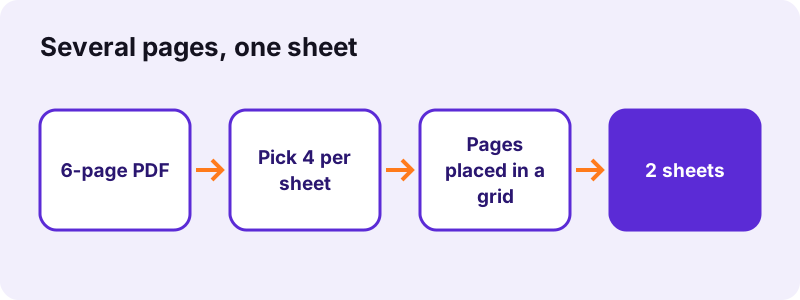
A 6-page A4 test file became 3 landscape A4 sheets at 2 per sheet, 2 portrait sheets at 4 per sheet and a single sheet at 16 per sheet, each in 0.1 to 0.2 seconds. A 4-page scan of 8.07 MB fitted on one sheet at 4 per sheet and kept its size, since the scans were placed, not re-encoded.
“Correct imposition minimizes printing time by maximizing the number of pages per impression”
How pdf24 tools pages per sheet lays out the grid
The grids are 2 × 1 for 2 pages, 2 × 2 for 4, 3 × 2 for 6, 4 × 2 for 8, 3 × 3 for 9 and 4 × 4 for 16. Each sheet keeps an 18-point margin and a 10-point gap between pages, and pages fill the grid left to right, then top to bottom.
Sheet orientation in pdf24 tools pages per sheet
The tool turns the sheet to suit the grid: portrait pages at 2, 6 or 8 per sheet go on a landscape sheet, while 4, 9 and 16 per sheet stay portrait. Landscape source pages, such as slides, swap the grid so they use the paper well.
Frames in pdf24 tools pages per sheet
Tick Draw a thin frame around each page to get a 0.6-point grey border around every page. Frames help when pages have white backgrounds and would otherwise melt into each other, as with plain text pages.
pdf24 tools pages per sheet: printing tip
Print the new PDF at Actual size or 100 % and switch off any pages-per-sheet setting in the printer dialog, or the printer will shrink the sheets a second time.
How small does text get with pdf24 tools pages per sheet?
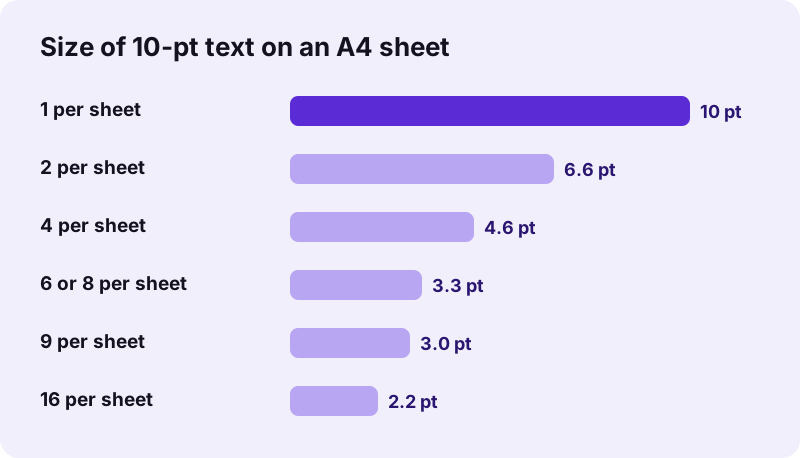
Readability depends on the original text size. With A4 pages on A4 sheets, 10-point body text prints at about 6.6 points with 2 per sheet and 4.6 points with 4 per sheet, both readable. At 6 or more per sheet text falls to about 3 points, fine for slides with large type but too small for reports.
| Pages per sheet | Scale of each page | Good for |
|---|---|---|
| 2 | 66 % | Reports, contracts, reading copies |
| 4 | 46 % | Handouts, drafts to proofread |
| 6 | 33 % | Slide decks, lecture notes |
| 8 | 33 % | Slides with big titles |
| 9 | 30 % | Overviews, photo contact sheets |
| 16 | 22 % | Thumbnails of a long deck |
If text is too small, pick A3 as the sheet size: every page then prints about 1.41 times larger, the ratio between A3 and A4 sides.
How much paper does pdf24 tools pages per sheet save?
pdf24 tools pages per sheet cuts the sheet count to the page count divided by the pages per sheet, rounded up. A 24-page deck needs 12 sheets at 2 per sheet, 6 at 4, 4 at 6 and 2 at 16. Printing double-sided halves that again, so 4 per sheet plus duplex prints 24 pages on 3 sheets.
| Pages in PDF | 2 per sheet | 4 per sheet | 6 per sheet | 9 per sheet | 16 per sheet |
|---|---|---|---|---|---|
| 6 | 3 | 2 | 1 | 1 | 1 |
| 24 | 12 | 6 | 4 | 3 | 2 |
| 50 | 25 | 13 | 9 | 6 | 4 |
| 100 | 50 | 25 | 17 | 12 | 7 |
The last sheet may be only partly filled; the empty cells simply stay white.
Is pdf24 tools pages per sheet private?
pdf24 tools pages per sheet works only in your browser, so the document is never uploaded. The PDF is read from your device, the sheets are composed by JavaScript in the open tab, and the result is saved from memory. No server sees the file, there is no account, and closing the tab removes it.
The result line confirms 0 bytes uploaded after each run. That suits exam papers, board slides and internal reports that should not pass through someone else's server just to be printed.
pdf24 tools pages per sheet, booklet or page size?
Three tools change how pages land on paper. Pages per sheet puts several pages on one side of a sheet in reading order. A booklet puts two pages per side in folding order, so a folded stack reads like a book. Changing the page size gives each page a new paper size, one page per sheet.
| You want | Tool |
|---|---|
| Handout with 4 slides per sheet | Pages per sheet |
| Folded A5 booklet from A4 pages | PDF booklet |
| Letter pages printed on A4 | Change PDF page size |
| Two halves of a page as two pages | Halve PDF pages |
To print only some pages several per sheet, take them out first with Extract PDF pages, then run this tool on the extract.
pdf24 tools pages per sheet: frequently asked questions
Is pdf24 tools pages per sheet free?
Yes. pdf24 tools pages per sheet costs nothing, needs no account and adds no watermark. There is no limit on file count or page count other than your device's memory, because the sheets are built by your own phone or computer rather than a server.
Which layouts does pdf24 tools pages per sheet offer?
Six: 2, 4, 6, 8, 9 or 16 pages per sheet, on A4, US Letter or A3 paper. The grids are 2 × 1, 2 × 2, 3 × 2, 4 × 2, 3 × 3 and 4 × 4. The tool picks portrait or landscape for the sheet so that the pages use the paper as fully as possible.
Why use pdf24 tools pages per sheet instead of the printer setting?
The printer setting works only at that printer and is easy to forget. A PDF with the pages already placed prints the same everywhere, can be emailed to a copy shop, and shows the exact layout on screen before you print. Print it at 100 % and turn the printer's own setting off.
Does pdf24 tools pages per sheet keep text sharp?
Yes. Pages are placed as vector content, not as pictures, so text and lines stay sharp at any size and can still be selected and searched in the new PDF. Scanned pages are placed as they are, so they keep their original resolution too.
Does pdf24 tools pages per sheet upload my PDF?
No. The PDF is opened by your browser and the new sheets are built in the same tab with JavaScript. Nothing is sent to a server, as the result line confirms with 0 bytes uploaded. After the page has loaded, the tool also works with the network switched off.
In which order does pdf24 tools pages per sheet place pages?
Left to right, then top to bottom, like reading a page of text. With 4 per sheet, page 1 is top left, page 2 top right, page 3 bottom left and page 4 bottom right; page 5 starts the next sheet. For folding order instead of reading order, use PDF booklet.
Can pdf24 tools pages per sheet print 2 slides per page?
Yes. Choose 2 pages per sheet. Landscape slides are stacked one above the other, one row each, which leaves each slide at a good size. With 6 per sheet, slides form a 2 × 3 grid, the classic handout layout, still large enough to read titles and big text.
Can I add frames with pdf24 tools pages per sheet?
Yes. Tick Draw a thin frame around each page and every page gets a light grey 0.6-point border. It makes white pages easier to tell apart on the sheet and helps when you cut the sheet into cards. Without the option, pages sit on the sheet without any line.
What paper size should I pick in pdf24 tools pages per sheet?
Pick the paper in your printer: A4 in most countries, US Letter in the United States and Canada. Choose A3 when the printer takes it and the text would be too small on A4; each page then prints about 1.41 times larger. The original page size does not limit the choice.
Does pdf24 tools pages per sheet work on a phone?
Yes, in Safari on iPhone and iPad and in Chrome or Samsung Internet on Android, without an app. Choose the PDF, set the layout, press Make sheets, and the new file is saved to your downloads. Print it from the phone with AirPrint or Android's print service.
Is this the official pdf24 tools pages per sheet tool?
No. pdf24tools is an independent website and is not affiliated with PDF24 or Geek Software GmbH. This tool is our own code that runs in your browser. We use the name only because people search for it; your documents are processed on your device, never on our servers.
pdf24 tools pages per sheet: sources
- Imposition — Wikipedia
- ISO 216 paper sizes — Wikipedia
- Letter (paper size) — Wikipedia
- File API — MDN Web Docs