How to use pdf24 assemble PDF documents in 4 steps
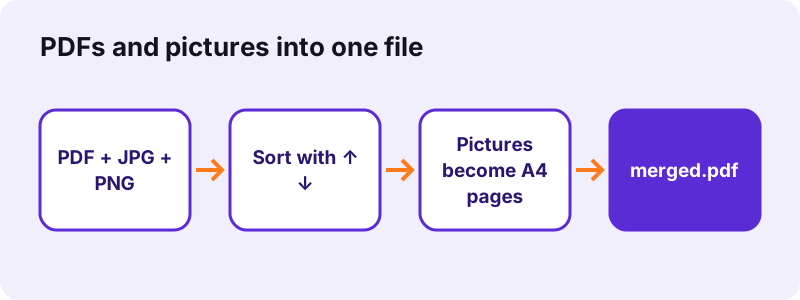
- Add PDFs and pictures. Tap Choose PDF files and select PDFs, photos and scans together, or drop them on the box. At least 2 files are needed.
- Sort the list. Every file is one row. Move it with ↑ and ↓, remove it with ×. The final document follows the list from top to bottom.
- Press Merge PDF. PDF pages are copied as they are; each picture is placed on a new A4 page, turned to landscape when it is wider than tall.
- Download merged.pdf. Save the file, open it and check the order. The original files are not changed.
What is pdf24 assemble PDF documents?
pdf24 assemble PDF documents is a merge tool that also accepts pictures. You put PDF files and images in one list, set the order, and get one PDF back. PDF pages are copied unchanged, while every JPG, PNG, HEIC or other picture is centred on its own A4 page, so a mixed pile of papers becomes one clean document.
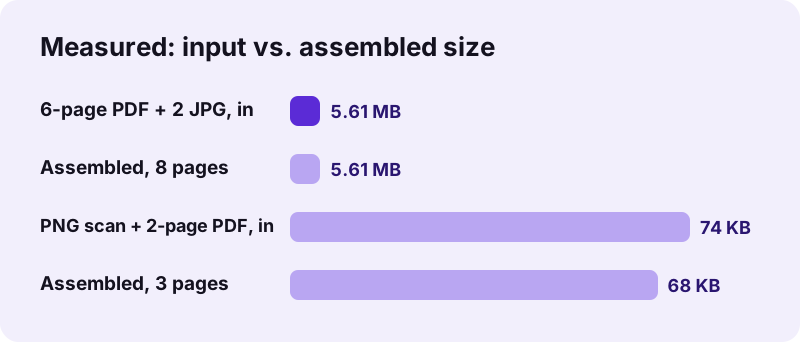
In our test a 6-page typed PDF, a 3.6 MB phone photo and a 2.0 MB scanned page became one 8-page file of 5.61 MB in 0.2 seconds. A PNG scan of an invoice placed before a 2-page PDF gave a 3-page file of 68 KB in 0.9 seconds. The sizes stay close to the inputs because JPG and PNG files are embedded exactly as they are.
pdf24 assemble PDF documents for applications and claims
The typical job is a file that a portal or an office wants in one piece: a filled form as PDF, a photo of your passport, a scanned diploma and a bank letter. Assembling them in the requested order saves printing and rescanning. Insurance claims work the same way: claim form first, then photos of the damage and the receipts.
pdf24 assemble PDF documents on a phone
On Android and iPhone the picker lets you mix files from the photo library and the file manager. Photos taken with an iPhone are often HEIC; the tool decodes them in the browser and stores them as JPEG inside the PDF, so the result opens on any computer.
pdf24 assemble PDF documents with multi-page TIFF scans
Office scanners and fax software often save several pages in one TIFF file. Each page inside the TIFF becomes its own A4 page in the result, in the order the scanner wrote them, so a 3-page TIFF adds 3 pages.
pdf24 assemble PDF documents: tip for sharp photos
Take photos of papers in daylight, straight from above, and crop them in the phone's photo app before you add them. The tool fits the picture into the page as it is; it does not straighten or crop.
Which files can pdf24 assemble PDF documents take?
pdf24 assemble PDF documents accepts PDF files plus the common picture formats: JPG, PNG, HEIC and HEIF, WebP, GIF, BMP, TIFF and SVG. Word, Excel or PowerPoint files are not accepted here; convert them to PDF first and then add the PDF to the list together with your pictures.
| File type | What happens inside the PDF | Quality |
|---|---|---|
| All pages copied in order | Unchanged, text stays selectable | |
| JPG / JPEG | Embedded as it is on an A4 page | Unchanged |
| PNG | Embedded as it is on an A4 page | Unchanged |
| HEIC / HEIF | Decoded, stored as JPEG | Very close to the photo |
| WebP, GIF, BMP | Redrawn as JPEG (up to 3,000 px) | Very close; GIF animation keeps frame 1 |
| TIFF | Each frame becomes a page (up to 4,000 px) | Lossless PNG inside |
| SVG | Rendered as a picture (up to 4,000 px) | Sharp, but no longer vector |
For Office files use Word to PDF, Excel to PDF or PowerPoint to PDF, then come back with the PDFs. If you only have pictures, JPG to PDF offers page size, margin and quality options that this tool does not.
How does pdf24 assemble PDF documents place a picture on a page?
pdf24 assemble PDF documents puts each picture on a new A4 page of 595 × 842 points. A picture that is wider than tall gets a landscape page. The image is scaled to fit inside a 20-point margin, centred, and never enlarged more than 1.5 times, so a small logo does not turn into a blurry full page.
- Page size: always A4, portrait or landscape, whatever the PDF pages around it use.
- Margin: 20 points (about 7 mm) on every side, white.
- Scaling: fit inside the margin, proportions kept, at most 150 %.
- Text: a picture page has no selectable text; run OCR on the result if you need search.
“Based on the PostScript language, a PDF file encapsulates a complete description of a fixed-layout document”
pdf24 assemble PDF documents with US Letter pages
Picture pages are A4 even when your PDFs are Letter size, so the file can mix 595 × 842 and 612 × 792 point pages. Readers handle that without trouble. For one uniform size, run Change PDF page size on the assembled file and pick Letter.
pdf24 assemble PDF documents and searchable text
Text in your PDF pages stays searchable. Text inside photos is only pixels. To make it searchable, open the assembled file in OCR PDF, which recognises the words and adds an invisible text layer.
pdf24 assemble PDF documents or Merge PDF: which one?
Both tools join files into one PDF on your device with the same engine. Merge PDF accepts PDF files only and skips anything else with a message. pdf24 assemble PDF documents accepts PDFs and pictures in one list. If all your files are already PDFs, the result is identical; the difference is only which files the picker lets in.
| Question | Merge PDF | Assemble PDF |
|---|---|---|
| Accepts PDF | Yes | Yes |
| Accepts JPG, PNG, HEIC, TIFF | No | Yes, as A4 pages |
| Order of files | ↑ ↓ arrows | ↑ ↓ arrows |
| Output name | merged.pdf | merged.pdf |
| Uploads | 0 bytes | 0 bytes |
See Merge PDF for the details that both tools share: what survives a merge, password-protected files and digital signatures.
Is pdf24 assemble PDF documents safe for ID photos?
Assembling ID photos and personal papers here is safe because no file leaves your device. The browser reads the pictures and PDFs from your storage, builds the new PDF in the open tab, and offers it as a download. No server receives a copy, nothing is logged, and closing the tab clears the files from memory.
That matters most for exactly the files people assemble: passports, residence permits, payslips and medical letters. The result line after each run states the time taken and 0 bytes uploaded. Photos keep their EXIF data inside JPG files, so remove location data in the phone first if the receiver should not see it.
pdf24 assemble PDF documents: problems and fixes
Most failed assemblies come from a file type the tool does not take, a password-protected PDF or a very large photo set on an older phone. The message under the button names the problem. Skipped files are counted, for example 1 file skipped, so you can see at once which file needs another route.
- A file is skipped: it is not a PDF or a supported picture; convert it to PDF first.
- This PDF is password-protected: unlock it with Unlock PDF, then assemble.
- A picture is sideways: rotate it in the photo app, or rotate that page later with Rotate PDF pages.
- The result is too big for an upload form: shrink it with Compress PDF.
pdf24 assemble PDF documents: frequently asked questions
Is pdf24 assemble PDF documents free?
Yes, pdf24 assemble PDF documents is free with no account, no watermark and no limit on the number of files. The work runs on your own phone or computer, so there is no server cost to pass on. The only practical limit is memory: dozens of 12-megapixel photos at once are better assembled on a computer than on an old phone.
Can I mix JPG and PDF files in pdf24 assemble PDF documents?
Yes, that is what the tool is for. Add PDFs and JPG, PNG, HEIC, WebP, GIF, BMP, TIFF or SVG pictures in one list, sort them with the arrows and merge. PDF pages are copied unchanged; each picture gets its own A4 page, centred with a 20-point margin.
What page size does pdf24 assemble PDF documents give pictures?
Every picture is placed on an A4 page, 210 × 297 mm, portrait for tall pictures and landscape for wide ones. The picture is scaled to fit inside a 20-point margin and enlarged at most 1.5 times. PDF pages in the same list keep their own sizes, so a Letter-size PDF stays Letter.
Does pdf24 assemble PDF documents reduce photo quality?
JPG and PNG files are embedded byte for byte, so they keep their full quality; our 3.6 MB photo arrived in the PDF at the same size. HEIC, WebP, GIF and BMP are converted to JPEG at high quality, and TIFF to lossless PNG, with a cap of 3,000 to 4,000 pixels on the longest side.
Can I add Word files to pdf24 assemble PDF documents?
Not directly. The picker takes PDFs and pictures only. Convert each Word, Excel or PowerPoint file to PDF with our converters, which also run in the browser, and then add those PDFs to the list together with your photos and scans. The order of the final file is still yours to set.
Does pdf24 assemble PDF documents upload my photos?
No. The photos and PDFs are read by the browser and the new file is built in the same tab. Nothing is sent to a server, which the result line confirms with 0 bytes uploaded. That makes it suitable for passports, ID cards, payslips and medical papers that should never sit on someone else's server.
How do I change the order in pdf24 assemble PDF documents?
Each row in the file list has ↑ and ↓ buttons and an × to remove it. The finished PDF follows the list from top to bottom. To change the order of single pages inside a PDF you added, assemble first, then open the result in Rearrange PDF pages, where every page can be moved.
Why does pdf24 assemble PDF documents make a picture page landscape?
The tool turns the A4 page to landscape whenever the picture is wider than it is tall, so the picture fills the page instead of shrinking into a strip. A photo of a portrait document that was taken sideways will therefore land on a landscape page; rotate the photo first, or turn the page later with Rotate PDF pages.
Can pdf24 assemble PDF documents make the text in photos searchable?
Not by itself. A photo is stored as a picture, so its words cannot be searched or copied. After assembling, run the file through OCR PDF: it recognises the text on picture pages and adds an invisible text layer, while pages that already had real text stay as they are.
Does pdf24 assemble PDF documents work on iPhone?
Yes, in Safari on iOS 15 or later. Choose photos from the library or documents from Files in the same picker. HEIC photos from the iPhone camera are decoded in the browser and stored as JPEG, so the assembled PDF opens on Windows, Android and Mac without any extra codec.
Is this the official pdf24 assemble PDF documents tool?
No. pdf24tools is an independent website and is not affiliated with PDF24 or Geek Software GmbH. This tool is our own code and runs entirely in your browser. We use the name only because it is what people search for, and your files are never processed on our servers or anyone else's.
More pdf24 assemble PDF documents tools and guides
pdf24 assemble PDF documents: sources
- PDF — Wikipedia
- ISO 216 paper sizes — Wikipedia
- File API — MDN Web Docs
- Combine PDFs in Preview on Mac — Apple Support