How to use pdf24 PowerPoint to PDF in 3 steps
- Choose the presentation. Drop one or more .pptx, .ppsx or .potx files on the box, or tap Choose files.
- Press Convert to PDF. Each slide is drawn on its own page by JavaScript on your device.
- Download the PDF. Save the PDF, or the ZIP for several decks, and page through it once.
What does pdf24 PowerPoint to PDF draw from a slide?
pdf24 PowerPoint to PDF draws each slide in layers, the way PowerPoint does: the background from the slide, layout or master, then logos and bars from the master, then pictures, shapes, tables and text boxes in their stacking order. Text is real text set in Noto Sans, so the PDF can be searched and copied.
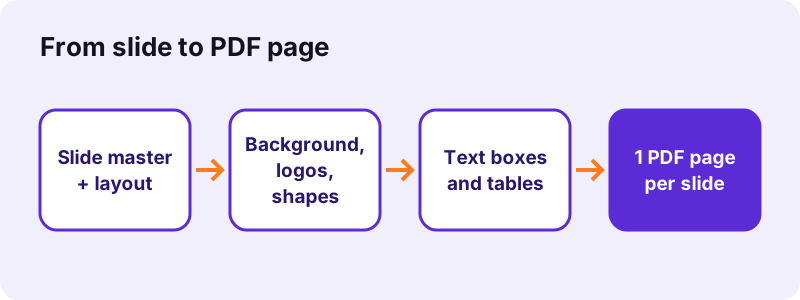
Text sizes come from the run itself, or from the placeholder on the layout or master, so a title keeps its title size even when the slide does not set one. Theme colours are resolved through the theme file, including lighter and darker tints such as Accent 1, Lighter 40 %.
“Microsoft PowerPoint, or simply PowerPoint, is a presentation program developed by Microsoft.”
Slide size in pdf24 PowerPoint to PDF
Each PDF page has the slide's own size from presentation.xml. Our 4:3 test deck gave 720 × 540-point pages (10 × 7.5 in); a 16:9 deck saved by current PowerPoint gives 960 × 540-point pages (13.33 × 7.5 in).
pdf24 PowerPoint to PDF and fonts
All text is set in Noto Sans regular, bold or italic. A deck designed with a display font will look plainer; line breaks inside a text box can move by a word because letter widths differ.
pdf24 PowerPoint to PDF for right-to-left and Asian text
Lines in Arabic, Hebrew, Hindi, Thai, Chinese, Japanese or Korean are shaped by the browser and placed as images, so they look right but cannot be selected in the PDF.
pdf24 PowerPoint to PDF tip for brand fonts
If the exact typeface matters for a client deck, export from PowerPoint itself; use the browser converter for handouts, reviews and quick sharing.
What does pdf24 PowerPoint to PDF leave out?
pdf24 PowerPoint to PDF does not draw charts, SmartArt, gradients, rotated shapes, animations, transitions, embedded videos or audio. Speaker notes are not printed. A slide that relies on a chart therefore shows an empty space where the chart was; everything else on that slide is still drawn.
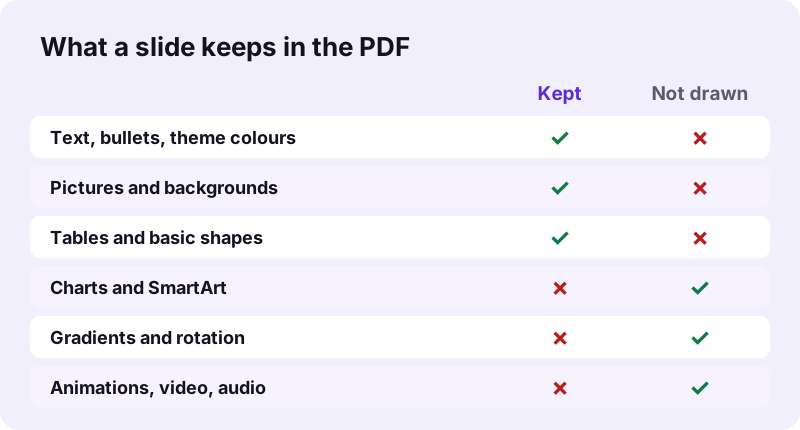
| Slide element | In the PDF |
|---|---|
| Text boxes, titles, bullets | Drawn, selectable |
| Pictures (PNG, JPG) | Drawn |
| Backgrounds (colour or picture) | Drawn |
| Rectangles, ellipses, lines | Drawn with fill and outline |
| Other preset shapes | Drawn as their bounding rectangle |
| Tables | Drawn |
| Grouped objects | Drawn |
| Charts, SmartArt | Not drawn |
| Gradients, rotation | Not drawn |
| Animations, video, audio | Not drawn |
| Speaker notes | Not included |
Fix for charts: in PowerPoint, right-click the chart → Save as Picture, put the PNG on the slide in place of the chart, save, and convert again.
How fast is pdf24 PowerPoint to PDF? Measured
pdf24 PowerPoint to PDF converted our 3-slide, 31 KB test deck with a picture into a 3-page, 14,541-byte PDF in 1.2 seconds in Chrome on Windows 10; 124 characters of slide text were extractable. A 2-slide OpenDocument deck took 0.8 seconds.

| Deck | Input | Pages | Page size | Time | |
|---|---|---|---|---|---|
| dc-deck.pptx | 31 KB | 14,541 B | 3 | 720 × 540 pt | 1.2 s |
| dc-slides.odp | 2.0 KB | 9,759 B | 2 | 793.7 × 446.5 pt | 0.8 s |
The PDF can be smaller than the .pptx because the presentation package also carries layouts, masters and themes that are only drawn once per slide.
Is pdf24 PowerPoint to PDF safe for unreleased decks?
pdf24 PowerPoint to PDF never uploads the presentation. The browser reads it with the File API, JavaScript unzips and draws it in memory, and the result line confirms 0 bytes uploaded. Pitch decks, board slides and unreleased product plans stay on your device, with no account and no stored copy.
Background: how browsers read local files (MDN).
pdf24 PowerPoint to PDF for PPTX, PPSX, POTX, PPT and ODP files
The converter reads the modern PowerPoint XML formats: .pptx decks, .ppsx slide shows and .potx templates. Old binary .ppt files from PowerPoint 97–2003 cannot be read and must be saved as .pptx first. OpenDocument and Keynote decks have their own routes.
| File | What to do |
|---|---|
| .pptx, .ppsx, .potx | Convert here, or on PPTX to PDF |
| .ppt (97–2003) | Save as .pptx first, see PPT to PDF |
| .odp (Impress) | ODP to PDF |
| .odg (Draw) | ODG to PDF |
| .key (Keynote) | Keynote → File → Export To → PowerPoint, then convert |
pdf24 PowerPoint to PDF on iPhone, Android, Mac and Chromebook
The page runs in Safari on iPhone and iPad, Chrome on Android, and every current browser on Windows, macOS, Linux and ChromeOS, so a deck received by e-mail can become a PDF without the PowerPoint app.
- iPhone/iPad: save the .pptx to Files, then Choose files → Browse.
- Android: download it, then pick it from Download or Drive.
- Mac without Office: drag the .pptx from Finder.
- Google Slides: File → Download → Microsoft PowerPoint (.pptx), then convert.
pdf24 PowerPoint to PDF with many pictures on a phone
Large decks full of photos need memory. If a phone tab reloads, convert on a computer, or reduce picture sizes in PowerPoint first.
pdf24 PowerPoint to PDF versus Export in PowerPoint
PowerPoint's own Export → Create PDF keeps your fonts, charts, SmartArt and gradients, and can print notes pages or handouts. The browser converter is the quick route when PowerPoint is not installed, on a phone, or when you want several decks done in one batch.
| Need | Browser converter | PowerPoint desktop |
|---|---|---|
| No install | Yes | No |
| Charts, SmartArt, gradients | No | Yes |
| Original fonts | No (Noto Sans) | Yes |
| Notes pages and handouts | No | Yes |
| Batch of decks | Yes, ZIP | One at a time |
| 0 bytes uploaded | Yes | Yes |
pdf24 PowerPoint to PDF problems and fixes
Most surprises come from content the converter does not draw or from the file type. These fixes cover the usual cases.
- "Old binary .ppt" message or file skipped: save as .pptx in PowerPoint, Keynote, Google Slides or LibreOffice Impress.
- Empty area on a slide: a chart or SmartArt; replace it with a picture.
- Shape looks square: a preset shape other than rectangle, ellipse or line is drawn as its rectangle.
- Hidden slides appear: every slide in the deck is drawn; delete hidden ones in a copy.
- PDF too big for e-mail: use Compress PDF.
pdf24 PowerPoint to PDF next steps
- Merge PDF to join several decks.
- Pages per sheet for 2, 4 or 6 slides per handout page.
- PDF to PowerPoint to go back.
pdf24 powerpoint to PDF: frequently asked questions
Is pdf24 PowerPoint to PDF free?
Yes. It is free, with no sign-up, no watermark and no limit on decks, because your own device does the work. pdf24tools is an independent website and is not affiliated with PDF24 or Geek Software GmbH; we use the name only because it is what people search for. All our tools run the same private way.
Does pdf24 PowerPoint to PDF upload my presentation?
No. The .pptx is read from your disk by the browser, unzipped and drawn in memory by JavaScript. The result line shows the bytes read and 0 bytes uploaded. Only the converter code is fetched from our server; your slides never are.
Can pdf24 PowerPoint to PDF convert old .ppt files?
No. PowerPoint 97–2003 .ppt files use a binary format the converter cannot read, and the page tells you so. Open the file in PowerPoint, Keynote, Google Slides or LibreOffice Impress, save it as .pptx, and convert that copy. Your slides keep their content in the new format.
Does pdf24 PowerPoint to PDF keep animations?
No. A PDF is static, and the converter draws each slide in its final state, with every object visible at once. Animations, transitions, embedded video and audio are not included. If an animation reveals items one by one, all of them appear together on the PDF page.
Are speaker notes included by pdf24 PowerPoint to PDF?
No. Only the slides themselves are drawn, one per page. To share notes, use PowerPoint's own export with Notes Pages, or copy the notes into a document and convert it with Word to PDF. The slide text on each page stays selectable and searchable.
Why are charts missing after pdf24 PowerPoint to PDF?
Charts and SmartArt are not drawn, because they are stored as separate data that needs a chart engine. The rest of the slide is drawn normally. Save the chart as a picture in PowerPoint, place the picture on the slide instead, and convert again.
Does pdf24 PowerPoint to PDF keep the 16:9 format?
Yes. Each page takes the slide size stored in the presentation, so a 16:9 deck gives wide pages and a 4:3 deck gives 720 × 540-point pages, as our test showed. Nothing is cropped or padded to A4, which keeps the PDF looking like the slide show.
Can pdf24 PowerPoint to PDF put several slides on one page?
Not in one step: it always makes one page per slide. After converting, open Pages per sheet and choose 2, 4 or 6 pages per sheet to make a printable handout. That keeps the slide text selectable, because pages are placed, not turned into images.
Does pdf24 PowerPoint to PDF work with Google Slides?
Yes, after downloading. In Google Slides choose File, Download, Microsoft PowerPoint (.pptx), then pick that file here. A Slides link cannot be converted directly, because the page only reads files that are on your device. Comments and speaker notes from Slides are not printed.
Is the text selectable after pdf24 PowerPoint to PDF?
Yes, for Latin, Greek and Cyrillic scripts: slide text is drawn as real text with an embedded Noto Sans subset, so you can search and copy it. From our 3-slide test deck 124 characters were extractable. Lines in Arabic, Hebrew or Asian scripts are placed as images.
Can pdf24 PowerPoint to PDF convert several decks at once?
Yes. Select or drop several .pptx files together; each one becomes its own PDF with the same name, and the set downloads as a ZIP. To get one combined PDF, open Merge PDF afterwards and drop the converted files in the order you want.
More pdf24 powerpoint to PDF tools and guides
pdf24 powerpoint to PDF: sources
- Microsoft PowerPoint — Wikipedia
- Office Open XML — Wikipedia
- File API — MDN Web Docs