How to use pdf24 PNG to PDF in 4 steps
- Choose the PNG files. Tap Choose images or drop one or more PNG files on the box. Each PNG becomes one page.
- Check the order. Use the ↑ and ↓ arrows in the file list to move a screenshot up or down.
- Keep Original quality. Original keeps the PNG lossless. Pick Small file only when the PNG is a large photo and the PDF must be light.
- Convert and download. Press Convert to PDF, save the file and zoom in to check that lines and text are sharp.
What happens to a PNG in pdf24 PNG to PDF?
pdf24 PNG to PDF decodes each PNG and stores its pixels in the PDF with lossless Flate compression, the same family of compression PNG itself uses. Nothing is turned into JPEG in Original mode, so a 1200 × 800 chart arrives as 1200 × 800 pixels and the file size stays close to the PNG's own size.
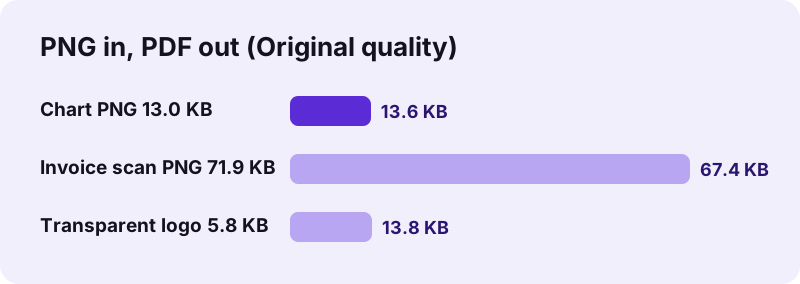
Our invoice scan of 1654 × 2339 pixels even became slightly smaller as a PDF, 67.4 KB against 71.9 KB, because the PDF library recompresses the pixel data. A small transparent logo grew from 5.8 KB to 13.8 KB, since the transparency is stored as a separate mask next to the colour data.
“PNG was developed as an improved, non-patented replacement for Graphics Interchange Format (GIF).”
pdf24 PNG to PDF for screenshots
Screenshots are the most common PNG files: Windows Snipping Tool, macOS and Android all save them as PNG by default. They contain sharp interface text and flat colours, which JPEG blurs into grey halos. Keeping Original quality is therefore the right choice for bug reports, tutorials and proof-of-payment screenshots.
pdf24 PNG to PDF with transparent backgrounds
A PNG with an alpha channel keeps it in the PDF: transparent pixels show whatever is behind them, which on a normal page is white paper. Logos and signatures therefore look clean, without a black or grey box around them. If you later place the page over something else, for example with an overlay tool, the transparency still works.
pdf24 PNG to PDF for charts and diagrams
Wide charts are usually landscape. With orientation on Automatic the tool chose an A4 landscape page, 841.9 × 595.3 pt, for our 1200 × 800 chart, so the graphic fills the width instead of shrinking into a portrait page. Choose Same as image when the PDF will only be viewed on screen and you want no white border at all.
pdf24 PNG to PDF: tip for sharp printing
A PNG prints at the pixels it has. A 1200 px wide chart on an A4 page gives about 150 dpi, fine for a report; a 600 px icon gives about 75 dpi and looks soft. Export charts at twice the size you need before converting, rather than trying to sharpen them afterwards.
Why is a photo PNG so big after pdf24 PNG to PDF?
A photo saved as PNG is huge because PNG stores every pixel losslessly, and the pdf24 PNG to PDF result keeps that weight. Our 12-megapixel photo PNG of 15.03 MB gave a 12.17 MB PDF in Original mode, while High (smaller) turned it into a 1.24 MB PDF in 0.7 s.
PNG is ideal for graphics with flat areas and poor for camera photos. High and Small file redraw the picture as JPEG at 3,000 or 1,600 pixels on the long side, which suits photos well. For screenshots and charts stay with Original; the files are small anyway.
| Input | Original | High (smaller) | Small file |
|---|---|---|---|
| Invoice scan, 1654 × 2339, 71.9 KB | 67.4 KB, lossless | not measured | 37.7 KB, JPEG 1131 × 1600 |
| Photo PNG, 3024 × 4032, 15.03 MB | 12.17 MB, 10.7 s | 1.24 MB, 0.7 s | not measured |
| Chart, 1200 × 800, 13.0 KB | 13.6 KB, 0.3 s | not measured | not measured |
pdf24 PNG to PDF and transparency in the smaller modes
JPEG has no transparency, so High and Small file paint transparent areas white before encoding. On a white page you will not see a difference, but the mask is gone. Keep Original for logos you may reuse on coloured backgrounds.
Is pdf24 PNG to PDF private?
pdf24 PNG to PDF is private because the screenshots never leave your device. The browser reads each PNG with the File API, the PDF is built in JavaScript on your phone or computer, and the result line reports 0 bytes uploaded. Screenshots of bank apps, chats or passwords stay with you.
- No account, no email address and no watermark.
- Works in airplane mode once the page is loaded.
- Nothing is stored; closing the tab clears the files from memory.
- Same tool for other formats: JPG to PDF and images to PDF.
pdf24 PNG to PDF or JPG to PDF: which one to use
Both pages use the same engine, but the right input format depends on what the picture shows.
Use pdf24 PNG to PDF for anything drawn by a computer: screenshots, charts, maps, diagrams, logos, scanned forms saved as PNG. These files have large flat areas, compress well without loss and keep sharp edges. Use JPG for camera photos, where lossy compression keeps files small with no visible change. If you are unsure, look at the size: a PNG over 5 MB is almost always a photo, and High (smaller) will cut it by about 90 %, as our 15.03 MB photo PNG reaching 1.24 MB shows.
| Property | PNG page | JPG page |
|---|---|---|
| Compression in Original mode | Lossless (Flate) | JPEG kept as is |
| Transparency | Kept as a mask | Not available |
| Best for | Screenshots, charts, logos | Photos, phone scans |
pdf24 PNG to PDF on Windows, Mac, iPhone and Android
The page works in Chrome, Edge, Firefox and Safari on desktop and mobile.
On Windows, screenshots land in Pictures › Screenshots; on a Mac they appear on the desktop; on Android they sit in the Screenshots album; on iPhone the Photos app may hand them over as PNG or as JPG depending on the app. Select them all at once and each one becomes a page. For a strict size limit, use PNG to PDF under 200 KB.
pdf24 PNG to PDF: frequently asked questions
Is pdf24 PNG to PDF free?
Yes. pdf24 PNG to PDF is free, with no account, no watermark and no limit on how many files you convert. The work runs in your browser, so there is no server cost to charge for. You only need a current browser on a phone, tablet or computer.
Is pdf24 PNG to PDF made by PDF24?
No. pdf24tools is an independent site, not affiliated with PDF24 or Geek Software GmbH. The phrase appears in our titles because people search for it. The converter and the measured numbers on this page are our own, and your PNG files are processed only on your own device.
Does pdf24 PNG to PDF lose quality?
Not in Original mode. The PNG pixels are stored in the PDF with lossless compression, so every pixel is identical to the source. Quality changes only if you pick High (smaller) or Small file, which convert the picture to JPEG and reduce its size to make the PDF lighter.
Does pdf24 PNG to PDF keep transparency?
Yes, in Original mode. The alpha channel is stored as a soft mask in the PDF, so transparent parts show the white page or whatever lies behind them later. In High and Small file modes transparent areas are filled with white, because those modes write JPEG, which cannot store transparency.
Can pdf24 PNG to PDF put several screenshots in one PDF?
Yes. Select all the PNG files at once or press Add more files. Each screenshot becomes one page in the order of the list, and the arrows move a page up or down. The download is one PDF called images.pdf when more than one picture is used.
Does pdf24 PNG to PDF upload my screenshots?
No. The page reads the PNG files with the browser File API and builds the PDF locally. The result line shows 0 bytes uploaded, nothing is stored on a server, and the tool keeps working with the network switched off, which you can test in airplane mode.
Why did pdf24 PNG to PDF make my file bigger?
Two cases make the PDF larger than the PNG. A transparent PNG gets a separate mask in the PDF, so our 5.8 KB logo became 13.8 KB. A PNG that was already very well optimised may also grow a little. For photos saved as PNG, choose High to shrink the file strongly.
Can I select the text in a PDF from pdf24 PNG to PDF?
No. A PNG contains pixels, so the text in a screenshot becomes part of a picture in the PDF. You can read and print it, but not search or copy it. Run the OCR tool on the finished PDF to add a hidden, searchable text layer.
Which page size should I use in pdf24 PNG to PDF?
Use A4 or US Letter when the PDF may be printed or uploaded to a form, since both match real paper. Use Same as image for screen-only documents such as slide exports, so every page is exactly the size of its PNG and has no white border.
Does pdf24 PNG to PDF work on an iPhone?
Yes. Open the page in Safari, tap Choose images and pick the screenshots from Photos or Files. Some iPhone apps share screenshots as JPG instead of PNG; both are accepted. The PDF is saved through the download prompt to the Files app, where you can share it.
Can pdf24 PNG to PDF make the PDF smaller than 100 KB?
Yes, for most screenshots and scans. Choose Small file, or use the PNG to PDF size pages, which rebuild the PDF with gradually smaller pictures until it fits the limit you need. Our invoice scan went from 71.9 KB to 37.7 KB with Small file.
More pdf24 PNG to PDF tools and guides
pdf24 PNG to PDF: sources
- PNG — Wikipedia
- Portable Network Graphics (PNG) Specification — W3C
- File API — MDN Web Docs