How to use pdf24 tools TIFF to PDF in 4 steps
- Choose the TIFF. Tap Choose images or drop a .tif or .tiff file on the box. You can add several TIFF files.
- Check the file order. With several files, the ↑ and ↓ arrows set which file comes first; pages inside one TIFF keep their own order.
- Pick page size and quality. A4 or US Letter for documents, Same as image for drawings. Keep Original for black-and-white scans.
- Convert and download. Press Convert to PDF. The TIFF is decoded on your device; save the PDF and scroll through every page.
What does pdf24 tools TIFF to PDF do with a multi-page TIFF?
pdf24 tools TIFF to PDF reads every image directory inside the TIFF, which is how the format stores pages, and turns each one into a PDF page in the same order. Our 3-page test file at 850 × 1100 pixels per page became a 3-page A4 PDF, each page centred with a small margin.
The TIFF is decoded in the browser by the open-source UTIF.js library, because browsers cannot display TIFF on their own. Each decoded page is then stored as a lossless PNG inside the PDF in Original quality. A TIFF that the decoder cannot read stops with a clear error instead of producing blank pages.
“TIFF is widely supported by scanning, faxing, word processing, optical character recognition, image manipulation, desktop publishing, and page-layout applications.”
pdf24 tools TIFF to PDF for scanner output
Office scanners and multifunction printers often save a stack of pages as one multi-page TIFF. Opening that file on a phone usually shows only the first page, if anything. Converting it gives a PDF that every mail client, portal and phone shows completely, page by page, with the original page order intact.
pdf24 tools TIFF to PDF for fax documents
Fax software and online fax services commonly deliver TIFF files with one page per fax sheet, often black and white. These convert well in Original quality: flat black text on white compresses very efficiently as PNG, which is why our scan shrank from 88.3 KB to 35.6 KB instead of growing.
pdf24 tools TIFF to PDF for large archive scans
Archive and museum TIFFs can be very large. The converter caps the long side of each page at 4,000 pixels in Original and High modes, which is still about 340 dpi on A4, and at 1,600 pixels for JPEG pages in Small file. Pages smaller than the cap keep their exact pixel size.
pdf24 tools TIFF to PDF: tip for the right page size
Choose A4 or US Letter to match the paper the document was scanned from, so printing gives the real size. Choose Same as image with no margin for drawings or plans, so the PDF page has exactly the TIFF's proportions and no white frame.
Which quality should I pick in pdf24 tools TIFF to PDF?
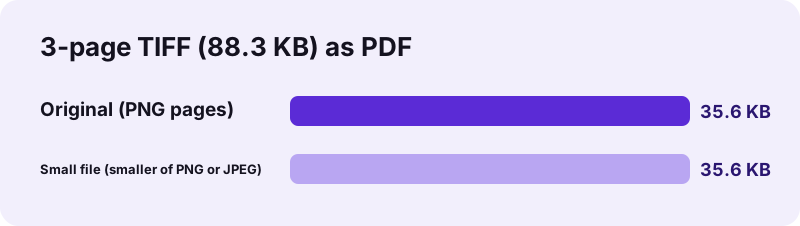
pdf24 tools TIFF to PDF gives the best result for most scans in Original quality, which stores every page as a lossless PNG. Small file compares a 1,600-pixel JPEG page with the lossless page and keeps the smaller one: our black-and-white 3-page test gave 35.6 KB in both, not 83.6 KB.
| Option | Page encoding | Long side cap | 3-page scan result |
|---|---|---|---|
| Original | PNG, lossless | 4,000 px | 35.6 KB, 1.1 s |
| High (smaller) | JPEG 88 % | 4,000 px | not measured |
| Small file | smaller of JPEG 88 % and lossless PNG | 1,600 px for JPEG pages | 35.6 KB (lossless pages kept) |
JPEG suits colour photographs, not sharp text on a plain background. Small file checks this for you page by page and keeps JPEG only when it is smaller, which is the case for colour TIFFs from cameras or photo scanners. High always writes JPEG pages, so pick it only for colour photos. The 1.1 s of the first run includes loading the TIFF decoder once.
pdf24 tools TIFF to PDF and searchable text
A scanned TIFF contains pictures of pages, so the PDF has no selectable text. To search or copy the words, run OCR on the PDF afterwards; it adds an invisible text layer and keeps the page images as they are.
Is pdf24 tools TIFF to PDF safe for confidential scans?
pdf24 tools TIFF to PDF is safe for contracts, medical faxes and HR files because nothing is uploaded: the browser reads the TIFF with the File API, decodes it in JavaScript and builds the PDF on your device. The result line shows 0 bytes uploaded, and the tool works offline once loaded.
- No account, no watermark, no limit on pages.
- Several TIFF files can go into one PDF in one run.
- Other picture formats work in the same box: see images to PDF.
- Need separate pictures instead? Use TIFF to JPG.
pdf24 tools TIFF to PDF on Windows, Mac and phones
The converter runs in Chrome, Edge, Firefox and Safari on desktop and mobile.
Windows Photos and macOS Preview can show TIFF files, but sending them to someone on a phone or uploading them to a form often fails. In the browser you just pick the file; on a phone, choose it from the Files app, since TIFF files rarely sit in the photo gallery. A PDF also tends to be accepted by portals that list only PDF, JPG and PNG.
TIFF and PDF solve different problems. TIFF is a container for high-quality raster pages, popular in scanning since revision 6.0 of the format in 1992, but phones and web browsers do not display it natively. PDF holds the same page images plus page sizes, so the document prints at the right scale and opens everywhere. Keep the TIFF as your master copy if an archive requires it, and send the PDF to people and portals.
pdf24 tools TIFF to PDF: frequently asked questions
Is pdf24 tools TIFF to PDF free?
Yes. pdf24 tools TIFF to PDF is free, without an account, a watermark or a page limit. The decoding and the PDF building run in your browser, so there is no server cost and no queue. You can convert as many TIFF files as your device's memory can hold.
Is pdf24 tools TIFF to PDF part of PDF24?
No. pdf24tools is an independent website and is not affiliated with PDF24 or Geek Software GmbH. We use the search phrase in our titles because people type it, but the converter and the measurements here are our own. Your TIFF never leaves your device while you use it.
Does pdf24 tools TIFF to PDF convert every page of a multi-page TIFF?
Yes. Each image directory in the TIFF that has a width and height becomes one PDF page, in the original order. Our 3-page file gave a 3-page PDF. Thumbnail images that some scanners store alongside the pages are also directories, so check the result for an extra small page.
Does pdf24 tools TIFF to PDF upload the file?
No. The TIFF is read with the browser File API and decoded on your device by the UTIF.js library. The PDF is built locally with pdf-lib, the result line reports 0 bytes uploaded, and nothing is stored. You can switch on airplane mode after loading the page and it still works.
Why is my PDF from pdf24 tools TIFF to PDF bigger than expected?
Colour TIFF pages stored as lossless PNG can be large. For colour photos, choose High or Small file to store JPEG pages instead. For black-and-white scans keep Original or use Small file, which keeps the lossless page when JPEG would be bigger: our scan stayed at 35.6 KB in both modes, while plain JPEG pages had made it 83.6 KB.
Can pdf24 tools TIFF to PDF combine several TIFF files?
Yes. Select all the TIFF files at once or press Add more files. The PDF contains the pages of the first file, then the pages of the second, and so on. Use the arrows in the file list to change the order of the files before you press Convert to PDF.
Can I search the text after pdf24 tools TIFF to PDF?
Not directly. A scanned TIFF holds pictures of the pages, and the PDF keeps those pictures, so the words are not selectable. Run the OCR tool on the finished PDF to add a hidden text layer that makes the pages searchable and lets you copy text.
Does pdf24 tools TIFF to PDF keep the resolution?
Yes, up to 4,000 pixels on the long side in Original and High quality. Larger pages are scaled down to that size, which still gives about 340 dpi on an A4 page. Small file reduces the long side to 1,600 pixels when it writes JPEG pages, enough for reading on screen.
What if pdf24 tools TIFF to PDF cannot open my TIFF?
The tool shows an error instead of an empty PDF. This can happen with rare compression types or damaged files. Open the TIFF in an image viewer, save it again as a standard TIFF or as PNG, and convert that copy. Most scanner and fax TIFFs open without any problem.
Does pdf24 tools TIFF to PDF work on an iPhone or Android phone?
Yes. Open the page in Safari or Chrome, tap Choose images and pick the TIFF from the Files app, where downloaded email attachments are stored. Decoding a large multi-page TIFF takes longer on a phone, because all the work happens on the device itself.
Which TIFF extensions does pdf24 tools TIFF to PDF accept?
Both .tif and .tiff are accepted, as well as files the system labels image/tiff. The same converter also accepts JPG, PNG, WebP, HEIC, SVG, GIF and BMP on the images to PDF page, if you want to mix a TIFF scan with photos in one PDF.
More pdf24 tools TIFF to PDF tools and guides
pdf24 tools TIFF to PDF: sources
- TIFF — Wikipedia
- TIFF, Revision 6.0 — Library of Congress
- File API — MDN Web Docs