How to use pdf24 TIFF to JPG in 4 steps
- Choose the TIFF. Tap Choose images or drop the .tif or .tiff file on the box. Several TIFF files can go together.
- Pick the JPEG quality. High (88 %) suits documents and photos; Best (95 %) keeps fine scan detail; Small file (60 %) for email.
- Press Convert images. The TIFF is decoded on your device and each page is saved as a JPG.
- Download. A single-page TIFF gives one .jpg; multi-page files and batches come as one ZIP.
What does pdf24 TIFF to JPG do with a multi-page TIFF?
pdf24 TIFF to JPG reads every page stored in the TIFF and saves each one as its own JPG, named after the file with -page-1, -page-2 and so on. Our 3-page scan gave scan-3p-page-1.jpg to scan-3p-page-3.jpg, each 850 × 1100 pixels, delivered together in one ZIP of 82.3 KB.
Browsers cannot show TIFF files, so the page loads the open-source UTIF.js decoder the first time you convert. It turns each TIFF page into pixels, which the browser then encodes as JPEG at your chosen quality. Pixel size is kept exactly; nothing is cropped or scaled.
“The format was created by Stephen Carlsen, an engineer at Aldus Corporation, for use in desktop publishing.”
pdf24 TIFF to JPG for scanner files
Office scanners often save a document as a multi-page TIFF. Phones, chat apps and most web forms cannot show it, or show only the first page. As JPG pages, each sheet can be previewed, attached to a message or uploaded to a portal that accepts pictures only.
pdf24 TIFF to JPG for faxes
Fax services deliver received faxes as TIFF, usually in black and white. Converted to JPG they open on any phone. Text stays readable at High (88 %); choose Best (95 %) for small print, where JPEG compression could soften thin strokes.
pdf24 TIFF to JPG for photo archives
Photographers and archives keep masters as TIFF because the format can be lossless. Converting a copy to JPG gives sharing files at a fraction of the size, while the TIFF master stays untouched on your disk. Pixel dimensions are kept, so prints from the JPG have the same resolution.
pdf24 TIFF to JPG: tip for transparent TIFFs
A TIFF can carry transparency. JPEG cannot, so transparent areas are filled with white before saving. If you need the transparency, convert with TIFF to PNG instead, which keeps it.
Which quality should I choose in pdf24 TIFF to JPG?
pdf24 TIFF to JPG offers four JPEG levels: Best 95 %, High 88 % (the default), Medium 75 % and Small file 60 %. The pixel size is the same for all of them. Use Best for archive photos and fine print, High for normal documents, and Small file when the pages must fit an email or upload limit.
| Level | JPEG quality | Good for |
|---|---|---|
| Best | 95 % | Archive photos, small print |
| High (default) | 88 % | Letters, forms, faxes |
| Medium | 75 % | Chat apps, previews |
| Small file | 60 % | Strict size limits |
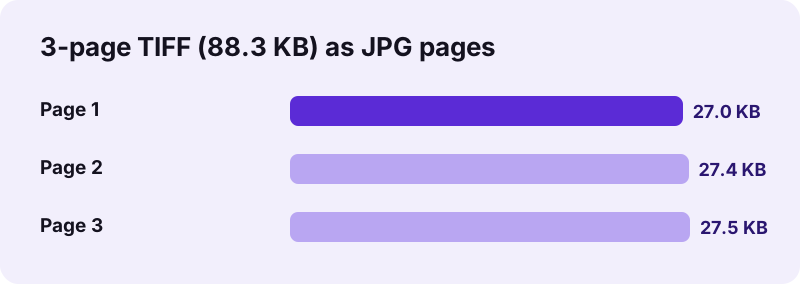
At High, our three scanned pages came out at 27.0, 27.4 and 27.5 KB, together smaller than the 88.3 KB TIFF. Black-and-white scans with a lot of white space compress well in JPEG; colour photo TIFFs shrink even more, since JPEG was designed for photographs.
pdf24 TIFF to JPG or TIFF to PDF?
If the pages belong together, a PDF keeps them in one file and in order: TIFF to PDF turns the same 3-page TIFF into one 3-page PDF. Choose JPG when each page is needed as a separate picture, for example to upload a passport scan and a utility bill into different fields of a form.
Is pdf24 TIFF to JPG safe for confidential scans?
pdf24 TIFF to JPG is safe for contracts, medical faxes and ID scans because nothing is uploaded. The browser reads the TIFF with the File API, decodes it with JavaScript inside the page and encodes each JPG with its own canvas encoder. The result line shows 0 bytes uploaded, and the tool works offline after loading.
- No account, no watermark, no page limit.
- Several TIFF files come back as one ZIP.
- The JPGs carry no EXIF data from the TIFF.
- Nothing is stored; closing the tab clears the files.
pdf24 TIFF to JPG on Windows, Mac and phones
The converter runs in Chrome, Edge, Firefox and Safari on every major system.
Windows Photos and macOS Preview can open TIFF, but exporting every page of a multi-page file one by one is slow. In the browser one click converts them all. On a phone, pick the TIFF from the Files app, where email attachments and downloads are stored; decoding a large TIFF takes longer on a phone because all the work happens on the device.
TIFF has been around since the 1980s and is still the standard output of many scanners, fax servers and digitisation projects, because it can store pages losslessly and hold several pages in one file. JPG is the opposite: one picture per file, lossy, but readable by every device and website. Converting bridges the two without giving up the TIFF original.
pdf24 TIFF to JPG speed and file names
Our conversion with pdf24 TIFF to JPG took 0.2 s for three pages on a laptop. Larger colour TIFFs from photo scanners need more time and memory, so convert them a few at a time on a phone. The ZIP is named after the first file plus image-convert, and each JPG inside keeps the original base name with its page number, so pages stay in order when sorted by name. Unzip the file with the built-in tool of Windows, macOS, Android or iOS, and the pages appear as ordinary pictures that every gallery, viewer and upload button understands without extra software.
pdf24 TIFF to JPG: frequently asked questions
Is pdf24 TIFF to JPG free?
Yes. pdf24 TIFF to JPG on this site costs nothing, with no account, no watermark and no page limit. Decoding and encoding run in your browser, so there is no server cost to recover. Any current browser on a computer, tablet or phone can run the conversion.
Is pdf24 TIFF to JPG made by PDF24?
No. pdf24tools is an independent website and is not affiliated with PDF24 or Geek Software GmbH. We use the search phrase in our titles because people type it, but the converter, its code and the measurements on this page are our own. Your files are processed only on your device.
Does pdf24 TIFF to JPG convert all pages of a multi-page TIFF?
Yes. Every page stored in the TIFF that has a width and height becomes its own JPG, numbered -page-1, -page-2 and so on. Our 3-page test file gave three JPGs in one ZIP. Some scanners also store small thumbnails as extra pages, so check for an extra tiny picture.
Does pdf24 TIFF to JPG upload my scans?
No. The TIFF is read with the browser File API and decoded on your device by the UTIF.js library. The JPGs are encoded by the browser, the result line reports 0 bytes uploaded, and nothing is stored. You can switch on airplane mode after loading the page and it still works.
Does pdf24 TIFF to JPG keep the resolution?
Yes. Each JPG has exactly the pixel size of its TIFF page; our scan pages stayed 850 × 1100 pixels. Nothing is scaled or cropped. Only the compression changes, according to the quality level you choose, from Best at 95 % to Small file at 60 %.
Why are the JPGs from pdf24 TIFF to JPG smaller than the TIFF?
JPEG uses lossy compression designed for photographs, while TIFF files are often stored uncompressed or losslessly. Our 88.3 KB TIFF gave three JPGs of about 27 KB each at 88 % quality. Colour photo TIFFs usually shrink much more than black-and-white document scans.
What happens to transparency in pdf24 TIFF to JPG?
Transparent areas become white, because JPEG cannot store transparency. The converter fills the background with white before saving each page, so nothing turns black. Use the TIFF to PNG converter on this site if you need to keep a transparent background.
Can pdf24 TIFF to JPG convert several TIFF files at once?
Yes. Select all the TIFF files together. Every page of every file becomes a JPG, and the whole set downloads as one ZIP. Each JPG name starts with its TIFF file name, so pages from different files never mix up, even in a large batch.
What if pdf24 TIFF to JPG cannot open my TIFF?
The tool shows an error instead of producing empty pictures. Rare compression types or damaged files can cause this. Open the TIFF in an image viewer, save it again as a standard TIFF or PNG, and convert that copy. Normal scanner and fax TIFFs open without problems.
Does pdf24 TIFF to JPG work on an iPhone or Android phone?
Yes. Open the page in Safari or Chrome, tap Choose images and pick the TIFF from the Files app. The ZIP or JPG downloads to Files or Downloads, and both systems can unzip it with their built-in file apps. Large multi-page files take longer on a phone.
Which extensions does pdf24 TIFF to JPG accept?
Both .tif and .tiff are accepted, as well as files labelled image/tiff. The four-letter and three-letter endings mean the same format. If your file has another ending, for example from a fax service, rename it to .tif and try again.
More pdf24 TIFF to JPG tools and guides
pdf24 TIFF to JPG: sources
- TIFF — Wikipedia
- TIFF, Revision 6.0 — Library of Congress
- JPEG — Wikipedia