How to use pdf24 TIFF to PNG in 4 steps
- Choose the TIFF. Tap Choose images or drop the .tif or .tiff file on the box. Several files can go together.
- Check the list. Every page of every TIFF in the list becomes one PNG; remove files you do not need.
- Press Convert images. The TIFF is decoded on your device and each page is saved as PNG.
- Download. A single-page TIFF gives one .png; multi-page files and batches come as one ZIP.
What does pdf24 TIFF to PNG keep from the TIFF?
pdf24 TIFF to PNG keeps every page, the exact pixel size of each page and its transparency, and stores the pixels losslessly. Our 3-page scan became scan-3p-page-1.png to scan-3p-page-3.png, each 850 × 1100 pixels, in one ZIP of 84.4 KB, slightly smaller than the 88.3 KB TIFF.
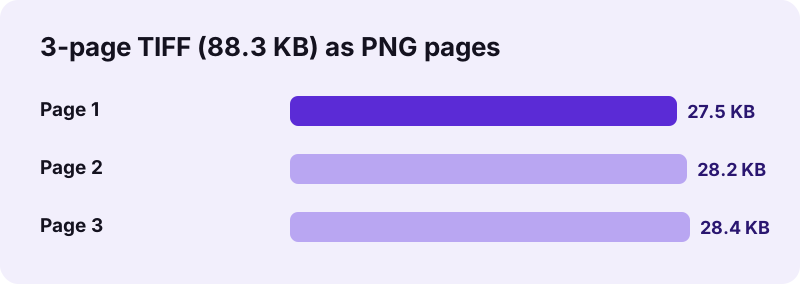
The TIFF is decoded in the browser by the open-source UTIF.js library, since browsers cannot display TIFF themselves. Each page becomes 8-bit RGBA pixels, which the browser writes as PNG. Two things do not carry over: colour depth above 8 bits per channel, and TIFF metadata tags such as scanner model or resolution.
“PNG was published as an informational RFC 2083 in March 1997 and as the standard ISO/IEC 15948:2004 in 2004.”
pdf24 TIFF to PNG for scanned documents
Document scans have sharp black text on white paper. PNG keeps every edge exactly, with no JPEG halos, which makes the pages ideal for OCR, for archiving and for zooming in on signatures and stamps. Black-and-white scans also compress very well as PNG, as our file shows: three pages took 84.4 KB together, less than the TIFF they came from.
pdf24 TIFF to PNG for maps, plans and drawings
GIS maps, architectural plans and technical drawings are often exchanged as TIFF. Converted to PNG, they open in every browser and image editor while staying lossless, so thin lines and small labels remain readable at any zoom.
pdf24 TIFF to PNG with transparent TIFFs
TIFF files from design programs can hold an alpha channel. The PNG keeps it, because the converter does not fill the background when the target is PNG. Cut-out product photos and logos therefore stay transparent, ready for slides and websites.
pdf24 TIFF to PNG: tip for photo TIFFs
Large colour photo TIFFs stay large as PNG, because both formats are lossless. If you only need to share the photos, TIFF to JPG makes much smaller files with no visible difference.
Why convert TIFF to PNG with pdf24 TIFF to PNG?
pdf24 TIFF to PNG makes lossless images usable everywhere. TIFF is a professional format that browsers, phones, chat apps and most websites cannot show, while PNG is lossless too and opens in every browser and editor. The conversion changes the container, not the picture, so quality stays exactly the same.
| Property | TIFF | PNG |
|---|---|---|
| Lossless storage | Yes (most files) | Yes, always |
| Several pages in one file | Yes | No, one picture per file |
| Transparency | Yes | Yes |
| Shows in web browsers | No | Yes |
| Our 3-page scan | 88.3 KB in 1 file | 84.4 KB in 3 files (ZIP) |
The PNG converter has no quality setting, because lossless output has nothing to adjust. Need all pages in one document instead? TIFF to PDF keeps a multi-page TIFF together as one PDF.
pdf24 TIFF to PNG for editing and OCR
Because nothing is lost, the PNG pages are a good working copy. Image editors open them directly, so you can straighten a crooked scan, crop the edges, black out a line or add an arrow, and save again as often as you like without the quality slowly dropping, as it would with JPG. OCR programs also read sharp PNG text more reliably than compressed JPG text. A useful routine is to keep the original TIFF untouched in your archive, use pdf24 TIFF to PNG to make the working pages, edit them, and then combine the finished pages into one document with the images to PDF tool on this site.
Is pdf24 TIFF to PNG private?
pdf24 TIFF to PNG is private because the TIFF never leaves your device. The browser reads it with the File API, the decoder runs as JavaScript in the page, and each PNG is written by the browser's canvas encoder. The result line shows 0 bytes uploaded, nothing is stored, and the tool works offline after loading.
- No account, no watermark, no page limit.
- Several TIFF files come back as one ZIP.
- Safe for medical faxes, contracts and HR scans.
- Closing the tab clears the files from memory.
pdf24 TIFF to PNG on Windows, Mac and phones
The converter works in Chrome, Edge, Firefox and Safari on desktop and mobile.
On Windows and Mac, drop the TIFF from Explorer or Finder onto the box. On a phone, TIFF files arrive as email attachments or downloads and live in the Files app, not the gallery; pick them there with the Choose images button. Large multi-page TIFFs take longer on a phone, because the decoding happens on the device itself.
Scanners, fax servers, microscopes and digitisation projects still write TIFF because it is flexible and can be lossless. That flexibility is also its weakness: some TIFF variants do not open in common software. PNG has one simple, standard way of storing pixels, so the same file opens everywhere, from a decade-old office suite to a phone browser.
pdf24 TIFF to PNG speed and file names
Our three pages converted in 0.2 s on a laptop. The ZIP is named after the first TIFF, and each PNG inside keeps the TIFF's name plus its page number, so the pages sort in the right order. Unzip it with the tool built into your system and the pages appear as ordinary pictures.
pdf24 TIFF to PNG: frequently asked questions
Is pdf24 TIFF to PNG free?
Yes. pdf24 TIFF to PNG on this site costs nothing, with no account, no watermark and no limit on pages. The TIFF decoder and the PNG encoder both run in your browser, so there is no server cost to recover. Any current browser is enough to use it.
Is pdf24 TIFF to PNG made by PDF24?
No. pdf24tools is an independent website and is not affiliated with PDF24 or Geek Software GmbH. We use the search phrase in our titles because people type it, but the converter, its code and the measurements on this page are our own. Your files are processed only on your device.
Is pdf24 TIFF to PNG lossless?
Yes, for normal 8-bit TIFF files every pixel is stored exactly in the PNG. Pixel size stays the same and nothing is compressed lossily. TIFFs with 16 bits per channel are reduced to 8 bits, because the browser works with 8-bit colour; on screen the difference is not visible.
Does pdf24 TIFF to PNG convert every page?
Yes. Each page stored in the TIFF with a width and height becomes its own PNG, numbered -page-1, -page-2 and so on, and all pages download together as one ZIP. Thumbnail images stored by some scanners count as pages too, so look for an extra small picture.
Does pdf24 TIFF to PNG upload my files?
No. The TIFF is read with the browser File API and decoded locally with the UTIF.js library. The PNGs are encoded by the browser, the result line reports 0 bytes uploaded and nothing is stored. The tool keeps working after you switch off the network.
Does pdf24 TIFF to PNG keep transparency?
Yes. When the TIFF has an alpha channel, the PNG keeps it, because nothing is painted behind the picture when the target is PNG. Transparent logos and cut-out photos therefore stay transparent and can be placed on any background.
Why are the PNGs not much smaller after pdf24 TIFF to PNG?
Both TIFF and PNG are lossless, so the pixels need about the same space. Our 3-page scan went from 88.3 KB to 84.4 KB in total. For much smaller files, use the TIFF to JPG converter, which uses lossy compression designed for photos and scans.
Can pdf24 TIFF to PNG convert several TIFF files together?
Yes. Select all the TIFF files at once. Every page of every file becomes a PNG, and everything downloads as one ZIP. Each PNG name begins with its TIFF file name and ends with its page number, so pages from different files stay separate.
What if pdf24 TIFF to PNG shows an error?
The decoder could not read the file, which can happen with rare compression types or damaged TIFFs. Open the file in an image viewer, save it again as a standard TIFF, and convert that copy. Ordinary scanner and fax TIFFs convert without problems.
Does pdf24 TIFF to PNG work on an iPhone or Android phone?
Yes. Open the page in Safari or Chrome, tap Choose images and pick the TIFF from the Files app. The PNG or ZIP downloads to Files or Downloads; both systems unzip it with their built-in file app. Large files take longer, since the phone does all the decoding.
Does pdf24 TIFF to PNG keep the DPI of my scan?
No. The pixel count is kept exactly, but resolution tags such as 300 dpi are not written into the PNG. Print programs then assume a default. Set the print size in the printing dialog, or use the TIFF to PDF converter, which places each page on a real paper size.
More pdf24 TIFF to PNG tools and guides
pdf24 TIFF to PNG: sources
- TIFF — Wikipedia
- PNG — Wikipedia
- Portable Network Graphics (PNG) Specification — W3C