How to use pdf24 sign PDF in 5 steps
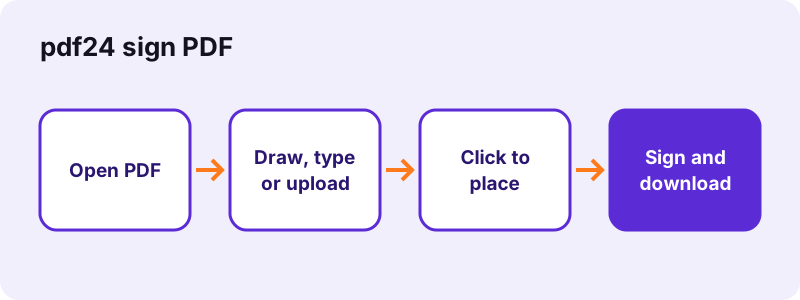
- Open the PDF. Choose the document or drop it on the box. The pages appear and the signature panel opens by itself.
- Create your signature. Draw it in the box, type your name and pick a script font, or upload a photo of your signature. Choose black, blue or red ink.
- Place it on the page. Press Use this signature, then click on the signature line. Drag to move it and pull the corner to resize.
- Add initials, date or text. Use Initials for every page that needs them, Date for today's date and Text for your printed name or a place.
- Press Sign and download. The signed copy is written on your device and saved as -signed.pdf. Open it once to check the placement.
What does pdf24 sign PDF put on the page?
pdf24 sign PDF places a visible signature: a transparent image of your drawn, typed or uploaded signature, positioned exactly where you click. Initials, the date and short text can be added beside it. The result looks like a pen signature on paper and shows the same in every PDF reader and on printouts.
| Method | How it works | Best for |
|---|---|---|
| Draw | Sign in a 900 × 300 pad with a mouse, trackpad, pen or finger; strokes are smoothed | Phones and tablets, a natural look |
| Type | Type up to 60 characters and pick Dancing Script, Caveat or Great Vibes | Quick signing on a laptop |
| Upload | Use a PNG, JPEG or WebP photo of your signature; the white paper is removed | The exact signature you use on paper |
Each signature is cropped to its ink, so no white rectangle covers the line under it. A signature starts at about 24 % of the page width and initials at about 10 %; both can be resized freely without distortion.
pdf24 sign PDF tested on a 2-page invoice
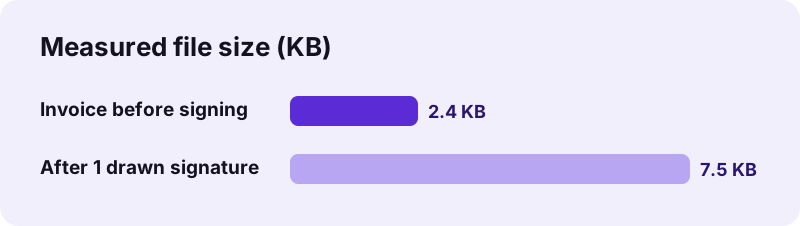
To test pdf24 sign PDF we opened a 2-page invoice of 2.4 KB, drew a signature with the mouse and clicked in the middle of page 1. Pressing Sign took 0.2 seconds. The file grew to 7.5 KB, because the signature is stored once as a small PNG image. The invoice text stayed selectable, and the page count stayed at 2.
pdf24 sign PDF on iPhone and Android
On a phone, the fastest way to use pdf24 sign PDF is the Draw tab: sign with your finger in the pad, which fills the width of the screen, then tap Use this signature and tap the signature line. Turn the phone sideways for a wider pad. The signed file lands in Downloads on Android and in Files on iPhone.
pdf24 sign PDF on Windows, Mac and Chromebook
With a mouse, a typed signature often looks better than a drawn one. A trackpad works for drawing if you sign slowly. If you have a scanned signature from earlier, the Upload tab reuses it, and the white background is removed automatically.
pdf24 sign PDF tip for a clean uploaded signature
Photograph your signature in daylight on plain white paper, with a dark pen, filling most of the frame. Pixels lighter than the paper become transparent, so shadows and grey paper are the only things that spoil the result; crop the photo tightly before uploading.
Is a signature from pdf24 sign PDF legally valid?
pdf24 sign PDF creates a simple electronic signature: an image of your signature placed on the document. Many countries accept simple electronic signatures for everyday contracts, forms and letters, but some documents require an advanced or qualified signature with a certificate. When the stakes are high, ask the receiver which kind they accept.
“This type of signature has the same legal standing as a handwritten signature as long as it adheres to the requirements of the specific regulation…”
In the United States the ESIGN Act of 2000 gives electronic signatures legal effect in commerce, and in the European Union the eIDAS Regulation of 2014 defines simple, advanced and qualified levels. Wills, some property deeds and court filings are common exceptions that still need ink or a qualified signature. This page explains what the tool does; it is not legal advice.
pdf24 sign PDF versus a certificate-based digital signature
“A digital signature is a mathematical scheme for verifying the authenticity of digital messages or documents.”
| Point | Visible signature (pdf24 sign PDF) | Certificate digital signature |
|---|---|---|
| What is added | An image of your signature | A cryptographic seal tied to a certificate |
| Detects later changes | No | Yes, the seal breaks |
| Needs a certificate | No | Yes, from a trust provider or your ID card |
| Shows in every reader | Yes, as part of the page | Yes, plus a validation panel |
| Typical use | Forms, delivery notes, everyday agreements | Tenders, regulated contracts, qualified e-signing |
pdf24 sign PDF and documents that are already signed
If a PDF already carries a certificate signature from someone else, adding any new content changes the file, and readers will report that the document was modified after signing. Sign such files first, or ask the other party to sign last.
Is pdf24 sign PDF safe for contracts and IDs?
pdf24 sign PDF keeps the document and your signature on your device. The browser reads the file with the File API, and the signature is drawn into the pages by JavaScript running locally; our result line showed 0 bytes uploaded. The signature image exists only in the open tab and disappears when you close it.
| Question | Answer |
|---|---|
| Document uploaded | No, 0 bytes |
| Signature stored on a server | No |
| Signature kept after closing the tab | No |
| Account needed | No |
| Network requests | The page, the PDF engine and, for typed signatures, 3 script fonts |
Typed signatures in pdf24 sign PDF use fonts that the page loads from Google Fonts; only the font files are requested, never your name or your document. Drawn and uploaded signatures need no font at all. The File API on MDN describes how a page reads a local file without sending it anywhere.
pdf24 sign PDF and sharing the signed file
Anyone who receives a signed PDF can copy the picture of your signature. That is true of every visible signature, including a scan of a paper page. Send signed documents only to the intended receiver, and for sensitive cases protect the file with Lock PDF before you send it.
pdf24 sign PDF: initials, date and text fields
Contracts often ask for initials on every page and a date next to the signature. In pdf24 sign PDF the Initials button opens the same Draw, Type and Upload panel, saves your initials separately and places them smaller. Date inserts today's date in your browser's format at 12 pt, and Text adds a printed name, a city or a job title.
pdf24 sign PDF on every page of a contract
- Create your initials once with the Initials button.
- Click on each page where they are required; each click places another copy.
- Create your full signature and place it on the last page.
- Add the date beside the signature and press Sign.
The signature and the initials stay ready while the page is open, so a 10-page contract takes about as many clicks as it has pages.
How do I sign a PDF for someone else with pdf24 sign PDF?
pdf24 sign PDF signs only with the signature you create on your own device, so each signer opens the file and adds their own mark. For two signers, the first person signs and sends the file, and the second opens that signed copy and signs below. Nobody's signature is stored online between the two steps.
Sign in the order the document expects, use the same colour for all signers unless the receiver asks otherwise, and keep the unsigned original. If one signer needs to fill in form fields as well, do that first with Fill out PDF and sign the filled copy.
Why is pdf24 sign PDF not working?
pdf24 sign PDF stops with a clear message in four cases: the PDF is password-protected, the file is damaged, no signature was created before pressing Sign, or a drawn signature was empty. Each case has a quick fix, listed below, and none of them needs a new download or an account.
| Message or symptom | Fix |
|---|---|
| “This PDF is password-protected” | Remove the password with Unlock PDF, sign, then lock it again |
| “Could not open this PDF” | Run Repair PDF and sign the repaired copy |
| “Draw, type or upload a signature first” | Make a signature in the panel and press Use this signature |
| “Nothing added yet” | Click on the page after creating the signature |
| Typed signature shows a plain font | Wait a second for the script fonts to load, or use Draw |
pdf24 sign PDF: signature missing when printed
The signature is part of the page content, so it prints in every program. If it is missing on paper, the printer was probably sent the original file instead of the -signed.pdf download. Open the signed copy and print that one, or use Print PDF.
pdf24 sign PDF compared with the edit and fill tools
Signing is one of several jobs people do on a form, and pdf24 sign PDF covers only that one. Use the page that matches the job, and combine them when a document needs more than one.
| Job | Tool |
|---|---|
| Sign, initial and date | pdf24 sign PDF (this page) |
| Type into real form fields | Fill out PDF |
| Type on a printed form without fields | Write on PDF |
| Add a logo, white-out or correction | Edit PDF |
| Join a signed page with other files | Merge PDF |
pdf24 sign PDF: frequently asked questions
Is pdf24 sign PDF free?
Yes. Signing on pdf24tools costs nothing, needs no account and adds no watermark. The work runs in your own browser, so there is no server cost and no daily limit: you can sign one file after another in the same tab, and your signature stays ready while the page is open.
Does pdf24 sign PDF upload my document?
No. The browser reads the PDF from your device and writes the signed copy locally; the result line in our test showed 0 bytes uploaded. Your signature image also stays in the tab. Typed signatures load 3 script fonts from Google Fonts, but no part of your document or name is sent.
Is a pdf24 sign PDF signature legally binding?
It is a simple electronic signature. Laws such as the US ESIGN Act and the EU eIDAS Regulation give electronic signatures legal effect, and simple ones are widely accepted for everyday agreements. Some documents need an advanced or qualified signature with a certificate, so check with the receiver for important contracts.
Can I sign a PDF on iPhone with pdf24 sign PDF?
Yes. Open the page in Safari or Chrome, pick the PDF from Files, sign with your finger in the Draw pad and tap the signature line. Turning the phone sideways gives a wider pad. The signed copy is saved to Files, from where you can mail or message it.
Can I sign a PDF on Android with pdf24 sign PDF?
Yes. Chrome, Samsung Internet, Edge and Firefox on Android all work. Choose the file, draw with your finger, tap Use this signature and tap the page where it goes. The -signed.pdf file appears in Downloads and can be shared straight from the download notification.
Does pdf24 sign PDF create a digital signature with a certificate?
No. It places a visible signature image, which is an electronic signature but not a certificate-based digital signature. A certificate signature adds a cryptographic seal that proves the file was not changed. You need a certificate from a trust provider or a national ID card for that.
How do I type a signature with pdf24 sign PDF?
Open the Type tab, write your name (up to 60 characters) and pick one of 3 script fonts: Dancing Script, Caveat or Great Vibes. Choose black, blue or red ink, press Use this signature and click on the page. The typed name is placed as a sharp, transparent image.
Can I upload a picture of my signature to pdf24 sign PDF?
Yes. The Upload tab takes PNG, JPEG or WebP files. Remove white background is on by default: light pixels become transparent, so the signature sits on the line without a white box. Crop the photo close to the ink and use a dark pen for the cleanest result.
Can I add initials with pdf24 sign PDF?
Yes. Press Initials, create them by drawing, typing or uploading, and click on every page where they are required. The initials are stored separately from the full signature and placed at about 10 % of the page width, so you can switch between the two without redrawing.
How do I add the date with pdf24 sign PDF?
Press Date and click where it belongs: today's date is inserted in your browser's date format at 12 pt. Click the text to change it if the document asks for another format or another day. The date is real text, so it stays selectable in the signed file.
Can I change the signature colour in pdf24 sign PDF?
Yes. The signature panel offers black, blue and red ink. Blue is common on contracts because it shows that a printed copy was signed, not photocopied, while black prints most clearly. The colour applies to drawn and typed signatures; uploaded images keep their own colours.
Can I move or resize the signature in pdf24 sign PDF?
Yes. Drag the placed signature to move it and pull its corner handle to resize it; the proportions are kept, so it never stretches. Select it and remove it to start over. Nothing is written into the file until you press Sign.
Does pdf24 sign PDF save my signature for next time?
No. The signature is kept only while the page is open, so you can place it on several pages or files in one session. Closing the tab deletes it. For a reusable signature, save a PNG of your signature on your device and upload it each time.
Can two people sign the same PDF with pdf24 sign PDF?
Yes, one after the other. The first signer signs and sends the -signed.pdf file, and the second signer opens that copy, adds their signature and saves again. Each signature is created on the signer's own device, and no shared online copy is involved.
Does pdf24 sign PDF keep the text of the document?
Yes. The pages are not converted to images: the signature is drawn on top of the existing content, and all original text, links and form fields stay as they were. In our test the invoice text was still selectable and searchable after signing.
How much bigger does pdf24 sign PDF make the file?
Only by the signature image. Our 2-page invoice grew from 2.4 KB to 7.5 KB with one drawn signature. Placing the same signature on many pages reuses the stored image, so a contract with initials on every page grows only slightly more than a single signature.
Why is my pdf24 sign PDF signature not visible?
Usually the original file was opened instead of the signed download. Look for the file ending in -signed.pdf. If the signature is missing there too, it was probably created but not placed on a page: create it, then click on the page before pressing Sign.
Can pdf24 sign PDF sign a password-protected PDF?
Not directly when it needs a password to open. An encrypted file must be unlocked first with Unlock PDF, which needs the password. Sign the unlocked copy, then add protection again with Lock PDF if the document must stay restricted. Files with only an owner password (printing or copying limits) are signed and saved directly, and the signed copy no longer carries those limits.
Does pdf24 sign PDF work offline?
The page and the PDF engine load once over the internet; after that, drawing and placing the signature run on your device. Typed signatures need the script fonts, which also load once. Without any connection at the start, the page cannot load, because no app is installed.
Can I sign a scanned document with pdf24 sign PDF?
Yes. A scanned page is a picture inside the PDF, and the signature is placed on top of it like on any page. If the scan is very large, signing still works, but a phone may be slow; compress the scan first for faster opening.
Can pdf24 sign PDF fill out the form before signing?
The signing page adds text with the Text and Date buttons, which is enough for a name and a place. For real form fields with boxes and drop-downs, fill them first with Fill out PDF, then sign the filled copy on this page.
Is a typed name enough with pdf24 sign PDF?
For many everyday documents a typed name in a script font is accepted as an electronic signature, because what counts is the intent to sign. Some receivers prefer a drawn signature that matches your paper one. If you are unsure, use Draw or Upload.
Does pdf24 sign PDF add a watermark?
No. The signed copy contains your pages and the items you placed: signature, initials, date and text. There is no watermark, footer or branding. If you need a mark such as SIGNED COPY across the pages, the Add watermark tool does that separately.
Which browsers work with pdf24 sign PDF?
pdf24 sign PDF runs in current Chrome, Edge, Firefox and Safari on Windows, macOS, Linux, Android, iPhone and iPad, with no plug-in or app. Drawing uses pointer events, so a mouse, trackpad, stylus and finger all work. We ran our test in Chrome on a Windows laptop.
Can I sign several PDFs at once with pdf24 sign PDF?
One file is signed at a time, but the signature stays ready while the page is open. Open the next file, click on the page and press Sign again; you do not need to redraw. To sign one combined document, join the files first with Merge PDF.
Can pdf24 sign PDF remove a signature later?
After saving, the signature is part of the page and cannot be lifted off cleanly. Keep the unsigned original so you can start again. Before saving, select the signature on the page and remove it, or simply drag it to the right place.
Why does a pdf24 sign PDF file say it was modified?
That message appears when the original PDF already carried a certificate signature from someone else. Any added content changes the file after that seal, and readers report it. Add your visible signature before the certificate signature is applied, or ask the other party to sign last.
Can pdf24 sign PDF sign in a specific signature box?
Yes. Click inside the box and resize the signature to fit; the editor maps your click to exact page coordinates, so the signature lands where you see it, also on rotated or landscape pages. Signature form fields themselves are not filled, the image is placed over them.
Who makes the pdf24 sign PDF tool?
The pdf24tools team makes it. pdf24tools is an independent website and is not affiliated with PDF24 or Geek Software GmbH. Our signing tool was built separately and runs entirely in your browser; this page describes only what our tool does, measured with our own test files.
What size should a signature be with pdf24 sign PDF?
A signature roughly 4 to 6 cm wide on an A4 or Letter page looks natural; the default of about 24 % of the page width is close to 5 cm on A4. Initials start at about 10 %. Resize by the corner handle until it fits the line.
Can I sign with a stylus using pdf24 sign PDF?
Yes. Apple Pencil, Surface Pen, S Pen and other styluses work in the Draw pad, because it listens to pointer events. Strokes are smoothed with curves and drawn 5 pixels wide on the 900 × 300 pad, which gives a pen-like line when placed on the page.
Can I sign a Word document with pdf24 sign PDF?
Convert it first, because pdf24 sign PDF accepts PDF files only: Word to PDF turns a .docx file into a PDF in your browser, and you can sign that PDF here. The signed result is a PDF, which is the format most receivers expect for signed documents anyway.
What happens to my signature after pdf24 sign PDF?
It exists in the open tab as a small image and in the signed file you downloaded. Nothing is kept on a server. When you close or reload the tab, the signature in the page memory is gone; the copy inside your signed PDF is the only one left.
More pdf24 sign PDF tools and guides
pdf24 sign PDF: sources
- Electronic signature — Wikipedia
- Digital signature — Wikipedia
- Electronic Signatures in Global and National Commerce Act — Wikipedia
- eIDAS — Wikipedia
- File API — MDN Web Docs