How to use pdf24 overlay PDF in 4 steps
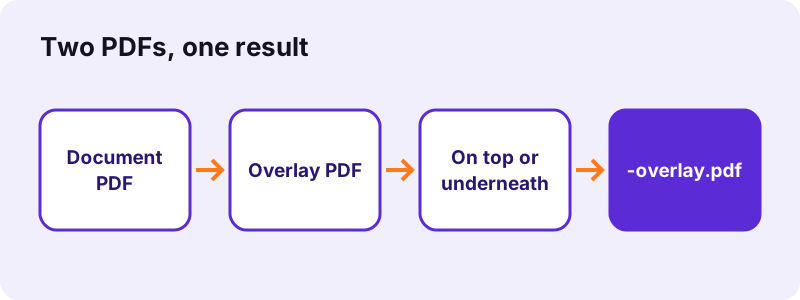
- Choose two PDFs. Tap Select two PDF files. The first file in the list is the document, the second is the overlay; swap them with ↑ and ↓ if needed.
- Pick top or underneath. On top suits stamps and added text; Underneath suits letterheads and backgrounds.
- Pick pages and opacity. Use the overlay's first page on every page, or page 1 on page 1, page 2 on page 2. For On top, set the opacity: 100, 75, 50 or 25 %.
- Press Overlay PDFs and download. The combined file ends in -overlay.pdf and has as many pages as the document.
What does pdf24 overlay PDF do?
pdf24 overlay PDF draws the pages of a second PDF onto the pages of a first one, either above the content or below it. The first PDF is the document and decides the page count and size; the second is the layer, such as a letterhead, a stamp or a background. Both stay vector content, so text remains sharp.
In our test, a 1-page APPROVED STAMP PDF of 903 bytes was laid on all 6 pages of a 5,238-byte document in 0.1 seconds; the result weighed 6,217 bytes, because the stamp page is stored once and reused. Underneath, the same pair gave 10,096 bytes, as both layers are drawn onto fresh pages.
“A letterhead is the heading at the top of a sheet of letter paper (stationery).”
pdf24 overlay PDF with a letterhead
Save the company letterhead as a 1-page PDF, write letters without it, and put the letterhead underneath with Use its first page on every page. Letters exported from Word usually have no white page fill, so the letterhead shows through around the text.
pdf24 overlay PDF with a stamp
A stamp, a COPY mark or a draft notice goes on top. Make it a 1-page PDF with the mark where it should appear and nothing else, then pick On top and an opacity such as 50 % so the text below stays readable.
pdf24 overlay PDF page by page
With Page 1 on page 1, page 2 on page 2, each document page gets the overlay page with the same number. If the overlay is shorter, it starts again from its first page: a 2-page overlay on a 5-page document is used as 1, 2, 1, 2, 1.
pdf24 overlay PDF: tip for exact placement
The overlay page is scaled to the size of each document page. Make the overlay PDF the same paper size as the document, A4 on A4 or Letter on Letter, and its content lands exactly where you placed it.
On top or underneath in pdf24 overlay PDF?
With pdf24 overlay PDF the layer goes on top when it must cover the document, as a stamp, a signature image or a text layer does. It goes underneath when it is a background, such as a letterhead, a watermark pattern or ruled paper. The mode also changes what else survives in the file, so the table below compares both.
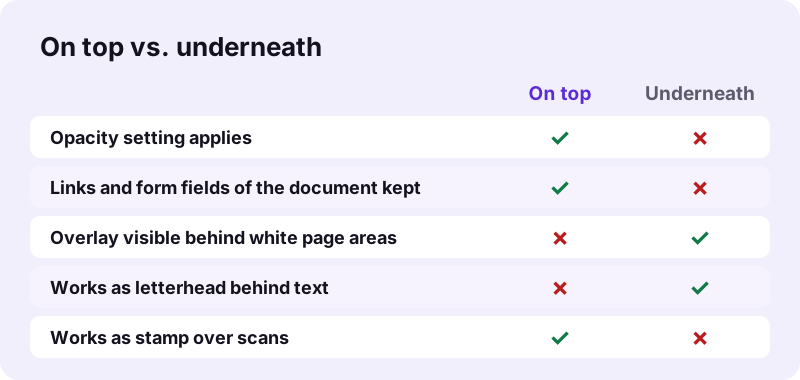
| On top | Underneath | |
|---|---|---|
| Typical use | Stamp, mark, added text | Letterhead, background |
| Opacity option | 100, 75, 50 or 25 % | not used |
| Document links and fields | Kept | Not kept (pages redrawn) |
| File size in our test | 6,217 bytes | 10,096 bytes |
Underneath only shows where the document page is transparent. A scan is a picture that covers the whole page, so a letterhead placed under a scan is hidden. For scans, put the layer on top with a lower opacity instead.
Which file goes first in pdf24 overlay PDF?
In pdf24 overlay PDF the first file in the list is always the document and the second is the overlay. The result has the page count and page sizes of the document. The tool takes exactly two PDFs; choosing a third file replaces the first one in the list, so check the order before pressing the button.
- Pick the document first, then the layer, or pick both and sort them with ↑ and ↓.
- Check the thumbnails: the first row is the page count you will get.
- Make the layer: a 1-page PDF for the same layer on every page, or a multi-page PDF for page-by-page layers.
A layer can be made from almost anything: export a Word page as PDF with Word to PDF, turn a PNG logo into a page with JPG to PDF, or cut one page out of a template with Extract PDF pages.
Is pdf24 overlay PDF private?
pdf24 overlay PDF runs entirely in your browser, so neither file is uploaded. Both PDFs are read from your device, the pages are combined in the open tab, and the result is saved from memory. No server receives your letterhead, contracts or stamps, and nothing is left behind after the tab is closed.
The result line confirms 0 bytes uploaded after each run. That is useful for company stationery and signature stamps, which should not end up in someone else's storage.
pdf24 overlay PDF or a watermark?
A text watermark and an overlay can look alike, but they start from different material. The watermark tool writes a word such as CONFIDENTIAL diagonally across every page from text you type. The overlay tool uses any PDF page as the layer, so it can carry a logo, a full letterhead, a coloured design or several lines placed exactly.
| You want | Tool |
|---|---|
| The word DRAFT across every page | Add watermark |
| Company letterhead behind letters | Overlay PDF, underneath |
| A stamp from a PDF on every page | Overlay PDF, on top |
| Page numbers | Add page numbers |
| Two files one after the other | Merge PDF |
pdf24 overlay PDF: frequently asked questions
Is pdf24 overlay PDF free?
Yes. pdf24 overlay PDF is free, with no account and no watermark of ours. There is no page limit beyond your device's memory, because the two files are combined by your own phone or computer. You can try both modes and all opacity levels on the same pair of files.
How many files does pdf24 overlay PDF take?
Exactly two: the document first and the overlay second. Adding a third file replaces the first one in the list. To lay several layers, run the tool more than once, using the result of the first run as the document of the second, for example letterhead underneath, then a stamp on top.
Can pdf24 overlay PDF add a letterhead to every page?
Yes. Use a 1-page letterhead PDF as the second file, choose Underneath and Use its first page on every page. The letterhead then sits behind the text of every page. This works for documents exported from Word or similar programs, whose pages usually have no white fill covering the background.
Why does pdf24 overlay PDF hide a letterhead under a scan?
A scanned page is one picture that fills the whole page, white areas included, so anything underneath is covered. Put the layer on top instead and lower the opacity to 50 or 25 %, so the scan stays readable through it. Typed documents do not have this problem.
Does pdf24 overlay PDF upload my files?
No. Both PDFs are opened by your browser and combined in the same tab with JavaScript. Nothing is sent to a server, as the result line confirms with 0 bytes uploaded. After the page has loaded, the overlay tool even works without a network connection.
Does pdf24 overlay PDF apply opacity in both modes?
No, only with On top. There it sets how strongly the overlay covers the document: 100 % fully, 25 % faintly. Underneath, the document is drawn over the layer at full strength, so the setting has no effect; make the background itself lighter in the program that created it.
Does pdf24 overlay PDF keep links and form fields?
With On top, yes: the layer is drawn onto the existing pages, so their links, comments and form fields stay. With Underneath, the document pages are redrawn on new pages, which keeps their look but not their clickable items. Fill forms before overlaying underneath.
What does pdf24 overlay PDF do with a different page size?
The overlay page is scaled to the size of each document page. A Letter-size layer on A4 pages is stretched slightly to fit, which can move a logo a few millimetres. Make the overlay the same paper size as the document for exact placement, or resize it first with Change PDF page size.
Can pdf24 overlay PDF use a different layer per page?
Yes. Choose Page 1 on page 1, page 2 on page 2 and use a multi-page overlay PDF. Each document page gets the overlay page with the same number; when the overlay runs out of pages, it starts again from its first page, so a 3-page overlay repeats every 3 pages.
Does pdf24 overlay PDF work on a phone?
Yes, in Safari on iPhone and iPad and in Chrome or Samsung Internet on Android, without an app. Pick both files from Files or Downloads, set the options, press Overlay PDFs, and the result is saved to your downloads, ready to send by mail or messenger.
Is this the official pdf24 overlay PDF tool?
No. pdf24tools is an independent website and is not affiliated with PDF24 or Geek Software GmbH. This overlay tool is our own code that runs in your browser. We use the name only because people search for it; your files are processed on your device, never on our servers.
pdf24 overlay PDF: sources
- Letterhead — Wikipedia
- PDF — Wikipedia
- File API — MDN Web Docs