How to use pdf24 write PDF in 4 steps
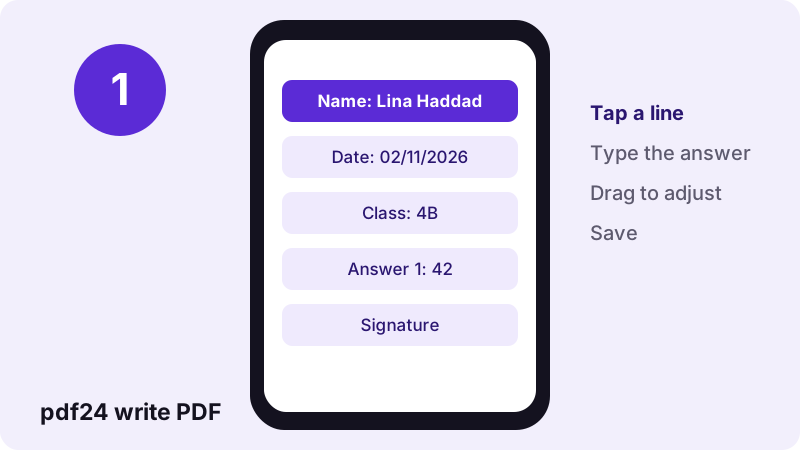
- Open the PDF. Choose the form, worksheet or letter, or drop it on the box.
- Choose Text and a size. Press Text, then pick a size (11 or 12 pt suits most forms) and a colour.
- Click and type. Click just above the line or inside the box and type. Drag the text to fine-tune its position.
- Save the file. Press Save and download the -edited.pdf copy with your answers.
When should you use pdf24 write PDF?
pdf24 write PDF is the right tool when a document has blanks to complete but no fillable fields: scanned application forms, school worksheets, printed tax or visa forms, delivery notes and letters that need a reference or a date. Each click places a text box you can type into, move and resize.
| Your document | Use | Why |
|---|---|---|
| Has clickable form fields | Fill out PDF | Answers go into the fields and stay editable |
| Printed lines or boxes, no fields | pdf24 write PDF (this page) | Type wherever you click |
| You want to send it out as a fillable form | Make PDF fillable | Turns blank lines into fields |
| Needs a signature too | Sign PDF | Draw, type or upload a signature |
pdf24 write PDF on a 6-page test document
Our test file had 6 A4 pages and 1,944 words of text, at 5.1 KB. We clicked on page 1, typed one line and saved: the job took 0.4 seconds and the result was 9.2 KB. The added 4.1 KB is the part of the Noto Sans font needed for the typed letters; all 6 pages and their text were unchanged.
pdf24 write PDF on a phone
Tap Text, tap the line and type with the phone keyboard. For small boxes, zoom the browser page first so your finger hits the right spot; the text is stored as a position on the page, so zooming never moves it. Drag the text with one finger to nudge it onto the line.
pdf24 write PDF on a computer
With a mouse, pdf24 write PDF places text to within a few pixels. Press Enter inside a text box for a second line, which is handy for addresses. Tab moves focus between placed items, so you can review every answer from the keyboard before saving.
pdf24 write PDF tip for grid boxes
Forms with one box per letter are hard to hit exactly. Type the whole word in one text box at 12 to 14 pt and add spaces between letters until each one sits in its box, then check by zooming in.
What does pdf24 write PDF type with, and in which languages?
pdf24 write PDF types in Noto Sans, embedded as a small subset that holds only the letters you used. Latin, Greek and Cyrillic text, including accents such as é, ü, ç or ł, is saved as real text you can select and search. Ten sizes from 9 to 48 pt and four colours are available.
“Font embedding is the inclusion of font files inside an electronic document for display across different platforms.”
| Where you write | Size | Colour |
|---|---|---|
| Lines of an official form | 10–11 pt | Black or blue |
| Worksheet answers | 12–14 pt | Blue |
| Headline or grade | 24–32 pt | Red or green |
| Small print, footnotes | 9 pt | Black |
pdf24 write PDF with Arabic, Hebrew, Indic, Thai or CJK text
Text that needs shaping or right-to-left order, and Chinese, Japanese and Korean characters, is drawn by your browser and placed on the page as a sharp transparent image at the chosen size. It prints and displays correctly but cannot be selected or searched later. Mixed pages are fine: Latin answers on the same page stay real text.
pdf24 write PDF on scanned forms
A scanned form is a photo of paper, so it never has fields, and the lines may be slightly tilted. Typing on it works the same way as on a digital PDF; place each answer separately so that a tilt across the page does not push later words off their lines.
Scans also have no text layer, so search and copy find nothing on them. pdf24 write PDF does not change that: your typed answers become searchable text, but the printed questions stay a picture. Run OCR PDF first if the receiver needs to search the whole form.
pdf24 write PDF and very large scans
A phone may slow down on a scan of 50 MB or more, because every page is a big picture. Make a smaller copy with Compress PDF, write on that copy, and keep the full-resolution scan as your archive. If the scan is crooked, Rotate PDF pages fixes pages turned by 90 or 180 degrees.
Is pdf24 write PDF private enough for passports and tax forms?
pdf24 write PDF never uploads the form: the browser opens it, you type, and the copy is written on your device. Our result line showed 0 bytes uploaded. Passport numbers, tax IDs and bank details therefore stay on your phone or computer and are gone from the page memory once you close the tab.
The only downloads are the page itself, the PDF engine and the font file. The File API on MDN describes how a page reads a local file without sending it. Before you mail a completed tax form, consider Lock PDF to add a password.
pdf24 write PDF: limits and fixes
Typing on top of a page has a few edges worth knowing before you start a long form.
- Typed text is drawn into the page, so a receiver cannot edit your answers in a form viewer.
- Existing printed words are not changed; cover them with White-out in Edit PDF and type over.
- Password-protected PDFs open only after Unlock PDF.
- Only one font family is available, Noto Sans.
- The editor shows up to 300 pages at a time.
pdf24 write PDF: frequently asked questions
Is pdf24 write PDF free?
Yes. Typing on PDFs at pdf24tools is free, with no sign-up, no watermark and no limit on files or pages per day. The work runs in your own browser, so there is no server cost involved. You can complete one form after another in the same tab.
Can pdf24 write PDF type on a form without fields?
Yes, that is its main job. Click on any line, box or margin and type; the text stays where you clicked and is saved as part of the page. If the form does have real fields, Fill out PDF is quicker because it lists all of them.
Does pdf24 write PDF upload my document?
No. The browser reads the file from your device and writes the completed copy locally; our test showed 0 bytes uploaded. Only the page, the PDF engine and the font are downloaded, and nothing remains on a server after you close the tab.
Can I change the font size in pdf24 write PDF?
Yes. Ten sizes are available: 9, 10, 11, 12, 14, 16, 18, 24, 32 and 48 pt, with 14 pt as the default. Select a text box you already placed and pick a new size to change it. Most printed forms use 10 or 11 pt.
Is text from pdf24 write PDF searchable?
Yes, for Latin, Greek and Cyrillic text: it is saved as real text in an embedded font subset, so it can be selected, copied and found with search. Text in scripts such as Arabic, Hindi or Chinese is placed as an image and is not searchable.
Can I write on a PDF on my iPhone with pdf24 write PDF?
Yes. Open the page in Safari or Chrome, pick the PDF from Files, tap Text, tap the line and type. Zoom the page first for small boxes. Saving puts the completed form into Files, ready to attach to an e-mail or upload to a portal.
Can pdf24 write PDF write in two lines?
Yes. Press Enter inside a text box to start a new line; the line spacing follows the chosen size. This works well for addresses and short paragraphs. For longer text, several separate boxes are easier to line up with the printed lines.
What colours does pdf24 write PDF offer?
Black, blue, red and green. Black or blue look most natural on official forms, and many offices ask for one of those two. Red and green suit corrections and teacher comments. You can change the colour of any placed text before saving.
Can pdf24 write PDF add a signature as well?
You can type your name, but for a real-looking signature use Sign PDF, which draws, types in a script font or uploads your signature. Write your answers here first, save, then open the saved copy in Sign PDF to sign it.
Why is my text not on the line in pdf24 write PDF?
The click sets the top-left corner of the text box, so text clicked on the line sits slightly below it. Click a little higher, or drag the text up until the letters rest on the line. Zooming in before saving makes the alignment easy to check.
Can I edit my answers after saving with pdf24 write PDF?
Not in the saved copy, because the text becomes part of the page. Keep the blank original: open it again and type the answers anew. If you need answers that stay editable, make the form fillable first with Make PDF fillable, then use Fill out PDF.
Who makes the pdf24 write PDF tool?
The pdf24tools team makes it. pdf24tools is an independent website and is not affiliated with PDF24 or Geek Software GmbH. Our tool for typing on PDFs was built separately, runs in your browser and is described here only from our own tests with our own files.
More pdf24 write PDF tools and guides
pdf24 write PDF: sources
- Font embedding — Wikipedia
- File API — MDN Web Docs
- PDF — Wikipedia