How to use pdf24 lock PDF in 4 steps
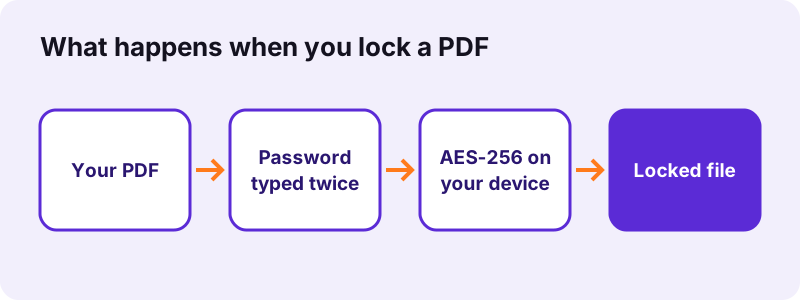
- Choose the PDF. Tap Choose PDF files or drop the file on the box. The browser reads it from your disk; nothing is sent to a server.
- Type the password twice. Enter a new password of at least 4 characters in both boxes. The two entries must match, which catches typing mistakes.
- Press the button. qpdf, compiled to WebAssembly, encrypts the file with AES-256 on your device. Leave the three Block options unticked for a plain open password.
- Download and test. Save the -protected.pdf file and open it once: your reader should ask for the password before it shows any page.
What does pdf24 lock PDF do to a file?
pdf24 lock PDF encrypts the whole document with a password you choose, using AES with a 256-bit key and the PDF 2.0 security handler (revision 6). Without that password a reader cannot decrypt the pages, text or images, so the file shows nothing but a password prompt to anyone who opens it.
The password you type is the user or open password. When you leave the Block options unticked, the same password also acts as the owner password, so whoever can open the file can also print, copy and edit it. That is the right choice when the goal is simply to keep strangers out.
“AES is a variant of Rijndael, with a fixed block size of 128 bits, and a key size of 128, 192, or 256 bits.”
pdf24 lock PDF with AES-256 explained
AES-256 is the largest key size defined in NIST FIPS 197. Our check with pypdf read the locked files as encryption version 5, revision 6, which is the AES-256 scheme of ISO 32000-2. Older 40-bit RC4 or 128-bit schemes are never used.
pdf24 lock PDF on iPhone and Android
The tool runs in Safari on iPhone and iPad and in Chrome, Edge or Firefox on Android. Phone keyboards often capitalise the first letter automatically, so check the password before you press the button; the repeat box helps you notice.
pdf24 lock PDF on Windows, Mac and Linux
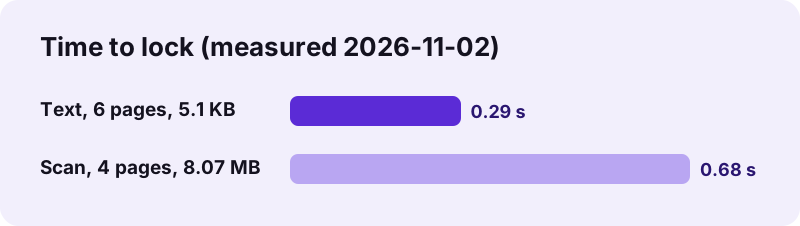
No program has to be installed. The encryption engine loads once into the browser and is cached, so a second file locks faster than the first. Our 8.07 MB scan took 0.68 seconds on a Windows laptop.
pdf24 lock PDF: tip for strong passwords
The tool accepts 4 characters, but short passwords can be guessed by software that tries millions of combinations. Use 12 characters or more, or let Generate password create a random one, and send it to the recipient by a different channel than the file.
Is pdf24 lock PDF safe for confidential files?
pdf24 lock PDF is designed for confidential files because neither the document nor the password leaves your device: the browser reads the PDF with the File API and qpdf encrypts it in memory. Both of our runs reported 0 bytes uploaded, and closing the tab removes the file and the password from memory.
That matters more for this tool than for most: a service that encrypts on a server sees the unprotected file and the password in the same moment. Here the only copy of the password is the one you keep.
There is no password recovery. If you forget the password, nobody can open the locked file again, including us. Keep the unlocked original or store the password in a password manager.
pdf24 lock PDF test results
We locked two test files in Chrome on Windows on 2026-11-02 and checked each output with pypdf. Both were encrypted with AES-256, both refused to open without the password, and both opened with the right one. The encryption adds about 1 KB of overhead, whatever the size of the original.
| Test file | Before | After | Time | Encryption found |
|---|---|---|---|---|
| text-6p.pdf (6 pages, text) | 5,238 bytes | 6,496 bytes | 0.29 s | AES-256, V5 R6 |
| scan-4p.pdf (4 scanned pages) | 8,463,060 bytes | 8,463,958 bytes | 0.68 s | AES-256, V5 R6 |
With no Block option ticked, the permission value in both files was -4, which in the PDF format means every action is allowed once the file is open. The password controls who opens the file, not what they do afterwards.
pdf24 lock PDF or Secure PDF: which one do you need?
Locking and securing answer different questions. An open password decides who can read the file at all; permission limits decide what a reader may do after opening it, such as printing or copying text. The table compares the two pages, which use the same AES-256 engine.
| Lock PDF (this page) | Secure PDF | |
|---|---|---|
| Main purpose | Keep people out | Limit printing, copying, editing |
| Password needed to open | Yes | Yes |
| Owner password | Same as the open password | Random, 18 characters, shown once |
| Best for | Payslips, medical records, contracts | Handouts, previews, exam papers |
Both options are on this page, under the password boxes. If restrictions are your main goal, Secure PDF explains each limit and what readers really do with it.
Who can open a file after pdf24 lock PDF?
After pdf24 lock PDF, only someone who types the exact password can open the file, in any standard reader: Adobe Acrobat, the viewers built into Chrome, Edge, Firefox and Safari, Apple Preview, and the default apps on Android and iOS. The password is case-sensitive, so Report2026 and report2026 are two different passwords.
- Opens with the password: Acrobat Reader, Chrome, Edge, Firefox, Safari, macOS Preview, Files on iPhone.
- Shows a prompt first: email previews and cloud drive previews, which cannot show the pages.
- Cannot be searched or indexed: desktop search and drive search see no text inside.
- Very old readers from before 2008 may not support AES-256.
Because previews cannot decrypt the file, recipients should download it before opening. Tell them that in the email, along with how they will get the password.
pdf24 lock PDF for email attachments
Mail servers and virus scanners cannot look inside an encrypted PDF, and a few company filters hold such attachments back. If a locked file does not arrive, share it through a cloud link instead, and always send the password separately, for example by text message.
pdf24 lock PDF not working? Common messages
Locking stops with a clear message when something is missing. The three common ones cover a password under 4 characters, two entries that do not match, and a file that already has a password. A damaged PDF can also fail, and Repair PDF usually fixes the structure before you try again.
| Message | Cause | What to do |
|---|---|---|
| Use a password of at least 4 characters. | Password too short | Type a longer password |
| The two passwords are not the same. | Typing mistake | Retype both boxes |
| This PDF already has a password. | File is encrypted | Unlock PDF first, then lock it |
| The file could not be protected. | Damaged structure | Run Repair PDF, then retry |
To change the password of a file you can open, use Unlock PDF with the old password, then lock the unlocked copy with the new one. A broken file goes through Repair PDF first.
What does pdf24 lock PDF keep in the document?
pdf24 lock PDF keeps every page exactly as it was: text stays selectable, links and bookmarks keep working, form fields can still be filled, and images keep their quality. Only the bytes are encrypted, so after the right password is entered the file looks and behaves like the original.
- Kept: text, fonts, images, links, bookmarks, form fields, comments.
- Kept: page count and page size.
- Added: AES-256 encryption dictionary, about 1 KB.
- Not added: watermarks, expiry dates or tracking.
pdf24 lock PDF: frequently asked questions
Is pdf24 lock PDF free?
Yes. pdf24 lock PDF costs nothing, needs no account and adds no watermark or footer to the document. There is no daily limit, because the encryption runs on your own device instead of a paid server. You can lock as many files as you want, one after another, and every result is a standard encrypted PDF.
How strong is the encryption of pdf24 lock PDF?
pdf24 lock PDF encrypts files with AES using a 256-bit key, the strongest option in the PDF standard (encryption version 5, revision 6). The cipher itself is not the weak point; the password is. A long password of 12 or more mixed characters makes guessing attacks impractical, while a 4-character one can be found quickly.
Can I protect a PDF without uploading it with pdf24 lock PDF?
Yes, that is how the tool always works. The PDF is read from your disk with the browser File API and encrypted in memory by qpdf compiled to WebAssembly. The result line in our tests said 0 bytes uploaded, and neither the file nor the password is stored anywhere after you close the page.
What happens if I forget the password set with pdf24 lock PDF?
The file cannot be opened again, by you or by anyone else, because the password is the key that decrypts the pages and it is never saved. There is no reset link and no master key. Keep the unlocked original in a safe place, or save the password in a password manager before you share the locked copy.
Does pdf24 lock PDF work on iPhone?
Yes. Open pdf24 lock PDF in Safari or Chrome on an iPhone or iPad, choose the PDF from Files, type the password twice and tap the button. The locked file is saved to Downloads in Files. The same works on Android in Chrome, Edge or Firefox, with no app to install.
Can pdf24 lock PDF stop printing and copying too?
Yes. Under the password boxes you can tick Block printing, Block copying text and Block editing. The tool then sets a separate random owner password, shown once after the run, that controls those limits. Without the ticks, the open password alone protects the file and readers may print and copy once it is open.
Does pdf24 lock PDF change the quality or size of my file?
No. pdf24 lock PDF encrypts pages, images and fonts without re-encoding them, so quality is identical once the file is opened. The size grows only by the encryption data: 5,238 bytes became 6,496 bytes for our text file, and an 8,463,060-byte scan grew by just 898 bytes, which is far below 0.1 %.
Can pdf24 lock PDF lock several files at once?
Not in one run. The tool takes one PDF at a time so that each file gets a password you type deliberately. To protect many files with one password, merge them first with Merge PDF and lock the merged file, or repeat the four steps for each document, which takes under a second per file.
Why does pdf24 lock PDF say my file already has a password?
The file is already encrypted, either with an open password or with owner restrictions only. Encrypting twice is not allowed by the PDF format. Remove the existing protection with Unlock PDF, using the current password if the file asks for one, and then lock the unlocked copy with your new password.
Is pdf24tools the official pdf24 lock PDF tool?
No. pdf24tools is an independent website and is not affiliated with PDF24 or Geek Software GmbH. Our Lock PDF page is our own build around the open-source qpdf library, running in your browser. The name only describes what people type when they look for a free way to protect PDF files with a password.
Will a file from pdf24 lock PDF open in Adobe Acrobat?
Yes. AES-256 encryption is part of the PDF standard and is supported by Acrobat and Acrobat Reader, by the PDF viewers in Chrome, Edge, Firefox and Safari, and by Apple Preview. Each asks for the password before showing the first page. Only very old readers released before 2008 may not understand AES-256.
How do I remove a password added by pdf24 lock PDF?
Open Unlock PDF, choose the locked file, type the password in the password box and press the button. You get an unlocked copy that opens without a prompt. The original locked file is not changed, so keep whichever version you need and delete the other one when it is no longer required.
More pdf24 lock PDF tools and guides
pdf24 lock PDF: sources
- FIPS 197, Advanced Encryption Standard (AES) — NIST
- Advanced Encryption Standard — Wikipedia
- PDF — Wikipedia
- File API — MDN Web Docs