How to use pdf24 set PDF viewer preferences in 4 steps
- Choose the PDF. Tap Choose PDF file or drop the PDF on the box. It is read on your device, not uploaded.
- Pick the page layout and side panel. Continuous scrolling and No panel are preselected; choose two-page spreads, bookmarks, thumbnails or full screen instead, or Keep as it is.
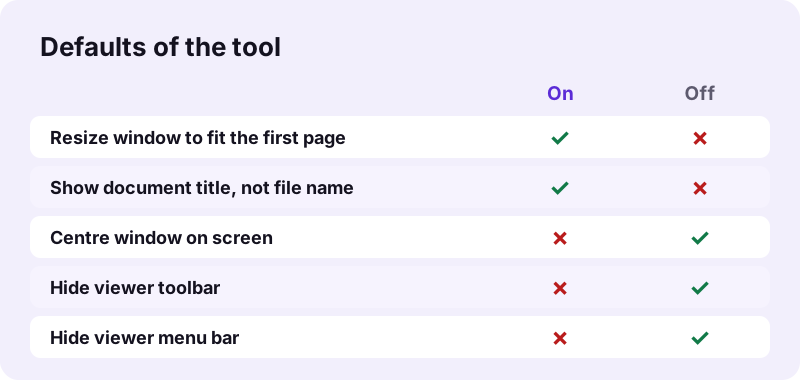
- Tick the window options. Fit the window to the first page and show the document title are on by default; centring the window and hiding the toolbar or menu bar are off.
- Press the button and download. The settings are written into the file's catalog and the -prefs.pdf file downloads.
What does pdf24 set PDF viewer preferences change?
pdf24 set PDF viewer preferences writes three things into the PDF catalog: the page layout (how pages are arranged), the page mode (which side panel shows, or full screen) and a ViewerPreferences dictionary with window options. In our test the output carried /OneColumn, /UseNone, FitWindow true and DisplayDocTitle true, while every page stayed identical.
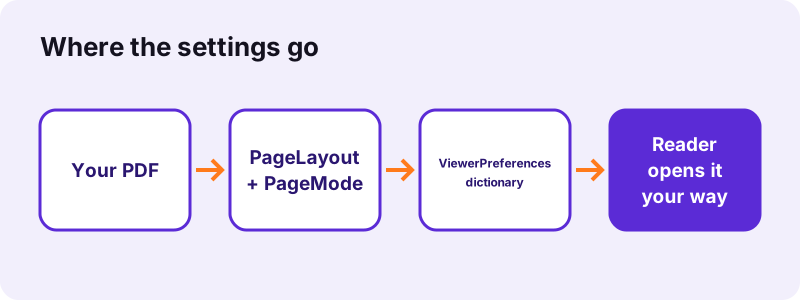
| Option in the tool | Entry in the PDF | Values |
|---|---|---|
| Page layout when opened | /PageLayout | SinglePage, OneColumn, TwoColumnLeft, TwoColumnRight, TwoPageLeft, TwoPageRight |
| Side panel | /PageMode | UseNone, UseOutlines (bookmarks), UseThumbs, FullScreen |
| Window options | /ViewerPreferences | FitWindow, CenterWindow, DisplayDocTitle, HideToolbar, HideMenubar |
“The PDF specification also provides for encryption and digital signatures, file attachments, and metadata to enable workflows requiring these features.”
pdf24 set PDF viewer preferences: the 7 page layouts
One page at a time suits slides; continuous scrolling suits reports. The two-column layouts scroll in spreads, and the two-page layouts flip a spread at a time. Odd pages left puts page 1 beside page 2, while cover page alone (TwoPageRight) shows page 1 on its own, like a printed book, so later spreads pair 2–3, 4–5 and so on.
pdf24 set PDF viewer preferences on iPhone and Android
You can set the preferences from a phone in Safari, Chrome, Edge or Firefox. Mobile PDF apps usually decide the layout themselves, so the settings matter most when the file will later be opened on a desktop reader.
pdf24 set PDF viewer preferences on Windows and Mac
Desktop readers such as Adobe Acrobat Reader honour these entries, which is also what the result note says: browser viewers may ignore some. Test the file in the reader your audience uses before you send it out.
pdf24 set PDF viewer preferences: tip for presentations
For a deck exported as PDF, choose One page at a time and Full screen. The file opens straight into a slide view, and a click or arrow key moves to the next page in readers that support it.
Which settings should pdf24 set PDF viewer preferences use?
The right choice in pdf24 set PDF viewer preferences depends on the document type. Reports and manuals read best with continuous scrolling and the bookmarks panel; magazines and brochures with two pages at a time and the cover alone; slide decks with one page at a time in full screen; scanned books with thumbnails for jumping to a page.
| Document | Page layout | Side panel | Window |
|---|---|---|---|
| Report or manual | Continuous scrolling | Bookmarks | Fit window, show title |
| Magazine or brochure | Two pages at a time (cover page alone) | No panel | Fit window |
| Slide deck | One page at a time | Full screen | — |
| Scanned book | Two pages side by side, scrolling | Page thumbnails | Show title |
The bookmarks panel only helps when the PDF has bookmarks. Add them first with Bookmark PDF, which can also open the panel on its own.
pdf24 set PDF viewer preferences with the document title
With Show the document title ticked, the reader's title bar shows the title instead of the file name. If the file has no title, the tool writes the file name as the title, which is what happened with our text-6p.pdf. For a better title, write it first with Change PDF info.
Does pdf24 set PDF viewer preferences change the pages?
No. Viewer preferences live in the PDF catalog, next to the pages rather than inside them, so text, images, links, form fields and the document info are copied unchanged. Our 6-page file kept all 13,806 characters of text, and a test file with author, keywords and an XMP packet kept all of them.
| Test file | Settings | Before | After | Time |
|---|---|---|---|---|
| text-6p.pdf (6 pages) | Defaults | 5,238 bytes | 4,322 bytes | 0.11 s |
| text-6p.pdf | Cover page alone + thumbnails + hide toolbar | 5,238 bytes | 4,326 bytes | 0.16 s |
| pg-meta.pdf (3 pages, full info + XMP) | Full screen | 2,147 bytes | 1,761 bytes | 0.12 s |
The files got a little smaller because saving again packs internal objects more tightly and drops unused ones; the content is untouched.
Is pdf24 set PDF viewer preferences safe for private files?
pdf24 set PDF viewer preferences writes the settings in your own browser: the File API reads the PDF, pdf-lib adds the catalog entries in memory and the new copy downloads directly. All three test runs reported "0 bytes uploaded", so internal documents never pass through a server, and closing the tab clears the data.
Viewer preferences are hints, not security. Hiding the toolbar or menu bar does not stop anyone from printing, copying or saving the file. To restrict those actions, use Secure PDF; to require a password, use Lock PDF.
A password-protected PDF has to be opened first with Unlock PDF; protect it again after setting the preferences.
When to use pdf24 set PDF viewer preferences
Opening settings are worth setting whenever first impressions matter: a sales brochure that should open as a spread, a manual that should show its bookmarks, a kiosk or trade-fair screen running a PDF in full screen, or an e-book whose title should appear instead of a file name like scan_0042.pdf.
- Brochures and magazines: two pages at a time, cover alone.
- Handbooks: continuous scrolling with the bookmarks panel.
- Kiosks and stands: full screen, toolbar hidden.
- Forms: one page at a time, window fitted to the page.
If the PDF will be published online, finish with Web-optimize PDF so page 1 also appears quickly.
pdf24 set PDF viewer preferences not working? Fixes
When a PDF ignores its opening settings, the reader is usually the cause: browser viewers and many mobile apps apply their own layout and panels. Other cases are a user setting in the reader that overrides documents, or simply opening the old file instead of the -prefs.pdf download.
| Symptom | Cause | Fix |
|---|---|---|
| Layout ignored in a browser | Browser viewer uses its own layout | Open the file in a desktop reader |
| Bookmarks panel empty | File has no bookmarks | Add them with Bookmark PDF |
| Title bar shows file name | Show the document title not ticked | Run the tool again with it ticked |
| Settings gone after editing | Another program re-saved the file | Set preferences as the last step |
Some readers also have a preference to restore the last view of a file, which can override what the document asks for on later openings.
pdf24 set PDF viewer preferences: frequently asked questions
Is pdf24 set PDF viewer preferences free?
Yes. pdf24 set PDF viewer preferences on pdf24tools costs nothing, needs no sign-up and adds no watermark. There is no limit on files, because the settings are written in your own browser instead of on a server. Each run produces a normal PDF that you can keep and share.
Which readers follow pdf24 set PDF viewer preferences?
The settings are part of the PDF standard, ISO 32000, and desktop readers such as Adobe Acrobat Reader apply them when the file opens. Browser viewers and many phone apps may ignore some or all of them and use their own layout. Test the result in the reader your audience will use.
Does pdf24 set PDF viewer preferences change my document?
Only its opening settings. Pages, text, images, links, form fields and document info are copied unchanged; our 6-page test file kept its 13,806 characters and a file with author, keywords and XMP kept all of them. The one addition: with Show the document title on, an untitled file gets its file name as title.
How do I make a PDF open in full screen with pdf24 set PDF viewer preferences?
Choose Full screen under Side panel and, for slides, One page at a time under Page layout. Save and open the file in a desktop reader: it starts in full-screen mode. Acrobat Reader may ask for confirmation the first time, as a safety step against documents that take over the screen.
What does cover page alone mean in pdf24 set PDF viewer preferences?
It is the TwoPageRight layout: page 1 is shown by itself on the right, and the following pages appear as spreads 2–3, 4–5 and so on, like an open book or magazine. Odd pages left, the TwoPageLeft layout, instead pairs page 1 with page 2 from the start.
Is my file uploaded when I use pdf24 set PDF viewer preferences?
No. The PDF is read with the browser File API and the catalog entries are written in memory on your device. The result line shows 0 bytes uploaded, nothing is stored, and closing the tab removes every trace. You can load the page and then work offline as well.
Does pdf24 set PDF viewer preferences work on a phone?
Yes, you can set them from Safari on iPhone and iPad or from Chrome, Edge and Firefox on Android, and saving takes a fraction of a second. Keep in mind that phone PDF apps often ignore page layout and panel settings; the preferences pay off when the file is opened on a computer.
Can pdf24 set PDF viewer preferences stop printing or copying?
No. Hiding the toolbar and menu bar only changes what the reader shows; keyboard shortcuts and other readers still print and copy. To limit printing, copying or editing, use Secure PDF, which encrypts the file with AES-256 and sets permission flags that compliant readers enforce.
Does pdf24 set PDF viewer preferences set the zoom level?
The tool sets Resize the window to fit the first page, which makes the reader window match the page size when the file opens. It does not store a fixed zoom percentage such as 125 %. Most readers fit the page into the window, so the page appears fully visible at first.
Is pdf24tools the official pdf24 set PDF viewer preferences tool?
No. pdf24tools is an independent website and is not affiliated with PDF24 or Geek Software GmbH. Our tool is our own build on the open-source pdf-lib library and runs entirely in your browser. The page name only describes what people search for when they want to control how a PDF opens.
Can I undo pdf24 set PDF viewer preferences?
Yes. Run the tool again on the new file and pick other values, for example continuous scrolling, No panel and all window options unticked. Keep as it is leaves the layout or panel entry untouched instead. Your original file is never changed, because the tool always saves a new copy named -prefs.pdf.
Why are my settings lost after editing a file from pdf24 set PDF viewer preferences?
Some editors and converters rebuild the PDF catalog when they save and drop entries they do not know or use. Make viewer preferences one of the last steps: merge, edit, sign and compress first, set the preferences, and if the file goes online, web-optimize it as the very last step.
pdf24 set PDF viewer preferences: sources
- PDF — Wikipedia
- ISO 32000-2:2020 Document management — Portable document format — Part 2: PDF 2.0 — ISO
- File API — MDN Web Docs