How to use pdf24 PDF to secure PDF in 5 steps
- Choose the PDF. Tap Choose PDF files or drop the file on the box. It is read from your disk and never uploaded.
- Set the open password. Type a password of at least 4 characters in both boxes. Recipients will need it to open the file.
- Tick the limits. Choose any mix of Block printing, Block copying text and Block editing. Each tick clears specific permission bits in the file.
- Press the button. The file is encrypted with AES-256 on your device and a random 18-character owner password is created for the limits.
- Save both passwords. Copy the owner password from the result line before you leave the page; it is shown only once and is needed to lift the limits later.
What does pdf24 PDF to secure PDF add to a file?
pdf24 PDF to secure PDF adds three things: AES-256 encryption, an open password for readers, and a permissions entry that tells PDF readers which actions to refuse. The permissions are protected by a separate owner password of 18 random characters, so a reader who knows the open password still cannot remove the limits.
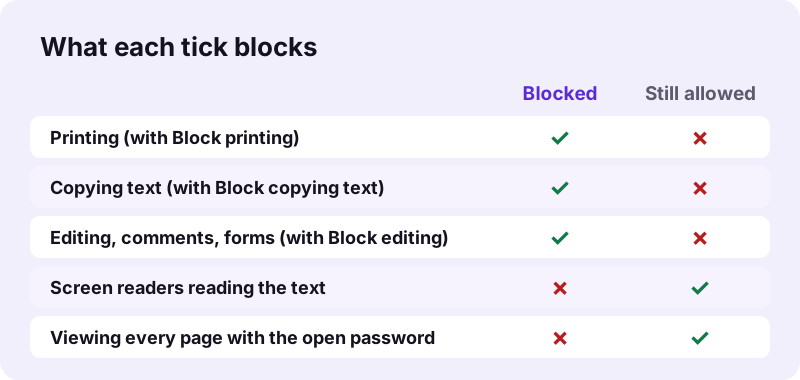
The permissions live in one number in the encryption dictionary, the /P value. Each bit stands for one action. Our test files showed -4 with no limits (everything allowed), -2072 with printing and copying blocked, and -3392 with all three boxes ticked.
“Each of them transforms data in blocks of 128 bits, and the numerical suffix indicates the bit length of the associated cryptographic keys.”
pdf24 PDF to secure PDF: the permission bits
| Tick | Bits cleared | Effect in a compliant reader |
|---|---|---|
| Block printing | 3 (print) and 12 (high-quality print) | Print button greyed out |
| Block copying text | 5 (copy and extract) | Select and copy refused |
| Block editing | 4, 6, 9 and 11 (modify, annotate, fill forms, assemble) | No edits, comments, form filling or page changes |
| Any choice | 10 stays set | Accessibility tools may still read the text |
pdf24 PDF to secure PDF and screen readers
Bit 10 is left on in every output, so screen readers and other assistive software may still extract text for people who cannot see the page. That keeps secured documents usable for blind and low-vision readers while ordinary copy and paste stays blocked.
pdf24 PDF to secure PDF on phones and computers
The tool works the same in Chrome, Edge, Firefox and Safari on Windows, macOS, Linux, Android and iOS. Nothing is installed; the qpdf engine loads once into the browser as WebAssembly and stays in its cache.
pdf24 PDF to secure PDF: tip for the owner password
Paste the owner password into a password manager entry named after the file. Without it, the limits can only be lifted by tools that ignore the rules, and you lose the clean way to make a printable copy later.
How strong are the limits of pdf24 PDF to secure PDF?
pdf24 PDF to secure PDF sets limits that act as a firm request, not a vault. Pages are AES-256 encrypted, yet anyone with the open password can decrypt them, and rule-ignoring software can then print or copy. Adobe Acrobat, browser viewers and Apple Preview respect the limits; some converters and command-line tools do not.
- Strong: nobody without the open password can read any page.
- Strong: the owner password has 18 characters from a 56-character set, about 104 bits of randomness.
- Weaker: limits rely on the reader honouring the /P bits.
- Never: a screenshot or a phone photo of the screen cannot be prevented by any PDF setting.
For truly confidential pages the open password is what protects you, so choose a long one. Use the limits to discourage casual copying, printing of drafts or editing of a form, not to stop a determined person.
pdf24 PDF to secure PDF test results
We secured the same 6-page text file twice in Chrome on Windows on 2026-11-02 and read the outputs with pypdf. Both used AES-256 (encryption version 5, revision 6), both opened with the open password, and both carried the exact permission bits for the boxes we ticked, with a fresh owner password each time.
| Ticks | Size before | Size after | Time | /P value |
|---|---|---|---|---|
| None (plain lock) | 5,238 bytes | 6,496 bytes | 0.29 s | -4 |
| Block printing + copying | 5,238 bytes | 6,499 bytes | 0.29 s | -2072 |
| All three | 5,238 bytes | 6,499 bytes | 0.27 s | -3392 |
The two owner passwords shown were different 18-character strings, as expected from a random generator. The added size, about 1.2 KB, is the encryption data and is the same for a 5 KB file and an 8 MB one.
When is pdf24 PDF to secure PDF the right choice?
Securing with permissions fits documents that people should read but not reuse freely: course handouts, exam papers, price lists sent to resellers, book previews, signed agreements that must not be altered, and forms that should be printed only by the office. If you only need to keep strangers out, the simpler Lock PDF is enough.
| Document | Suggested ticks |
|---|---|
| Exam paper sent ahead to teachers | Block printing until the exam day, copying |
| Price list for resellers | Block editing |
| Book or report preview | Block printing and copying |
| Signed contract copy | Block editing |
The plain open password, without limits, is explained on Lock PDF. Both pages share the same engine; this one is about what readers may do once the file is open.
pdf24 PDF to secure PDF for signed documents
Secure a document before anyone signs it with a certificate. Encrypting a file afterwards rewrites it and breaks existing digital signatures. A drawn signature from Sign PDF is part of the page and survives securing without problems.
Is pdf24 PDF to secure PDF private?
pdf24 PDF to secure PDF keeps both the document and the passwords on your device. The browser reads the file with the File API, qpdf encrypts it in memory, and the owner password is created with crypto.getRandomValues in the same tab. Our runs reported 0 bytes uploaded, and nothing is stored after the tab closes.
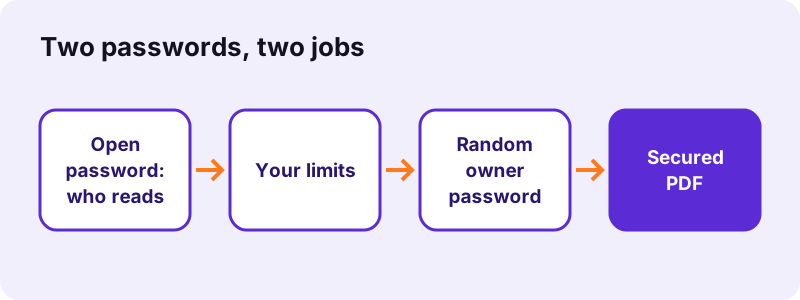
Neither password can be recovered later. Keep the original unsecured file, or store both passwords somewhere safe.
pdf24 PDF to secure PDF problems and fixes
Securing stops with a short message when an input is missing or the file is already encrypted. The fixes are quick: type a longer password, retype both password boxes, or unlock the file first. A file whose structure is broken should go through Repair PDF before you try again.
| Message | Fix |
|---|---|
| Use a password of at least 4 characters. | Type a longer open password |
| The two passwords are not the same. | Retype both boxes |
| This PDF already has a password. | Use Unlock PDF, then secure the copy |
| The file could not be protected. | Run Repair PDF first |
To change the limits of a file you secured earlier, unlock it with Unlock PDF and run this tool again with new ticks. A damaged file is rebuilt by Repair PDF.
pdf24 PDF to secure PDF: frequently asked questions
Is pdf24 PDF to secure PDF free?
Yes. pdf24 PDF to secure PDF costs nothing, needs no account and adds no watermark. There is no daily limit, because AES-256 encryption and the permission flags are applied by qpdf running in your own browser rather than on a paid server. Each result is a standard encrypted PDF that any modern reader opens with the password.
What is the difference between pdf24 PDF to secure PDF and Lock PDF?
Lock PDF sets one password that controls who may open the file; after opening, everything is allowed. pdf24 PDF to secure PDF adds limits on printing, copying and editing and protects them with a second, random owner password. Both use the same AES-256 encryption, so the difference lies only in what happens after the file is opened.
Can people still print a file made with pdf24 PDF to secure PDF?
Not in readers that follow the PDF rules when Block printing is ticked: the print command is greyed out in Acrobat, Chrome, Edge, Firefox and Preview. Programs that ignore the rules can still print once the file is open, and nothing stops a screenshot. Treat the limit as strong discouragement rather than a guarantee.
Why does pdf24 PDF to secure PDF need an open password?
The PDF format can only encrypt a file and lock its permissions when a security handler is present, and our tool always pairs the limits with an open password of at least 4 characters. That way the pages are encrypted with AES-256 as well, and the file cannot be read by anyone who does not know the password.
Where is the owner password after pdf24 PDF to secure PDF?
It is printed in the result line right after the run, for example as an 18-character mix of letters and digits. It is shown only once and is not stored anywhere. Copy it into a password manager or a note before you leave the page, because it is the clean way to lift the limits later.
Does a file from pdf24 PDF to secure PDF work with screen readers?
Yes. Every output keeps permission bit 10, which allows text extraction for accessibility, even when Block copying text is ticked. Screen readers such as NVDA, JAWS and VoiceOver can therefore still read the document aloud, while ordinary select-and-copy in a reader is refused. That keeps secured documents usable for blind and low-vision readers.
Can I secure a PDF on my phone with pdf24 PDF to secure PDF?
Yes. The tool runs in Safari on iPhone and iPad and in Chrome, Edge or Firefox on Android. Pick the file from your storage, type the password twice, tick the limits and press the button. On a phone, copy the owner password with a long press on the result line before you switch apps.
Does pdf24 PDF to secure PDF change quality or file size?
Quality stays identical, because pages, images and fonts are encrypted rather than re-encoded. The size grows only by the encryption data: our 5,238-byte test file became 6,499 bytes with all three limits set. A large scan grows by roughly the same amount, so the share becomes tiny as files get bigger.
Is pdf24tools the official pdf24 PDF to secure PDF service?
No. pdf24tools is an independent website and is not affiliated with PDF24 or Geek Software GmbH. Our secure PDF page is our own build around the open-source qpdf library, running in your browser, and the name only describes what people search for when they want to restrict printing or copying of a PDF.
How do I remove the limits set by pdf24 PDF to secure PDF?
Open Unlock PDF, choose the secured file and type the open password. The unlocked copy opens without a prompt and allows printing, copying and editing again. Unlock only files you own or are allowed to change: the limits were set by someone for a reason, and removing them from other people's documents can break terms of use.
Can pdf24 PDF to secure PDF block copying but allow printing?
Yes. Tick Block copying text and leave Block printing and Block editing unticked. In our test that combination gave a permission value of -20, clearing only bit 5, so compliant readers refuse select-and-copy but still print at full quality. Every mix of the three boxes works the same way and changes only the bits listed in the table above.
More pdf24 PDF to secure PDF tools and guides
pdf24 PDF to secure PDF: sources
- FIPS 197, Advanced Encryption Standard (AES) — NIST
- PDF — Wikipedia
- Crypto: getRandomValues() method — MDN Web Docs
- File API — MDN Web Docs