Is pdf24 safe to use with private documents?
Yes, pdf24tools is safe for private documents because the file never leaves your device. The browser opens it locally with the File API and every tool processes it in JavaScript or WebAssembly on your phone or computer. Our logs of more than 20 runs showed no upload request at all.
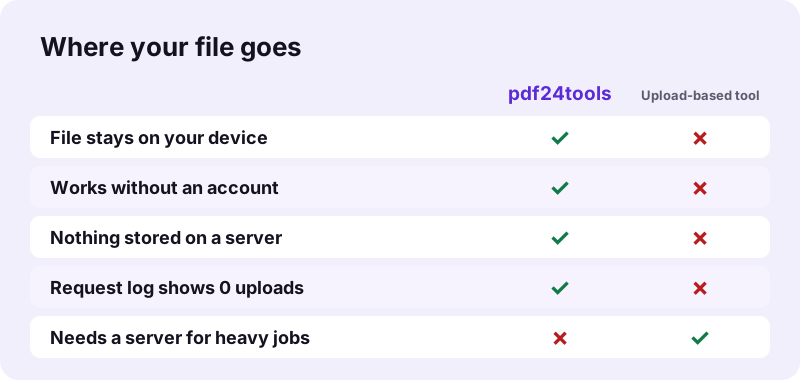
That design answers the question is pdf24 safe in the most direct way: a file that is never sent cannot be read, kept or leaked by a server. There is no account to hack and no history of your files on our side.
is pdf24 safe: how we tested it
We served the site locally and drove Chrome with Playwright. For each run we recorded every network request the page made, then counted the ones that could carry a file: POST and PUT. The count was 0 for compress, merge, split, convert, OCR, sign, edit and redact.
is pdf24 safe for OCR, which downloads data
OCR PDF is the one tool that fetches extra files: the Tesseract engine and the language data come from a public CDN on first use. These are downloads to you, made with GET requests. Your scan is not part of them.
is pdf24 safe after you close the tab
The file lives only in the tab's memory while you work. Closing the tab or pressing Start over releases it. The result you downloaded stays in your own download folder, under your control.
is pdf24 safe: a 30-second self-check
Load a tool, then switch off Wi-Fi or mobile data and run it. If the result appears, the work happened on your device. This works for every tool except OCR on its very first use, when the language data is still missing.
How can you check yourself whether is pdf24 safe holds true?
You can check it in your own browser in two minutes. Open the developer tools with F12, select the Network tab, run a tool on a test file and look at the method column. A safe browser-only tool shows GET requests for its scripts and no POST request carrying your file.
- Open a tool such as Compress PDF.
- Press F12 (Cmd+Option+I on a Mac) and open Network.
- Choose a test file and run the tool.
- Sort by Method: look for POST or PUT.
- Compare the size of the requests with the size of your file.
If you see your file size in an outgoing request, the answer to is pdf24 safe for that tool would be no, because the file was sent. On pdf24tools the only large transfers are incoming: the page itself and, for OCR, the language data.
is pdf24 safe for redaction, signatures and passwords?
Privacy also depends on using the right tool for the job. Redact PDF really removes text, while Edit PDF white-out only hides it. Sign PDF places a visible image, not a certificate signature. Lock PDF encrypts with AES-256. Knowing these limits matters more than where the file is processed.
| Tool | What we found | Safe for hiding text? |
|---|---|---|
| Redact PDF | 240 matches marked; 0 characters left on the 6 redacted pages | Yes |
| Edit PDF white-out | The word under the white box was still extractable | No |
| Sign PDF | Signature added as an image, file 12 KB to 29 KB | Not a security feature |
| Lock PDF | AES-256 encryption with your password | Yes, with a strong password |
“Redaction or sanitization is the process of removing sensitive information from a document so that it may be distributed to a broader audience.”
So is pdf24 safe for hiding a name or an account number? Yes with Redact PDF, no with a white box. After redacting, try to select or search the hidden word in your reader: if nothing is found, the text is really gone.
is pdf24 safe from malware in downloaded files?
The results are safe to open because the tools only write PDF, Word, Excel, image or ZIP files from your own content. Nothing is installed, so there is no program that could carry malware onto your computer. The redacted copy also drops the old file's metadata and lists pdf24tools as its producer.
A browser page runs inside the browser's sandbox and cannot reach files you did not pick yourself. That is a second reason why the question is pdf24 safe has a different answer for a web page than for software you install.
Why is pdf24 safe in the browser but upload tools need trust?
Browser-only processing is safer by design because there is no copy of your file anywhere else. An upload-based service has to receive the file, store it at least for a while and delete it later, and you must trust each of those steps. A local tool removes all three steps instead of promising them.
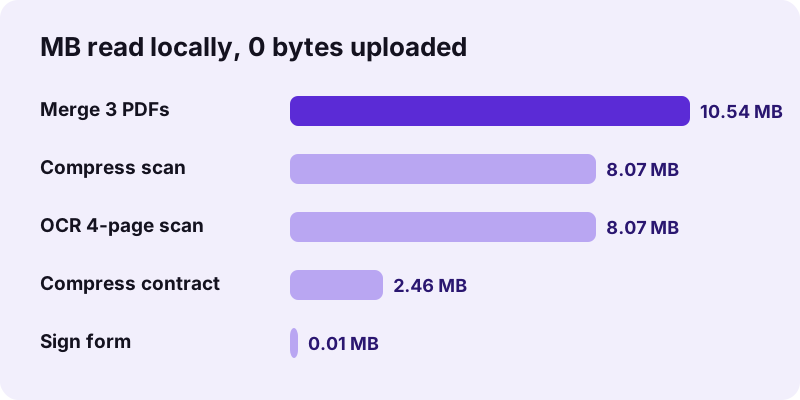
The cost of local processing is speed on weak devices. Our 4-page OCR run took 82.2 seconds on a laptop, and the 100 KB compression of an 8.07 MB scan took 106.6 seconds, because the device itself did all the work. For private files that trade is usually worth it.
Upload services are not unsafe by default, but their safety depends on how they store and delete files, which you cannot see from outside. With local processing the only place your document exists is the device you are holding, and you can prove it in the Network tab.
| Step | Upload-based tool | pdf24tools |
|---|---|---|
| File transfer | Sent to a server | None (0 bytes) |
| Storage | Kept until deleted | Tab memory only |
| Deletion | On the service's schedule | When you close the tab |
is pdf24 safe on a shared or work computer?
On a shared computer the risk is not the site but what stays behind. Downloaded results remain in the download folder, and the browser may keep them in its download list. Delete the files after use, clear the download history, and use a private window if the computer belongs to someone else.
- Use a private or incognito window on shared devices.
- Delete the -compressed, -signed or -redacted file after sending it.
- Lock sensitive results with Lock PDF before you email them.
- Check your company policy: some forbid any web tool for client files.
For most people the honest summary of is pdf24 safe is short: the processing is private, and the remaining risk is the copy you keep. Treat the downloaded result like any other sensitive file on your device.
is pdf24 safe: frequently asked questions
Is pdf24 safe for passport and ID scans?
Yes. On pdf24tools the scan is processed on your own device and never uploaded, which is the core of why is pdf24 safe gets a yes here. Our request logs showed 0 POST requests in every test, including an 8.07 MB scan. Delete the result after submitting it on a shared computer.
Is pdf24 safe without an account?
Yes. No tool asks for an email, login or payment, so there is no account data that could leak. You open a page and use the tool. Because nothing is stored on a server, there is also no file history: keep your downloaded results yourself.
Is pdf24 safe according to reddit?
We cannot speak for forum posts, and we do not quote ratings we did not collect. What we can show is measured: no upload in more than 20 logged runs. The better test is your own: open the Network tab, run a tool and look for a POST request with your file.
Is pdf24 safe for company contracts?
The processing is, because the contract stays on the device that opened it. Whether you may use any web tool for client files is a question for your company policy. If it allows browser tools, lock the final file with a password before sending it outside the company.
Is pdf24 safe for removing confidential text?
Only with the right tool. Redact PDF burns black boxes into the page and removes the text below: our redacted pages had 0 extractable characters left. The white-out of Edit PDF only covers text, which stays inside the file and can still be copied. Use Redact PDF for anything confidential.
Is pdf24 safe when OCR loads data from the internet?
Yes. OCR PDF downloads the recognition engine and language data from a public CDN the first time, using normal GET requests. Your scan is not sent along. After the data has loaded, the recognition runs on your device; our 4-page test produced 457 words with no upload.
Is pdf24 safe on Android and iPhone?
Yes. On phones the tools run inside the browser, such as Safari or Chrome, with the same local processing as on a computer. Nothing is installed and the browser can only read the files you pick. The result goes to the Downloads folder of the phone.
Is pdf24 safe to use offline?
Offline use is the strongest proof of is pdf24 safe: load a tool, turn off the connection and run it. If the download link appears, nothing could have been sent. This works for every tool once its libraries have loaded; OCR needs its language data first, which comes from the internet.
Is pdf24 safe for digital signatures?
Sign PDF adds a visible signature image, which is fine for many forms but is not a certificate-based digital signature. Signing a file with an existing certificate signature can also break that signature's check. If a document must stay verifiable, sign it in software that holds your certificate.
Is pdf24 safe with password-protected files?
Yes. Unlock PDF only opens a file with the password you type, and it runs locally with qpdf compiled to WebAssembly. Without the right password a file stays locked: our test file with an open password stopped with a message asking for it. Passwords are never sent anywhere.
Is pdf24 safe for medical records?
The tools themselves do not send the record anywhere, which is what most privacy rules care about. You still decide where the result goes afterwards. Lock the file with a password before emailing it, and remove extra pages with Remove PDF pages so you share only what is needed.
Is pdf24 safe here the same as on other sites?
No. pdf24tools is an independent website and is not affiliated with PDF24 or Geek Software GmbH. This guide covers only our own browser tools and our own measurements from 2 November 2026. For another product, check its own privacy policy and run the same Network-tab test.
Is pdf24 safe from leaving data in my browser?
The tools keep no copy in browser storage of your document. The file exists in the tab's memory while you work and is released when you close the tab. Downloaded results stay in your download folder and download history, so delete them on a shared computer.