How to use pdf24 OCR PDF in 4 steps
- Open the scan. Choose a scanned PDF or a photo of a page (JPG, PNG, WebP), or drop it on the box.
- Check the language. Pick the language of the text from 11 choices; it starts on the language of this page.
- Choose the result. Searchable PDF keeps the pages and adds hidden text; Plain text saves only the words as a .txt file.
- Run and download. Press the button, wait while each page is recognised, then save the -ocr.pdf or .txt file.
What does pdf24 OCR PDF change in a scanned file?
pdf24 OCR PDF keeps every original page untouched and adds an invisible layer of recognised words placed over the matching letters. Viewers then let you search, select and copy the text, while the page still shows the original scan. Words recognised with very low confidence are left out instead of being guessed.
“Optical character recognition (OCR) or optical character reader is the electronic or mechanical conversion of images of typed, handwritten or printed text into machine-encoded text”
| File | Result | Words | Before → after | Time |
|---|---|---|---|---|
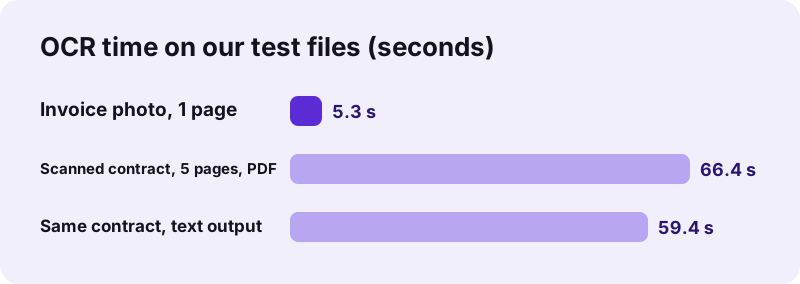
| Invoice photo (PNG, 1 page) | Searchable PDF | 54 | 72 KB → 105 KB | 5.3 s |
| Scanned contract (PDF, 5 pages) | Searchable PDF | 2,575 | 2.46 MB → 2.60 MB | 66.4 s |
| Same contract | Plain text | about 2,591 | → 14 KB .txt | 59.4 s |
pdf24 OCR PDF accuracy on a clean scan
We checked the pdf24 OCR PDF text output of the 5-page contract word by word against the words of the original document: all 2,565 alphabetic words were real words of the source, with no misread ones. Before OCR, a search for thirty found 0 matches in the scan; after OCR the same search found 150. The invoice photo came back as its exact text, including amounts such as 319.70.
pdf24 OCR PDF on a phone
pdf24 OCR PDF runs on phones too, but it is heavy work: each page is rendered at about 300 dpi and analysed by the recognition engine on the device. Expect a phone to take longer than our laptop's 13 seconds per page, keep the screen on, and start with a few pages.
pdf24 OCR PDF on a computer
On a computer, long scans are practical: our 5-page contract took just over a minute. The progress line shows which page is being read. The first run of a session also downloads the language data once, which is why our 1-page photo took 5.3 seconds.
pdf24 OCR PDF tip for better results
Scan at 300 dpi, keep pages straight and use the Document or Black and white clean-up in Scan to PDF for phone photos. Clean contrast and straight lines matter more to recognition than colour.
Which languages does pdf24 OCR PDF recognise?
pdf24 OCR PDF recognises 11 languages: English, French, Spanish, Portuguese, German, Italian, Russian, Arabic, Indonesian, Turkish and Vietnamese. Pick the language the document is written in; the list starts on the language of the page you are on. A wrong language setting mainly costs accents and special letters.
| Language | Script | Note |
|---|---|---|
| English, French, Spanish, Portuguese, German, Italian, Indonesian, Turkish, Vietnamese | Latin with accents | Choose the exact language for its accents (é, ß, ş, ơ) |
| Russian | Cyrillic | Latin words in the text are read less reliably |
| Arabic | Arabic, right to left | An Arabic font is embedded for the text layer |
pdf24 OCR PDF with mixed-language documents
One language is used per run. For a French letter with English names, choose French: names in Latin letters are still recognised. For documents in two scripts, such as Arabic and English, run the dominant language; the other script may come out incomplete.
Is pdf24 OCR PDF private if it downloads an engine?
pdf24 OCR PDF downloads the recognition engine and the language data from a public code library on first use, but your file never travels the other way: the pages are read, rendered and recognised on your device. Our result lines read 0 bytes uploaded for every OCR run, including the 2.46 MB contract.
The engine is Tesseract, compiled to run inside the browser. Downloading code and dictionaries is like loading a font; nothing about your document is in those requests. The File API on MDN explains how a page reads a local file without sending it.
“Tesseract is an optical character recognition engine for various operating systems. It is free software, released under the Apache License.”
Why does pdf24 OCR PDF find wrong or no words?
pdf24 OCR PDF depends on what the page shows. Blurred photos, tiny print, handwriting, heavy stamps and the wrong language setting all reduce accuracy. Pictures without text can even produce junk words: our test page of random coloured shapes returned 457 meaningless words. Clean, straight scans of printed text give the best results.
| Problem | Fix |
|---|---|
| No text was recognised | Check the language, and make sure the page is not upside down; turn it with Rotate PDF pages |
| Many wrong letters | Rescan at 300 dpi or clean the photo with Scan to PDF |
| Handwriting not read | The engine is trained on print; handwriting is not supported |
| Junk words on photos or charts | Delete them in the text output, or OCR only the text pages |
| File already has text | No OCR needed: use Copy from PDF or Search PDF |
pdf24 OCR PDF and what to do next
A searchable PDF from pdf24 OCR PDF opens the door to the other text tools. Typical next steps after OCR:
- Find every mention of a name or amount with Search PDF.
- Copy the whole text with Copy from PDF.
- Turn the scan into an editable document with PDF to Word.
- Compare two scanned versions with Compare PDF, after OCR on both.
- Shrink the result with Compress PDF if it must fit an e-mail.
pdf24 OCR PDF: frequently asked questions
Is pdf24 OCR PDF free?
Yes. OCR on pdf24tools is free, with no account, no watermark and no page limit. The recognition runs in your browser on your own device, so there is no server time to charge for. Long documents simply take longer, at roughly 13 seconds per page on our laptop.
Does pdf24 OCR PDF upload my scan?
No. The page downloads the recognition engine and the language data once, but your file is never sent: our result lines read 0 bytes uploaded on every run. The pages are rendered and recognised on your device, and nothing is stored after you close the tab.
How long does pdf24 OCR PDF take?
On our Windows laptop, about 13 seconds per page: 66.4 seconds for a 5-page scanned contract and 5.3 seconds for a 1-page invoice photo, including the one-time language download. Phones are slower. The progress line shows which page is being recognised.
Can pdf24 OCR PDF read handwriting?
Not reliably. The engine is trained on printed text, so handwritten notes usually come out as wrong letters or are skipped. Printed forms with handwritten answers work for the printed part; type the handwritten answers yourself if they must be searchable.
Does pdf24 OCR PDF change how my scan looks?
No. The original pages stay exactly as they were; the recognised words are added as invisible text over the matching letters. Only the file size grows a little, from 2.46 MB to 2.60 MB for our 5-page contract, mainly because of the embedded font.
Can pdf24 OCR PDF save plain text?
Yes. Choose Plain text (.txt) as the result to get only the recognised words, with a --- n --- line between pages. Our 5-page contract gave a 14 KB text file of about 2,591 words, ready to paste into a document or translation tool.
Which files does pdf24 OCR PDF accept?
Scanned PDFs and single images that your browser can open, such as JPG, PNG and WebP. A PDF is read page by page at about 300 dpi; an image becomes one page. For several photos, combine them first with Scan to PDF, then run OCR on that PDF.
How accurate is pdf24 OCR PDF?
On a clean, straight scan of printed text it is very accurate: all 2,565 alphabetic words of our 5-page contract matched the source. Accuracy drops with blur, small print, skewed pages, stamps and the wrong language setting, and pictures without text can produce junk words.
Can pdf24 OCR PDF recognise Arabic?
Yes. Choose Arabic as the language; the text layer is written with an embedded Arabic font. Arabic recognition is more sensitive to scan quality than Latin text, so a sharp 300 dpi scan matters even more. Mixed Arabic and English pages may lose some of the second script.
Why did pdf24 OCR PDF find no text?
Usually the language is wrong, the page is upside down or sideways, or the scan is too blurred. Rotate the pages first, choose the right language and try again. If the PDF already has a text layer, OCR is not needed: Copy from PDF reads it directly.
Can I use pdf24 OCR PDF on a phone?
Yes, in current Chrome, Safari, Edge and Firefox. OCR is demanding, so a phone takes longer than a computer and needs the screen to stay on. Start with a few pages; for long scans, a computer is the more comfortable choice.
Who makes the pdf24 OCR PDF tool?
The pdf24tools team makes it. pdf24tools is an independent website and is not affiliated with PDF24 or Geek Software GmbH. Our OCR page uses the open-source Tesseract engine inside your browser; this page describes it only from our own tests with our own files.
More pdf24 OCR PDF tools and guides
pdf24 OCR PDF: sources
- Optical character recognition — Wikipedia
- Tesseract (software) — Wikipedia
- File API — MDN Web Docs