How to use pdf24 view as PDF in 3 steps
- Choose the PDF. Tap Choose PDF files or drop the file on the box.
- Press the button. The pages are drawn one by one; a counter shows progress on long files.
- Scroll and read. Scroll through the pages; each shows its number, such as 3 / 12. The download link gives the same file back.
What does pdf24 view as PDF show?
pdf24 view as PDF draws each page of the file as a sharp image in the page, at up to twice its natural size and about 1,100 pixels wide, extra sharp on high-density screens. Pages appear in order with a caption such as 2 / 6, and files longer than 300 pages show the first 300 with a note.
| Feature | In this viewer | Where else |
|---|---|---|
| Show all pages with numbers | Yes, up to 300 | — |
| Works without an app | Yes, any modern browser | — |
| Select and copy text | No, pages are images | Copy from PDF |
| Search for a word | No | Search PDF |
| Use the download | Print PDF | |
| Change the file | No, read-only | Edit PDF |
pdf24 view as PDF measured on two files
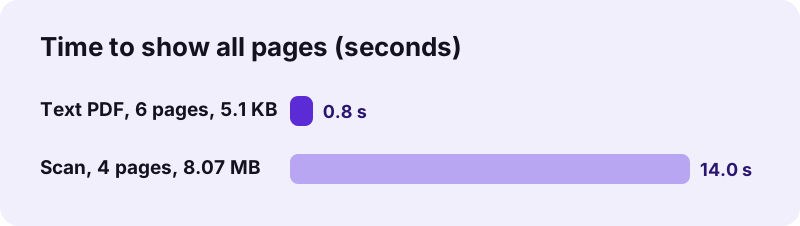
A 6-page text document of 5.1 KB was fully on screen in 0.8 seconds. A 4-page scan of 8.07 MB took 14.0 seconds, because each page is a large photo that has to be decoded and scaled. The download link returned exactly the same bytes as the original in both cases, 5,238 and 8,463,060 bytes.
pdf24 view as PDF on a phone
On Android phones without a PDF app, a downloaded PDF sometimes opens nowhere. This page draws it in the browser instead. Pinch to zoom on small print; the pages are drawn at high resolution, so zooming to about 2× stays readable.
pdf24 view as PDF on a shared computer
In a library, a hotel lobby or an office kiosk you may not be allowed to install software, and opening a file in a desktop program can leave it in a recent-files list. The browser viewer keeps the pages only in the tab's memory.
pdf24 view as PDF tip for private browsing
On a shared computer, open the page in a private or incognito window. When you close it, the browser discards the page memory, and nothing about the file stays in the history of that window.
Is pdf24 view as PDF safe for private files?
pdf24 view as PDF reads the file with the browser's File API and draws it with pdf.js on your device, so the document never leaves your computer or phone. Our result lines read 0 bytes uploaded for both test files. Bank statements, contracts and medical letters can be read without handing them to anyone.
“Portable Document Format (PDF), standardized as ISO 32000, is a file format developed by Adobe in 1993 used to present documents”
Because PDF is a published standard, an open-source reader such as pdf.js can draw it faithfully in any browser. The File API on MDN explains how a page reads a file on your disk without sending it.
Why won't my file open in pdf24 view as PDF?
pdf24 view as PDF shows an error instead of pages in three cases: the file is protected by an open password, it is damaged or only partly downloaded, or it is not really a PDF, such as an HTML page saved with a .pdf name. Each case has a quick fix listed below.
| Cause | Fix |
|---|---|
| Open password | Remove it with Unlock PDF (you need the password) |
| Damaged or truncated file | Download it again, or try Repair PDF |
| Not a real PDF | Open it with the program that made it |
| Very slow on a phone | Make a lighter copy with Compress PDF |
pdf24 view as PDF with very long documents
The viewer draws at most 300 pages, so phones do not run out of memory on a 1,000-page manual. To read a later part, cut it out with Extract PDF pages and open that smaller file.
pdf24 view as PDF or the browser's built-in viewer?
Chrome, Edge, Firefox and Safari can open PDFs themselves when you click a link to one. That built-in viewer is the better choice when it works: it lets you select text and search. pdf24 view as PDF helps in the cases where the built-in route fails or is not available.
| Situation | Better choice |
|---|---|
| A PDF link opens fine in the browser | The browser's own viewer |
| The phone downloads the file but has no app to open it | pdf24 view as PDF |
| The file comes from e-mail, a USB stick or a messaging app | This page: choose it from Files |
| Company policy blocks the built-in viewer | This page |
| You need to search or copy text | Search PDF or Copy from PDF |
Both routes draw the file on your device. The difference is the feature set: our viewer shows pages as images and focuses on getting a document on screen, while the other tools on this site add search, copying, printing and editing as separate steps.
pdf24 view as PDF for scans, forms and comments
Scanned pages appear exactly as scanned, including stamps and handwriting. Form fields show the values stored in the file, and comments show where the file asks for them to be displayed, because the drawing follows the standard. Filling those fields happens in Fill out PDF.
- Standard PDF files of any version, opened from your device.
- Landscape and rotated pages are shown upright, as the file defines them.
- Mixed page sizes keep their proportions.
- Up to 300 pages are drawn, each with its number.
pdf24 view as PDF: frequently asked questions
Is pdf24 view as PDF free?
Yes. Reading PDFs on pdf24tools is free, with no sign-up and no limit on files. The viewer runs in your browser on your own device, so there is no server work involved. Open as many documents as you like, one after another, in the same tab.
Does pdf24 view as PDF upload my file?
No. The browser reads the file from your device and draws it locally; the result line in our tests showed 0 bytes uploaded. Only the page and the PDF engine are downloaded. Nothing about your document is stored on a server or kept after you close the tab.
Can I open a PDF on Android with pdf24 view as PDF?
Yes. Open the page in Chrome, Samsung Internet, Firefox or Edge, choose the PDF from Downloads or Files and press the button. The pages are drawn in the browser, which helps when no PDF app is installed or the file will not open elsewhere.
Can I select text in pdf24 view as PDF?
No. The viewer draws pages as images to show them exactly as designed. To copy text, use Copy from PDF, which extracts the text of every page into a box you can copy. To find a word, use Search PDF, which lists every match with its page.
How many pages can pdf24 view as PDF show?
Up to 300 pages; longer files show the first 300 and a note with the number of remaining pages. Our 6-page test file was ready in 0.8 seconds. For a later part of a very long document, extract those pages first and open the smaller file.
Why is pdf24 view as PDF slow on my scan?
Scanned pages are big photos that must be decoded and scaled: our 4-page scan of 8.07 MB took 14 seconds, while a text file took under a second. Compress the scan for faster viewing, or open it on a computer, which decodes images faster than most phones.
Can pdf24 view as PDF open password-protected files?
Files with an open password cannot be shown, because the pages are encrypted. Remove the password with Unlock PDF, which needs the password you were given, then view the unlocked copy. Files that only restrict printing or copying usually open normally.
Does pdf24 view as PDF change my file?
No. The viewer is read-only. The download link offers the original file back with exactly the same bytes: 5,238 bytes in, 5,238 bytes out in our test. To change a file, use Edit PDF, Sign PDF or one of the other tools.
Can I print from pdf24 view as PDF?
Use the download link to save the file, then print it from your PDF program, or open Print PDF, which prepares the pages you choose and opens your browser's print dialog directly. Printing the viewer page itself would print the website, not your document.
Does pdf24 view as PDF work offline?
The page and the PDF engine must load once over the internet. After that, opening and drawing the file runs on your device, and a dropped connection during viewing changes nothing. There is no installable app, so a fresh start without any connection will not work.
Can pdf24 view as PDF show forms and comments?
Yes, as far as the file shows them on its pages: stored form answers and visible comments are drawn like the rest of the page. The viewer does not let you fill fields; Fill out PDF lists every field and saves your answers.
Who makes the pdf24 view as PDF tool?
The pdf24tools team makes it. pdf24tools is an independent website and is not affiliated with PDF24 or Geek Software GmbH. Our viewer is built on the open-source pdf.js engine and runs in your browser; this page describes it from our own tests only.
pdf24 view as PDF: sources
- PDF — Wikipedia
- PDF (Portable Document Format) Family — Library of Congress
- File API — MDN Web Docs