How to use pdf24 print PDF in 4 steps
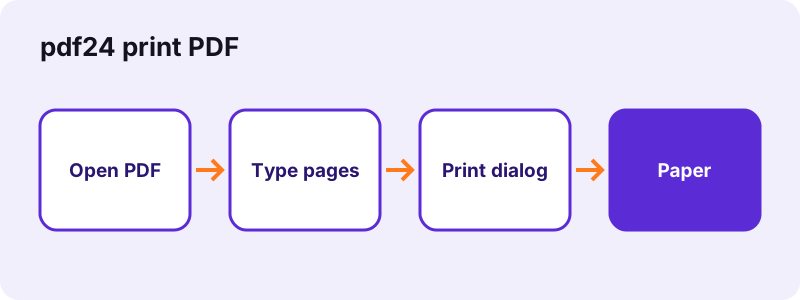
- Open the PDF. Choose the file or drop it on the box.
- Choose the pages. Leave Pages to print empty for all pages, or type a list such as 1-3, 5 or 4- for page 4 to the end.
- Press the button. The chosen pages are copied into a new PDF and the browser's print dialog opens.
- Print or save. Pick the printer, copies and paper in the dialog and print; if it did not open, download the -print.pdf file and print that.
How does pdf24 print PDF choose the pages?
pdf24 print PDF reads the Pages to print box: single pages and ranges separated by commas or spaces, such as 1-3, 5. A range without an end, like 4-, runs to the last page, and -3 starts at page 1. An empty box prints every page. The pages are copied in the order you list them.
| You type | Pages printed | Count |
|---|---|---|
| (empty) | 1 to 10 | 10 |
| 2-3 | 2, 3 | 2 |
| 1-3, 5 | 1, 2, 3, 5 | 4 |
| 8- | 8, 9, 10 | 3 |
| -2 | 1, 2 | 2 |
| 5, 1 | 5, then 1 | 2 |
| 1, 1 | 1 twice | 2 |
pdf24 print PDF measured on a 6-page file
We opened a 6-page document of 5.1 KB, typed 2-3 and pressed the button. The new 2-page PDF of 1.8 KB was ready in 0.1 seconds and the result line said 2 pages ready. The pages are copied as they are, so text stays sharp vector text and prints at your printer's full resolution.
pdf24 print PDF on a phone
Android and iPhone print through the system print service, such as Mopria, a manufacturer app or AirPrint. If the dialog does not appear on a phone, open the downloaded -print.pdf file and use Share, then Print. Printing only the needed pages saves paper when you print a boarding pass or a single form page.
pdf24 print PDF on Windows, Mac and Chromebook
On a computer the browser's own print dialog opens with the prepared pages. Choose the printer, the number of copies, colour or black and white, and two-sided printing there; those settings belong to your printer driver, not to this page.
pdf24 print PDF tip: save as PDF instead of paper
Every desktop print dialog offers Save as PDF or Microsoft Print to PDF as a printer. You do not need it here: the -print.pdf download already is a PDF with only your chosen pages.
Why does pdf24 print PDF not open the print dialog?
pdf24 print PDF opens the dialog from a hidden frame in the page. Some browsers, mostly on phones and in strict privacy modes, block that or have no print support, and then nothing appears. The prepared file is still ready: download the -print.pdf file and print it from your PDF viewer or the system share menu.
| Problem | Fix |
|---|---|
| No dialog appears | Download -print.pdf and print it from your viewer |
| “No valid pages in that list” | Check the numbers: the message says how many pages the PDF has |
| Pages print too small or cut off | In the dialog, choose Fit to page or Actual size |
| Password-protected file | Open it with Unlock PDF first |
| Very large scan prints slowly | Make a lighter copy with Compress PDF |
pdf24 print PDF and print quality
The tool does not convert pages to pictures. Text and vector drawings reach the printer as they are stored in the file, so a contract prints as crisply as from a desktop PDF program. Scanned pages print at the resolution they were scanned at.
“Dots per inch is a measure of spatial printing, video or image scanner dot density”
The higher that density, the finer the detail. A scan made at 150 dpi will look softer on paper than on screen; for crisp printed copies of paper documents, scan at 300 dpi.
pdf24 print PDF with several pages per sheet
To save paper, many print dialogs offer pages per sheet. If yours does not, prepare the file with Pages per sheet, which puts 2, 4, 6, 9 or 16 pages on one sheet, then print it here. For a folded booklet, use PDF booklet first.
pdf24 print PDF for everyday print jobs
Most people only need part of a document on paper. pdf24 print PDF makes that a one-box job: type the pages, print, done. These are the page lists we use for common cases.
| Job | Pages to print | Tip |
|---|---|---|
| Boarding pass from a 4-page booking | 1 | Black and white is enough |
| Signature page of a contract | the last page number, e.g. 12 | Sign, then scan it back with Scan to PDF |
| One chapter of a manual | e.g. 41-58 | Two-sided saves half the paper |
| Form pages without the instructions | e.g. 3-4 | Fill them first with Fill out PDF |
| Slides as handouts | empty (all) | Prepare 4 per sheet with Pages per sheet |
If the page you want is hard to find in a long file, open it first with View PDF, which numbers every page as n / total, then come back and type those numbers here. With pdf24 print PDF the numbers always mean the position of the page in the file, not the number printed on it.
Is pdf24 print PDF private?
pdf24 print PDF builds the print file on your device and hands it to your own browser's print dialog; no file goes to our server or to a cloud print service run by us. Our result line read 0 bytes uploaded. What your printer or its driver does with the job depends on your own setup.
The page loads its own code and the PDF engine once. The File API on MDN explains how a page reads a local file without sending it.
pdf24 print PDF: frequently asked questions
Is pdf24 print PDF free?
Yes. Printing from pdf24tools is free, with no account and no limit. The page prepares the pages in your browser and uses your own printer, so there is nothing to pay for on our side. Paper and ink are, of course, your own.
How do I print certain pages with pdf24 print PDF?
Type them in the Pages to print box: single pages and ranges separated by commas, such as 1-3, 5. A range like 4- runs to the end of the document. Only those pages go into the print file, in the order you typed them.
Does pdf24 print PDF upload my document?
No. The browser reads the file from your device, copies the chosen pages into a new PDF and opens the print dialog locally. Our test showed 0 bytes uploaded. No print service of ours is involved; your printer receives the job from your own device.
Why doesn't pdf24 print PDF show a print dialog?
Some browsers, especially on phones, block printing from a hidden frame or do not support it at all. The prepared file is still created: download the -print.pdf file and print it from your PDF viewer, or open it and choose Share, then Print.
Can I print a PDF on my phone with pdf24 print PDF?
Yes, through your phone's print service, such as AirPrint on iPhone or Mopria on Android. If the dialog opens, choose the printer there. If not, open the downloaded file from Files or Downloads and print it from the share menu.
Does pdf24 print PDF lower the print quality?
No. The pages are copied without converting them to images, so text and vector graphics print at the printer's full resolution. Scanned pages print at the resolution they were scanned at, which is why 300 dpi scans look crisper on paper than 150 dpi ones.
Can pdf24 print PDF print double-sided?
Two-sided printing is a setting of your printer, chosen in the print dialog, often under More settings or Layout. The tool hands over the pages in order, so double-sided printing works whenever your printer supports it. Long-edge binding suits portrait pages.
Can I print several copies with pdf24 print PDF?
Yes. Set the number of copies in the print dialog. If you want one page twice inside the same file, list it twice in the Pages to print box, such as 1, 1, which copies that page twice into the print file.
What if pdf24 print PDF says no valid pages?
The numbers you typed are outside the document; the message tells you how many pages it has. Check for typos such as 13 instead of 3, and remember that page numbers printed on the pages may differ from the position of the page in the file.
Can pdf24 print PDF print a password-protected file?
Not while it is encrypted. Remove the password with Unlock PDF, which needs the password you were given, then print the unlocked copy. Files whose owner disabled printing also need unlocking first, if you are allowed to print them. The unlocked copy stays on your device.
Can pdf24 print PDF print a scanned document?
Yes. Scanned pages are copied like any page and print at their scan resolution. Large scans can be slow to send to the printer; a lighter copy made with Compress PDF prints faster and usually looks the same on office paper.
Who makes the pdf24 print PDF tool?
The pdf24tools team makes it. pdf24tools is an independent website and is not affiliated with PDF24 or Geek Software GmbH, and we offer no virtual printer driver. Our print page runs in your browser and uses your own printer; this page describes it from our own tests.
pdf24 print PDF: sources
- Dots per inch — Wikipedia
- File API — MDN Web Docs
- PDF — Wikipedia