How to use pdf24 compare PDF files in 4 steps
- Choose two PDFs. Select the old version first and the new version second, or drop both files on the box.
- Press the button. The text of both files is read page by page and compared word by word on your device.
- Read the summary. The result line says how many words were removed and added and lists the pages with changes.
- Open the report. Download comparison.pdf: each page shows version A on the left and B on the right, with changes marked.
What does pdf24 compare PDF files report?
pdf24 compare PDF files produces a report PDF with one sheet per page: version A on the left with removed words boxed in red, version B on the right with added words boxed in green. The result line counts the removed and added words and names every page that changed, so you know where to look.
| Change between v1 and v2 | Words in v1 | Words in v2 |
|---|---|---|
| Quantity | 3 | 4 |
| Line total | 119.70 | 159.60 |
| Invoice total | 319.70 | 359.60 |
| New sentence | — | Delivery is free for orders above 200 euros. |
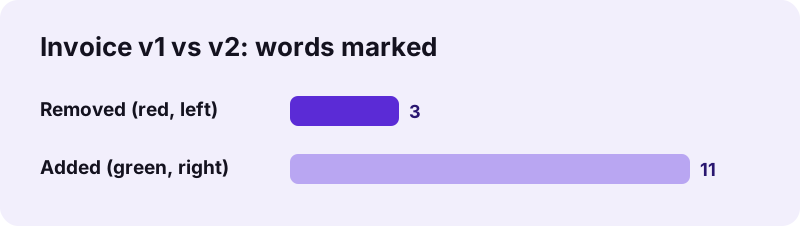
That is 3 replaced words plus an 8-word sentence: 3 removed and 11 added, exactly what the tool reported. We checked the result with a separate word diff in Python, which listed the same four changes.
pdf24 compare PDF files on our two invoices
The two invoice versions were 2 pages each, 2.4 KB and 2.5 KB. The comparison ran in 1.4 seconds and produced a 2-page report of 6.4 KB. Only page 1 was listed as changed, which matched the files: page 2, with the payment terms, was identical.
pdf24 compare PDF files on a phone
On a phone, select both files in one go from Files or Downloads; the box accepts exactly two. The report is wide because it holds two pages side by side, so turn the phone sideways or zoom in on the marked words.
pdf24 compare PDF files on a computer
A large screen shows both columns of the report at a readable size. Open comparison.pdf in your PDF reader, zoom to fit the width and step through the pages listed in the summary.
pdf24 compare PDF files tip: keep the order
The first file is treated as the old version A and the second as the new version B. If the colours look reversed, with your new text in red, swap the files and run the comparison again.
How does pdf24 compare PDF files match the words?
pdf24 compare PDF files extracts every word with its position from both files, normalises characters such as ligatures, and finds the longest runs of words that appear in the same order in both versions. Words outside those matching runs are marked as removed or added. Layout, fonts and images are not compared.
“document comparison, also known as redlining or blacklining, is a process by which changes are identified between two versions of the same document”
The method follows the longest-matching-block idea behind the diff family of tools. Because it compares the sequence of words across the whole document, text that moved to another page through an insertion is still recognised as unchanged.
pdf24 compare PDF files and long documents
We also measured long files, because that is where a simple word diff usually goes wrong. On two versions of a 1,900-word document with 4 small edits, the report marked 4 removed and 4 added words, exactly the count of Python's difflib word diff on the same text, and a 6-page, 1,920-word report compared with itself gave No differences. Common words such as the are matched in order like any other word, so they are never flagged on their own; rare words that occur once in both files act as anchors, so long contracts compare in one pass instead of section by section.
pdf24 compare PDF files: what is not compared
- Formatting: bold, italics, fonts, colours and sizes.
- Images, charts and signatures.
- Page layout: a paragraph that moved but kept its words counts as unchanged.
- Scanned pages without a text layer: run OCR PDF on both first.
- Comments, form-field values and metadata such as the title or author.
- Hidden text such as white-out boxes: covered words still count as present.
Is pdf24 compare PDF files private?
pdf24 compare PDF files reads both versions with the browser's File API and builds the report on your device. Our result line read 0 bytes uploaded. Draft contracts, tender documents and price lists therefore stay with you while you compare them, and nothing remains anywhere after you close the tab.
The page loads its own code and two PDF engines, one to read text and one to write the report. See the File API on MDN for how a page reads local files without sending them.
pdf24 compare PDF files: common messages
The summary line of pdf24 compare PDF files tells you what happened in one sentence. These are the messages you can see, what each one means and the next step. Most problems come from scans without text or from choosing two different documents instead of two versions of one.
| Message | Meaning | What to do |
|---|---|---|
| No differences in the text | Same words in the same order | Nothing to review; formatting may still differ |
| Neither file has a text layer | Both are scans | Run OCR PDF on both, then compare the OCR copies |
| Password-protected | One file is encrypted | Unlock PDF first |
| Very many changes on every page | Different documents, or a re-typed or re-scanned copy | Check you chose two versions of the same file; run OCR on both copies with the same settings |
To pull out only the changed pages for a colleague, use Extract PDF pages on the report with the page numbers from the summary.
pdf24 compare PDF files: frequently asked questions
Is pdf24 compare PDF files free?
Yes. Comparing PDFs on pdf24tools is free, with no account and no limit on comparisons. The work runs in your browser on your own device, so no server is involved. Compare as many pairs of files as you need, one pair at a time.
Does pdf24 compare PDF files upload my documents?
No. Both files are read by your browser and compared locally; the result line in our test showed 0 bytes uploaded. The report is created on your device too. Nothing about the documents is stored on a server or kept after you close the tab.
Can pdf24 compare PDF files compare scanned PDFs?
Not directly, because scans contain pictures of text, not words. The tool then reports that neither file has a text layer. Run OCR PDF on both scans, then compare the two OCR copies; recognition errors may show up as small changes.
Does pdf24 compare PDF files show formatting changes?
No. Only the words and their order are compared. A word that became bold, a new font or a changed colour is not marked, and neither are images. Check the layout visually by placing the two pages side by side in the report.
What do the colours in pdf24 compare PDF files mean?
Red boxes on the left page mark words that are in version A but not in version B, so they were removed. Green boxes on the right page mark words that are only in version B, so they were added. A changed word shows as one red and one green box.
How accurate is pdf24 compare PDF files?
On short documents it matched an independent word diff exactly: 3 removed and 11 added words on our invoices. On long documents it does too: two 1,900-word versions with 4 real edits gave 4 removed and 4 added words, the same as Python's difflib, and a 1,920-word file compared with itself reported no differences. Long files need no splitting.
Can pdf24 compare PDF files compare more than two files?
No, exactly two files are compared each time: the first is version A, the second version B. For three versions, compare the first with the second, then the second with the third, and keep both reports so each round of changes stays traceable.
Can I compare Word documents with pdf24 compare PDF files?
Convert them first: Word to PDF turns each .docx into a PDF in your browser, and you can then compare the two PDFs here. Word's own compare feature also shows formatting changes, which this tool does not, so use whichever answers your question.
Does pdf24 compare PDF files work when pages shifted?
Yes. The words of each file are compared as one sequence across all pages, so a paragraph pushed to the next page by an insertion still counts as unchanged. Only the inserted words are marked, on whichever page they ended up.
What file does pdf24 compare PDF files create?
A report named comparison.pdf with one wide sheet per page: page A on the left, page B on the right, a grey background and the file names above each column. If one version has more pages, the missing side shows a dash.
Can I use pdf24 compare PDF files on a phone?
Yes. Choose both files at once from Files or Downloads, press the button and open the report. Because each sheet holds two pages side by side, turn the phone sideways or zoom in to read the marked words comfortably on a small screen.
Who makes the pdf24 compare PDF files tool?
The pdf24tools team makes it. pdf24tools is an independent website and is not affiliated with PDF24 or Geek Software GmbH. Our comparison tool was built separately and runs in your browser; this page reports what it does from our own tests, including its limits, as measured on 2026-11-02.
pdf24 compare PDF files: sources
- Document comparison — Wikipedia
- diff — Wikipedia
- File API — MDN Web Docs