How to use pdf24 scan to PDF in 4 steps
- Take or choose photos. On a phone tap Take a photo for each page, or choose existing photos; on a computer drop image files on the box.
- Check the order. Use the arrows in the file list to move a page up, or remove a photo that went wrong.
- Pick clean-up and page size. Document gives white paper and dark text; Black and white is smallest; choose A4, US Letter or Same as image.
- Create the PDF. Press the button and save the PDF; one photo keeps its name, several become scan.pdf.
What does pdf24 scan to PDF do to each photo?
pdf24 scan to PDF scales each photo to at most 2,400 pixels on its long side, applies the clean-up you chose and places it centred on an A4 or Letter page, turned to landscape for wide photos. Document clean-up stretches the contrast so paper turns white and ink turns black, which also shrinks the file.
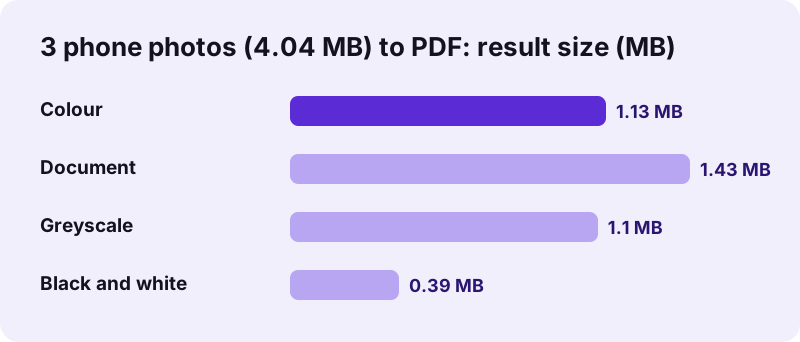
| Clean-up | What it does | Result | Time |
|---|---|---|---|
| Document (default) | Greyscale, paper pushed to white, ink to black | 1.43 MB | 1.3 s |
| Black and white | Pure black and white, adapts to shadows across the page | 393 KB | 3.9 s |
| Greyscale | Grey tones, no contrast change | 1.10 MB | 0.9 s |
| Colour | The photo as taken | 1.13 MB | 0.6 s |
pdf24 scan to PDF on our test photos
To test pdf24 scan to PDF we made 3 photos of contract pages at 3024 × 4032 pixels, lying on a brown table with a shadow from the left, 4.04 MB together. Document turned the text black and readable at 1.43 MB. Black and white gave pure white paper at 393 KB, the smallest file, but turned the table edge around the sheet into a black frame. Colour kept the brown table and the shadow.
pdf24 scan to PDF with the phone camera
On Android and iPhone the Take a photo button opens the rear camera straight away. Take one page, confirm, and tap the button again for the next page; each photo joins the list. Hold the phone parallel to the paper, fill the frame with the page and avoid your own shadow.
pdf24 scan to PDF on a computer
On a computer, drop the photos you transferred from your phone or a webcam, or several JPG files at once. The order in the list is the page order; use the arrows to fix it before creating the PDF.
pdf24 scan to PDF tip: crop before you add
The tool does not detect page edges, so whatever surrounds the paper ends up in the PDF. Use your phone's photo editor to crop each picture to the sheet first, or take the photo close enough that the page fills the frame.
Which pdf24 scan to PDF setting should you choose?
pdf24 scan to PDF with Document clean-up suits most letters, forms and receipts: readable text, white paper and a moderate file size. Choose Black and white for text-only pages that must be as small as possible, Greyscale for pencil notes, and Colour for photos, coloured stamps or anything where colour carries meaning.
| Purpose | Clean-up | Page size |
|---|---|---|
| Sending a signed letter or form | Document | A4 or US Letter |
| Upload portal with a 1 MB limit | Black and white | A4 or US Letter |
| Receipt for expenses | Document | Same as image |
| Handwritten notes in pencil | Greyscale | Same as image |
| Document with coloured stamps or photos | Colour | A4 or US Letter |
“From a grayscale image, thresholding can be used to create binary images.”
Black and white uses an adaptive threshold: each pixel is compared with the average of its surroundings, not with one value for the whole page. That is why a shadow falling across the sheet does not turn half the page black.
pdf24 scan to PDF page sizes
A4 is 210 × 297 mm and US Letter 8.5 × 11 inches; the photo is fitted inside with its proportions kept. Same as image makes each page exactly the size of the photo at 200 dpi, which suits receipts and cards that are much smaller than a sheet.
Is pdf24 scan to PDF private?
pdf24 scan to PDF processes the photos on your phone or computer: the camera picture goes straight into the page, the clean-up runs in JavaScript and the PDF is written locally. Our result lines read 0 bytes uploaded. Passports, payslips and medical letters you photograph therefore never pass through a server.
The page loads its own code and the PDF engine once; no account or app is needed. See the File API on MDN for how a page reads local files without sending them. The photos stay in your phone's gallery only if your camera app saves them there.
pdf24 scan to PDF compared with a flatbed scanner
A flatbed scanner lights the page evenly and keeps it flat, which a phone cannot fully match. For everyday documents the phone route is good enough and much faster.
“An image scanner is a device that optically scans images, printed text, handwriting, or an object and converts it to a digital image.”
| Point | Phone + this tool | Flatbed scanner |
|---|---|---|
| Equipment needed | A phone and a browser | A scanner and its driver |
| Even lighting | Depends on the room; clean-up helps | Yes |
| Page edges and perspective | Not corrected; crop first | Straight |
| Available anywhere | Yes | No |
pdf24 scan to PDF and searchable text
The PDF contains pictures of the pages, so its text cannot be searched or copied yet. Run OCR PDF on it to add a text layer; a clean Document scan gives the best recognition. If the file is still too big for an e-mail, Compress PDF can shrink it to an exact size.
pdf24 scan to PDF: limits
pdf24 scan to PDF keeps things simple; these are the cases where you need an extra step.
- No automatic edge detection, cropping or perspective correction: crop photos first.
- No rotation inside the tool: fix sideways pages afterwards with Rotate PDF pages.
- No text recognition: run OCR PDF on the result.
- Images larger than 2,400 pixels are scaled down, which still gives about 205 dpi along the height of an A4 page.
- To add more pages later, scan them separately and join with Merge PDF.
pdf24 scan to PDF: frequently asked questions
Is pdf24 scan to PDF free?
Yes. Scanning to PDF on pdf24tools is free, with no account, no watermark and no page limit. The camera photos are processed in your own browser, so there is no server cost. Scan as many documents as you need, one after another.
Does pdf24 scan to PDF upload my photos?
No. The photos are read and cleaned up on your device, and the PDF is written there too; our result lines showed 0 bytes uploaded. Nothing is stored on a server. Only the page and the PDF engine are downloaded, once.
Can I scan with my phone camera using pdf24 scan to PDF?
Yes. On Android and iPhone, the Take a photo button opens the rear camera directly. Take one page at a time; each photo is added to the list. You can also choose photos you already took from the gallery or Files.
How big is a PDF from pdf24 scan to PDF?
It depends on the clean-up. Our 3 phone photos of 4.04 MB became 1.43 MB with Document, 1.10 MB with Greyscale, 1.13 MB with Colour and only 393 KB with Black and white. Text-only pages in Black and white give the smallest files.
Does pdf24 scan to PDF crop the page automatically?
No. The tool does not detect paper edges or correct perspective, so the background around the sheet stays in the PDF. Crop each photo in your phone's photo editor first, or take it close enough that the page fills the frame.
Which clean-up should I pick in pdf24 scan to PDF?
Document for most letters, forms and receipts; Black and white for the smallest file of text-only pages; Greyscale for pencil notes; Colour when colour matters, such as stamps or photos. Document is the default and gave dark, readable text on our shadowed test photos.
Can pdf24 scan to PDF make several pages into one PDF?
Yes. Add as many photos as you need; each becomes one page, in the order shown in the list. Use the arrows to change the order and the remove button to drop a bad photo before you create the PDF.
Is a PDF from pdf24 scan to PDF searchable?
Not yet: the pages are pictures. Run OCR PDF on the result to add an invisible text layer, which makes the text searchable and copyable. On our clean 5-page scan, OCR recognised all 2,565 alphabetic words correctly, so a sharp scan pays off.
What page size does pdf24 scan to PDF use?
A4 by default, or US Letter, or Same as image, which sizes each page to its photo at 200 dpi. On A4 and Letter the photo is centred and fitted with its proportions kept, and wide photos get a landscape page.
Why does my pdf24 scan to PDF page have a black frame?
With Black and white, the table or background around the paper is usually darker than the sheet, so it turns black. Crop the photo to the paper before adding it, or use the Document clean-up, which keeps the background grey instead.
Does pdf24 scan to PDF work on a computer?
Yes. Drop JPG, PNG or WebP files on the box or choose them, and the same clean-ups and page sizes apply. Photos transferred from a phone or saved from a webcam work fine; the camera button is meant for phones and tablets.
Who makes the pdf24 scan to PDF tool?
The pdf24tools team makes it. pdf24tools is an independent website and is not affiliated with PDF24 or Geek Software GmbH. Our scanning page was built separately and runs in your browser; this page describes it only from our own tests with our own files.
More pdf24 scan to PDF tools and guides
pdf24 scan to PDF: sources
- Image scanner — Wikipedia
- Thresholding (image processing) — Wikipedia
- File API — MDN Web Docs