How to use pdf24 split PDF in 4 steps
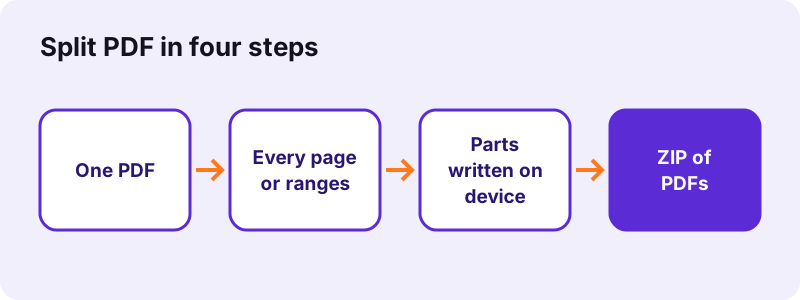
- Choose the PDF. Tap Choose a PDF or drop the file on the box. Thumbnails of the pages appear so you can see what is where.
- Pick how to split. Every page makes one file per page. By ranges makes one file per group, such as 1-3, 4-6. Extract pages makes one file with the pages you list.
- Press Split PDF. The parts are written on your device, one after another; the status line counts them.
- Download the result. Several parts come as one ZIP; a single part comes as a PDF. Unzip and check the page numbers in the file names.
What does pdf24 split PDF do?
pdf24 split PDF copies chosen pages of one PDF into new, separate PDF files. Nothing is redrawn or compressed, so every page looks exactly as before and typed text stays selectable. You decide the cut: one file per page, one file per range you type, or one file holding only the pages you pick out.
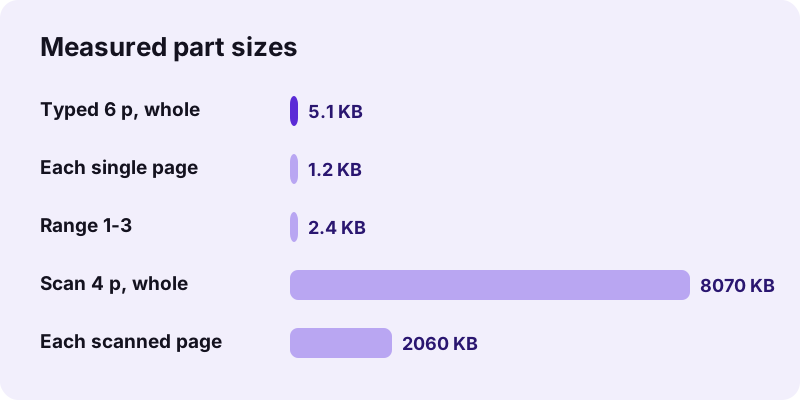
Run on our typed 6-page test file of 5,238 bytes, pdf24 split PDF made six single-page PDFs of 1,237 bytes each, zipped into 8.1 KB. The 4-page scan of 8.07 MB gave four files of 2.04 to 2.11 MB, one per scanned page. Ranges 1-3, 4-6 gave two 3-page files of 2,443 bytes.
Which split modes does pdf24 split PDF offer?
pdf24 split PDF has three modes. Every page makes as many files as the PDF has pages. By ranges makes one file per comma-separated group, such as 1-3, 4-6, 7-10. Extract pages collects every page you list into one single file. The mode buttons sit above the Split PDF button.
| Mode | You type | You get |
|---|---|---|
| Every page | nothing | 1 PDF per page, in a ZIP |
| By ranges | 1-3, 4-6 | 2 PDFs: pages 1–3 and pages 4–6 |
| By ranges | 1, 2-5, 6- | 3 PDFs: page 1, pages 2–5, page 6 to the end |
| Extract pages | 2, 5-7 | 1 PDF with pages 2, 5, 6 and 7 |
- A dash with no end, such as 8-, runs to the last page.
- A dash with no start, such as -3, starts at page 1.
- Commas or semicolons separate the files; spaces inside a group just separate page numbers.
- Arabic and Persian digits are understood too.
pdf24 split PDF into single pages
Every page is the right mode for a stack of scanned letters, a set of certificates or a batch of invoices saved as one file. Each part is named after the original plus its page number, for example report-page-3.pdf, so the files sort correctly in any folder.
pdf24 split PDF into chapters with ranges
For a manual or a thesis, look at the thumbnails, note where each chapter starts, and type the ranges: 1-12, 13-30, 31-. Parts are named with their first and last page, such as thesis-pages-13-30.pdf.
pdf24 split PDF tip for uneven ranges
Ranges do not need to touch or follow each other. 1-2, 9-10 makes two files and simply leaves pages 3 to 8 out. The same page may also appear in two ranges, for example a cover page you want at the front of both parts.
pdf24 split PDF with a wrong page number
Numbers beyond the last page are clipped. If no valid page is left, the tool says how many pages the PDF really has, so you can correct the list and press the button again.
How big are the files after pdf24 split PDF?
The parts made by pdf24 split PDF weigh about as much as the pages they hold. A typed page is usually one to a few kilobytes, a scanned page often one to three megabytes. Shared items such as fonts are copied into every part that needs them, so all parts together can be slightly larger than the original.
That is why splitting is not a way to compress. If one part is still too large for an upload form, run Compress PDF on that part. To get the opposite, many files into one, use Merge PDF.
Is pdf24 split PDF safe for confidential files?
pdf24 split PDF is safe for confidential files because the PDF never leaves your device. The browser reads the file, the pages are copied into new files by JavaScript in the same tab, and the ZIP is built locally. No server gets a copy, there is no account, and closing the tab clears everything from memory.
“The File API enables web applications to access files and their contents.”
The result line after each split states the time taken and 0 bytes uploaded. You can load the page, switch the network off and split a payslip, a medical report or a contract: the tool keeps working offline.
pdf24 split PDF on phone and computer
pdf24 split PDF works the same in every current browser: Chrome, Edge, Firefox and Safari on Windows, macOS and Linux, and Chrome, Samsung Internet or Safari on Android and iPhone. No app is installed. The only difference between devices is where the ZIP lands and how you open it afterwards.
- iPhone and iPad: the ZIP is saved to Downloads in the Files app; tap it once to unzip it into a folder.
- Android: the ZIP lands in Download; Files by Google and most file managers open it with one tap.
- Windows: right-click the ZIP and choose Extract All.
- Mac: double-click the ZIP in Finder.
- Chromebook: the Files app opens ZIP files like folders.
pdf24 split PDF without unzipping
If you need only one part, Extract pages gives a single PDF instead of a ZIP. Type the pages, for example 4-5, and the download is a normal PDF ready to attach.
What does pdf24 split PDF keep in each part?
Each part made by pdf24 split PDF keeps the full content of its pages: text, fonts, images, page size, rotation, links and comments that sit on the page. Things that belong to the whole document are not copied: bookmarks, the document title and form logic. A digital signature does not stay valid, as every part is a new file.
- Kept: text, images, vector graphics, page size and orientation, annotations.
- Not kept: the bookmark outline; rebuild it with Bookmark PDF.
- Not kept: certificate signatures; sign the part again if it must be signed.
- Unchanged: the original PDF on your device.
“Within each page, there are one or multiple content streams that describe the text, vector and images being drawn on the page.”
pdf24 split PDF or a related page tool?
Splitting is one of several page tools, and picking the right one saves a step. Use the split tool for several output files, Extract PDF pages for one file with chosen pages, Remove PDF pages to delete a few pages and keep the rest, and Halve PDF pages to cut each page itself into two halves.
| Goal | Best tool |
|---|---|
| Many files from one PDF | Split PDF |
| One file with pages 2, 5 and 9 | Extract PDF pages |
| Same file without pages 3 and 4 | Remove PDF pages |
| Each scanned double page into 2 pages | Halve PDF pages |
| New page order | Rearrange PDF pages |
Why is pdf24 split PDF not working?
pdf24 split PDF fails for three usual reasons: the PDF needs a password to open, the range list holds no valid page, or the file is damaged. Each case shows a message in red under the button. A grey button simply means no file has been chosen yet, so add the PDF first.
- Password-protected: open it with Unlock PDF using your password, then split the unlocked copy.
- No valid pages in that list: check the page count shown in the message and fix the numbers.
- Could not open this file: try Repair PDF, then split the repaired file.
- The ZIP will not open on a phone: use the Files app on iPhone or a file manager on Android.
pdf24 split PDF use cases
People use pdf24 split PDF to send only the relevant pages, to stay under an attachment limit, to file scanned mail one letter per document, or to hand each colleague their own section. The steps are the same in every case; only the ranges change, which keeps the job to a few seconds of work.
- Scanned post: one 20-page scan into 20 letters, then file each one.
- Payslips: a yearly PDF into 12 monthly files.
- Exams: one class scan into one file per student with ranges such as 1-2, 3-4, 5-6.
- Legal: the main contract and each annex as separate files.
pdf24 split PDF: frequently asked questions
Is pdf24 split PDF free?
Yes. pdf24 split PDF is free, with no account, no watermark and no daily limit. The work runs on your own phone or computer, which is why it costs nothing to offer. The only limit is the memory of your device, which matters only for scans of several hundred megabytes on older phones.
How do I split a PDF into single pages with pdf24 split PDF?
Choose the PDF, keep the mode Every page, press Split PDF and download the ZIP. It contains one PDF per page, named with the page number, such as file-page-1.pdf. Our 6-page test file gave six files of 1.2 KB each in 0.2 seconds on a desktop computer.
How do I type ranges in pdf24 split PDF?
Pick By ranges and type the groups separated by commas: 1-3, 4-6 makes two files. A group can be one page (5), a run (2-4) or open-ended (8- to the end, -3 from the start). Semicolons also work as separators, and numbers outside the document are ignored.
Does pdf24 split PDF upload my file?
No. The PDF is read by your browser and split in the same tab with JavaScript; no byte is sent to a server. The result line confirms 0 bytes uploaded. You can test it by loading the page, switching off Wi-Fi and splitting a file: it still works, because nothing needs the network.
Why do I get a ZIP from pdf24 split PDF?
When a split produces more than one file, the browser would otherwise ask you to allow many downloads at once. The tool packs the parts into one ZIP instead. If you want a single PDF, use the Extract pages mode, which collects your chosen pages into one file and downloads it directly.
Does pdf24 split PDF reduce quality?
No. pdf24 split PDF copies pages with their original text, fonts and images; nothing is re-compressed or turned into a picture. Our scanned pages kept their 2 MB size each, which shows that the images inside were not touched. Typed text stays selectable and searchable in every part.
Can pdf24 split PDF split by file size?
There is no size-based mode. Each part weighs about as much as its pages, so you can plan ranges from the sizes: typed pages are a few KB, scanned pages one to three MB. If a part is still too big, compress it afterwards with an exact target such as 1 MB.
Can pdf24 split PDF cut a page in half?
No, splitting separates whole pages. To cut each page itself into a left and a right half, for example a scanned book spread, use Halve PDF pages. It turns 6 double pages into 12 single pages and can put the right half first for right-to-left books.
Does pdf24 split PDF work on iPhone and Android?
Yes. It runs in Safari on iPhone and iPad and in Chrome or Samsung Internet on Android, without an app. On iPhone the ZIP lands in Downloads in the Files app and unzips with one tap; on Android it lands in the Download folder and opens in any file manager.
Can pdf24 split PDF open a password-protected PDF?
Only after the password is removed. An encrypted file stops with a message. Unlock it with the Unlock PDF tool using the password you know, split the unlocked copy, and protect the parts again if needed. The tool never tries to guess or break a password.
Are bookmarks kept by pdf24 split PDF?
No. The bookmark outline belongs to the whole document, not to single pages, so the parts come without it. Links and comments placed on a page do travel with that page. If a part needs bookmarks, add them in a minute with Bookmark PDF, which proposes one entry per page.
How many pages can pdf24 split PDF handle?
There is no fixed page limit. The thumbnails show the first 200 pages, but ranges can address any page of the file. Long text documents with hundreds of pages split in seconds; very large scans depend on the memory of the device, and a computer copes better than an older phone.
Can I split several PDFs at once with pdf24 split PDF?
The tool takes one PDF per run, so that the page thumbnails and the ranges refer to one document. For several files, split them one after another; each run takes about a second. To split a set of files the same way, merge them first and then split the merged file.
What are the file names after pdf24 split PDF?
Single pages are named after the original plus the page, such as invoice-page-2.pdf. Ranges get the first and last page, such as invoice-pages-3-5.pdf. The ZIP is named after the original with -split added. Rename the parts afterwards if a portal expects other names.
Does pdf24 split PDF change my original file?
No. The original stays on your device exactly as it was; the tool only reads it. The parts are new files in your downloads. That also means you can try different ranges as often as you like, because nothing is overwritten and the original is always available for another split.
Does pdf24 split PDF work offline?
Yes, once the page has loaded. The PDF engine is downloaded with the page and then runs in the browser without a network connection. Open the page while you are online, and splitting keeps working on a plane or in a basement office where the signal is gone.
Is this the official pdf24 split PDF tool?
No. pdf24tools is an independent website and is not affiliated with PDF24 or Geek Software GmbH. This split tool is our own code that runs in your browser. We use the name because it is what people search for; your files are processed on your device, never on our servers.
More pdf24 split PDF tools and guides
pdf24 split PDF: sources
- File API — MDN Web Docs
- PDF — Wikipedia
- PDF (Portable Document Format) Family — Library of Congress