How do you pdf24 split PDF into pages one by one?
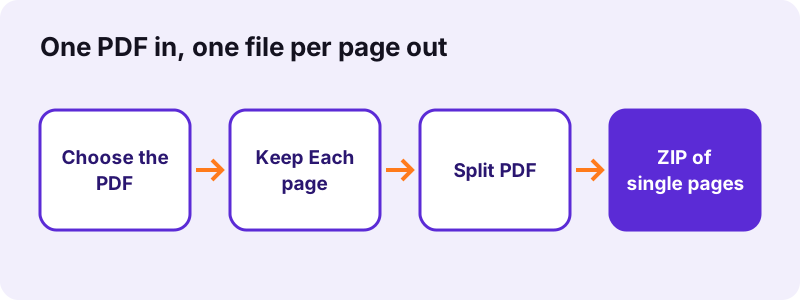
To split a PDF into single pages, open Split PDF, choose the file, keep the mode Each page and press Split PDF. Every page is saved as its own PDF, named after the original with -page-1, -page-2 and so on, and all files download together in one ZIP archive.
- Open Split PDF in any browser.
- Click Choose a PDF or drop the file on the box; the page thumbnails appear.
- Leave the mode on Each page.
- Press Split PDF.
- Download the ZIP and unzip it; you get one PDF per page.
pdf24 split PDF into pages: how the files are named
A file called report.pdf gives report-page-1.pdf, report-page-2.pdf and so on, packed in report-split.zip. The numbers match the page numbers of the original, so sorting by name in a folder keeps the right order even for documents of 100 pages or more.
pdf24 split PDF into pages: opening the ZIP
Windows and macOS open ZIP files with a double-click. On an iPhone, tap the ZIP in the Files app and it unpacks into a folder; on Android, the Files app offers Extract. The ZIP is only a container: each PDF inside is a normal, complete document.
pdf24 split PDF into pages: size of each page file
Each page file carries its own copy of the fonts and pictures that page uses. Our 6-page text file of 5.1 KB gave six files of 1,237 bytes each, so the parts together are larger than the original. Scanned pages are roughly the original size divided by the page count.
pdf24 split PDF into pages: tip for long scans
If you only need a few pages, use the Extract mode instead of splitting everything. Typing 2, 4-5 gave one 3-page PDF in our test, which saves unzipping and deleting the pages you do not want.
Which pdf24 split PDF into pages mode should you use?
The split tool offers three modes. Each page makes one file per page. Ranges cuts the document into several parts you define, such as 1-2, 3-5. Extract copies only the pages you list into a single new PDF. Pick the mode by asking how many files you want to end up with.
| Mode | You type | Result | Our test |
|---|---|---|---|
| Each page | nothing | one PDF per page, in a ZIP | 6 pages → 6 files, 0.2 s |
| Ranges | 1-2, 3-5 | one PDF per range, in a ZIP | 5-page scan → 2 files (1.04 MB + 1.55 MB) |
| Extract | 2, 4-5 | one PDF with those pages | 6 pages → 3-page PDF |
Commas separate parts and a hyphen marks a run of pages. In Ranges each comma starts a new file; in Extract all listed pages go into the same file. The hint under the box repeats this rule while you type, so you can pdf24 split PDF into pages without guessing the syntax.
What did our pdf24 split PDF into pages tests show?
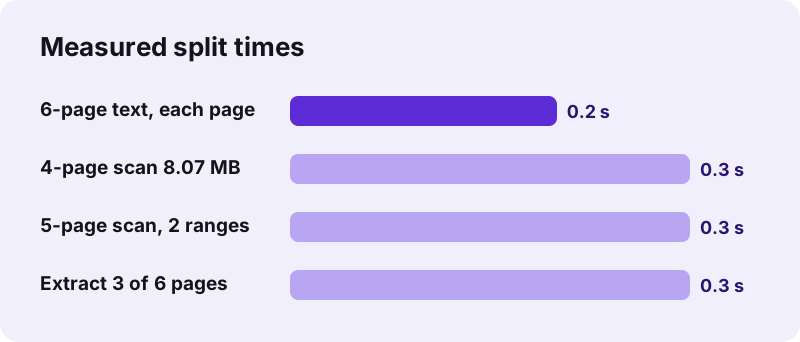
Our split tests showed that splitting is near-instant and lossless. A 6-page text PDF became six files in 0.2 seconds, an 8.07 MB scan became four files in 0.3 seconds, and every page kept its A4 size and content. Text pages stayed selectable because pages are copied, not redrawn.
| Input | Mode | Output | Time |
|---|---|---|---|
| text-6p.pdf, 5.1 KB | Each page | ZIP 7.9 KB, 6 files | 0.2 s |
| scan-4p.pdf, 8.07 MB | Each page | ZIP 8.08 MB, 4 files | 0.3 s |
| contract scan, 2.46 MB | Ranges 1-2, 3-5 | ZIP with 2 files | 0.3 s |
| text-6p.pdf | Extract 2, 4-5 | one PDF, 3 pages | 0.3 s |
Because nothing is redrawn, the time hardly depends on file size: the 8.07 MB scan took only 0.1 seconds longer than the 5.1 KB text file. That is the main practical difference between the tools that copy pages and the ones that render them. Plan for seconds, not minutes, when you pdf24 split PDF into pages, even on a phone.
pdf24 split PDF into pages without losing quality
Splitting does not touch quality at all. Each page is copied into a new document exactly as it was, with the same text, pictures, fonts and page size. Nothing is compressed or rasterised, which is why a scanned page keeps its full resolution and a typed page keeps searchable text.
- Kept: text, images, page size, rotation, vector drawings.
- Not kept: bookmarks of the original and its document title.
- Invalidated: certificate-based digital signatures, because each part is a new file.
- Refused: PDFs that need a password to open; unlock them first with Unlock PDF.
“A PDF file encapsulates a complete description of a fixed-layout document, including the text, fonts, vector graphics, raster images and other information needed to display it.”
Is pdf24 split PDF into pages safe for confidential files?
Splitting a confidential PDF here is safe because the file never leaves your device. The browser reads it with the File API and copies the pages in JavaScript; the result line reports 0 bytes uploaded and our request log showed no POST request. There is no account and nothing to delete on a server afterwards.
This is useful when you must send one page of a contract, a single payslip from a yearly file, or one certificate from a scanned bundle, and the rest must stay private. Learn how browsers read local files in the MDN File API documentation.
pdf24 split PDF into pages on iPhone, Android, Mac and Windows
Splitting works in every current browser, so the same steps apply on phones and computers. The only difference is where the ZIP lands and how you open it. On a phone, the Files app unpacks the archive; on a computer, a double-click is enough.
| Device | ZIP saved to | How to unzip |
|---|---|---|
| iPhone / iPad | Files → Downloads | Tap the ZIP |
| Android | Downloads | Files app → Extract |
| Windows | Downloads | Double-click or Extract all |
| Mac / Linux | Downloads | Double-click |
If you want single pages on a phone without unzipping, use Extract with one page number, for example 3; you get that page directly as a PDF and can share it at once. This is the quickest way to pdf24 split PDF into pages on a phone when only one page is needed.
Why does pdf24 split PDF into pages show an error?
Splitting stops with an error in three cases: the page ranges point outside the document, the PDF is password-protected, or the file is damaged. The message names the problem; a 6-page file, for example, rejects a range such as 7-9 and tells you how many pages it has.
- Check the page count shown with the thumbnails before typing ranges.
- Use only digits, commas and hyphens, such as
1-3, 5. - Unlock protected files with the password you know, then split.
- Repair damaged files with Repair PDF first; our broken test file was rebuilt in 0.8 seconds.
To join parts back together later, use Merge PDF; to drop pages instead of splitting, use Remove PDF pages.
pdf24 split PDF into pages: frequently asked questions
Is pdf24 split PDF into pages free?
Yes. You can pdf24 split PDF into pages on pdf24tools without paying, registering or receiving a watermark. There is no limit on the number of pages or files per day. The work runs on your own device in the browser, so there is no server cost to recover through a subscription.
How fast is pdf24 split PDF into pages?
Very fast, because pages are copied rather than redrawn. Our 6-page text file split in 0.2 seconds and an 8.07 MB, 4-page scan in 0.3 seconds on a Windows laptop in Chrome. Even long documents usually finish in a few seconds; phones take a little longer.
Does pdf24 split PDF into pages reduce quality?
No. Each page is copied into a new file unchanged, so text stays selectable and scans keep their resolution. Nothing is compressed. If the single pages are too large to send, run Compress PDF on them afterwards, which shrank our 2.46 MB scan to 493 KB.
Why do I get a ZIP from pdf24 split PDF into pages?
Because one PDF becomes many files, and browsers download a single archive more reliably than dozens of separate files. The ZIP is about the size of the parts together. Unzip it with a double-click on a computer or a tap in the Files app on a phone.
Can pdf24 split PDF into pages give me just one page?
Yes. Choose the Extract mode and type a single page number, such as 3. You get that page as one PDF, without a ZIP. To get several chosen pages in one file, type them with commas, for example 2, 4-5, which gave a 3-page PDF in our test.
Does pdf24 split PDF into pages upload my document?
No. The browser opens the PDF on your device and the split runs in JavaScript there. The result line shows 0 bytes uploaded and our request log contained no POST request with file data, so confidential pages never reach a server.
How do I write ranges in pdf24 split PDF into pages?
Use page numbers, hyphens for runs and commas between parts, for example 1-2, 3-5. In Ranges mode each part becomes its own file; in Extract mode all listed pages go into one file. Ranges outside the document are rejected with a message naming the page count.
Can pdf24 split PDF into pages split a scanned PDF?
Yes. Scanned pages are split like any other pages and keep their full resolution. Our 4-page scan of 8.07 MB gave four files totalling 8.08 MB. To make the scanned pages searchable, run OCR PDF on the file before or after splitting.
Does pdf24 split PDF into pages keep bookmarks and links?
Page content, including visible link text, is copied unchanged. Bookmarks of the original document are not carried into the parts, because each part is a new, shorter PDF. Add bookmarks to a part afterwards with Bookmark PDF if it is long enough to need them.
Can pdf24 split PDF into pages handle password-protected files?
Not while they are locked. A PDF that needs a password to open stops with a message. Remove the password with Unlock PDF using the password you know, then split the unlocked copy. Our locked test file was refused within 0.3 seconds, before any work started.
Is pdf24 split PDF into pages an official tool?
No. pdf24tools is an independent website and is not affiliated with PDF24 or Geek Software GmbH. Our split tool is our own browser code, and every number on this page comes from our own tests with our own files on 2 November 2026.
Does pdf24 split PDF into pages work on iPhone?
Yes. Open the page in Safari, choose the PDF from Files, keep Each page and tap Split PDF. The ZIP is saved to Downloads in Files; tap it to unpack the single pages. For one page only, use Extract and skip the ZIP.
Will pdf24 split PDF into pages break a digital signature?
A certificate-based digital signature covers the whole original file, so it is not valid in the split parts. A visible signature image stays on its page. When the signature must be verifiable, send the complete signed original instead of a split part.
More pdf24 split PDF into pages tools and guides
pdf24 split PDF into pages: sources
- PDF — Wikipedia
- File API — MDN Web Docs
- PDF (Portable Document Format) Family — Library of Congress