How to use pdf24 merge PDF in 4 steps
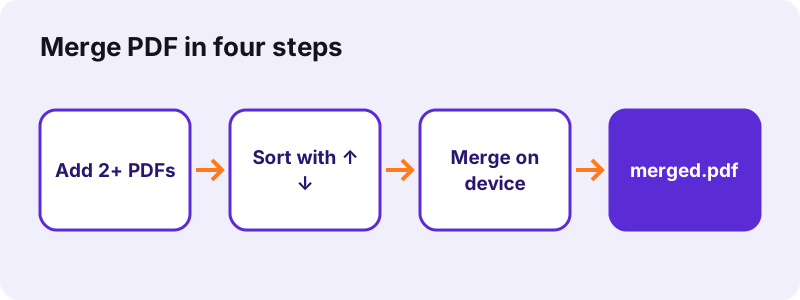
- Add the PDF files. Tap Choose PDF files or drop them on the box. You need at least 2 files; add more later with Add more files.
- Put them in order. Each file shows a first-page thumbnail. Use ↑ and ↓ to move a file, or × to take it out of the list.
- Press Merge PDF. The files are read in the order shown and their pages are copied into one new document on your device.
- Download merged.pdf. Save the file and open it to check the page count. The result line shows the time taken and 0 bytes uploaded.
What does pdf24 merge PDF do with your files?
pdf24 merge PDF reads every PDF you add, copies all of its pages in the order of the list, and writes one new document called merged.pdf. Nothing is re-compressed or redrawn, so text stays selectable, scans keep their resolution and each page keeps its own size and orientation. The whole job runs inside your browser.
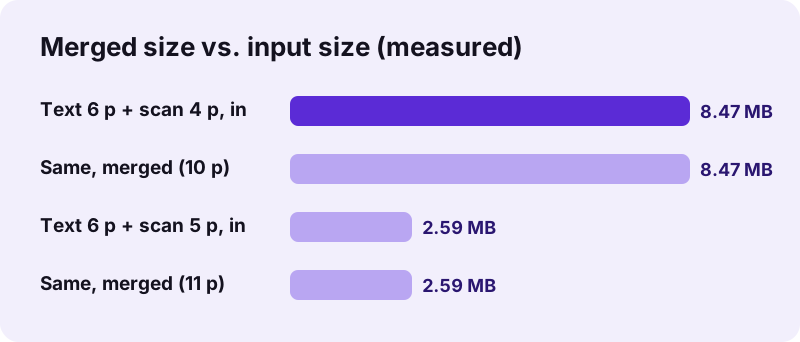
Two test runs of pdf24 merge PDF show what to expect. A 6-page typed document (5.1 KB) plus a 4-page scan (8.07 MB) became a 10-page file of 8.07 MB in 0.9 s. A 6-page document plus a 5-page contract scan (2.47 MB) became an 11-page file in 0.2 s. Three tiny files of 6.9 KB in total even shrank to 3.2 KB, because shared parts are written once.
pdf24 merge PDF limits at a glance
pdf24 merge PDF has few limits, and none of them is a paywall. The list below sums up what the tool accepts and what it gives back.
- Minimum: 2 files. Maximum: no fixed limit; your device's memory is the only cap.
- Order: the list order from top to bottom, changeable at any time before you press the button.
- Output: one PDF named merged.pdf, ready to rename.
- Price: 0, with no account and no watermark on the pages.
pdf24 merge PDF step by step, with the order you want
Add the files in any order and fix it afterwards. Each row shows a thumbnail of the first page, the file name and its size. The ↑ arrow moves a file one place up, ↓ moves it one place down and × removes it. If the pages inside one file are in the wrong order, merge first and then use Rearrange PDF pages on the result.
pdf24 merge PDF on iPhone and iPad
Open the page in Safari, tap Choose PDF files and pick the documents from Files, iCloud Drive or another storage app. Safari offers merged.pdf as a download; open it from the Downloads folder in Files and use Share to send it by Mail or save it to a folder. No app from the App Store is needed.
pdf24 merge PDF on iPhone: files from Mail
Attachments in Mail must be saved to Files first (tap the attachment, then Save to Files). The file picker of the merge page cannot read inside the Mail app, but every file saved to Files appears in it at once.
pdf24 merge PDF tip: rename before you send
The result is always called merged.pdf. Rename it in Files with a long press, Rename, before you upload it to a portal, so the receiver sees a clear name such as application-2026.pdf.
pdf24 merge PDF on Android phones
In Chrome or Samsung Internet, tap Choose PDF files; Android opens its document picker, where you can select several files at once with a long press. The merged file lands in the Download folder and appears in the notification bar when it is ready.
pdf24 merge PDF on Windows, Mac and Linux
On a computer you can drag the files from File Explorer, Finder or your file manager straight onto the box. Holding Ctrl (Windows, Linux) or Command (Mac) while clicking selects several files in the picker. Chrome, Edge, Firefox and Safari all work; the files never leave the computer.
pdf24 merge PDF with scanned pages
Scans are just pictures inside a PDF, and the merge keeps them exactly as they are. A merged file of scans is therefore as large as the scans together: 8.07 MB in our 10-page test. If a portal asks for a smaller file, run Compress PDF on merged.pdf afterwards.
pdf24 merge PDF with pages of different sizes
An A4 page next to a US Letter page, or a landscape page next to a portrait one, stays as it was. Readers show each page at its own size. If one uniform size matters, for example before printing, run Change PDF page size on the merged file.
pdf24 merge PDF compared with printing to PDF
Some people combine files by printing them all to one PDF printer instead of using pdf24 merge PDF. That route re-creates every page, can rasterise scans, drops links and often changes margins. Copying the pages, as this tool does, keeps the original objects: the same fonts, the same images and the same page boxes.
Is pdf24 merge PDF safe for private documents?
pdf24 merge PDF is safe for contracts, IDs and medical files because it never uploads them. The browser reads each file from your disk with the File API, the pages are joined by JavaScript in that same tab, and the result is handed back as a local download. The result line confirms 0 bytes uploaded after every run.
“The File API enables web applications to access files and their contents.”
Closing the tab clears the files from memory. There is no account, no history of your documents and no copy on a server, so there is also nothing to delete afterwards. You can even load the page, switch off Wi-Fi and merge: the engine is already in the browser.
pdf24 merge PDF with password-protected files
A PDF that needs a password to open cannot be merged as it is; the tool stops with a message asking you to remove the password first. Use Unlock PDF with the password you know, merge the unlocked copy, and protect the merged file again with Lock PDF if needed.
pdf24 merge PDF and digital signatures
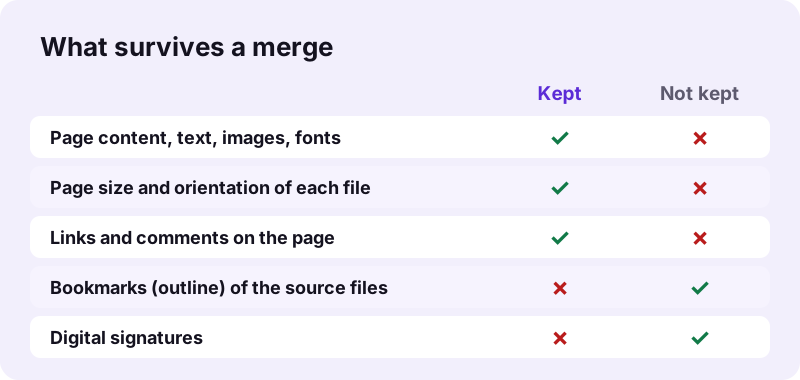
A certificate signature covers the exact bytes of the signed file. Any merged document is a new file, so the signature no longer validates in it. Keep signed contracts as separate files, or sign the merged document again after merging.
What does pdf24 merge PDF keep, and what not?
pdf24 merge PDF keeps everything that belongs to a page: text, fonts, images, vector drawings, page size, rotation, links and comments. It does not carry over things stored for the whole document, such as the bookmark outline, the document title and fillable form logic. A digital signature also stops validating, because the merged file is new.
“Portable Document Format (PDF), standardized as ISO 32000, is a file format developed by Adobe in 1993”
- Need bookmarks in the result? Merge, then add them again with Bookmark PDF.
- Need page numbers across all files? Merge, then use Add page numbers.
- Need form answers to survive? Fill the forms, flatten them with Flatten PDF, then merge.
pdf24 merge PDF quality: is anything lost?
No pixel is touched. Our 4-page scan had 8,463,060 bytes before and its pages took the same space inside the merged file. A merge that makes a file much smaller than its parts is re-compressing images; this one does not, which is why the quality is identical.
pdf24 merge PDF with Word files or pictures
This page accepts PDF files only. For photos and scans saved as JPG or PNG, use Assemble PDF, which takes PDFs and pictures in one list. For Word documents, turn each into a PDF with Word to PDF first, then merge the results here.
Why is pdf24 merge PDF not working on my file?
pdf24 merge PDF usually fails for one of four reasons: a file has an open password, a file is damaged, only one file was added, or the device ran out of memory on very large scans. The tool names the problem in red under the button, so you know which file to fix before you try the merge again.
| Message or symptom | Cause | Fix |
|---|---|---|
| This PDF is password-protected | The file is encrypted | Unlock it, then merge |
| Could not open this file | The file is damaged or not a real PDF | Run Repair PDF, then merge |
| Button stays grey | Fewer than 2 files in the list | Add a second PDF |
| Tab reloads or freezes | Hundreds of MB of scans on a phone | Merge in two batches, or on a computer |
A damaged download can often be saved with Repair PDF. If one file always fails, open it in your browser's PDF viewer: when even the viewer cannot show it, the file itself is broken, not the merge.
pdf24 merge PDF use cases
People use pdf24 merge PDF to send one attachment instead of five, to upload a single application file, to keep invoices of a month together or to print a whole set at once. The tool handles each case the same way, so the steps above apply whatever the documents are.
- Job applications: letter, CV and certificates as one file in the order the employer asks for.
- Visa and university portals: forms plus scanned passports in one upload.
- Accounting: twelve monthly statements in one yearly PDF.
- Teaching: worksheets from several sources as one printable pack.
- Legal: a contract and its annexes in one document before signing.
To reach a size limit after merging, the portal's number decides the next step; see Compress PDF to 1 MB for an exact-size result. To take a merged file apart again, use Split PDF.
pdf24 merge PDF: frequently asked questions
Is pdf24 merge PDF free?
Yes. pdf24 merge PDF costs nothing, needs no account and adds no watermark. There is no daily limit and no cap on the number of files, because the work is done by your own device rather than a paid server. The only practical limit is memory: a phone may struggle with several hundred megabytes of scans at once, which a computer handles easily.
How many files can pdf24 merge PDF combine?
At least 2, and as many as your device can hold in memory. In our tests 3 small files, 2 large scans and mixed sets all merged in under 1 second on a desktop. For very large sets on a phone, merge in batches of about ten files, then merge the batches, which keeps memory use low.
Does pdf24 merge PDF upload my files?
No. With pdf24 merge PDF the files are read by the browser from your disk and joined in the same tab with JavaScript. Nothing is sent to a server, nothing is stored, and the result line says 0 bytes uploaded after each merge. You can check it yourself: load the page, turn off the network, and the merge still works.
Can I change the order in pdf24 merge PDF?
Yes. Every file in the list has ↑ and ↓ buttons; the merged document follows the list from top to bottom. Remove a file with ×. To change the order of single pages rather than whole files, merge first and open the result in the Rearrange PDF pages tool, where each page has its own arrows.
Does pdf24 merge PDF reduce quality?
No. Pages are copied with their original images, fonts and vector content; nothing is re-compressed or turned into a picture. Our merged scan kept the same byte size as the source pages, which shows the images were not touched. Typed text also stays selectable and searchable in the result.
Why is my pdf24 merge PDF result so big?
A merged PDF weighs roughly the sum of its parts, because pages are copied without re-compression. Two files of 5.1 KB and 8.07 MB gave 8.07 MB. If you need it smaller, run Compress PDF on the merged file; it can aim at an exact size such as 1 MB or 200 KB for upload forms.
Can pdf24 merge PDF combine JPG and PDF files?
This page accepts PDF files only, so pictures are skipped with a message. Use Assemble PDF instead: it takes PDFs and images in one list, turns each picture into an A4 page with a 20-point margin, and keeps the order you set. Both tools work on your device in the same way.
Does pdf24 merge PDF keep bookmarks and links?
Links and comments placed on the pages are kept, because they belong to the page. The bookmark outline of each source file is not carried over, since it belongs to the whole document. After merging you can rebuild the outline in a minute with Bookmark PDF, which suggests one entry per page from its first line.
Can I use pdf24 merge PDF on iPhone?
Yes. It works in Safari on iPhone and iPad with iOS 15 or later, without an app. Pick the files from the Files app, sort them with the arrows, merge, and find merged.pdf in Downloads. From there, Share sends it by Mail, WhatsApp or AirDrop like any other document on the phone.
Can I merge password-protected PDFs with pdf24 merge PDF?
Not directly. An encrypted file stops the merge with a message asking you to remove the password. Open it with Unlock PDF using the password you already know, merge the unlocked copy, and lock the merged result again if it must stay protected. The tool never tries to break a password you do not have.
Does pdf24 merge PDF work offline?
Once the page has loaded, yes. The merge engine is a JavaScript library that the page downloads with the tool; after that the work needs no network at all. On a train or a plane, open the page while you still have a connection, and merging keeps working when the signal drops.
Can pdf24 merge PDF combine pages of different sizes?
Yes. Each page keeps its own size and orientation, so an A4 letter, a Letter-size form and a landscape table can sit in one file. PDF readers simply show each page at its size. If you want every page the same size for printing, run Change PDF page size on the merged file afterwards.
Will pdf24 merge PDF keep my digital signature?
No tool can keep it valid. A certificate signature protects the exact bytes of the signed file, and a merged file is a different file. The signature picture may still be visible on the page, but a reader will report the signature as invalid or missing. Keep signed files separate or sign again.
How long does pdf24 merge PDF take?
Usually under a second. Our desktop runs of pdf24 merge PDF took 0.1 s for 3 small files, 0.2 s for 2.47 MB and 0.9 s for 8.07 MB of scans. Time grows with the amount of data, not the page count. Phones are slower than desktops but stay in the range of a few seconds for normal documents.
Can I undo a merge with pdf24 merge PDF?
The original files are never changed, so there is nothing to undo: they stay on your device as they were. To take the merged file apart again, open it in Split PDF and choose By ranges, for example 1-6, 7-10, which gives back the two parts as separate files in one ZIP.
Does pdf24 merge PDF work in every browser?
It works in current versions of Chrome, Edge, Firefox, Safari, Opera and Samsung Internet on Windows, macOS, Linux, Android, iOS and ChromeOS. Internet Explorer is not supported. If the button does nothing, reload the page so the engine loads again, and check that the files are real PDFs.
Is this the official pdf24 merge PDF tool?
No. pdf24tools is an independent website and is not affiliated with PDF24 or Geek Software GmbH. Our merge tool is our own code that runs in your browser. We use the name only to describe what people search for, and every result is processed on your device, never on our servers.
More pdf24 merge PDF tools and guides
pdf24 merge PDF: sources
- File API — MDN Web Docs
- PDF — Wikipedia
- Combine PDFs in Preview on Mac — Apple Support
- PDF (Portable Document Format) Family — Library of Congress