How to use pdf24 add page numbers in 4 steps
- Open the PDF. Choose the file or drop it on the box.
- Pick position and style. Choose one of 6 positions and one of 4 styles: 1, Page 1, 1 / 10 or Page 1 of 10.
- Set the first number. Keep 1 or type another start, choose a size from 6 to 48 pt and decide whether the cover page stays blank.
- Number and download. Press the button and save the -numbered.pdf file.
What options does pdf24 add page numbers have?
The page numbering tool has five settings: position (6 choices), number style (4 choices), first number (0 to 99,999), font size (6 to 48 pt, default 11 pt) and a switch to leave the cover page unnumbered. Numbers are printed in dark grey Helvetica about 1 cm from the page edge, on every page.
| Setting | Choices | Default |
|---|---|---|
| Position | Bottom centre, bottom right, bottom left, top centre, top right, top left | Bottom centre |
| Style | 1 · Page 1 · 1 / 10 · Page 1 of 10 | 1 |
| First number | 0 to 99,999 | 1 |
| Font size | 6 to 48 pt | 11 pt |
| Don't number the cover page | On or off | Off |
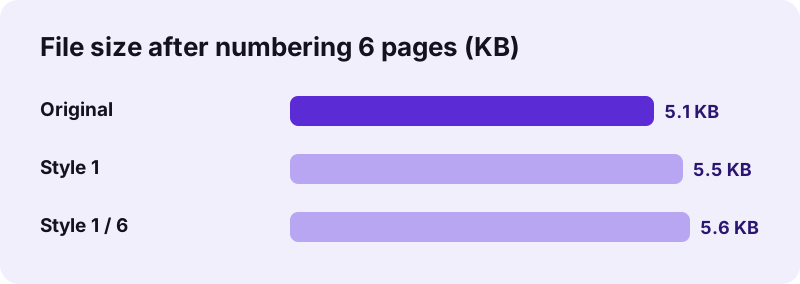
pdf24 add page numbers tested on 6 pages
To measure pdf24 add page numbers, we numbered a 6-page A4 document of 5.1 KB twice. With the plain style the result was 5.5 KB; with the 1 / 6 style it was 5.6 KB, because each page carries a few more characters. Both runs took 0.1 seconds. The 1,944 words of the original stayed selectable, and the new numbers can be found with search as well.
pdf24 add page numbers on a phone
On Android and iPhone the settings appear as normal form fields: drop-down lists for position and style, number boxes for the first number and size, and a checkbox for the cover page. The file saves to Downloads or Files when you tap the download link.
pdf24 add page numbers on Windows and Mac
On a computer, pdf24 add page numbers runs in any current browser without installing anything. Long documents of several hundred pages are numbered in a few seconds, because only one short line of text is drawn per page.
pdf24 add page numbers tip for printed booklets
Pages printed back to back look tidy with centred numbers, because left and right pages then match. Corner positions suit documents read on screen or printed on one side only.
How does pdf24 add page numbers handle a cover page?
With Don't number the cover page ticked, the first page stays blank and numbering starts on page 2 with your first number, so a report's first content page shows 1. The total in the 1 / 10 and Page 1 of 10 styles then counts only the numbered pages, which matches how readers count them.
| Cover switch | First number | Page 1 shows | Page 2 shows | Last page shows (style 1 / 10) |
|---|---|---|---|---|
| Off | 1 | 1 | 2 | 10 / 10 |
| On | 1 | nothing | 1 | 9 / 9 |
| Off | 5 | 5 | 6 | 14 / 14 |
| On | 3 | nothing | 3 | 11 / 11 |
pdf24 add page numbers for a chapter of a longer work
If your file is chapter 3 of a thesis that starts on page 41, set the first number to 41. The totals then run up from that start, so with the 1 / 10 style a 10-page chapter ends at 50 / 50; use the plain style when the total of the whole work is unknown.
pdf24 add page numbers: which style for which document
Page numbers let readers cite a page and see how long a document is. The style you pick in pdf24 add page numbers should match how the document will be read: on paper, in a court bundle or on a screen. The table lists the combinations we would choose.
“page numbers allow the citation of a particular page of the numbered document”
| Document | Style | Position |
|---|---|---|
| Thesis, book manuscript | 1 | Bottom centre |
| Contract, terms | Page 1 of 10 | Bottom right |
| Court or tender bundle | 1 / 10 | Top right |
| Presentation handout | 1 | Bottom right |
| Merged exhibits | Page 1 | Bottom centre, after merging |
pdf24 add page numbers after merging files
When you build one document from several files with pdf24 add page numbers in mind, join them first with Merge PDF and number the merged file, so the numbers run through without restarting. If a page is in the wrong place, fix the order with Rearrange PDF pages before numbering, because the numbers are fixed once printed.
Is pdf24 add page numbers safe for confidential files?
The numbering runs inside your browser: the file is read from your device, the numbers are drawn with JavaScript and the copy is saved locally. Both of our test runs reported 0 bytes uploaded. Board papers, legal bundles and medical reports can therefore be numbered without handing them to any server.
The page loads its own code and the PDF engine once; Helvetica is a standard PDF font and needs no download. See the File API on MDN for how a page reads a local file without sending it.
pdf24 add page numbers: limits
pdf24 add page numbers is deliberately simple: one style, one position and one sequence for the whole file. These cases need another step.
- Arabic digits only, no Roman numerals (i, ii, iii) for front matter.
- One position and style for the whole file; to number parts differently, split with Split PDF, number each part and merge again.
- Existing numbers are not removed; cover them with White-out in Edit PDF first.
- Fixed dark grey colour and Helvetica font.
- Password-protected files need Unlock PDF first.
pdf24 add page numbers: frequently asked questions
Is pdf24 add page numbers free?
Yes. Numbering pages on pdf24tools is free, with no account, no watermark and no page limit. Everything happens in your browser on your own device, so there is no server work behind it. You can number as many documents as you want, one after another.
Can pdf24 add page numbers start at a number other than 1?
Yes. Type any first number from 0 to 99,999. This is useful for a chapter that continues a longer work, or for exhibits that follow an earlier bundle. With the cover switch on, the first number appears on page 2 of the file.
How do I skip the first page in pdf24 add page numbers?
Tick Don't number the cover page. Page 1 then stays blank, page 2 receives your first number, and the totals in the 1 / 10 and Page 1 of 10 styles count only the numbered pages. A 10-page report with a cover therefore ends at 9 / 9.
Does pdf24 add page numbers upload my document?
No. The browser opens the PDF from your device, draws the numbers and saves the copy locally; our runs showed 0 bytes uploaded. Nothing is stored afterwards, so there is nothing to delete. The only downloads are the page code and the PDF engine, which load once.
Can pdf24 add page numbers put numbers at the top?
Yes. Three top positions are available: top left, top centre and top right, next to the three bottom ones. Numbers sit about 1 cm from the edge, which is inside the printable area of almost every office printer, so nothing is cut off on paper.
Can I change the font of pdf24 add page numbers?
The font is fixed to Helvetica in dark grey, a neutral choice that matches most documents and is built into every PDF reader. You can change the size from 6 to 48 pt. The default of 11 pt matches typical body text.
Does pdf24 add page numbers work on scanned PDFs?
Yes. The numbers are drawn on top of each scanned page as real text, so they print and can be searched even though the scanned words cannot. Scans may have dark edges; if a number lands on a shadow, choose a position away from it.
Can pdf24 add page numbers write Page 1 of 10?
Yes. Choose the style Page 1 of 10 and every page shows its number and the total, such as Page 3 of 12. The shorter 1 / 10 style shows the same information with fewer characters, which suits narrow margins and small font sizes.
Why do numbers from pdf24 add page numbers overlap my footer?
Your document already has text about 1 cm from the bottom edge, where the numbers go. Move them to the top, to another corner, or make them smaller, such as 9 pt. If old numbers are in the way, cover them with White-out in Edit PDF first.
Can I use pdf24 add page numbers on a phone?
Yes. The page works in current Chrome, Safari, Edge and Firefox on Android and iPhone. Choose the file, set the options in the drop-down lists and number boxes, press the button and save the numbered file to Downloads or Files, from where you can share it.
Does pdf24 add page numbers change the file size much?
No. Our 6-page document grew from 5.1 KB to 5.5 KB with plain numbers and to 5.6 KB with the 1 / 6 style. Helvetica is a standard font, so no font file is embedded, and only a few characters are added per page.
Who makes the pdf24 add page numbers tool?
The pdf24tools team makes it. pdf24tools is an independent website and is not affiliated with PDF24 or Geek Software GmbH. Our page numbering tool was built separately and runs entirely in your browser; this page describes it only from our own tests with our own files.
pdf24 add page numbers: sources
- Page numbering — Wikipedia
- File API — MDN Web Docs
- PDF — Wikipedia