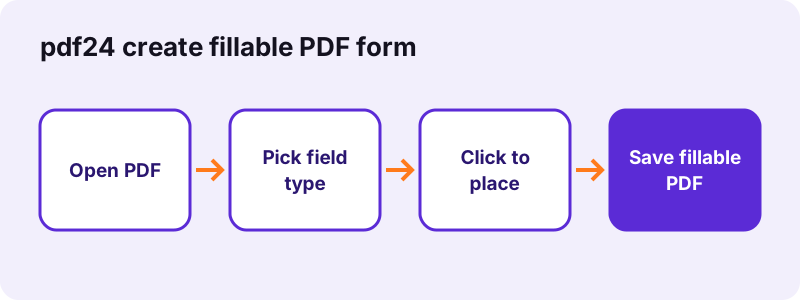
How to use pdf24 create fillable PDF form in 5 steps
- Open the PDF. Choose the blank form or document; the first 50 pages appear as previews.
- Choose the field type. Select Text box or Checkbox, and for text boxes a width of 120, 180, 260 or 360 pt.
- Click to place fields. Each click on a page adds one field of the chosen type at that spot; a purple frame shows it.
- Name or remove fields. Give each field a meaningful name in the list, such as last_name, or press × to remove it.
- Save the fillable PDF. Press Save fillable PDF and download the -fillable.pdf file, then test it in a PDF reader.
What fields can pdf24 create fillable PDF form add?
The form creator adds two field types that cover most paper forms: single-line text boxes in 4 widths and square checkboxes. Each field is a real AcroForm field with a name, a thin border and a light background, so readers can type into it and tick it in any standard PDF viewer.
| Field | Size | Default name | Typical use |
|---|---|---|---|
| Text box, short | 120 × 20 pt | field_1, field_2 … | Date, postcode, age |
| Text box, medium | 180 × 20 pt | field_n | First or last name, phone |
| Text box, long | 260 × 20 pt | field_n | E-mail, street address |
| Text box, very long | 360 × 20 pt | field_n | Full address, job title, notes |
| Checkbox | 14 × 14 pt | check_1, check_2 … | Yes / no, consent, options |
“A form is a document which contains blank spaces in which one can write or select an option.”
pdf24 create fillable PDF form tested on a 6-page file
To test pdf24 create fillable PDF form, we opened a 6-page document of 5.1 KB, clicked once with Text box selected and once with Checkbox selected, and saved. The job took 0.1 seconds and produced a 6.6 KB file with exactly 2 fields, a text field named field_1 and a checkbox named check_2. The page text was untouched.
pdf24 create fillable PDF form on a tablet
A tap counts as a click, so fields can be placed with a finger on an iPad or Android tablet. The previews are at most 640 pixels wide, so zoom the browser page for small forms to put each field exactly on its line. The field list under the pages works with the on-screen keyboard.
pdf24 create fillable PDF form on a computer
A mouse is the most precise way to place fields. The click sets the left edge of a text box and its vertical middle, so click at the start of the blank line, a little above it. Switch between Text box and Checkbox at any time; the next click uses the type selected now.
pdf24 create fillable PDF form tip: name fields for export
Field names are what form data exports and scripts see. Use short names without spaces, such as first_name, birth_date or agree_terms. Dots and spaces are replaced by underscores when saving, and duplicate names get _2, _3 added.
How do people fill in a form made with pdf24 create fillable PDF form?
A form saved by pdf24 create fillable PDF form opens in any PDF reader that supports form fields: Adobe Acrobat Reader, the built-in viewers of Chrome, Edge and Firefox, macOS Preview and most phone apps. Readers click a box and type, or click a checkbox to tick it, then save or print the completed form.
To try the form yourself, open the saved file in Fill out PDF: it lists every field by name, which is a quick check that each one was created and named as you intended. The fields stay editable after filling unless the person filling it chooses to flatten them.
| Viewer | Type into text boxes | Tick checkboxes |
|---|---|---|
| Adobe Acrobat Reader (Windows, Mac, phone) | Yes | Yes |
| Chrome and Edge PDF viewer | Yes | Yes |
| Firefox PDF viewer | Yes | Yes |
| macOS Preview | Yes | Yes |
| Fill out PDF on pdf24tools | Yes | Yes |
pdf24 create fillable PDF form with existing fields
If the PDF already has some fields, they are kept and new ones are added beside them. New names never clash with existing ones, because a number is appended when a name is taken. This makes it easy to add a missing checkbox to a form someone else built.
pdf24 create fillable PDF form or automatic detection?
Placing fields by hand gives full control and works on any PDF, including scans. If your form is a digital PDF with blank lines drawn as underscores or dots, Make PDF fillable finds those lines and places text boxes on them for you, which saves time on long forms. You can then add checkboxes by hand.
| Point | This page (manual) | Make PDF fillable (automatic) |
|---|---|---|
| Works on scanned forms | Yes | No, needs a text layer |
| Checkboxes | Yes | Added by hand |
| Field names | field_n, rename in the list | Taken from the label before the line |
| Best for | Short forms, scans, exact layouts | Long digital forms with ____ lines |
pdf24 create fillable PDF form from a Word document
If your form exists as a .docx file, convert it with Word to PDF first, then add the fields here. Keep the blank lines in the Word file: they show the person filling in the form where to type, and they help automatic detection.
Is pdf24 create fillable PDF form private?
pdf24 create fillable PDF form works on your device: the PDF is read by the browser, the previews are drawn locally and the fields are written with JavaScript. Our result line read 0 bytes uploaded. Application forms, patient intake sheets and HR templates therefore never leave your computer while you build them.
Only the page and the PDF engine are downloaded. The File API on MDN explains how a web page reads a file from your disk without sending it.
pdf24 create fillable PDF form: limits
The form creator focuses on the two field types most forms need. Know these limits before planning a complex form.
- No drop-down lists, radio-button groups, signature fields or buttons.
- Text boxes are single-line, 20 pt high; font size 12 pt.
- Fields cannot be moved after placing; remove and click again.
- Previews cover the first 50 pages.
- No calculations or validation scripts.
- Password-protected files need Unlock PDF first.
pdf24 create fillable PDF form: frequently asked questions
Is pdf24 create fillable PDF form free?
Yes. Building fillable forms on pdf24tools is free, with no account and no watermark. The tool runs in your browser, so there is no limit on forms or fields. Make as many forms as you need and send them to anyone; filling them in is free in every common PDF reader.
Which field types does pdf24 create fillable PDF form support?
Text boxes in 4 widths (120, 180, 260 and 360 pt, all 20 pt high) and checkboxes of 14 by 14 pt. Drop-down lists, radio buttons and signature fields are not available. For a signature, people can sign the completed form with Sign PDF.
Does pdf24 create fillable PDF form upload my form?
No. The browser reads the PDF from your device and writes the fillable copy locally; our test showed 0 bytes uploaded. Nothing is stored on a server, so drafts of application or patient forms stay private while you work on them.
Can I rename fields in pdf24 create fillable PDF form?
Yes. Every field appears in a numbered list under the pages with its type and page number. Type a new name into its box, such as email or start_date. Spaces and dots become underscores when you save, and duplicate names get a number added.
Can I move a field in pdf24 create fillable PDF form?
Not by dragging. Press × next to the field in the list to remove it, then click on the right spot to place a new one. Because each click places one field immediately, correcting a position takes just two clicks and no redrawing.
Does pdf24 create fillable PDF form work with scanned forms?
Yes. Manual placement does not need a text layer, so you can add text boxes and checkboxes to a scanned paper form. Make sure the scan is straight; rotate pages first if needed, so the fields line up with the printed lines.
Will forms from pdf24 create fillable PDF form work in Adobe Reader?
Yes. The fields are standard AcroForm fields, which Adobe Acrobat Reader, browser PDF viewers, macOS Preview and most mobile apps support. People can type, tick, save and print. Test the form once in the reader your recipients use most before you send it out widely.
How many pages can pdf24 create fillable PDF form handle?
Previews and field placement cover the first 50 pages of a document, and the file can be longer: later pages are kept unchanged. For forms longer than 50 pages, split off the part that needs fields, add them, and merge the parts again.
Can pdf24 create fillable PDF form make multi-line text areas?
No. Text boxes are single-line and 20 pt high, with a 12 pt font. For longer answers, place several boxes under each other, one per printed line, or use the 360 pt width. People typing longer text in a single-line box see it scroll.
Can I use pdf24 create fillable PDF form on a phone?
Yes, though a tablet or computer is easier. Tap on the preview to place a field, and use the field list to rename or remove it. Previews are small on phones, so zoom the browser page in to tap exactly on the lines.
Does pdf24 create fillable PDF form keep my existing fields?
Yes. Fields already in the PDF stay where they are, and new fields are added next to them. New names are checked against existing ones, so nothing is overwritten. This is useful to add a missing checkbox to a form made elsewhere.
Who makes the pdf24 create fillable PDF form tool?
The pdf24tools team makes it. pdf24tools is an independent website and is not affiliated with PDF24 or Geek Software GmbH. Our form creator was built separately and runs entirely in your browser; this page describes it only from our own tests with our own files, made on 2026-11-02.
More pdf24 create fillable PDF form tools and guides
pdf24 create fillable PDF form: sources
- Form (document) — Wikipedia
- Text box — Wikipedia
- Checkbox — Wikipedia
- File API — MDN Web Docs